


Connecting to 3rd and 4th generation iPads and the iPad mini, the Intuous Creative Stylus is a brand new pressure sensitive stylus from Wacom that aims to simulate pen on paper. The pen can react to 2048 different levels of pressure, enabling you to paint the perfect stroke. Powered by a AAAA battery that Wacom claims lasts up to 150 hours, the aluminum brushed pen connects to the latest iPads through Bluetooth 4.0, enabling you to rest your palm naturally on the iPad, while additional shortcut buttons can active various features in supported apps. At launch, the Intuos Creative Stylus will integrate with apps like Autodesk SketchBook Pro and Wacom’s newly revamped Bamboo Paper for sketching and taking notes. Wacom’s latest pressure sensitive stylus will run you $99.95, is available in black or blue, and comes with an additional carrying case, battery, and replacement nibs. You can order the pen online today from the Wacom Store, or wait until the pen hits Best Buy stores in October.
Google Maps Gets Traffic Data From Waze, Waze Gets POIs From Google Search→
Today on the Google Maps blog, Google detailed some of their upcoming changes to Google Maps and their recent acquisition, Waze. For the Google Maps app on iOS and Android, you’ll start seeing crowdsourced traffic data from Waze users.
This means when Wazers report accidents, construction, road closures and more on Waze, the updates will also appear on the Google Maps app for Android and iOS in Argentina, Brazil, Chile, Colombia, Ecuador, France, Germany, Mexico, Panama, Peru, Switzerland, UK and the US.
On the flip side, Waze is also integrating Google Search into their apps for more accurate search results. Online, the Waze Map Editor is now integrated with Google Street View and satellite imagery, making it easier to compare, correct, and update local street data.
You can download Google Maps and Waze for free from the App Store.
Here’s to Another Five Years
Apple wasn’t a brand that my friends and I conversed about in high school, our infatuation being PCs that weren’t Dell and graphics cards and the latest processors and Counter Strike. Apple was a part of my life insofar that they were the guys who made the cool MP3 players. I had an iPod video, and later an iPod touch, but I knew nothing of Steve Jobs. Macs were also unknown to me, but later I would realize that I used an iMac G3 with the weird puck mouse a few times in middle school. In my junior and senior years one of my classmates had the first iPhone, but it was just an iPod with a phone[1].
It wasn’t until after I graduated that Apple became a thing. No one knew it at the time, but 2008 was the last year that Apple would offer the polycarbonate MacBook in black. I remember having this sort of sudden fascination with it: how simple[2] it was, how different it was. This would be my college laptop, despite being in a price range that was out of budget and running an operating system that I wasn’t familiar with.
When the sales tax holiday came around, I made the decision to go all-in. I purchased the fully loaded MacBook in black, complete with an incredible 2.4 GHz Core 2 Duo processor[3], 4 GBs of memory, and 250 GBs of storage. Being my first laptop, I also purchased an AirPort Extreme so I could have Wi-Fi in the house. The Apple Store was accommodating between me and my overprotective bank, letting me use their phone behind the counter since my Nextel Motorola had no reception.
While the purchase itself was an experience, it wasn’t until I got home that I fully began to appreciate what I had in my hands. Out of the box the laptop was charged and ready to use. There was a prompt to sign up for MobileMe, but otherwise the laptop had no stickers or bloatware. Everything about it was perfect[4].
My MacBook, which I would come to call the BlackBook, had an unbelievable impact on how I thought about computers. It didn’t have the most powerful guts, but it had a great keyboard and trackpad, and the display was pretty good. I thought the MagSafe Power Adapter was brilliant, the magnetic connector certainly saving my bacon plenty of times in the classroom as the cord was sometimes yanked by a wild knee. The sleep indicator light became a reassuring delightful detail. All of those little details really added up.
The BlackBook would be the computer that soldiered on. A hard drive died, a replacement solid state drive died[5], and I upgraded the memory to an unrecommended six gigabytes, keeping it current. I replaced the battery in its third year and I’m probably due for another replacement. The fan started making noises in its fourth year but it never ceased to function so I tolerated it. It didn’t run Mountain Lion, but it did run Lion and that was good enough until Mavericks[6] was announced.
Thinking back, the black model was a good choice. Unlike the white MacBooks, cracks that developed in the surrounding bezel didn’t show as well. The black never did end up looking dirty, although fingerprints were constantly a problem. The oils from my wrists have stained the plastic making the black appear blacker and slick. It stood out from the crowd and it continues to look impressively modern. The keyboard, the trackpad, and the quality of the laptop itself far exceeded my expectations. The keys still feel just as good as they did when I first bought it. The trackpad’s button no longer has that new-click-feel, but it still works just as it always has.
I’ve repaired a lot of laptops of all shapes and sizes for spare cash in college. In 2013, no one else does two finger scrolling well. Apple was getting it right in 2008.
It was because of the BlackBook that I would eventually find myself watching Apple Keynotes in the back of the classroom while the professor was lecturing, and it was because of the BlackBook that I started creating my own WordPress site which eventually led to this one. Little did I know that I would end up using the laptop for an extended four years in college, and it was the machine I would continue to use for a year afterwards. Needless to say that it has been a significant part of my young adult life.
As much as I don’t want to give it up it’s finally showing its age. I will open up the case and blow the dust out and replace the fan. I’ll reapply thermal compound to the processor and reassemble the heat sink so that the laptop runs cooler. It still has life in it.
But it’s time to say goodbye. Five years is a long time to own a computer, and it’s impressive how well the BlackBook withstood the test of time. Apple is moving forward and I’m ready to embrace the latest they have to offer. Needless to say that Apple has made me a fan for life.
Today I’m using a new Mac, the latest MacBook Air, and it’s even more wonderful than the first. It has backlit keys that adjust to ambient lighting and new function keys I’m not used to and an even better display. There’s no button on the trackpad and my headphones finally work with the combination headphone + microphone port. It has USB3 and Thunderbolt, significantly faster interfaces than USB2 and FireWire. And the battery life is amazing[7]; I can use my laptop for two or three days without having to charge it. It’s never gotten hot, and I haven’t heard the fan even after watching hours of streaming video from my favorite websites. Being my first aluminum Mac, I can’t help but appreciate what a marvel of engineering this is.
Here’s to another five years.
- But it was just an iPod with a phone. Oh my god how naive! ↩
- I dismissed the Powerbook because I thought the keyboard looked weird and because the lid wasn’t magnetic. Because latches were so passé in 2008. The other alternatives were PCs that were running Windows Vista and underpowered netbooks. ↩
- Apple then released the aluminum MacBook in October that had an Nvidia chipset instead of the basic Intel chipset. Thus I learned a hard lesson in Apple release cycles. ↩
- The computer I had throughout high school was a Compaq desktop that my uncle had picked out and my grandmother then purchased when she visited in the summer of 2004. It was also quite the beast, having a 2.5 GHz Celeron D processor, one gigabyte of memory, and 40 GBs of storage. This was when ribbon cables were still the norm. It’s fitting that a Compaq was my first computer as Tim Cook is now the CEO of Apple. What a coincidence. ↩
- The MacBook had a first revision Serial ATA interface for the hard drive, so I couldn’t take full advantage of a SSD. However, the read and write speeds are still so much faster than a mechanical drive that it was like breathing new life into the machine. And to think today’s MacBook Airs have PCIe-based flash storage. ↩
- OS X Mavericks fixes all of the things that didn’t work quite right in Lion. ↩
- I swear that the battery on this MacBook Air lasts longer than my iPad. I can’t wait for this to be the standard. ↩
Digg 5.1 Brings the Most Popular Stories to Your iPhone and iPad
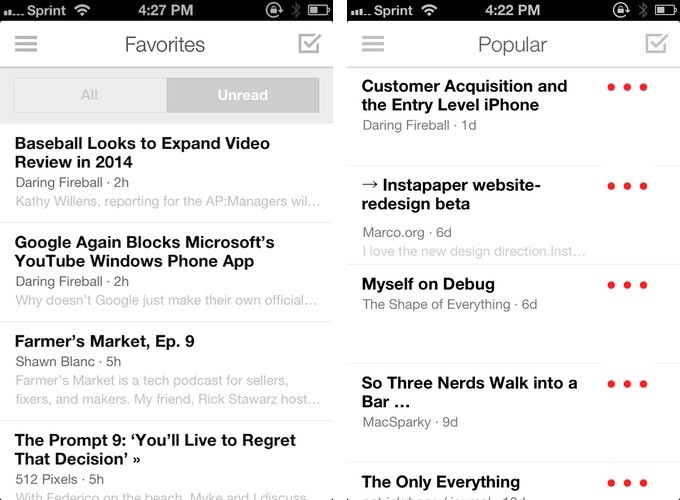
If you’ve settled on Digg as your feed reader of choice, you’ll like the latest batch of updates for the iOS apps, which brings the web’s clients Popular view to your iPhone and iPad. Throughout the app, you’ll also find new ways to filter out read and unread items, thanks to a toggle that slides in and out of view as you browse around. You’ll also find a static toggle in the settings that’ll let you view only the unread stuff. Other notable features include better scrolling and the ability to delete feeds and folders.
You can download Digg for free from the App Store.
You Can Finally Create Magazines of Cat GIFs in Flipboard→
Straight from the Inside Flipboard blog:
Who doesn’t love GIFs? Flipboard readers have already incorporated them into lively magazines like “Just GIF It,” “GIF Pop” and “GIF Me a Break.” Already on Android, GIF support comes to Flipboard for iPad and iPhone—so now anyone can collect and share their favorites in a magazine. (To celebrate, we’ve got some GIF-centric magazines we love featured today in By Our Readers. Tap on the red ribbon to find them in the Content Guide.)
In Flipboard 2.0.5 (App Store link), you’ll also get access to the latest Top Stories in Tech, News, Business, and Sports. Flipboard is also emphasizing the social aspects of their app by making it easier to find curators and prompting you to share your magazine with others once you’ve saved ten articles.
Apple Updates App Store Guidelines for Children’s and Gambling Apps→
Juli Clover of MacRumors writes about Apple’s latest revisions to the App Store Review Guidelines.
The new section detailing apps for children under age 13 specifies that such apps must include a privacy policy, may not include behavioral advertising (ads based on in-app activity, for example), and must ask for parental permission before allowing children to “link out of the app or engage in commerce.” Apps in the Kids Category of the App Store must be made specifically for children “ages 5 and under, ages 6–8, or ages 9–11.”
In addition to its guideline changes regarding children, Apple implemented two new guidelines that pertain to gambling. Apps that offer real money gaming are now required to be free and are forbidden from using in-app purchases to offer players credit or currency to use in such games.
Emphasis mine. That’s rule 24.3 in the guidelines and it isn’t terribly specific. Not being a parent, I’m not familiar with parental controls, so my initial assumption was that mom or dad would have to enter a password so the child could continue. I asked for specifics on Twitter, and the answer I got clarified that the app will just ask whether you’re a minor. I’m suddenly reminded of this Onion piece.
Parental controls (aka Restrictions) on iOS can also keep your child from installing apps, poking around on the Internet, and from making in-app purchases. Apple’s guide tells you how to turn Restrictions on and set a passcode, but OS X Daily has a quick walkthrough that highlights all the important stuff.
Pixar Founder Accepts the Disney Legends Award for Steve Jobs→
This weekend, Steve Jobs was awarded the Disney Legends Award. Husain Sumra from MacRumors writes:
Disney Legends was a program that originated 26 years ago, and over the years the program has honored over 250 individuals who have made significant contributions to The Walt Disney Company. Jobs received the award for his “visionary attitude, and penchant for innovation”, his work at Apple, his contributions to Pixar, and his work on the Disney board of directors.
The Making of the Tri-Tone→
You might be surprised to find that the Tri-tone wasn’t originally engineered for the iPhone. As Kelly Jacklin, the creator of the Tri-tone explains, the sound was originally intended as a confirmation sound for a disc burning feature in what would be the predecessor to iTunes.
I was looking for something “simple” that would grab the user’s attention. I thought a simple sequence of notes, played with a clean-sounding instrument, would cut through the clutter of noise in a home or office. So I had two tasks: pick an instrument, and pick a sequence of notes. Simple, right? Yeah, says you; everyone’s an armchair musician…
For reference, the Tri-tone is the default alert tone used when when receiving an SMS or Voicemail on an iPhone.
[via @drdrang]
Have an Instapaper Account? Check Out the New Web Beta→
From the Instapaper blog:
When the betaworks team sat down with Instapaper’s creator, Marco Arment, back in April to get a download of his ideas and to-dos for improving Instapaper, the first thing on his list was to update the Instapaper website. Well we’ve done it, and it’s now ready for you to check out and test.