How do I even begin to explain Rymdkapsel?
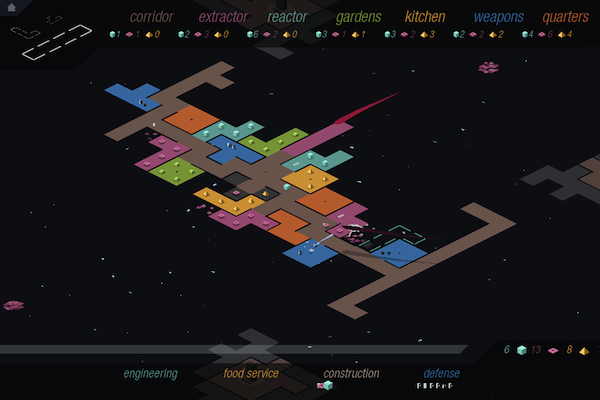
First there’s the tetris pieces, the various rooms you add on to your ship at any given moment. You can assign these pieces to rooms that create materials, or rooms that create sludge which can be used in a kitchen. These pieces intertwine to create the foundation of your ship, complete with weapons rooms, reactors, and quarters where new minions can be spawned. Vast corridors are needed to connect all of these tetris pieces together, making it necessary to create little microcosms of civilization that live in different sections of your ship.
Next there’s the little pixels, the minions and materials that you’ll watch travel around the ship as they man guns and carry materials to their proper destinations. No single minion is managed individually — they’re just dragged between the available resources on your ship. None of them are individually important, but all of them are equally important. There isn’t necessarily strength in numbers. Do you create a lot of minions and a sprawling city, hoping to complete your defenses on time to protect your civilization? Or do you keep your ship small and narrow, relying on a brave few to explore your surroundings? I chose the former.
Then there’s the enemy. As soon as you begin building you’re attacked and forced to defend yourself. As the game progresses enemies become much more numerous and dangerous. Without the proper defenses you could lose a swath of minions, having to dedicate a significant amount of time into growing sludge and working the kitchens so you can generate more little pixels in their quarters. It’s almost pathetic how helpless they are when they’re exposed.
It’s these enemies that control the pace of the game. You don’t have an infinite amount of time to build your ship and build resources. Instead the enemies come in waves and you must carefully keep an eye on a meter that informs you of when an attack is imminent. Your minions must travel the length of the corridors to reach a weapons room, and if they’re not properly protected the enemy will have their way.
A tutorial is given, but I don’t think the it does the game any justice beyond inviting you into the world. You’re walked through the general concepts of the game as events unfold and things happen, but it’s not until you start experimenting with the pieces that you’ll really begin to understand how all of this stuff fits together. And once you do, you begin to realize that Rymdkapsel is very much like and unlike a lot of our favorite games.
It’s Tetris. It’s an RTS strategy. It’s a tower defense game. It’s a race against the clock. It’s endless. It’s all of these things.
I don’t know how to summarize the game and how it makes me feel. An overreaching atmosphere of tranquility masks impending panic. You want to build quickly to meet objectives, but it’s easy to stretch yourself thin. This is evident when you become aware of how important time and distance are. Rooms have limited space and there has to be a balance when deciding how to expand your ship. Don’t forget that you’ll have to find more resources once your extractors are empty; will you have enough materials to continue on? Your minions are all separate pixels doing their own things, such as building rooms or idling, but they’re managed just like a resource would be. There’s all of this complexity and micromangement but it happens at this macro level and the game is actually really simple. The whole thing works so well and once it clicks you cannot put it down.
Rymdkapsel’s own description as a “meditative space strategy” is perfectly apt. It’s so good. Featured by Apple this week, download Rymdkapsel from the App Store for $3.99.