Don Southard

14 posts on MacStories since September 2011

Former MacStories contributor.

This Week's Sponsor:

SoundSource

New Year, New Audio Setup: SoundSource 6 from Rogue Amoeba


Screen Sharing For Alfred Brings VNC To Your Fingertips

Screen Sharing is a feature built into Mac OS X for remotely controlling another computer through the use of virtual network computing (VNC). Apple’s native screen sharing client is buried in the operating system making it nearly impossible to find the app when you actually need it. On top of that, it really lacks basic features like being able to store a connection for future use. Due to these shortcomings, most people turn to third party applications for managing their VNC connections. A quick search in the Mac App Store will turn up some pretty great options including Edovia’s Screens. Although apps like these work extremely well, not everyone wants to spend that much to easily connect to a remote computer. This is why I created the Screen Sharing for Alfred extension. I wanted Alfred to be able to function as my VNC client and really extend the functionality of the Apple’s native Screen Sharing app.

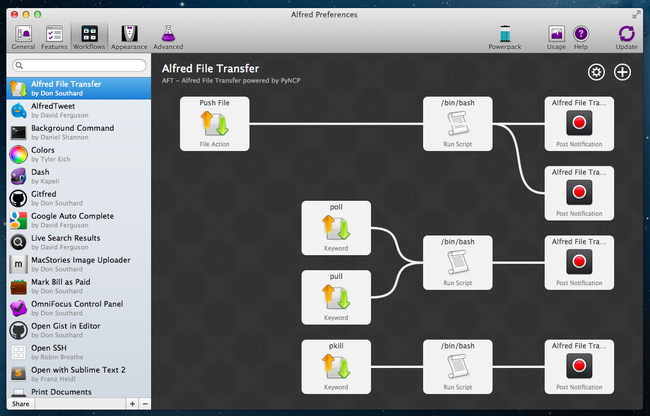
Screen Sharing for Alfred adds the ability to store information about VNC connections and quickly access them with a simple keyboard command. It is written in a beautiful fusion of shell scripting and AppleScript so it is fast, efficient, and capable of interacting with the user through AppleScript’s GUI prompts. It also incorporates David Ferguson’s genius Extension Updater system in case any new features are added in the future. For those unfamiliar with Updater, it is an extension for Alfred that allows developers to make bug fixes and add new features to released extensions – then when users run Updater, it will download the latest version of any extensions that have updates available. Read more


Evernote Releases Skitch for iPad

Skitch is a popular tool for annotating screenshots and images with the ability to quickly share them with others. It was purchased by Evernote back in August of this year and today they are proud to present Skitch for iPad.

Skitch is the amazingly fun and surprisingly powerful way to move your ideas and projects forward using fewer words. With Skitch, annotate and draw on just about anything that you see, whether it’s a new or existing photo, a webpage, screenshot, map, or a blank canvas. Then, share your work with friends, colleagues or save it all to Evernote. It couldn’t be simpler.

Skitch for iPad has a handful of useful features as well as some not so useful features, all of which are housed in the very common “home screen” style interface. I am not personally a fan of apps that lump their main features in to a grid of large square icons. I think it is a lazy approach to user experience on a touch screen device. The fonts, colors and images used for the layout elements makes the entire app feel like a cartoon. After all the featured icons are the thumbnails of the drawings you have added. To remove them you have to tap and hold like you would expect to do on a home screen except the icons don’t jiggle as an indication. Because of this, it feels like an unfinished implementation. When you are finished removing images you can’t just tap in an empty area of the screen like you would with an actual home screen, you have to find the tiny Done button on the bottom corner of the screen. These are certainly not a huge issues, just more like disappointments and it all goes back to the lack of thought that went in to the design of this app.

Read more


250 Million iOS Devices Sold, 18 Billion Apps Downloaded So Far

Tim Cook reported at today’s Apple keynote that iPod sales have exceeded 300 million units, with 45 million of those iPods sold since June of 2011. Also reported was that the iPhone 4 now accounts for over half of all iPhones sold.

iTunes has also seen significant growth. There are now over 20 million songs in iTunes. The number of features in the iTunes store has also increased; iTunes remains the number #1 music store worldwide and customers have downloaded over 16 billion songs.

Apple has sold over 250 million iOS devices. Tim Cook reported that 92% of Fortune 500 companies are testing and deploying the iPad. Apple’s Senior VP of iOS Software, Scott Forstall, reported over 500,000 apps are now available on the App Store, with 140,000 of them made specifically for the iPad. 18 billion apps have been downloaded so far, and over 1 billion are downloaded each month from the App Store. Apple has announced it has paid $3 billion to developers so far.


OS X Lion: 6 Million Downloads So Far, Apple Approaching 60 Million Mac Users

At Apple’s media event in Cupertino, CEO Tim Cook just announced that OS X Lion, released on July 20th, gained 6 million downloads so far on the Mac App Store, a 80% growth over the previous version, Snow Leopard. Tim Cook has also reported the iMac and MacBook Pro are the #1 desktop and notebook in the US, best representing the Mac’s 23% growth over the last year.

With the fast adoption of OS X Lion, which is sold at $29.99 on the App Store, and the popularity of the MacBook Air, Tim Cook announced Apple is nearing 60 million Mac users worldwide.

[image via]


Extending Evernote: AppleScripts for Chrome, Safari, Instapaper and Alfred

Evernote is a cross-platform note taking solution that is adored by many for its ability to not just store snippets of information but also serve as an external brain. Among the many reasons users are drawn to this product is its extensibility. You may not realize this but Evernote has a very in-depth AppleScript dictionary that you can use to extend the feature set and make it do some pretty neat things you can’t do with it out of the box. I am going to show you how simple AppleScripting can add a few cool features to your Evernote workflow.

Note: These scripts work best when called with a global keyboard shortcut using an app like Keyboard Maestro, FastScripts, or Alfred.

This first AppleScript is used for storing a URL to whatever webpage you are currently viewing and it works with Safari, Chrome, and Chrome Canary. By default Evernote stores the entire webpage including images, navigational menus, and even advertising links. Having a snapshot of a page is great for some situations, but most of the time you just want to grab a link to the site and safely store it in Evernote so it can be easily retrieved. This script will check to see which browsers are running and it will grab the frontmost tab from the browser that is currently active; it’ll then neatly format the information into a note with the proper title and source url, and automatically sync Evernote.

Here is an example of a page I enjoyed and wanted to be able to find again at a later time. Everything is neatly formatted with no extra fluff.

URL to Evernote

URL to Evernote

Here is an example macro to launch it from Keyboard Maestro:

Download the script: Webpage Link to Evernote AppleScript Read more