Graham Spencer

1054 posts on MacStories since January 2011

Former MacStories contributor.

Apple Music Gets Taylor Swift 1989 World Tour Video Exclusive

Re/code’s Peter Kafka:

Apple and Swift are syncing up for a multi-pronged deal that will give Apple exclusive rights to a Swift concert video that debuts on Sunday, December 20, as well as her help on a big Apple Music marketing campaign. Swift, apparently, will get a nice check in return.

It’s easy to see what Apple gets out of the deal, because an Apple spokesperson was happy to talk about it: Access to the concert video will be limited to Apple Music subscribers — that includes both the 6.5 million people (or more) who are paying for the music service, as well as anyone in the free, three-month trial.

It’s kind of amazing to look back at the history of Apple and Taylor Swift in the last six months. Back in June, Swift published a widely circulated criticism of Apple for not compensating artists during the three-month trial period of Apple Music. Famously, Apple responded swiftly to the criticism and within hours (on a Sunday no less) announced that they would change their plans and pay rights holders on a per-stream basis during the trial period. A few days after Apple’s backflip, Swift announced that her album 1989 which was not available on any streaming music services, would be available on Apple Music.

Now Apple is paying Swift to launch ‘The 1989 World Tour - Live’ video, exclusively on Apple Music. Re/code’s Peter Kafka is also reporting that Apple has also obtained the rights to use Swift’s name and likeness in Apple Store promotions and Swift-branded iTunes gift cards. Taylor Swift is also today’s interview guest on DJ Zane Lowe’s show on Beats 1, you can find showtimes here.

Filmed at Sydney’s ANZ Stadium in front of 76,000 fans, this exclusive concert film captures the excitement and energy of the hottest pop artist in the world. Interspersed with footage from her sold-out world tour and loaded with superstar guests, The 1989 World Tour - Live will be available exclusively on Apple Music starting 20 December.

https://twitter.com/taylorswift13/status/676085322061512704
Permalink


Apple News Can Now Feature Top Stories, Curated by Apple News Editors

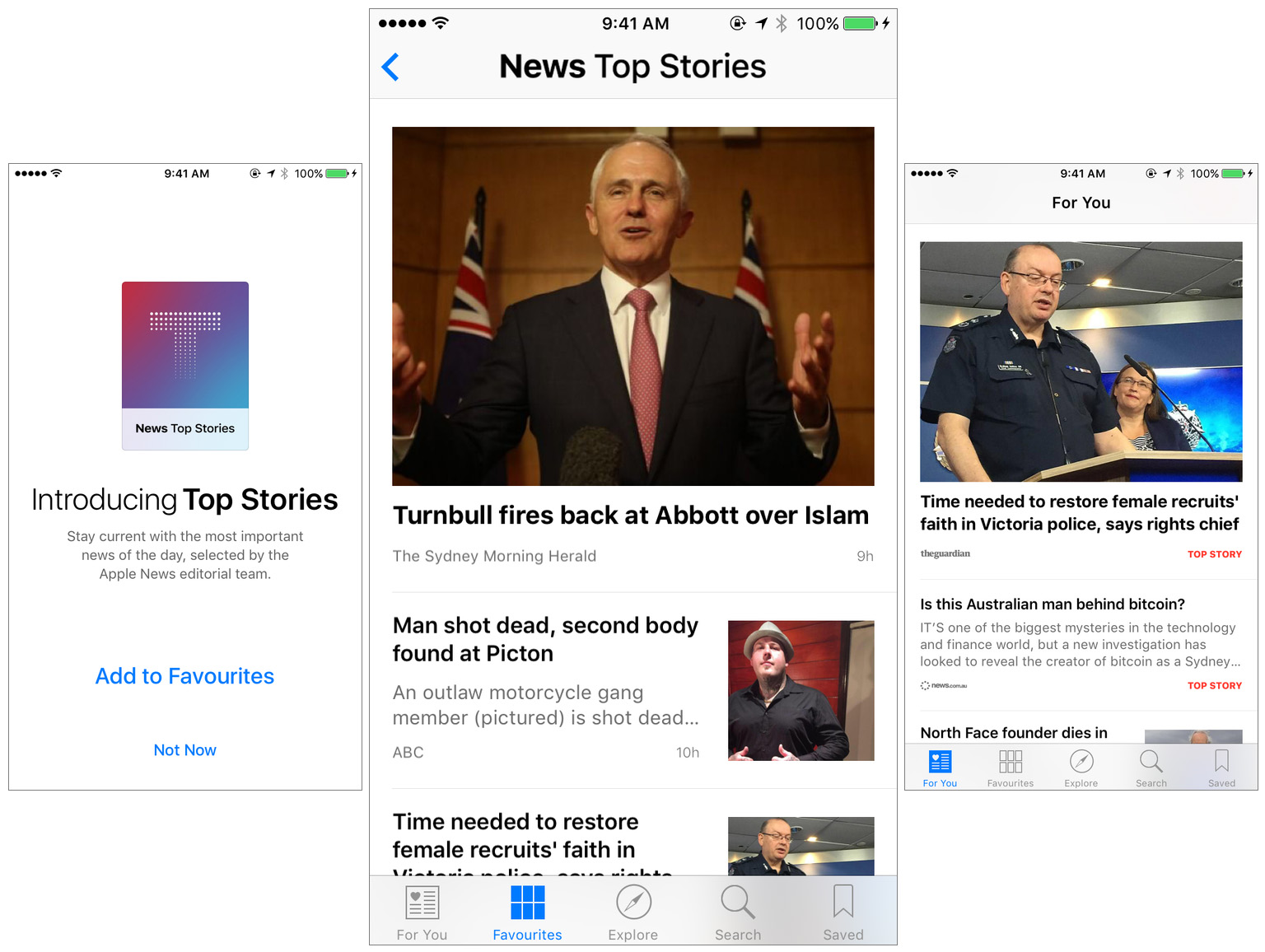
(L-R) The Apple News launch screen after you update to iOS 9.2, the Top Stories channel in my Favorites section, the For You section which features Top Stories (note the red tag on the right).

(L-R) The Apple News launch screen after you update to iOS 9.2, the Top Stories channel in my Favorites section, the For You section which features Top Stories (note the red tag on the right).

Peter Kafka, writing for Re/code, reports that yesterday’s iOS 9.2 software update also included a big new feature for Apple News:

Apple’s update for its iOS app, which begins rolling out today, has two components. Only one of them will be visible to regular users: Apple’s editors will curate a list of “top stories” they’ll display for all of the apps’ users, at least a couple of times a day.

That’s a change in philosophy from this fall’s launch, when the app was supposed to highlight stories based on each of its users’ tastes and reading behaviors.

That’s still going to happen throughout the day, but in the morning and in the afternoon, Apple will assemble a handful of stories it thinks all of its users would want to see. You know — like a newspaper.

After you install iOS 9.2 and open Apple News for the first time you’ll be given the open of adding ‘Top Stories’ to your Favorites. If you do add it to your favorites, the ‘For You’ section of Apple News will prominently feature articles that Apple editors have deemed to be a top news story for the day. You can also go directly to the Top Stories channel in your Favorites to view all of the top stories in one place.

In my launch review of Apple News I was critical of the overall Apple News experience, which I found to be disappointing. One of my chief complaints was that you couldn’t rely on Apple News to give you all of the day’s big news stories – the lack of human picks and poor automated curation was readily apparent:

Arguably the most frustrating part of For You is the fact you never get a good sense of what the big stories of the day are. To me, this is vital to any news app, website, or service – I don’t just want to read interesting articles that I might like, but I want to know the most important of those stories.

I’ve only spent 20 minutes with iOS 9.2 and the updated Apple News, but early signs are positive. The For You section began with stories which were prominently marked as a “Top Story” and indeed they were (mostly) appropriate. I was pleasantly surprised to see they even have Australian editors, curating the top Australian news stories. So I’m going to give Apple News a second chance and see if it fares any better with the addition of human curated top news stories, and I’ll report back to you all next week.


Apple Introduces iPhone 6s Smart Battery Case

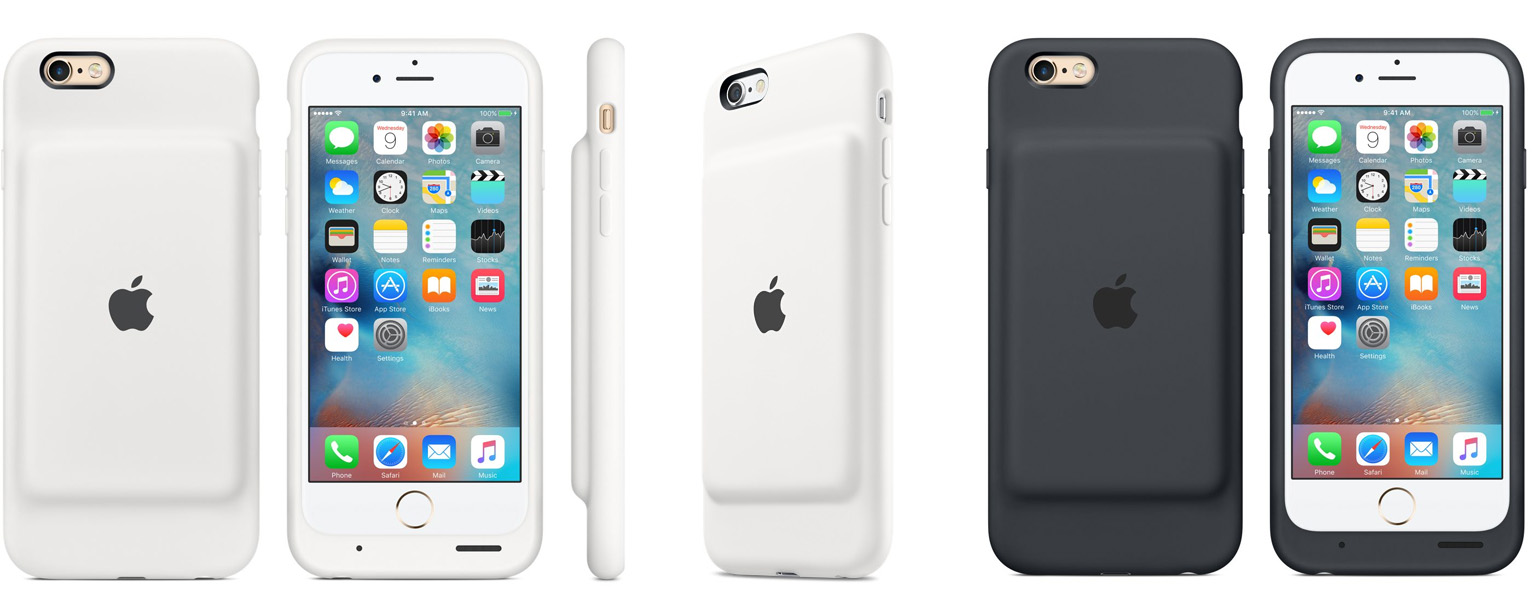
Apple today introduced the new iPhone Smart Battery Case for the iPhone 6s and iPhone 6. Available in White or Charcoal Gray, the Smart Battery Case includes a built-in battery which will boost your iPhone’s battery life for talk time up to 25 hours and internet use up to 18 hours on LTE.

You charge the Smart Battery Case and your iPhone simultaneously and the amount of charge left in the case is displayed on your iPhone’s normal battery indicator.

The Smart Battery Case is available to purchase from today for $99. The case’s exterior is silicone whilst the interior is a soft microfiber lining. It also features a “soft elastomer hinge design”, which Apple claims will make it easy to put the case on an iPhone and take it off.

For the time being, the Smart Battery Case is only available on the 4.7” iPhone 6 and iPhone 6s, it is not available for the iPhone 6s Plus or iPhone 6 Plus.

[via AppleInsider]


Apple Maps Used “Three Times As Often As Its Next Leading Competitor”

In an article from Associated Press, Anick Jesdanun gets a comment from Apple regarding the popularity of Apple Maps:

Apple says its mapping service is now used more than three times as often as its next leading competitor on iPhones and iPads, with more than 5 billion map-related requests each week. Research firm comScore says Apple has a modest lead over Google on iPhones in the U.S., though comScore measures how many people use a service in a given month rather than how often.

“We are fast learners and we are fast at fixing things,” said Greg “Joz” Joswiak, an Apple vice president who oversees product marketing for iPhones and related services. “We learned the maps business incredibly fast.”

It’s abundantly clear that Apple Maps has improved significantly in just three years, but at least in my experience, it still has a way to go before it is up to the standard of Google Maps, globally.

Which is why I thought it was odd that Apple would publicly reveal, in an almost boastful manner, that Apple Maps is used “more than three times as often as its next leading competitor” (read: Google Maps). At first glance that sounds impressive, but Apple Maps has been automatically installed on every single iOS device since 2012. If someone wants to use Google Maps they need to actively take steps to find it, install it, and avoid using Apple Maps when tapping address links or using Siri.

I wonder what the statistics are for some of Apple’s other default, automatically installed, apps? How many people use Safari, or Apple Mail or Apple Calendars rather than the “next leading competitor”? I would put money on those other default apps being way more than just three times as popular as the third party alternatives.

https://twitter.com/zkahn94/status/674081643141988353

Permalink

Google Calendar and Inbox Add Reminders

Vijay Umapathy, writing for the Official Gmail Blog:

Our calendars should help us make the most of our time — scheduling meetings at work, remembering brunch with friends, and keeping track of all our other commitments. But often our to-do list is elsewhere, separate from the Calendar that organizes our day, and we end up overcommitted or miss something important because we forgot to check our list.
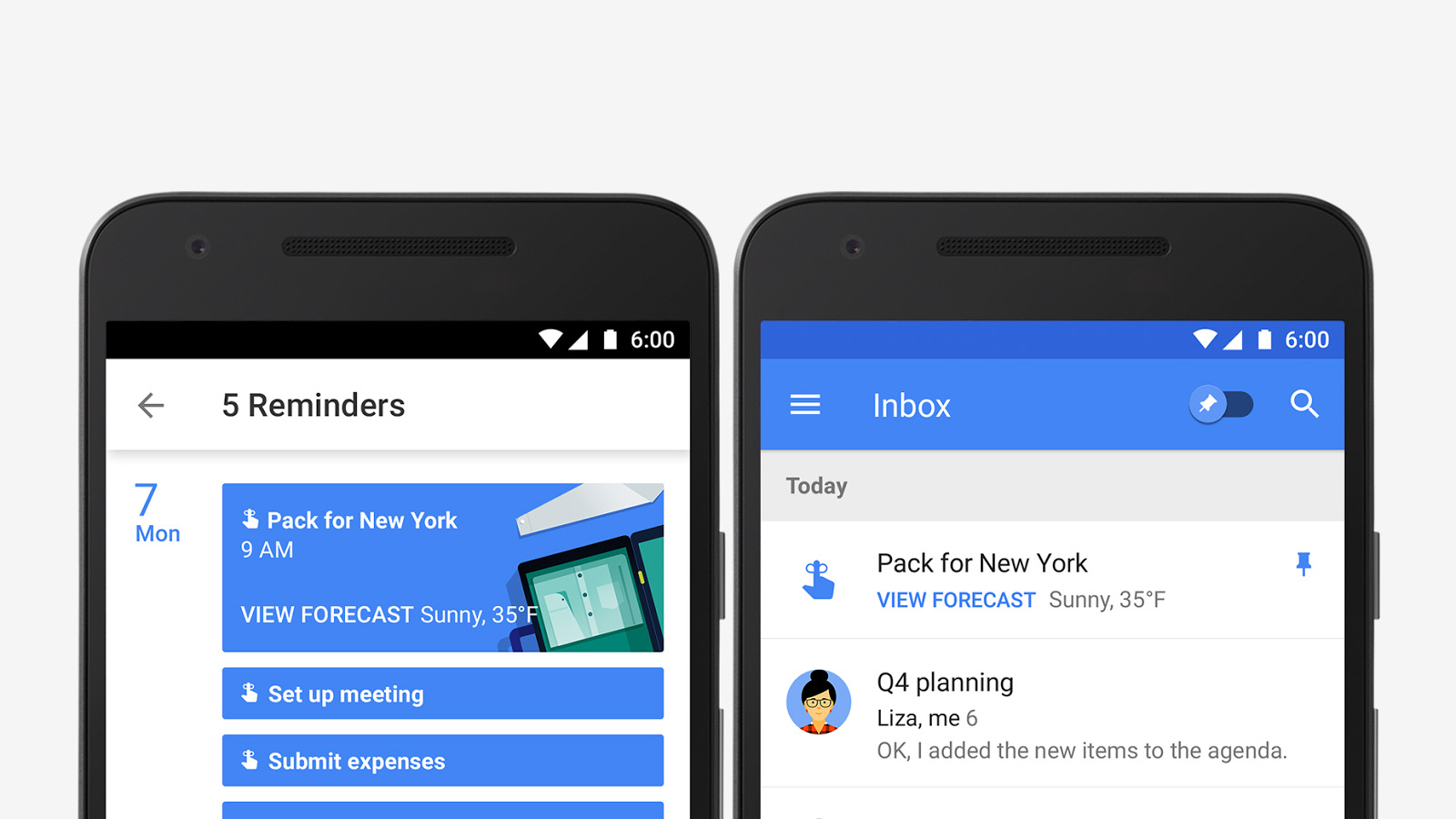
Now there’s a single way to manage your day: starting this week, you can create Reminders in Google Calendar to keep track of your to-dos alongside your scheduled events.

Reminders aren’t just kept in Google Calendar either, they will also be accessible from the Google Inbox, Google Keep and Google Now apps - and they’ll be coming to the web in the future. For those of you invested in the Google ecosystem, and just need a simple way to remember about tasks you need to do, this new Reminders feature from Google may be a perfect fit.

Permalink