Graham Spencer

1054 posts on MacStories since January 2011

Former MacStories contributor.

Exploring MoneyWiz: Complete Personal Finance Control On Your iPad

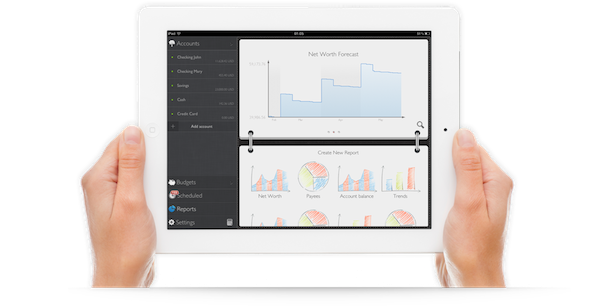
It wasn’t originally a New Year’s resolution to keep better track of my spending, but by the way things have turned out, it almost seems as if it was one. Early in January I began looking for a good Mac app for exactly this task. Originally I had hoped that Saver, an app I reviewed last year had since released an iPad app that I had not heard about – I really liked the app but wanted it on the iPad or Mac. Unfortunately Saver is still iPhone only, so I looked around a bit longer, asked around and tried a few apps on the Mac. I wasn’t thrilled with what I found. They all seemed a little to complex for what I wanted, so I kept looking. I forget how, but I eventually stumbled upon MoneyWiz which is available on the iPad and iPhone (at the time it was called SilverWiz). The developers haven’t yet released a Mac version (they’re working on it and expect to launch it in Spring this year), but they did give me an early look at the recent update to MoneyWiz for iPad (version 1.3), which launched late last week.

MoneyWiz for iPad does a couple of things: it keeps track of your expenses, allows you to set budgets (and track your progress), and provides you with the ability to create reports on various aspects of your financial situation. More importantly, I found MoneyWiz to be very flexible, not overly complex like some of the Mac apps I tried, and, at the same time, full of a wealth of features that should be sufficient for most individuals. Read more


Adobe Photoshop Touch Review

When I first heard that Adobe was bringing Photoshop to the iPad sometime last year, I was sceptical. I presumed it would be a very limited app compared to the powerful desktop app, or maybe just a slightly improved version of Photoshop Express. At best I thought it might give you some good editing tools to fix and correct photographs, perhaps with some layer support and effects. I didn’t think Adobe could pull off creating a great tablet version of Photoshop, and I wasn’t sure the iPad would be a good fit for the tasks in Photoshop.

So when I finally got to try out Adobe Photoshop Touch, I was intrigued to see what Adobe had accomplished. After a couple of hours playing around in the app (it accidentally went live yesterday, then Adobe pulled it) I’ve come away very impressed with what Adobe has accomplished. Photoshop Touch is a powerful and capable version of Photoshop for the iPad, without a doubt. To me, it is the latest iPad app that has demonstrated that the iPad is for more than “content consumption” — that’s just an old myth now.

It’s the apps that make the iPad great and Photoshop Touch is perhaps the prime example of the potential of the device and how flexible it is at becoming a great machine for a whole slew of different tasks, from reading, to writing, to viewing to editing and now, to using Photoshop for more than just basic photo edits. Sure, Photoshop Touch is still not as powerful as the desktop version, in fact it’s quite a distance away from reaching such parity — but it all comes down to the car Vs. truck analogy that Steve Jobs rather famously explained. Photoshop on your Mac or PC is still available for when you need to do complicated and advanced tasks, but for a lot of other tasks, you could probably migrate to the iPad and Photoshop Touch.

Enough with the introduction, let’s dive into our review of Photoshop Touch.

Read more


Tip: Handle iMessage Notification Overload with Contact Settings

Since Apple released a public beta of Messages for Mac, we’ve been having a bit of a notification overload here at MacStories HQ. See, ever since iMessage was released with iOS 5, we’ve had our own group message with everyone on the MacStories team – it was a portable water cooler, where we could chat about random things, share silly pictures and even co-ordinate things for the site, even when we were out and about. We used it quite frequently, but things turned for the worse last week when we all got that Messages for Mac beta. What might have been 10 messages in a given time period, suddenly morphed into 50 messages because of the convenience of having iMessage just a click way on our Macs. Things were becoming chaotic and quite distracting, Don had even turned off vibrations — meaning he got no notification for any message, from anyone.

We didn’t want to give up on using Messages for Mac, and it was probably going to be a hard task to change our messaging behaviours to limit the number of messages sent, but it was clear this week that we had to do something.

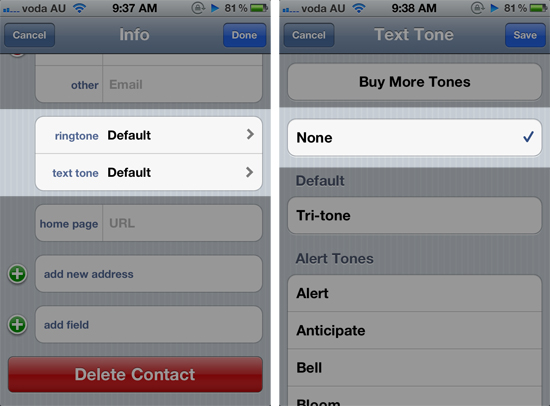
Fortunately, we think we have found a solution. In iOS, Apple includes the ability to change the text tone and ringtone on a per-contact basis. What we did for everyone in the MacStories team, was to change the text tone to “None”. You can do this by going into the Contacts app, selecting a contact and tapping the ‘Edit’ button and scrolling to “text tone”.

This now means regardless of whether your phone is on Silent or not, you will not get any noise or vibration to alert you to the new message. There are two downsides to this ‘workaround’: the first is that you will still get the notification bar flipping down from the top of your screen. The second problem, which could be a deal breaker for some, is that any messages from that person will not cause a vibration or text tone – important to remember if they are a participant in a few of your group message threads.

There should be another way…

Whilst the ability to change the text tone (and ringtone) on a per-contact basis is really cool (and can be used for a number of other purposes), perhaps there should be another way to control message notifications differently – especially now that iMessage is bundled in iChat, and may lead to an increased number of messages sent to iOS devices. Specifically I’m talking about muting specific message conversations. This would allow me to mute the message thread that has all of the MacStories members, but still receive notifications from Federico, in case he urgently wanted me to cover something.

Apple could easily implement the option inside the Messages app, simply displaying a mute icon next to each message thread when in the ‘Edit’ mode. Just like changing the text tone on a per-contact basis, this power-user option wouldn’t make the UI messy, because it would only appear in the ‘Edit’ screen. That way, users could choose between completely muting on a per-contact basis or on a per-message thread basis – all whilst still receiving notifications for your other messages.


iPad + Office + Apple + Microsoft: Why It All Makes Sense

iPad + Office + Apple + Microsoft: Why It All Makes Sense

Rumors of Office for the iPad flared up again this week after The Daily posted an alleged photo of it, after apparently getting some hands on with a near-complete build. Some of you may recall me tweeting that day, what I thought was a crazy thought: Apple inviting Microsoft on stage next month at the iPad 3 keynote to demo Office for iPad. Apparently it wasn’t as crazy as I originally thought, because others are thinking it might just happen.

Office for the iPad makes total sense, though. And I wouldn’t be surprised if Apple did give Microsoft some stage time to unveil it at the new-iPad event in a few weeks.

Those are the words of Dan Frommer of SplatF, someone who (in my mind) has always made strong, rational cases for his arguments, never sensationalising or using hyperbole for the sake of it. In an article published a few hours ago, he lays out why “iPad + Office + Apple + Microsoft” actually makes sense. In it he lists out all the big arguments for such a Microsoft appearance at Apple’s iPad 3 keynote.

This isn’t like when Microsoft had to scratch and think before making Office for the Mac in the ’90s, when it would be lucky to sell a couple million copies per year. The iPad is way different: It should easily pass 50 million unit sales this year alone, and that’s potentially tens of millions of Office buyers for Microsoft. (Office, by the way, represented significantly more of Microsoft’s sales and profits last quarter than Windows.)

I strongly encourage you to read the full list of arguments in his article, I don’t think anyone could have laid out the argument for such a proposition any stronger than Dan did. On the flip side though, Daring Fireball’s John Gruber doesn’t think it’ll happen.

But what would be in it for Apple to offer such a spot to Microsoft? You can argue that the iPad with Office available is an even more attractive platform/device than the iPad as it stands today, sans Office. But why share the spotlight with Microsoft? Apple doesn’t need to.

Permalink

Apple Purchases Land In Oregon For Another Large Data Center

An Apple spokeswoman has confirmed to news agency KTVZ.com that it has purchased land in Prineville, Oregon and plans to build a data center. The land, purchased from Crook County covers 160-acres and was purchased for a reported $5.6 million. Apple confirmed the purchase after they were named as the purchaser in a February 15th filing in Crook County.

Apple spokeswoman Kristin Huguet confirmed Tuesday that “we purchased the land and it’s for a data center,” but could not speak to details beyond that, other than to say it will be a “green” facility.

Rumors of Apple scouting out land in Prineville for another large data center emerged in December last year when it was reported that Apple was in discussions over purchasing the land. The land Apple purchased is nearby Facebook’s data center in Prinneville, which is pictured above.

[KTVZ.com via MacRumors]


Microsoft Office For iPad Coming Within Weeks? [Updated]

Microsoft’s Office Suite could be launching on the iPad App Store within weeks according to a new report in The Daily. Originally rumoured in November of last year by The Daily, Matt Hickey today says that the design team has “wrapped up the project” but an exact launch date was not known.

Hickey claims to have had a brief hands-on with a working prototype of the Office Suite app and notes that whilst the UI is similar to OneNote for iPad, it has hints of Metro. He notes that Word, Excel and PowerPoint files can be created and edited either locally on the iPad or online (presumably using Microsoft’s SkyDrive cloud service).

According to his sources, OneNote will also receive an update soon to reflect the Metro design. Those same sources also noted that no Android version was in the works.

[The Daily via The Next Web]

Jump the break to view all updates to this story.

Read more


China Telecom To Offer The iPhone 4S From March 9th

Starting from March 9th, China Telecom customers will be able to purchase the iPhone 4S. It comes about two months after China Unicom first offered the iPhone 4S in China.

Unlike China Unicom (the second largest carrier after China Mobile), the smaller China Telecom uses the CDMA technology. Though because the iPhone 4S has support for both CDMA and GSM networks, China Telecom will be selling the same hardware that customers on China Unicom and customers elsewhere across the world purchase.


[via The Verge]


Rovio Teases Angry Birds Space, Launching March 22

It may be on every platform under the sun and there may already be three versions of Angry Birds, but Rovio isn’t stopping any time soon with their Angry Birds franchise. In fact next month they will be launching the third game in the series: Angry Birds Space. Teaming up with NASA and the National Geographic, the new app will (naturally) feature some twists on the physics used in the game, including zero gravity and a new “lightspeed destruction” feature.

Angry Birds Space is a completely new game with innovative new gameplay, but with some of the familiar Angry Birds elements that fans already know and love – plus some surprises!

Rovio is planning on making it their biggest game launch since Angry Birds was first released and is targeting a launch on not only multiple platforms but also push the retail and publishing aspects of the game as well. Rovio will reveal more details about the game in early March, but until then you can visit the teaser site or view Angry Birds Teaser trailer below the break.

[Venture Beat via Eurogamer, Engadget]
Read more


Nightline Given Exclusive Access To Apple’s Foxconn Factories, Program To Air This Tuesday

The ABC’s Nightline program will air on Tuesday a report from Bill Weir that delves inside Apple’s Foxconn factories. ABC News announced the program on Twitter and PCWorld notes that Apple gave Weir “exclusive access” to tour the Foxconn factories, meet with workers as well as interview a “top executive”.

For years, Apple and Foxconn have been synonymous with monster profits and total secrecy so it was fascinating to wander the iPhone and iPod production lines, meet the people who build them and see how they live. Our cameras were rolling when thousands of hopeful applicants rushed the Foxconn gates and I spoke with dozens of line workers and a top executive about everything from hours and pay to the controversies over suicides at the plant and the infamous ‘jumper nets’ that line the factories in Shenzhen. After this trip, I’ll never see an Apple product the same way again.

It’s the latest move by Apple to try and quell the backlash from media and consumers over the treatment of workers at Apple’s suppliers — particularly at Foxconn. Earlier this year they released their 2012 Supplier Responsibility Report a few weeks earlier than previous years. Apple also revealed who their suppliers are and then joined the Fair Labor Association, who are currently conducting an investigation in regards to working conditions at Foxconn.


[PCWorld via TUAW]