Ryan Christoffel

991 posts on MacStories since November 2016

Ryan is an editor for MacStories and co-hosts the [Adapt](https://www.relay.fm/adapt) podcast on Relay FM. He most commonly works and plays on his iPad Pro and bears no regrets about moving on from the Mac. He and his wife live in New York City.

How the iPad’s Trackpad Support Works

Dieter Bohn at The Verge:

We can answer some of your questions about how trackpad support will work today and we’ll get a chance to actually use it ourselves in the public beta. In the meantime, here’s what we definitely know about how it will work based on videos Apple has released publicly and on a video presentation given to reporters this morning.

Bohn gives a great bullet-point walkthrough of how iPadOS handles input from a trackpad or mouse, complete with the roster of navigation gestures supported by trackpads.

Best of all, however, the article includes a video Apple created in which Craig Federighi, Apple’s software head, demos the trackpad on the iPad Pro’s new Magic Keyboard. Presumably it’s exactly what Federighi would have done if the company had been able to introduce the iPad Pro at a press event.

Permalink

Logitech Introduces Combo Touch Keyboard Case, Bringing a Trackpad to the iPad, iPad Air, and 10.5-inch iPad Pro

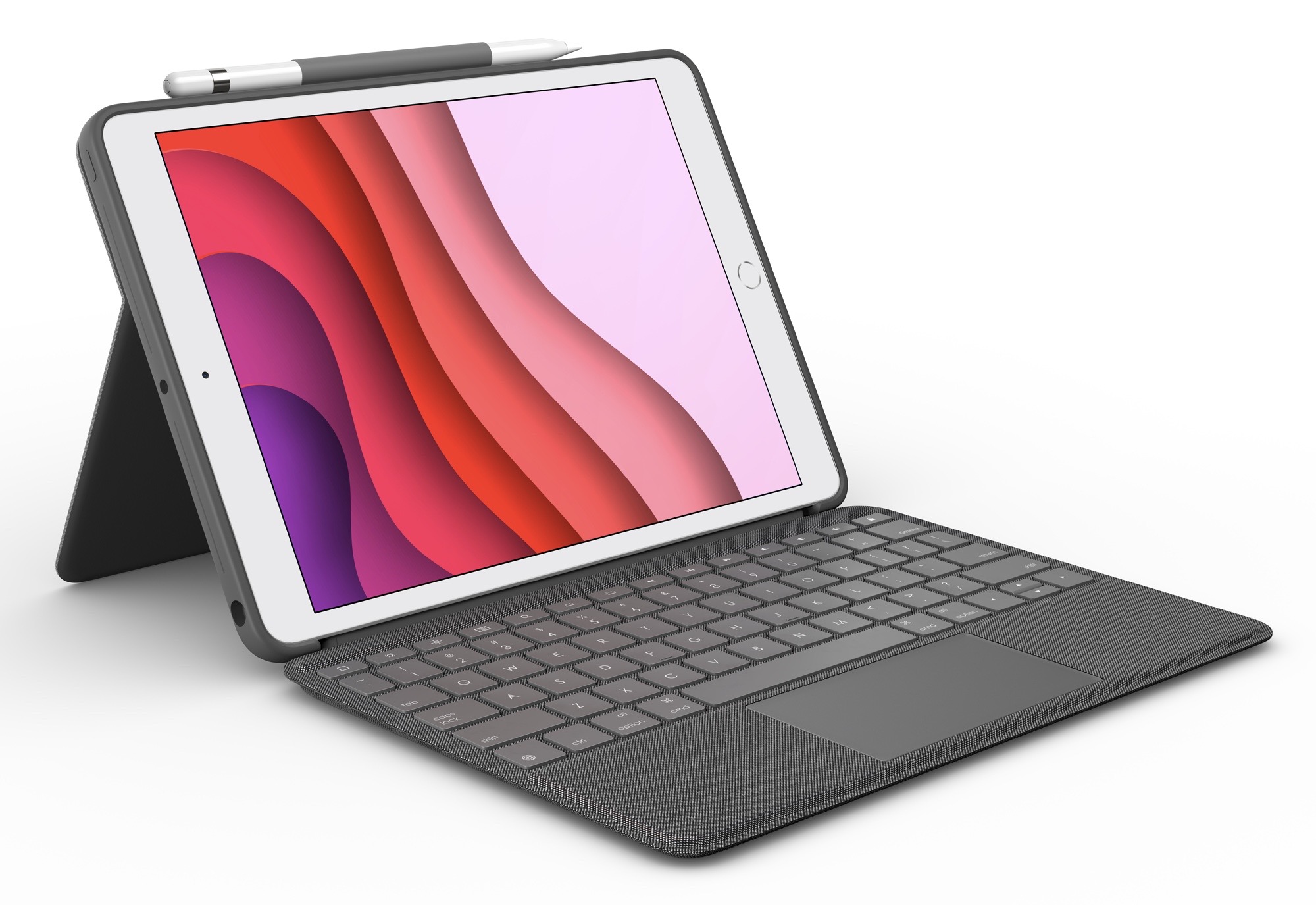
Today following Apple’s debut of the new iPad Pro and Magic Keyboard, and cursor support coming to all iPad models that can run iPadOS 13.4, Logitech has announced a brand new accessory coming in May: the Combo Touch, which brings a keyboard case with trackpad to the iPad (7th generation), iPad Air, and 10.5-inch iPad Pro. From the product listing on Apple’s online store:

Logitech’s Combo Touch for iPad combines a precision trackpad with a full-size backlit keyboard…Enjoy comfortable typing on a full-size keyboard with backlit keys that are perfect for working in dark environments like on an airplane or late at night. And the flexible design supports four use modes for extra versatility.

Despite all modern iPads gaining full cursor support, Apple currently only offers a first-party keyboard with built-in trackpad for the iPad Pro, not any other iPad model. Filling that gap, Logitech’s Combo Touch will be available for $149.95 as a great solution for users of other modern iPads. The Combo Touch covers the front and back of the iPad, includes a full keyboard and trackpad, and even offers a dedicated holder for the Apple Pencil. Notably, the device’s trackpad will also support all the same multitouch gestures that Apple’s Magic Keyboard offers.

Between Apple’s Magic Keyboard for the iPad Pro, and Logitech’s Combo Touch covering the iPad, iPad Air, and 10.5-inch iPad Pro, the only modern iPad where a keyboard case with trackpad isn’t being offered is the iPad mini.


Things Debuts Modernized Apple Watch App

The Apple Watch has come a long way in five years, and apps are only starting to catch up. Many Watch apps received the majority of their development attention with the first or second versions of watchOS, before the days of LTE service, independence, and SwiftUI. Those early Watch apps were hamstrung by OS limitations, but in the last few years as the platform has evolved, most apps never adapted to what’s possible now.

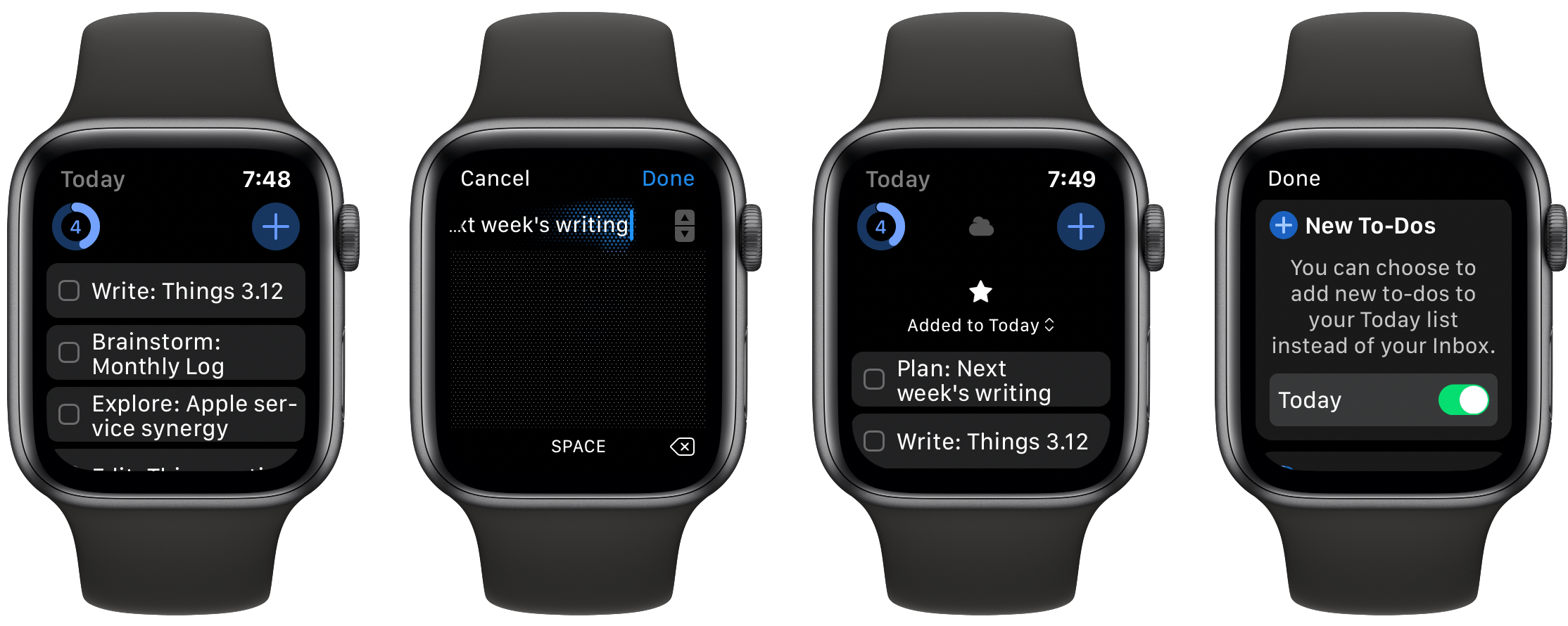
Things 3.12, releasing today, exists for just that purpose: it addresses the task manager’s former Watch client shortcomings, making it a truly capable companion for Things on iPhone, iPad, and Mac.

Read more


Twitter Launches Brazil Test of Stories-esque ‘Fleets’ Feature

Today Twitter announced a test, limited to Brazil, of a major new feature for the social service: Fleets, which take their inspiration from the Stories feature found on Instagram, Snapchat, and Facebook.

Fleets, short for “fleeting tweets,” live at the top of your timeline just like stories do in other social media apps, and they disappear after 24 hours. Multiple fleets can be written in a day and include text, images, GIFs, and videos, but the way they are interacted with is different than a standard tweet. There’s no way to retweet or reply to someone’s tweet in a public sense; instead, followers can react to a fleet via DM, or a reaction which is sent via DM. Presumably this means that if someone’s DMs are closed, only people they follow can respond to their fleets.

This new test was announced by Twitter Product Lead Kayvon Beykpour in a series of tweets where you can see both images and video of fleets being demoed.

Normally tests of new features, especially ones as limited as this, wouldn’t necessarily merit reporting on because there’s a good chance they may not come to fruition in full release. Fleets, however, are a major new functionality for Twitter and they have clearly had a lot of work poured into them. They’re also a reflection of where other social media services have already moved, making it highly likely that they’ll eventually get a wide release on Twitter, in some form or another.

Although I’m not a big user of ephemeral sharing on other services, and that’s unlikely to change here, I’m nevertheless happy to see Twitter continue pouring work into evolving its product. If fleets do get a worldwide release in the future, I’ll be interested to see if they cause the quality of timelines to improve as tweets are reserved for more important statements while fleets house everything else.