Ryan Christoffel

992 posts on MacStories since November 2016

Ryan is an editor for MacStories and co-hosts the [Adapt](https://www.relay.fm/adapt) podcast on Relay FM. He most commonly works and plays on his iPad Pro and bears no regrets about moving on from the Mac. He and his wife live in New York City.

Spark Adds Rich Text Formatting for Email: Lists, Text Colors, and Highlighting

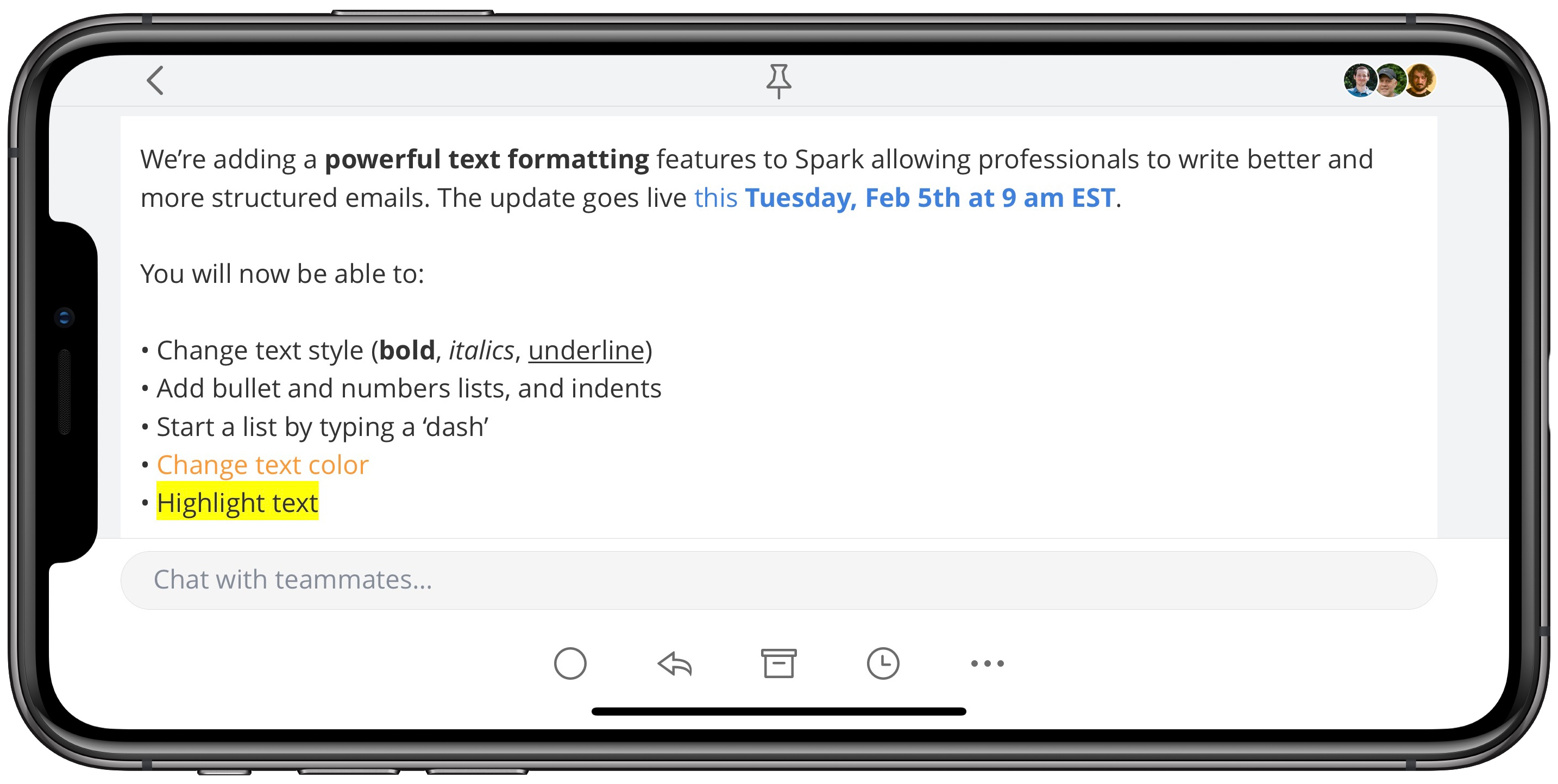
Today in an update to its iOS and Mac apps, the email client Spark has introduced new rich text formatting options to enable greater flexibility in styling your messages.

Spark already included the expected bold, italics, and underline options, and its macOS version previously allowed creating bulleted or numbered lists, but those list options have now come to iOS as well. Additionally, both Mac and iOS users can now change the color of text in their emails, as well as add highlighting to text.

Rich text support is a particularly important feature for an email app, so I’m glad to see it come to Spark. While I likely won’t start sending messages with different colored fonts, it’s nice having the variety of options Spark provides here. Lists in particular were something I’ve missed having in the past, and I like the idea of employing highlights to call out anything of special importance in an email. I’ve historically used bold for that purpose, but highlighting definitely does an even better job of standing out.

Spark’s latest update is available now as a free download for iOS, and the Mac update is coming soon.
Board Games for iOS, Vol. 7

I love a good board game. One favorite pastime for my wife and I is trying a new game or competing fiercely in an old favorite. What follows are some quality board games in digital form; after you’ve checked them all out, be sure to revisit each of the prior six collections of...


Back to the Mac…Out of Necessity

Recently, due to a fresh creative project I have in the works, I was more or less forced to purchase a new Mac due to the flailing usefulness of my seven-year-old MacBook Air. Since my Mac needs are limited and restricted to home use, the natural purchase choice for me was a 2018 Mac...


Why the Siri Face Is All I Need from My Apple Watch

What should a wrist computer ideally do for you?

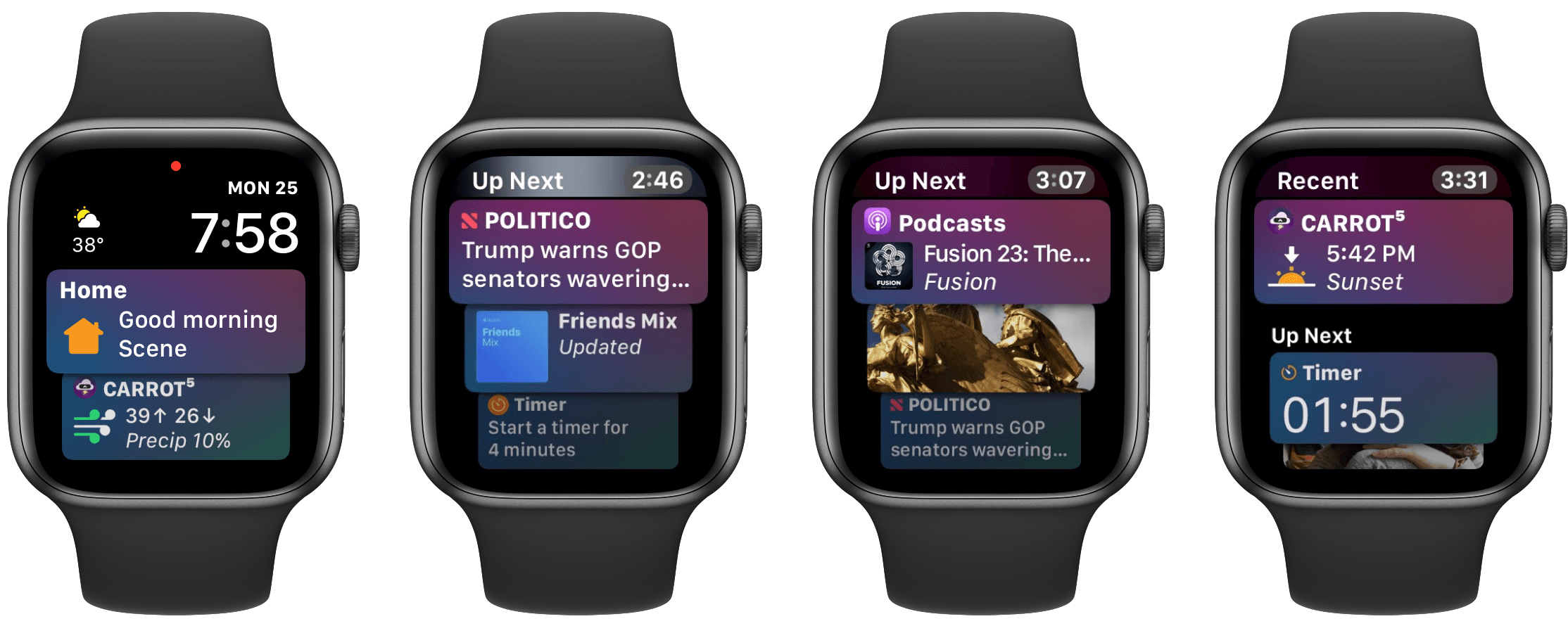
Telling the time is a given, and activity tracking has become another default inclusion for that category of gadget. But we’re talking about a computer here, not a simple watch with built-in pedometer. The device should present the information you need, exactly when you need it. This would include notifications to be sure, but also basic data like the weather forecast and current date. It should integrate with the various cloud services you depend on to keep your life and work running – calendars, task managers, and the like. It doesn’t have to be all business though – throwing in a little surprise and delight would be nice too, because we can all use some added sparks of joy throughout our days.

Each of these different data sources streaming through such a device presents a dilemma: how do you fit so much data on such a tiny screen? By necessity a wrist computer’s display is small, limiting how much information it can offer at once. This challenge makes it extremely important for the device to offer data that’s contextual – fit for the occasion – and dynamic – constantly changing.

Serving a constant flow of relevant data is great, but a computer that’s tied to your wrist, always close at hand, could do even more. It could serve as a control center of sorts, providing a quick and easy way to perform common actions – setting a timer or alarm, toggling smart home devices on and off, adjusting audio playback, and so on. Each of these controls must be presented at just the right time, custom-tailored for your normal daily needs.

If all of this sounds familiar, it’s because this product already exists: the Apple Watch. However, most of the functionality I described doesn’t apply to the average Watch owner’s experience, because most people use a watch face that doesn’t offer these capabilities – at least not many of them. The Watch experience closest to that of the ideal wrist computer I’ve envisioned is only possible with a single watch face: the Siri face.

Read more


How Apple Music Could Own the Classical Music Audience

Mitchel Broussard of MacRumors recently published an in-depth look at the problems classical music fans have with Apple Music’s approach to that expansive genre. Unlike many other common genres, such as hip-hop, pop, and country, the range of music deemed ‘classical’ bears its own unique challenges in a variety of areas. Broussard spoke to Benjamin Charles and Franz Rumiz, classical music enthusiasts, who shared their frustrations with how Apple Music fails to optimize for classical music’s distinctness. He writes:

[Apple Music’s Classical] section spans centuries, including all of the notable composers like Mozart (born 1756, died 1791), Maurice Ravel (b. 1875, d. 1937), and John Cage (b. 1912, d. 1992), but this grouping is frustrating for classical music aficionados, given how little these musicians have in common among one another…Rumiz: “The sorting of recordings follows the rules of pop & rock genre. For classical music this doesn’t fit at all, because you very often want to compare different recordings of the same pieces by the same composer with different soloists, orchestras and conductors.”
[…]
Charles says that one aspect of classical music that’s mixed up in the shuffle is the listener’s interest in a piece’s composer versus its performer. While some artists, like Leonard Bernstein, both compose and perform their music, Charles questions how Apple Music determines the best recording for a piece of music: “Is a recording more significant because it is composed by Bach, or is it more significant because it is performed by Glenn Gould?”

Classical music also can be extremely difficult to request of Siri due to the unique names for many classical tracks, and there are several other issues highlighted in the article, all of which appear like legitimate hindrances to a great classical music experience on Apple’s platform.

Overall Apple Music’s handling of classical music seems more like an oversight than an intentional design choice, but Broussard and his interviewees make a strong case that Apple should take note of. As the last line of the article states:

“This is a completely untapped market,” Charles tells me. “One streaming service could completely own the classical music audience if it wanted to.”

Permalink

Revisiting HomePod: One Year Later

In early 2017 one of the major stories around Apple and technology involved the company missing the boat on smart speakers, with Amazon Echo and Google Home devices continuing to take stake in many users’ homes. Apple responded to the chatter by making a move it rarely does: it pre-announced the HomePod at WWDC...


Elk

Utility apps, generally speaking, tend not to have a reputation for being design-conscious. This makes sense to some extent: if an app will only be opened occasionally, for seconds at a time, why should its developers spend much time fine-tuning how it looks and feels? Fortunately, in spite of that argument, there are still...


Agenda 5 Expands iPad External Keyboard Support

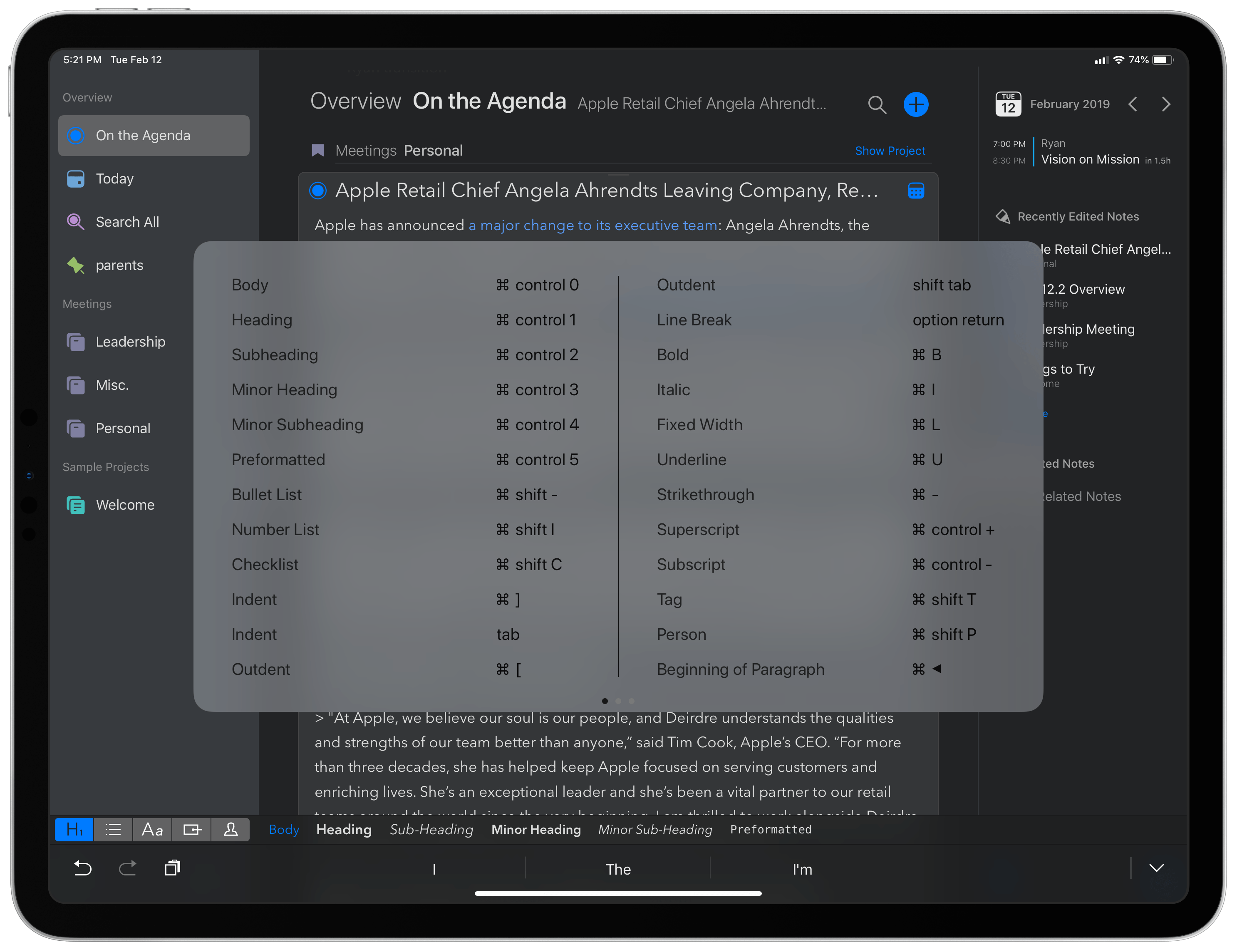
Agenda recently passed the milestone of its first full year in public release, with the Mac version debuting last January and the iOS app a few months later. The team behind Agenda has been keeping busy ever since, with improvements like Siri shortcuts, dark mode, accent colors, and most recently, images and file attachments. Today’s update to version 5.0 on iOS and the Mac is relatively minor by comparison, but it still offers a few valuable additions. There are new options for your text environment, like the ability to set a custom line spacing and use an extra small text size, plus you can now perform multi-tag and multi-person searches. The improvement that stands out most, however, is Agenda’s newly expanded support for external keyboards on iPad.

Read more