Ryan Christoffel

991 posts on MacStories since November 2016

Ryan is an editor for MacStories and co-hosts the [Adapt](https://www.relay.fm/adapt) podcast on Relay FM. He most commonly works and plays on his iPad Pro and bears no regrets about moving on from the Mac. He and his wife live in New York City.

Genius Enters New Partnership with Apple Music

Today Genius, the online music encyclopedia, shared word of a new partnership it has formed with Apple – more specifically, with Apple Music. From the company’s announcement post:

Starting today, Apple Music subscribers who visit Genius will be able to play any song in full right from the song page, simply by signing into their Apple Music account.

Genius is a great place to find historical information about a song, so the ability to play any track without leaving Genius makes for a great user experience. Embedded Apple Music tracks is only one half of this partnership though. Even if you’ve never used Genius, you’re bound to benefit from this agreement because of a second piece of news. The announcement post continues:

Genius has the world’s best lyrics database and now it’s available on Apple Music. Genius will provide lyrics to thousands of hit songs on the service—bringing world-class accuracy and timeliness powered by Genius’s global community of artists and fans.

It’s unclear at this time whether the addition of Genius lyrics to Apple Music will bring lyrics to songs that previously didn’t have any, or simply more accurate lyrics to songs that already have them. Hopefully both benefits are in store for Apple Music users.

In the first couple years of Apple Music’s life, the service didn’t strike very many partnerships with third-party businesses. That appears to be changing this year, with the recently completed acquisition of Shazam, free service offers for Verizon wireless customers, and now Genius integrations, Apple is extending its service in new ways to better compete with Spotify.
Permalink

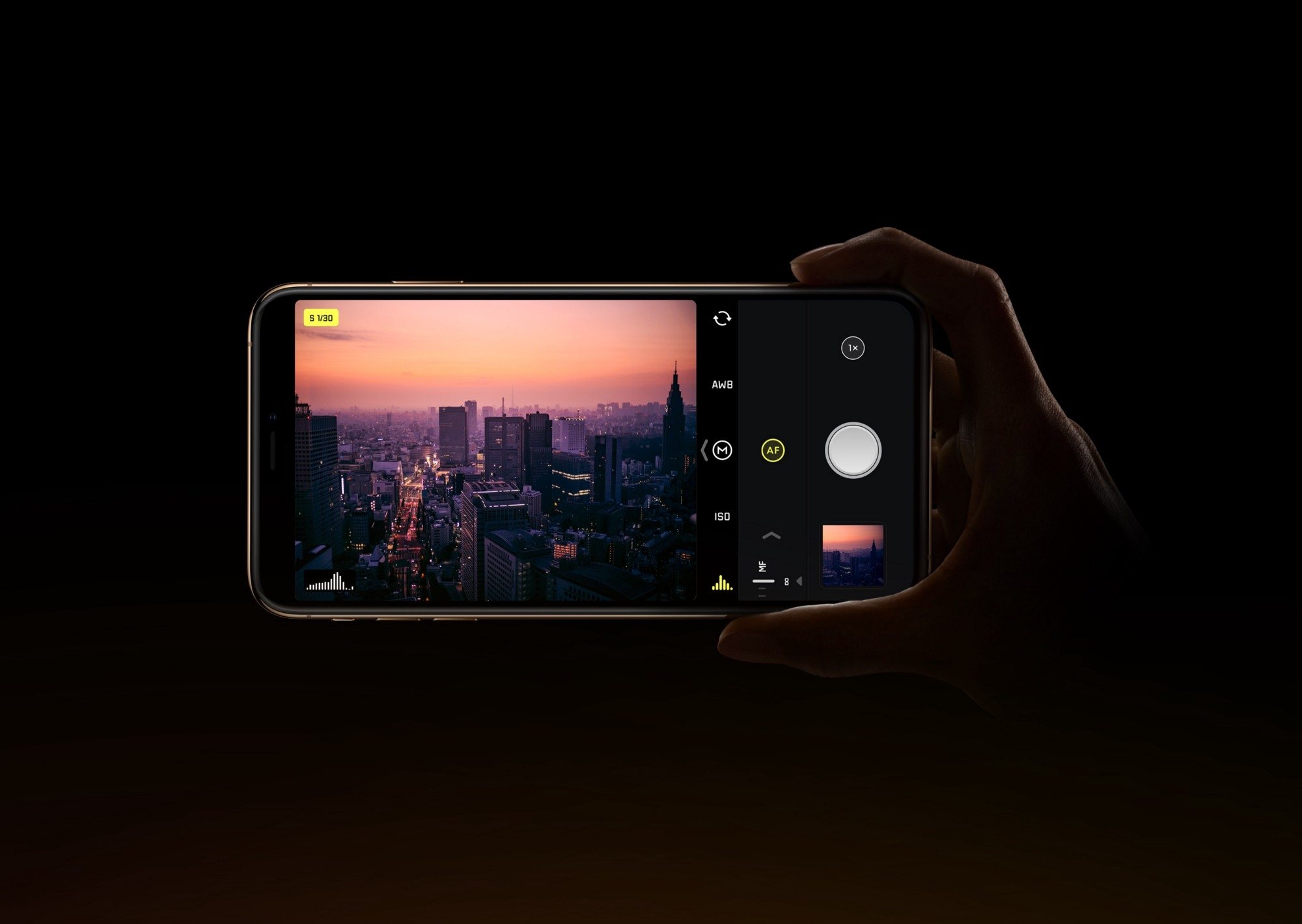
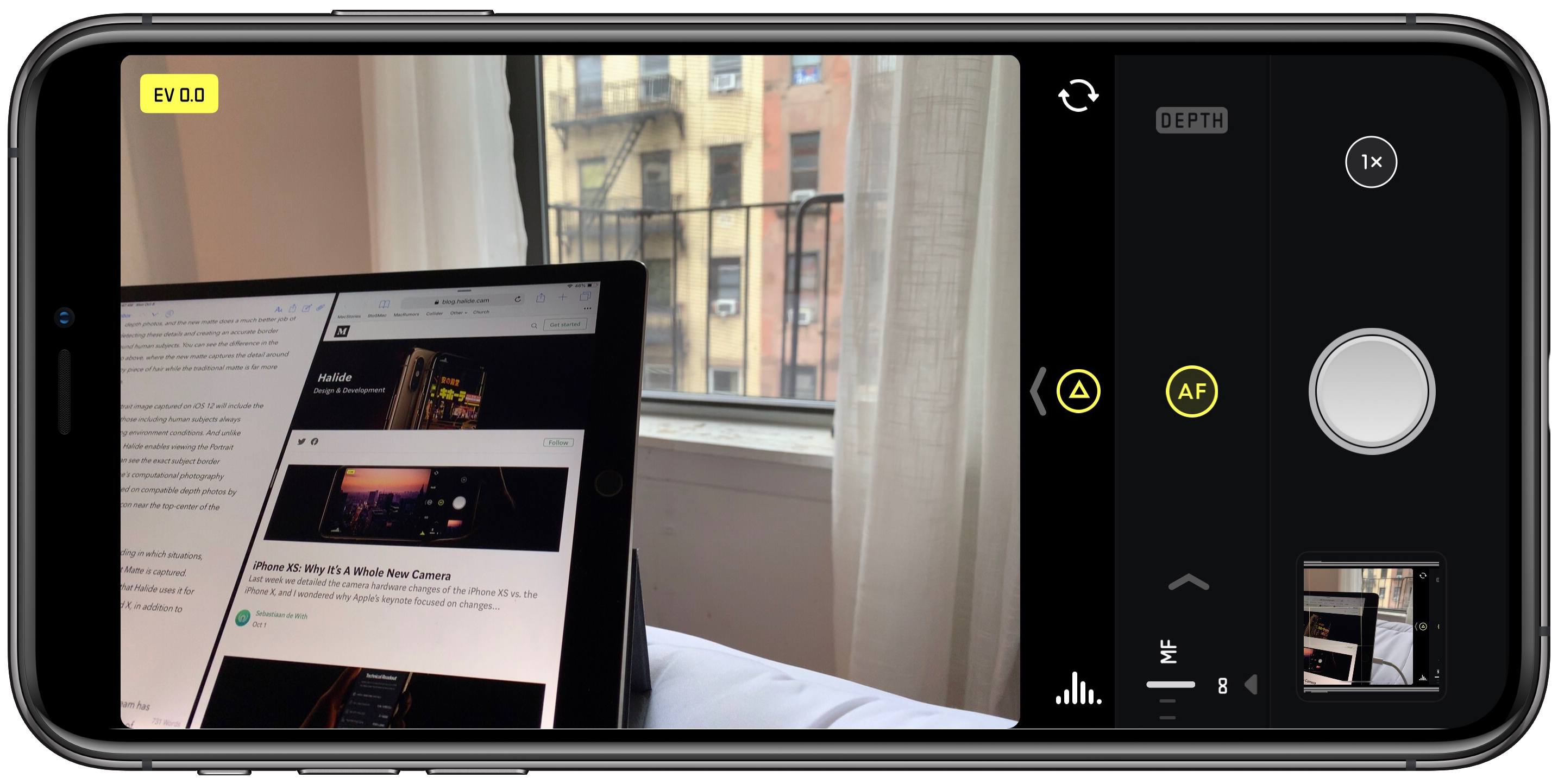
Halide Introduces Smart RAW for iPhone XS, Joining a Host of Other Improvements

Since its debut Halide has been one of the best manual camera apps available on iPhone. The month of September brought a number of challenges to Halide’s team though, thanks to all the photography work Apple put into iOS 12 and the iPhone XS. And in response, within the span of a few weeks Halide has receive two major updates: version 1.9 on iOS 12’s release date, and releasing today is version 1.10 featuring Smart RAW.

Read more


Daily Dictionary’s New Watch App Showcases the Latest watchOS Capabilities

Developer Benjamin Mayo released an update this week to his new word of the day app, Daily Dictionary. Version 1.2 adds an Apple Watch app, making it easy and convenient to view each day’s featured word from your wrist.

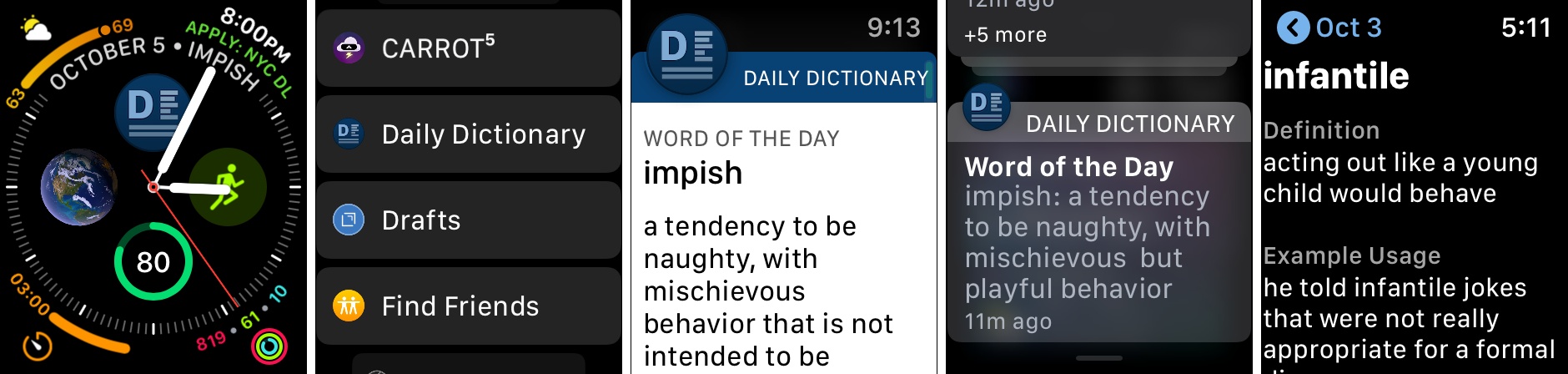
Daily Dictionary’s Watch app is particularly noteworthy due to its complications for the Series 4’s Infograph faces, and its custom UI for notifications. For complications, you can use a smaller option containing the app’s logo which serves as a launcher, or you can select a larger complication that includes the logo alongside the word of the day itself. If you’d like it to, the larger complication can also display the current date, saving you the need for a separate date complication elsewhere on the face.

One of the ways Daily Dictionary can provide its featured word each day is through a push notification, and if you have the new Watch app installed, you’ll get to see a custom notification UI that reflects the design of the full iOS app. Watch developers can take advantage of APIs that enable crafting more customizable notification interfaces, and Daily Dictionary is a great example of that. Now that the Apple Watch is becoming a more mainstream product, and since one of the Watch’s chief strengths is as a notification conduit, I hope we see lots of apps follow Daily Dictionary’s example in providing more creative Watch notifications.

Daily Dictionary is available on the App Store.


Apple’s Watch Face Problem

Jason Snell today published the article I’ve been itching to write, outlining the current mess that is Apple’s watch face ecosystem. The Apple Watch in so many ways is in its best position ever, which makes the lack of coherence in Apple’s watch face strategy particularly surprising.

As Apple continues to create new watch faces at a regular clip, those faces have grown more and more fragmented in what they can do. The Siri face introduced last year was an interesting new direction for watch faces, yet it remains one of a kind in many ways. The Series 4 Watch’s Infograph faces come with a whole new set of complications, all of which are wonderful except that they don’t work on other faces, nor do older complications work on the new faces. This lack of compatibility is frustrating enough, but what may be even more vexing is that Apple itself hasn’t even provided new complications for all of its apps, only some of them – I’d love a Podcasts complication on my Infograph face, but it simply doesn’t exist.

Snell offers up a handful of suggestions for where Apple should focus its watch face efforts going forward, all of which earn my total agreement. He writes:

Every face needs to be modernized and support the new complication styles, at least on Series 4. Key system apps and features like Messages and cellular status should be available on all faces. Every face design should be more flexible.

And moving forward, Apple should allow developers even more power in building complications. Complications should be able to appear when they have something to say and disappear when they don’t—for example, I’d love for a Timer complication to appear when I’m running a timer, but the rest of the time I’d rather not see it. If complications truly are the best face of Apple Watch apps, the developers of those apps need more power to build good ones.

Every one of these ideas is entirely reasonable, and would go a long way toward fixing the current watch face mess. I know we just got watchOS 5, but I hope watch faces are a strong area of focus for Apple in next year’s watchOS 6.

Permalink

An In-Depth Explanation of Computational Photography on the iPhone XS

Outside of Apple employees, one of the people most knowledgeable about the iPhone’s camera is Sebastiaan de With, designer of the manual camera app Halide. It is fitting, then, that Sebastiaan would publish what I believe is the best explanation of the iPhone XS camera system to date. Following up on a piece he wrote about the new camera’s hardware changes, the subject of today’s article is software – specifically, all the work of computational photography on the iPhone XS and XS Max.

The piece starts with an explanation of the iPhone’s new Smart HDR feature, then details the exact reasons why selfies on the new iPhones appear to employ skin smoothing (a theory he soundly debunks). Finally, Sebastiaan details the problem that the XS camera poses for RAW camera apps like Halide, and shares about the forthcoming solution Halide’s team came up with: something they call Smart RAW.

There are too many excellent, informative tidbits to quote here, so I highly recommend you check out the article in full. This year’s iPhones are so full of interesting changes to the way the camera works, most of which are undocumented by Apple – as Sebastiaan says, it is “a whole new camera” in many ways.

Permalink


iPhone XS Line Capturing Selfies with the Appearance of Skin Smoothing

The iPhone XS and XS Max have been in the hands of users for a week now, and during that time many selfies have undoubtedly been taken on the new devices. Some users have noticed an unexpected difference with their selfies, however: their skin looks smoother and less realistic than it should. Juli Clover reports on this for MacRumors:

When taking a selfie in a situation where lighting is less than ideal, such as indoors or outdoors in areas with lower lighting, the iPhone XS Max appears to be applying a drastic smoothing effect that can hide freckles, blemishes, and other issues.

In full outdoor lighting the problem is less apparent, which has led to speculation that the skin smoothing is actually a result of some heavy-handed noise reduction techniques.

You can test the new camera yourself with an iPhone XS Max and an older iPhone like an iPhone X model by taking selfies indoors and outdoors and comparing the differences between the two. In almost all cases where the lighting is low or uneven, photos captured with an iPhone XS Max look dramatically different.

9to5Mac has a quote from one user, Abdul Dremali, who said, “Apple reached out to me yesterday and are working on this issue actively.” That isn’t necessarily confirmation that a skin smoothing effect is being applied, but it does indicate that something’s happening with the XS front-facing camera that wasn’t intended.

There’s often one controversy or another surrounding the launch of a new iPhone, such as antennas not working properly or iPhones bending under pressure. This issue doesn’t seem quite like those past problems, as it should be a quick fix in software if something’s not functioning correctly. In 2018 there’s a lot that happens in software every time a photo is taken on an iPhone; it wouldn’t surprise me if a small tweak arrives in iOS 12.0.1 that helps skin remain natural to the eye no matter the lighting conditions. One way or another, we should hear more from Apple before long.

Permalink