Accessing Control Center Inside Apps on watchOS 5
...

 Accessing Control Center Inside Apps on watchOS 5
Q&A
‘sodes
Accessing Control Center Inside Apps on watchOS 5
Q&A
‘sodes Apple has a variety of new watch faces built into watchOS 5. A couple are exclusive to the new Series 4 Watch, but older models will still have access to faces like Fire and Water, Vapor, and Liquid Metal. What you may not know about these faces is that they were all created using practical effects. Josh Rubin at Cool Hunting writes:
Talking to Alan Dye, Vice President of User Interface Design at Apple, about this particular project he shared that “it’s more of a story about the design team. We could have done this digitally, but we shot this all in a studio. It’s so indicative of how the design team works—bringing our best and varied talents together to create these faces.” Surely it would have been cheaper to just render fire, water, liquid metal and vapor, but this is what makes Apple special—putting in the time and effort to do something right and real might only be noticed directly by a few, but is certainly felt by all.
To see this watch face project in action, check out the behind-the-scenes video below.
In addition to the early slate of iPhone reviews from the press, it’s become tradition in recent years for each iPhone to be graded as a camera by professional photographer Austin Mann. I especially enjoyed Mann’s review this year of the iPhone XS camera system. He writes:
Most of the time my expectations for camera upgrades on “S” years aren’t so high, but after shooting with the iPhone XS for a week, I can confidently say it’s a huge camera upgrade. There’s a lot of little improvements, but Smart HDR definitely takes the cake. This is a feature and technology that improves virtually everything you capture with your iPhone camera. I think you’ll be really thrilled when you experience the results yourself.
As I shared in last week’s issue of MacStories Weekly for Club MacStories, the iPhone XS and XR announcements caught me by surprise in that I expected there to be more change in the devices compared to last year’s iPhone X. I’ve ordered a XS Max, but the primary reason for my upgrade was the additional screen real estate compared to my X; bigger display aside, September’s keynote didn’t provide much of a compelling reason for me to purchase a new phone this year. However, Mann’s review and that of John Gruber have helped provide much-needed additional detail on the camera upgrades in the XS, which sound impressively significant.
One of the standout lines in Mann’s review for me comes near the beginning, where he says, “iPhone XS captures what your eyes see.” It’s hard to find higher praise than that.
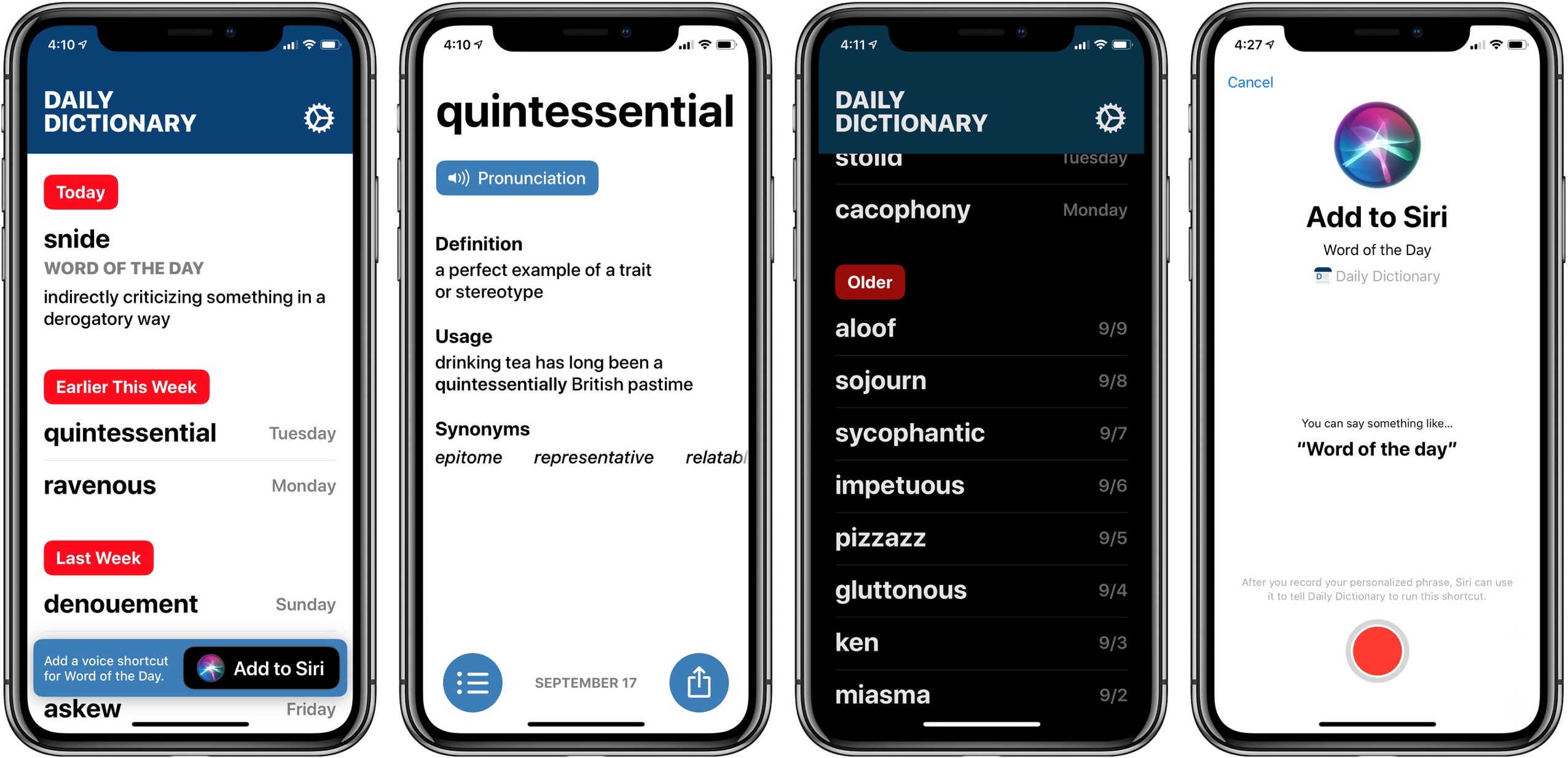
Today developer and writer Benjamin Mayo launched his latest iPhone app on the App Store: Daily Dictionary. From the app’s website:
One word every day. Words that you have known but long forgotten. And some that are entirely new.
Daily Dictionary is written by real people, not machines. No technical jargon or esoteric science terms. Just words you can use to improve your writing and expand your speaking vocabulary.
Get a word of the day with a push notification, lock screen widget, or ask Siri using iOS 12 Siri Shortcuts.
I’ve been testing Daily Dictionary over the last month, and it’s a beautiful app with a design language that feels like a preview in some ways of where Apple could take iOS in the future. There’s lots of big text, buttons that are easy to press, and gestural navigation of the app which works great one-handed. These things are all perfect fits for increasingly larger iPhones.
Regarding the app’s functionality, all it really does is provide a different interesting word each day, including pronunciation, definition, example sentence, and list of synonyms. But it does offer that word through a variety of means, which I appreciate: Siri shortcuts, notifications, or the app’s widget can all feed you each day’s word.
In many ways Daily Dictionary reminds me of ‘sodes, the podcast client by Jared Sinclair that I wrote about earlier this year. It’s light on features compared to competing apps, but its interface is a delight to use. And sometimes, a simple app that puts a smile on your face is all you need.
Daily Dictionary is available on the App Store.
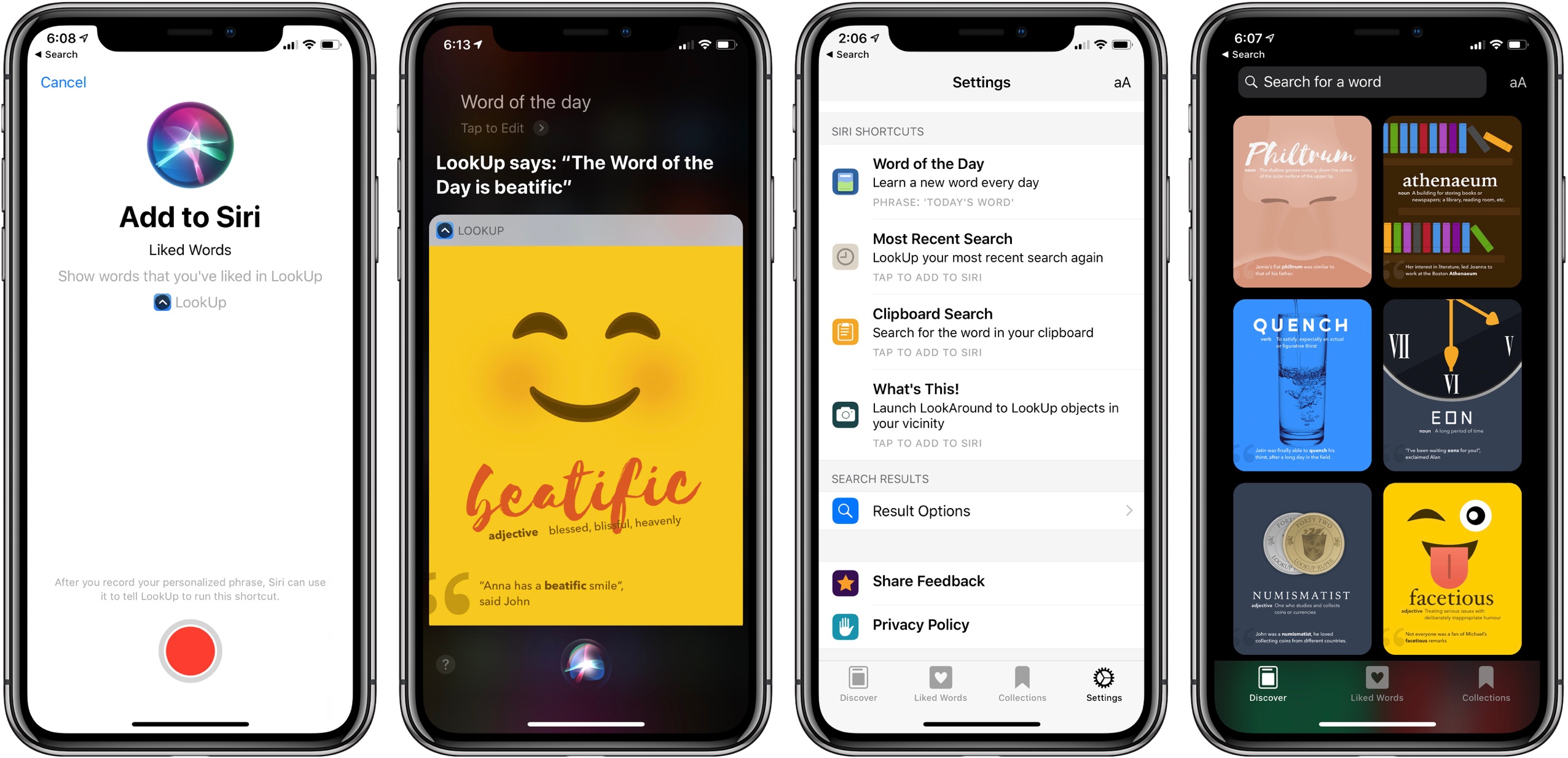
We all know that it’s important to regularly learn new things, but often the busyness of life crowds out that learning and we settle into routines that make learning unnecessary. Fortunately, one of the things made possible by iOS 12 and the new Shortcuts app is that you can create your own custom “routines” of sorts with the help of Siri, and integrate daily learning into those routines.
In that vein, the excellent dictionary app LookUp was updated this week to version 5, which takes advantage of Siri shortcuts in iOS 12 to offer access to the word of the day via Siri. The update also brings a new Collections feature, additional shortcut options, and more.
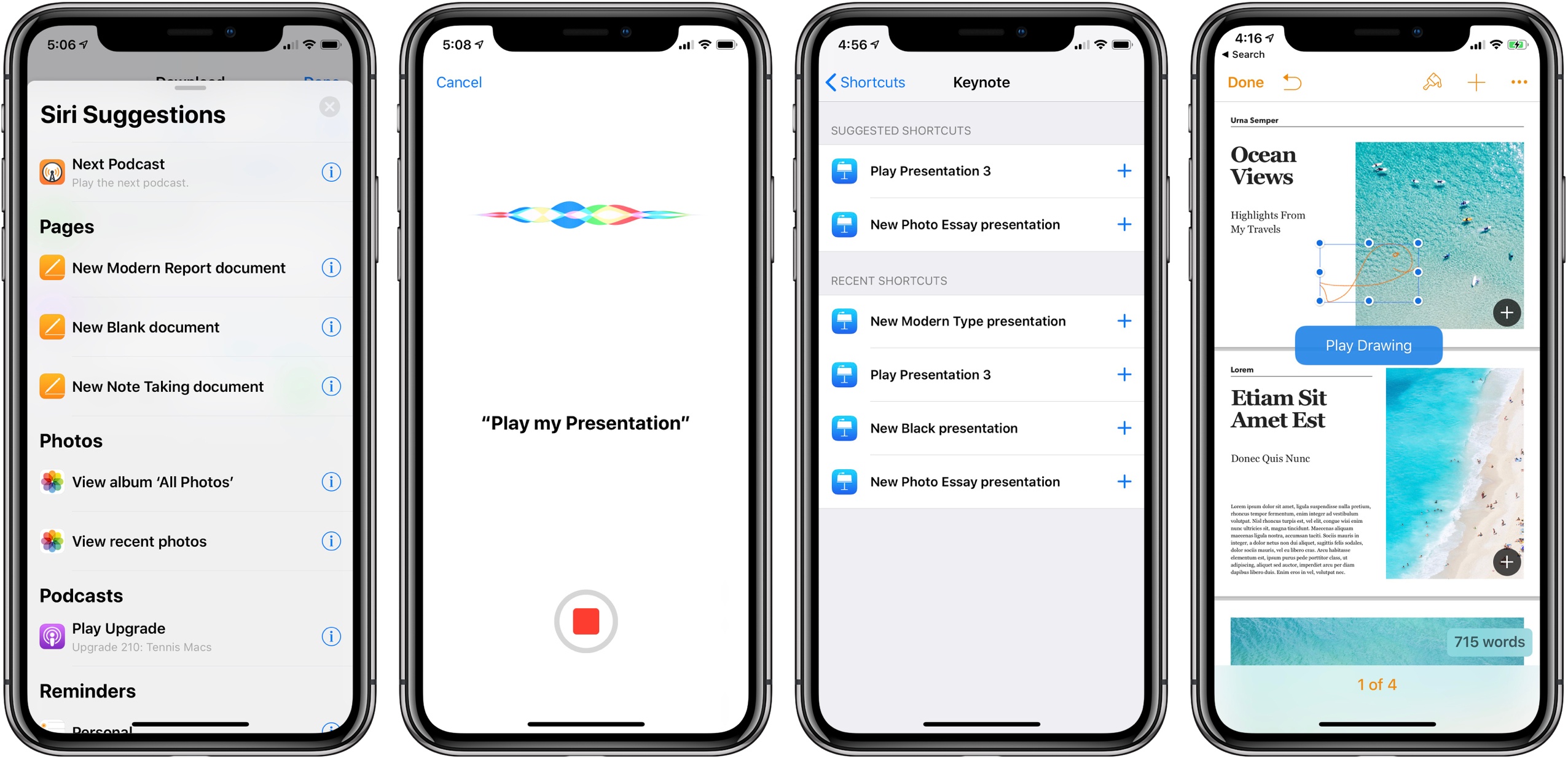
Released today in version 4.2, Apple’s iWork suite of Pages, Keynote, and Numbers now supports Siri shortcuts in iOS 12. Additionally, each app scored a handful of new features and improvements, many of which are available across all three apps, while others are app-specific, such as animated drawings in Pages and Smart Categories in Numbers.
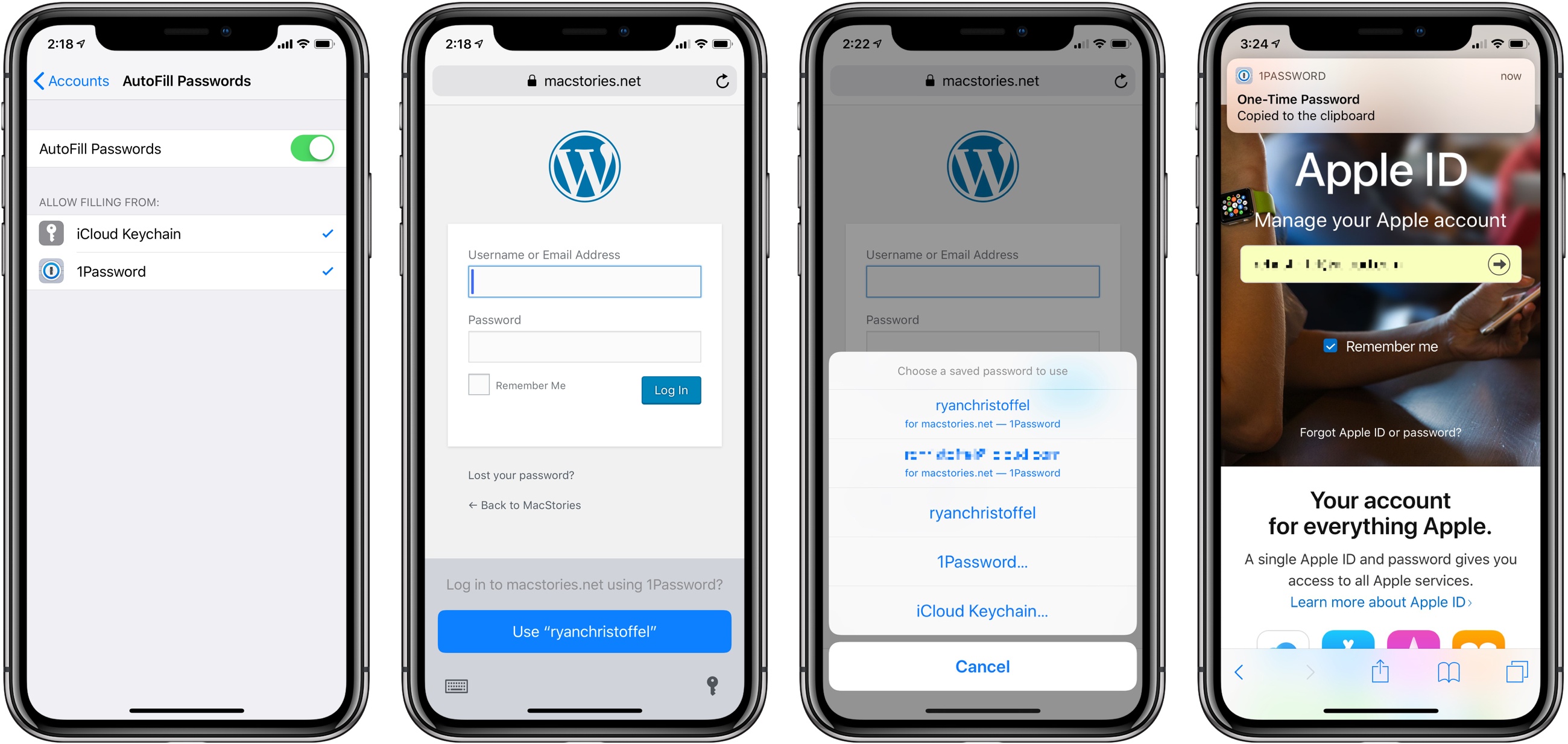
This year’s WWDC must have been a wild roller coaster ride for 1Password’s developers, Agile Bits. Anxieties were surely at a high as Apple shared news of iCloud Keychain’s expanded capabilities in iOS 12 – the system now offers seamless new password creation, security code AutoFill, and more. Those segments seemed to signal Apple’s intent to make third-party apps like 1Password unnecessary for most users. Yet not long after Apple’s Keychain announcements, a new API was discovered that told an entirely different story. As I wrote in my iOS 12 overview earlier this summer:
One advantage Apple’s own iCloud Keychain has had over third-party password managers like 1Password is that it can populate relevant account info inside the QuickType keyboard. That level of convenience is hard to beat, no matter how much more full-featured third-party apps may be. Fortunately, in iOS 12 a new Password Manager API will enable the same type of feature to be adopted by third parties.
The team at Agile Bits wasted no time getting to work implementing this Password Manager API, and it’s launching today in 1Password alongside iOS 12.