Member Requests
...

 Member Requests
 This week Fraser and Federico change gears and focus on Read Later services.
A different episode of Canvas this week – we talked about the best apps and services to save articles for later, including Apple’s own Reading List and some alternative power-user methods. You can listen here.
Sponsored by:
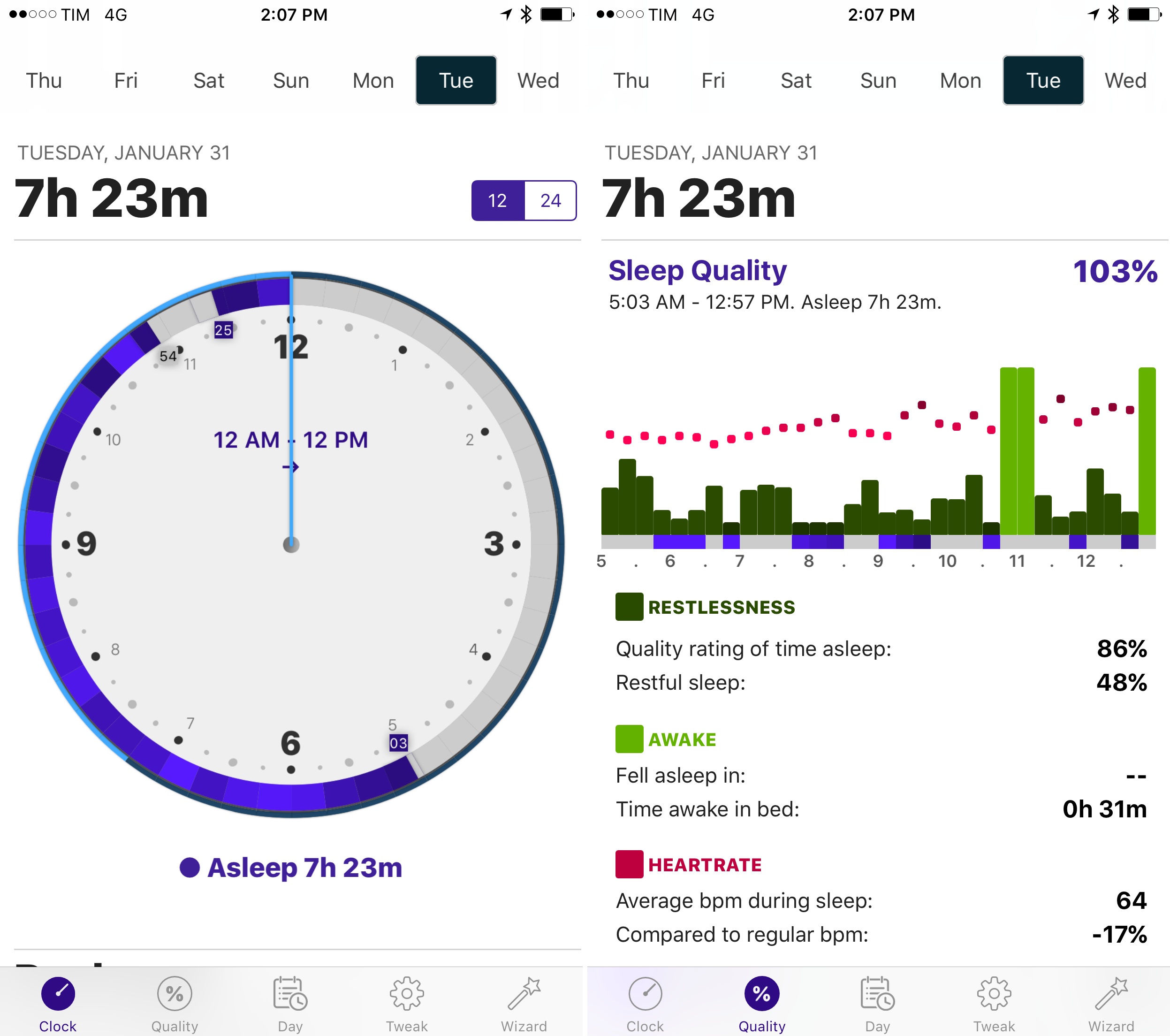
I first reviewed AutoSleep by David Walsh in December, noting how his idea of an automatic watchOS sleep tracker could bring one of the best Fitbit features to the Apple Watch. I’ve been wearing my Watch to bed every night, and AutoSleep has successfully logged sleep data with impressive accuracy.
As I wrote in my original review, however, AutoSleep needed an easier setup process and a cleaner design to help users understand and edit logged data. Walsh has been working hard on AutoSleep since launch, and version 3.0, released today on the App Store, addresses several of my complaints from the original app.
The setup wizard has been completely redesigned with a series of questions that make it easy to configure the app for your habits. Instead of cramming information on a single page, Sleep Quality and Day now have their own tabs in the app; the Day section is particularly handy to view a timeline of your day as logged by sensors on the iPhone and Apple Watch. Generally speaking, everything feels cleaner and better organized, and while some menus and symbols could still be explained differently, the overall app is more intuitive and accurate in its measurements.
Thanks to the fantastic battery life of the Apple Watch Series 2, wearing the Watch at night for sleep tracking isn’t a problem, and AutoSleep makes automatic tracking a reality with features I can’t find in any other app. If you tried the app and abandoned it at version 1.0, now’s a good time to check it out again.
AutoSleep 3.0 is available on the App Store.
Andrew Cunningham, writing for Ars Technica on a new warning that appears when running old 32-bit apps on the first beta of iOS 10.3:
Beta builds of iOS 10.3, the first of which was issued last week, generate warning messages when you try to run older 32-bit apps. The message, originally discovered by PSPDFKit CEO and app developer Peter Steinberger, warns that the apps “will not work with future versions of iOS” and that the app must be updated by its developer in order to continue running. The apps still run in iOS 10.3, but it seems likely that iOS 11 will drop support for them entirely.
Though the error message doesn’t explicitly mention the app’s 32-bit or 64-bit support, it’s definitely only older 32-bit apps that trigger the warning. Similar messages that did explicitly mention 64-bit support were present in the betas of iOS 10.0, but they were removed in the final release of the software. Apple has required 64-bit support for all new app submissions since February of 2015 and all app update submissions since June 2015, so any apps that are still throwing this error haven’t been touched by their developer in at least a year and a half (developers could add 64-bit support as early as 2013, but most of them opted not to until it became a requirement).
Note how, unlike the warning that was reinstated with iOS 10.1, this alert clearly states that “this app will not work with future versions of iOS” as opposed to “may slow down your iPhone”.
In my review of iOS 10, I had a couple of paragraphs on the warning that iOS displayed when launching a 32-bit app for the first time. The warning didn’t make it to the final version of iOS 10, so I didn’t cover it. I did, however, note that iOS 10 was accelerating the transition to 64-bit across the board.
Requiring apps to be compiled for 64-bit is going to introduce problems for software that is no longer maintained (especially classic iOS games), but Apple is moving toward cleaning up the App Store’s back catalog anyway. Enforcing the 64-bit requirement in iOS 11 wouldn’t be a complete surprise.
Stephen is away on an important mission. He left Myke and Federico behind to discuss the financial decline of Fitbit, and what’s missing from iOS 10.3. Myke also has some follow up about sleeping and lightbulbs, and Federico has been observing people.
A fun episode of Connected this week, with an interesting discussion of modern trends in iOS usage. You can listen here.
Sponsored by:
Good analysis by Ben Bajarin, who sums up various discussions I’ve read in my Twitter timeline lately about the quality of Apple’s services and the company’s approach to not collecting lots of data:
However, getting useful and good behavioral data is essential for Apple to make better products and services and, more importantly, compete with those services down the road. I’d almost prefer that, instead of Apple’s stance being not only to collect as little data as necessary and also to universally anonymize that data, they would simply say, “Trust us with your data. We will keep it safe and secure and we will deliver you superior products and services because of it.” I could also be satisfied with a hybrid approach where, for the most security conscious customers, Apple gives them the option to keep the existing privacy protocol as well as their differential privacy techniques, but also allow others to opt-in to giving them more data so that things like Siri, News, Apple Music, etc., benefit from that data and thus, deliver those customers a much more personalized and useful service. With some of the recent changes in iOS 10.3, I feel they are getting closer to exactly this scenario.
Ben refers to iOS 10.3’s upcoming iCloud data sharing option – a new (opt-in) setting to share iCloud-related data with Apple.
This is a complex problem: it’s still too early to understand the impact of Differential Privacy, and I don’t think Apple’s services are inherently terrible; but I also agree with the premise that by not collecting data, other companies may capitalize on Apple’s users in the future thanks to smarter services. I’d love to get more details on what Apple is working on for iCloud analytics.
Changing Widgets I love it when two of my favorite apps come together with integrations that speed up and simplify my workflow. Last week, Scanbot – my go-to scanner app for iOS – rolled out a new Todoist integration that lets you scan and save a document as a task.
The feature is explained here, and it’s quite ingenious: tasks are saved with the name of a scanned document, which is also added as an inline attachment inside a task. You can add due dates and times directly from Scanbot, and you can even pick an existing project for automatic upload, which means that as soon as a document is scanned in the app, it’ll be automatically uploaded as a task to a Todoist project.
As I wrote two years ago, I was hoping Scanbot would consider integration with Todoist, and I’m glad it’s out now.