Federico Viticci

10804 posts on MacStories since April 2009

Federico is the founder and Editor-in-Chief of MacStories, where he writes about Apple with a focus on apps, developers, iPad, and iOS productivity. He founded MacStories in April 2009 and has been writing about Apple since. Federico is also the co-host of AppStories, a weekly podcast exploring the world of apps, Unwind, a fun exploration of media and more, and NPC: Next Portable Console, a show about portable gaming and the handheld revolution.

Facebook and Google Dominate the List of 2016’s Top Apps

Sarah Perez, writing for TechCrunch:

Mobile applications from Facebook and Google dominated the new list of the year’s top apps released today by Nielsen. Not surprisingly, Facebook again grabbed the number one spot on the list, with more than 146 million average unique users per month, and 14 percent growth over last year. In fact, Facebook scored several spots on the top 10 chart, thanks to Messenger (#2) and Instagram (#8) – the latter which also showed some of the highest year-over-year growth, up 36 percent from 2015.

Messenger came in second place this year, with over 129 million average unique monthly users, followed by YouTube with over 113 monthly uniques.

However, it was Google, not Facebook, that grabbed the most spots on the year-end chart.

I assume that Nielsen’s study accounts for both the App Store and Google Play Store (iOS and Android apps), but their findings match the general state of the iOS App Store’s top charts. Notably, the only Apple-made app to make it into the Top 10 is Apple Music, which launched in June 2015 and has 20 million paying subscribers, though Nielsen reports over 68 million “average unique users” for it (Free users? Non-subscriber usage? Family accounts? I’d love to know their methodology for this).

See also, from two years ago: No Ecosystem Is an Island.
Permalink

Phil Schiller on How the iPhone Changed Apple

Steven Levy, writing for Backchannel, interviewed Apple’s Phil Schiller for the tenth anniversary of the iPhone’s introduction:

“If it weren’t for iPod, I don’t know that there would ever be iPhone.” he says. “It introduced Apple to customers that were not typical Apple customers, so iPod went from being an accessory to Mac to becoming its own cultural momentum. During that time, Apple changed. Our marketing changed. We had silhouette ads with dancers and an iconic product with white headphones. We asked, “Well, if Apple can do this one thing different than all of its previous products, what else can Apple do?’”

In the story, Schiller also makes an interesting point about Siri and conversational interfaces after being asked about Alexa and competing voice assistants:

“That’s really important,” Schiller says, “and I’m so glad the team years ago set out to create Siri — I think we do more with that conversational interface that anyone else. Personally, I still think the best intelligent assistant is the one that’s with you all the time. Having my iPhone with me as the thing I speak to is better than something stuck in my kitchen or on a wall somewhere.”
[…]
“People are forgetting the value and importance of the display,” he says “Some of the greatest innovations on iPhone over the last ten years have been in display. Displays are not going to go away. We still like to take pictures and we need to look at them, and a disembodied voice is not going to show me what the picture is.”

Permalink

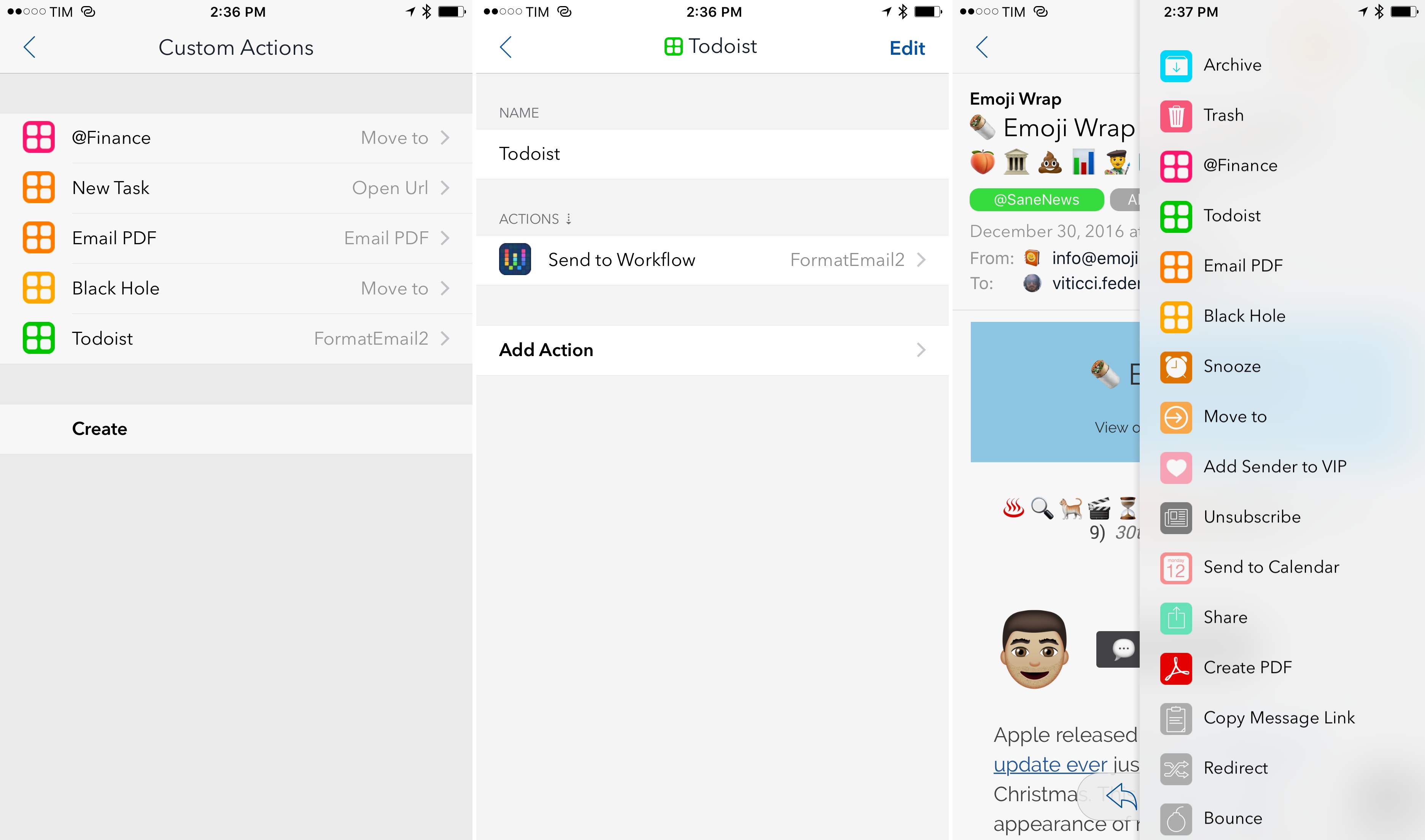
Airmail 1.5 Brings Custom Actions, Workflow Integration

Airmail, the most powerful email client for iOS and my 2016 App of the Year, has made integrations with third-party apps and services the central element of its experience, allowing users to deeply fine-tune their email workflows. With version 1.5, launching today on the App Store, the developers at Bloop are further expanding Airmail’s integration roster with the ability to create custom actions as well as Workflow support to craft automations tailored for messages shared from Airmail.

Read more


Amazon’s Alexa Is Everywhere at CES 2017

I try not to obsess over every single announcement from CES, but it seems like “Alexa everywhere” is a common theme of this year’s event. Jacob Kastrenakes has a useful roundup of Alexa devices and integrations at The Verge – but there are also smartphones and cars launching support for Amazon’s assistant.

It feels like Amazon is taking the “Netflix approach” with Alexa – to be on as many devices as possible and gain mindshare through convenience and simple user interactions (like Netflix, primarily in English-speaking countries in the first couple of years). I wonder if we’re going to see a proper Alexa app for iOS this year to issue commands from an iPhone. I wouldn’t be surprised to see something along the lines of Astra, only made by Amazon itself and integrated with most of the skills supported by the Echo speakers.

Permalink

Connected, Episode 123: 2017 Apple Predictions

Myke, Federico and Stephen draft their predictions for Apple’s 2017 before talking a little bit about some resolutions for the new year, tech-related and otherwise.

If you want to know what we think is going to happen in the Apple world this year, you don’t want to miss this week’s Connected. You can listen here.

Sponsored by:

  • Casper: Because everyone deserves a great night sleep. Get $50 off with the code ‘CONNECTED’
  • Squarespace: Make your next move. Enter offer code WORLD at checkout to get 10% off your first purchase.
Permalink

Alexa: Amazon’s Operating System

Astute take by Ben Thompson on how Amazon is building an operating system for the home with Alexa:

Amazon seized the opportunity: first, Alexa was remarkably proficient from day one, particularly in terms of speed and accuracy (two factors that are far more important in encouraging regular use than the ability to answer trivia questions). Then, the company moved quickly to build out its ecosystem in two directions:

  • First, the company created a simple “Skills” framework that allowed smart devices to connect to Alexa and be controlled through a relatively strict verbal framework; in a vacuum it was less elegant than, say, Siri’s attempt to interpret natural language, but it was far simpler to implement. The payoff was already obvious at last year’s CES: Alexa support was everywhere.
  • Secondly, “Alexa” and “Echo” are different names because they are different products: Alexa is the voice assistant, and much like AWS and Amazon.com, Echo is Alexa’s first customer, but hardly its only one. This year CES announcements are dominated by products that run Alexa, including direct Echo competitors, lamps, set-top boxes, TVs, and more.

“Works with Alexa” sure feels like this year’s CES motto (I try not to pay too much attention to CES announcements, but the underlying trends are interesting).

I use both HomeKit/Siri and Alexa. There are advantages and problems to both ecosystems: Apple’s approach is slower, perhaps more careful, and Siri works internationally; Alexa and the Echo are only available in a few countries, but the experience is leaner, generally faster, and there are dozens of compatible devices and skills launching every week. It’s a complicated comparison: Alexa works with web services while Siri integrates with native apps and hardware (like Touch ID); Alexa is expanding to a variety of accessories and third-party services, but Siri and HomeKit are more directly tied into your iOS devices.

I expect Apple to continue opening up SiriKit to developers to match Amazon’s rich ecosystem of skills, but even with more domains and apps, I think the idea of a dedicated assistant for the home is a winning one. On the other hand, I wonder how quickly Amazon can launch Alexa/Echo in other countries and build richer conversational experiences that go beyond simple commands. This will be fun to watch.

Permalink

AirPods, Siri, and Voice-Only Interfaces

Ben Bajarin makes a strong point on using Siri with the AirPods:

There is, however, an important distinction to be made where I believe the Amazon Echo shows us a bit more of the voice-only interface and where I’d like to see Apple take Siri when it is embedded in devices without a screen, like the AirPods. You very quickly realize, the more you use Siri with the AirPods, how much the experience today assumes you have a screen in front of you. For example, if I use the AirPods to activate Siri and say, “What’s the latest news?” Siri will fetch the news then say, “Here is some news — take a look.” The experience assumes I want to use my screen (or it at least assumes I have a screen near me to look at) to read the news. Whereas, the Amazon Echo and Google Home just start reading the latest news headlines and tidbits. Similarly, when I activate Siri on the AirPods and say, “Play Christmas music”, the query processes and then plays. Where with the Echo, the same request yields Alexa to say, “OK, playing Christmas music from top 50 Christmas songs.” When you aren’t looking at a screen, the feedback is important. If I was to ask that same request while I was looking at my iPhone, you realize, as Siri processes the request, it says, “OK” on the screen but not in my ear. In voice-only interfaces, we need and want feedback that the request is happening or has been acknowledged.

Siri already adapts to the way it’s activated – it talks more when invoked via “Hey Siri” as it assumes you’re not looking at the screen, and it uses UI elements when triggered from the Home button.

Currently, activating Siri from AirPods yields the same feedback of the “Hey Siri” method. I wonder if future Siri will talk even more when it detects AirPods in your ear as it means only you will be able to hear its responses.

Permalink


CardioBot: Heart Rate and Activity Tracker for Apple Watch [Sponsor]

Your Apple Watch measures your heart rate every 4 minutes during the day. With CardioBot, you can easily understand the data captured by the Apple Watch so you can improve your lifestyle and discover notable patterns.

CardioBot is an iPhone app that reads heart rate data stored by the Apple Watch in HealthKit. The app separates readings in low, resting, high resting, and elevated heart rate through different colors and charts, allowing you to see averages at a glance.

CardioBot also supports viewing data captured during workouts, and it can also provide sleep analysis information for a complete dashboard of your heart rate. All of this is done with a minimal and elegant interface that makes it easy to view statistics for individual days, browse detailed timelines, and compare day-to-day changes.

CardioBot is available for $2.99 on the App Store.

Our thanks to CardioBot for sponsoring MacStories this week.