Federico Viticci

10804 posts on MacStories since April 2009

Federico is the founder and Editor-in-Chief of MacStories, where he writes about Apple with a focus on apps, developers, iPad, and iOS productivity. He founded MacStories in April 2009 and has been writing about Apple since. Federico is also the co-host of AppStories, a weekly podcast exploring the world of apps, Unwind, a fun exploration of media and more, and NPC: Next Portable Console, a show about portable gaming and the handheld revolution.

Connected, Episode 116: Undead Zombie Echo Fish

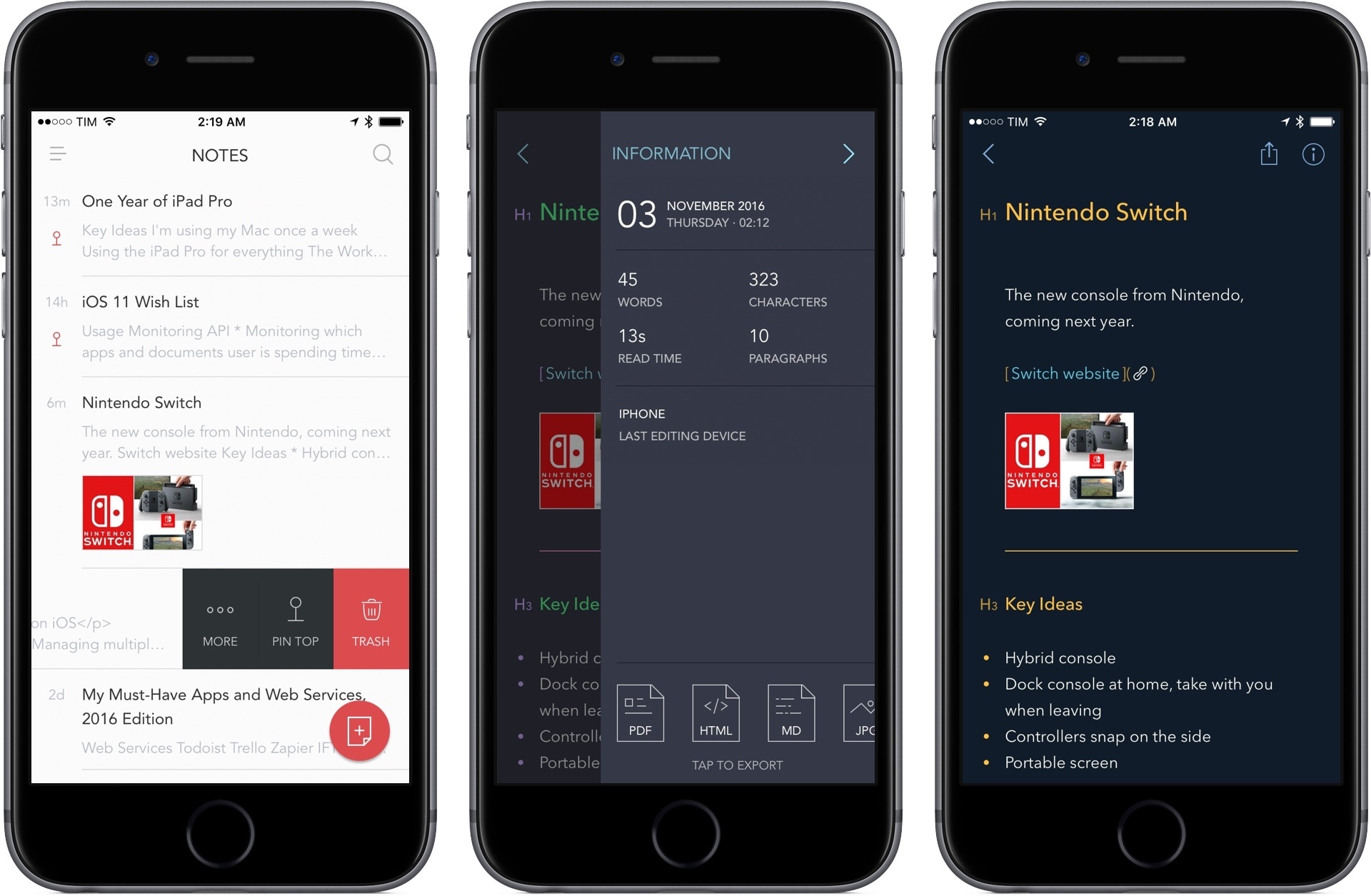
Myke is back to talk about dongles. Stephen has opinions about the Mac Pro. Federico is trying a new notes app.

More than you ever wanted to know about dongles and terrifying Alexa experiments on this week’s Connected. Also, we talk about Bear and the business of indie apps towards the end of the show. You can listen here.

Sponsored by:

  • Gemini 2, from Macpaw: The smart duplicate cleaner for Mac. Get 20% off with the coupon code CONNECTED.
  • Mailroute: a secure, hosted email service for protection from viruses and spam. Get a free trial and 10% off, for the lifetime of your account.
Permalink


How Slack Is Using Emoji

After introducing emoji reactions last year, our own Slack team saw a dip in the total number of messages sent. With hundreds of members communicating across a couple thousand channels, it was a welcome change. Before emoji reactions, messages begot more messages: replies, questions, acknowledgment. In a word, noise.

Fascinating look at how Slack is using emoji inside the company. It’s sort of amazing how versatile emoji can be when used in work communications with a bit of creativity. I’m also going to implement this idea for our own Slack:

Speaking of 18F, check out their blog post about using emoji reactions for knowledge management. They tag all “evergreen” content found in channels with :evergreen_tree:, and use a search query like the one mentioned above to find new messages worth codifying in their handbooks. At Slack, we do something similar, where anyone can tag a message with :notebook: to indicate it might be worth adding to the company’s internal documentation.

Permalink


How Apple’s Apps Will Use the Touch Bar

Good overview by Benjamin Mayo of all the Apple apps that will have Touch Bar integration on the new MacBook Pros. Apple certainly had the time to build extensive support for the new API while waiting for the new Pros to ship.

That’s a total of 23 Apple apps that live in the /Applications root folder with Touch Bar support as of the current macOS 10.12.1 build. The following apps have no Touch Bar integration as far as I could tell; App Store, Automator, Chess, Dashboard, Dictionary, DVD Player, Font Book, Image Capture, Photo Booth and Stickies. I expect all of Apple’s apps to flesh out their Touch Bar integrations in future macOS update.

See also: Steve Troughton-Smith’s utility to grab a screenshot of the currently active app in the Touch Bar.

Permalink


Why I’m Considering Bear as a Notes App Replacement

As I wrote in an issue of MacStories Weekly (exclusive to Club MacStories members), I recently moved my Club-related notes from the Apple Notes app to Trello. Because Club MacStories is a collaborative effort, it made sense to use Trello’s project management features to let the entire MacStories team see my notes. However, moving those notes to Trello considerably decreased my usage of Apple Notes, which left me wondering if it was time to consider an alternative app for my personal note-taking needs.

I praised Apple Notes numerous times since its relaunch on iOS 9. I believe Notes and Safari are Apple’s two best iOS apps, and I recommend Notes to anyone planning a switch from Evernote or OneNote. Notes is surprisingly advanced and fast; its iCloud sync is reliable; it even received support for collaboration in iOS 10. I’ve used Notes as my only note-taking app for over a year now.

After moving my most frequently accessed notes to Trello1, I looked at what was left in Notes, and I realized that I wanted to see if a different app could fill the gaps Apple didn’t address. For everything Notes gets right, there are several limitations that have required me to change how I work: Notes has no native Markdown support, no automation features, and its organization system based on folders could use a revamp. I accepted Notes’ shortcomings because I had no other choice; could a new app lure me away from it through the promise of features Apple would never ship?

My transition from Notes to Trello couldn’t have come at a better time. I’ve been keeping an eye on Bear, a new note-taking app developed by Italian studio Shiny Frog, for the entire summer. Bear piqued my interest right away: like Notes, it was based on CloudKit sync, but Bear also strived to augment the experience for “online writers” thanks to Markdown, automation features, themes, tags, cross-reference links, and more.

As Bear betas went out to testers, I told myself I wouldn’t need it because I was perfectly fine in Notes. But when I noticed that I was using Notes less frequently anyway, I took the plunge, moved my remaining personal notes to Bear, and put the app on my Home screen. This happened two weeks ago.

Read more


Connected, Episode 115: Out in the Real World

This week: Stephen’s new MacBook Pro, Federico’s new Amazon Echo Dot and the future of everything.

Myke was away on Connected this week, so Stephen and I talked about pro users and their Macs, plus what we’re doing with Alexa and the Amazon Echo. You can listen here.

Sponsored by:

  • Braintree: Code for easy online payments.
  • Mailroute: a secure, hosted email service for protection from viruses and spam. Get a free trial and 10% off, for the lifetime of your account.
Permalink

David Bowie Emojis Included in iOS 10.2 Beta

Sheldon Pearce, writing for Pitchfork:

The latest iOS update for iPhone will feature “male and female singer” emoji’s based on the cover of David Bowie’s 1973 album, Aladdin Sane, _The Sun_ reports. It is a part of a profession selection that includes firefighters, painters, doctors, scientists, pilots, and more. Take a look at the male and female singer emojis below via Emojipedia. iOS 10.2 also includes updated versions of previously released transportation and food emojis.

Great nod to Bowie. I love that Apple is including this in a keyboard millions of people will use every day.

Permalink