Federico Viticci

10804 posts on MacStories since April 2009

Federico is the founder and Editor-in-Chief of MacStories, where he writes about Apple with a focus on apps, developers, iPad, and iOS productivity. He founded MacStories in April 2009 and has been writing about Apple since. Federico is also the co-host of AppStories, a weekly podcast exploring the world of apps, Unwind, a fun exploration of media and more, and NPC: Next Portable Console, a show about portable gaming and the handheld revolution.

ICONIC: A Photographic Tribute to Apple Innovation [Sponsor]

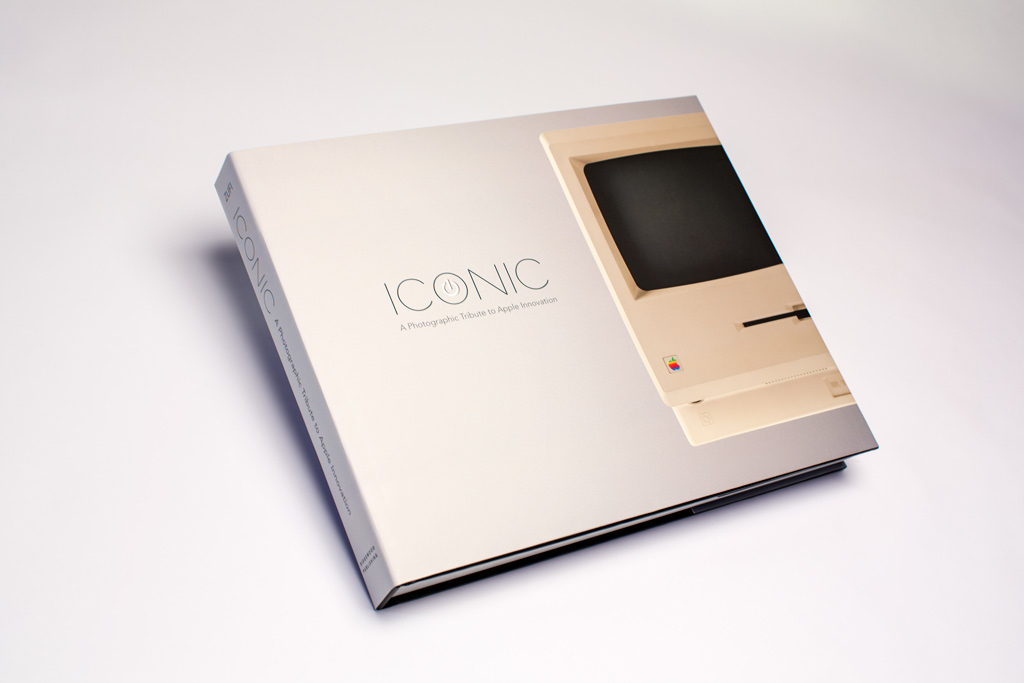
I’d like to tell you about a very cool coffee table book – it’s a book about Apple.

Back in 2009, a guy named Jonathan Zufi collected and photographed pretty much every single product Apple has ever made since 1976 and produced this stunning coffee table book. It’s called ICONIC: A Photographic Tribute to Apple Innovation.

If there was ever a perfect gift for the Apple fan – or history buff – this is it. 350 beautifully designed pages and hundreds of fantastic photos of basically every product Apple has ever made – every desktop, laptop, iOS device, printer, and even the old gaming devices, it’s all in here and I guarantee you’ll see some products that you didn’t even know Apple made. There’s an amazing chapter about prototypes and there’s also a chapter on packaging – all the boxes that came with all this amazing technology.

I personally own a copy of the original ICONIC book, and it’s indeed stunning. The book feels great, photographs are professional and well laid out – I had no idea some Apple products existed, but ICONIC provided a great visual intro.

ICONIC includes a foreword by Steve Wozniak and hundreds of amazing quotes from other Apple pundits – it’s really something.

The book comes in a few different versions including a version in a book case that looks like an old Apple floppy drive, and a new ‘UItimate Edition’ that ships in a white clamshell with an embedded glowing standby light that pulses just like the old sleep indicators on the MacBook Pros. It’s really worth seeing so visit iconicbook.com and take a look.

You can order the Classic Edition at Amazon, but if you decide you want the Classic Plus, Special, or Ultimate Editions then enter the code macstories when you check out for a 10% discount.

My thanks to ICONIC for sponsoring MacStories this week.


Virtual: Raichu’s Kind of a Bully

This week Federico and Myke discuss music influenced by video games, revisit the Wii U as a viable platform, celebrate 20 years of PlayStation, give their first impressions of the new Pokemon games and bemoan what EA have done to Peggle.

Make sure to listen to the second Crying album I mentioned, and go check out USgamer’s retrospective on the original PlayStation. You can get the episode here.

Sponsored by:

  • lynda.com: An easy and affordable way to help individuals and organizations learn. Free 10-day trial.
  • Hover: Simplified Domain Management. Use code ‘MASTERBALL’ for 10% off your first purchase.
Permalink

Professional App Pricing

Rob Rhyne, in response to Allen Pike’s post about the lack of a great app to record podcasts, has a few ideas about pricing professional software:

Professionals use your software to make money. If you can find a way for them to do their job faster or better, they will pay nearly any price. Did you purchase the maximum spec for your last computer or did you buy the cheapest you could find? Professionals always trade money for productivity. The real trick is building a product that makes them faster and better. Solve that problem and you can name your price.

I completely agree with Rob. Even on iOS, developers should consider creating professional software that’s aimed at a specific audience willing to pay what is a considered a “premium” on the App Store. There are examples of developers that understand this well, such as Teleprompt+, Numerics, Omni’s apps, and TrialPad.

If you can build a customer base that needs your app to get work done faster, there’s a good chance they’d be willing to pay higher prices and reward you with commitment to the product, constant suggestions and bug reports, and no inclination to be curious about competing products, even if they’re cheaper. I believe that’s true on any platform and digital marketplace.

For more on this topic, check out Michael Jurewitz’s blog posts from last year.

Permalink


Connected: Spinning Down This Rolodex

Stephen, Myke and Federico discuss accents, social networks, web browsers and the Today widget fiasco. Myke has a headache again.

Back from the Twitter discussion of last week, we talk about Apple’s confusing policies for Today widgets and our different setups for Safari and Chrome on iOS and OS X. You can get the episode here.

Sponsored by:

  • lynda.com: An easy and affordable way to help individuals and organizations learn. Free 10-day trial.
  • Hover: Simplified Domain Management. Use code ‘PEBBLEFOREVER’ for 10% off your first purchase.
  • Iconic: A Photographic Tribute to Apple Innovation
Permalink


Spotify Year in Music 2014

The year is about to end, and as usual Spotify has launched a Year in Music microsite for global and personal trends.

The global stats are cool, but largely unsurprising. What I really like is the breakdown of your personal listening habits by genre, artist, day of the week, season, and more. You can even see the split between desktop and mobile device streaming, and, if you’re a Premium subscriber, the location of your favorite artists on a chart.

I’m a big fan of Spotify’s use of data to improve algorithms, and this is another nice experiment. If you’re into this kind of visualizations, I also recommend the excellent Exist.io service, which supports Spotify (and many other wearable devices/apps).

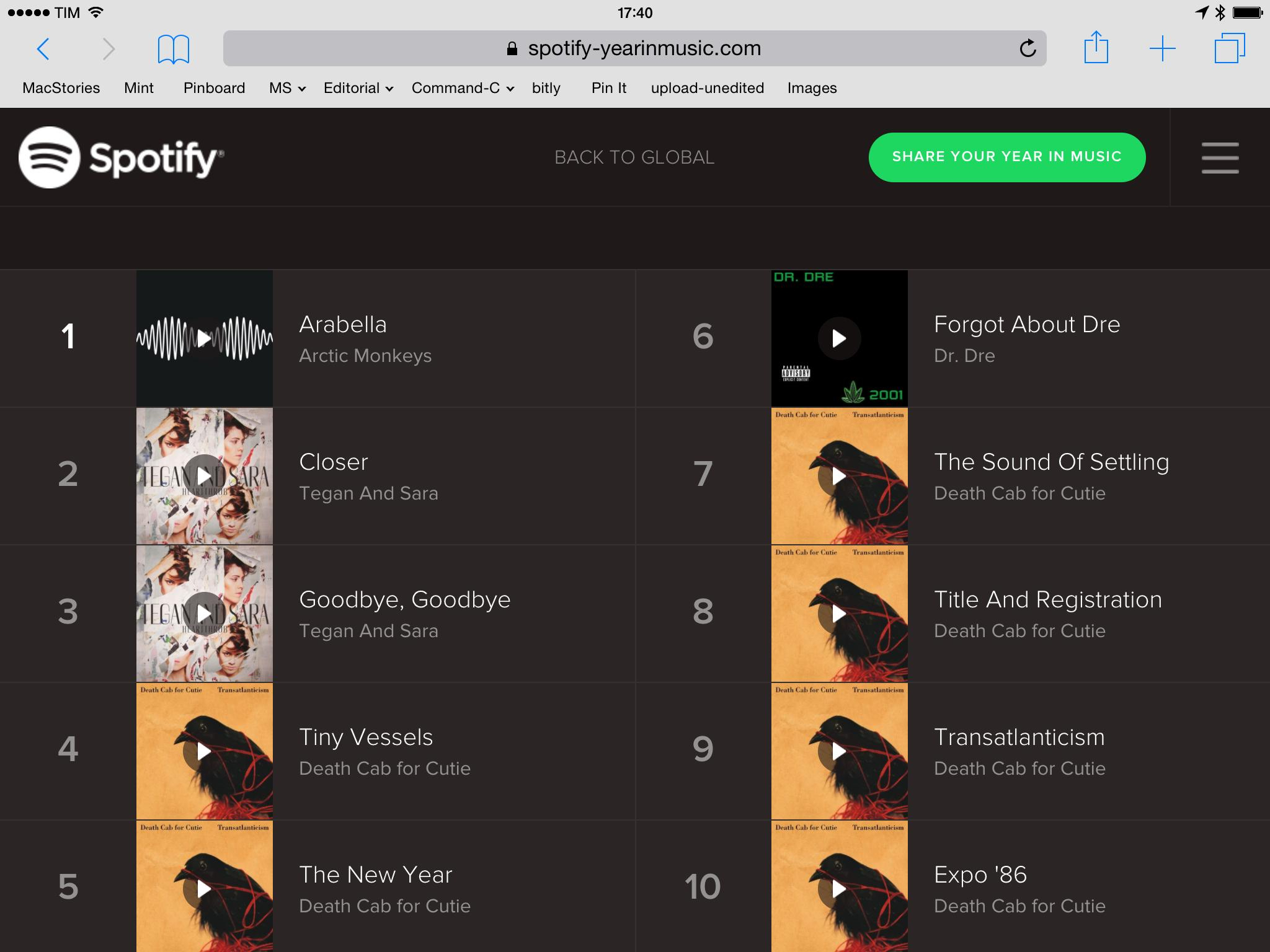
As for my top songs:

Death Cab for Cutie and Tegan and Sara? Looks about right.

Permalink

Apple Watch Website Update

I missed this update to the Apple Watch website when Apple refreshed it last week (via TUAW). The Watch microsite has been updated with more details for timekeeping and fitness features, revealing more details about customizable complications, watch faces, fitness and activity tracking, and more.

Timekeeping:

Many watches include a few specialized functions — known in watchmaking as complications — that go beyond telling the time. But Apple Watch comes with a full range that can be added to most faces. Some complications are traditional, such as moon phases or sunrises and sunsets. And some are unique to Apple Watch, like stock quotes, weather reports, your next calendar event, and a daily activity tracker. When you tap a complication, Apple Watch opens the corresponding app.

New Ways to Connect:

Use the built-in speaker and microphone for quick chats, or seamlessly transfer calls to your iPhone for longer conversations. To mute an incoming call, just cover Apple Watch with your hand.

Health and Fitness:

Apple Watch shows your daily activity at a glance. To see your progress and trends over longer periods of time, there’s Fitness, an Apple Watch companion app on your iPhone. You can view your activity history, workouts, and achievements by the day, week, or month. And the Fitness app can share your activity and workout data with the Health app on your iPhone, where it can be accessed by your favorite third-party health and fitness apps.

You can read our original overview of the Apple Watch here.

Permalink