Federico Viticci

10804 posts on MacStories since April 2009

Federico is the founder and Editor-in-Chief of MacStories, where he writes about Apple with a focus on apps, developers, iPad, and iOS productivity. He founded MacStories in April 2009 and has been writing about Apple since. Federico is also the co-host of AppStories, a weekly podcast exploring the world of apps, Unwind, a fun exploration of media and more, and NPC: Next Portable Console, a show about portable gaming and the handheld revolution.

Virtual: Leaking Battery Acid

This week Federico and Myke discuss a scientific study of Mario Galaxy, the merits and disadvantages of crowd-funded games, a GameBoy HDMI extension, tales of recent local multiplayer experiences and they talk about the iOS games they’ve been playing this week.

And if you’re looking for more podcasts for this holiday weekend, you can’t go wrong with the latest Virtual. Plenty of games and gaming-related links while we’re waiting for this month’s releases on the 3DS and Wii U. Get the episode here.

Sponsored by:

  • Drafts: where text starts on iPhone and iPad. Now easier and more powerful than ever.
  • Dash: Create beautiful dashboards with a few clicks. Sign up now to get one free private dashboard.
  • Loot Crate: a monthly subscription box service for epic geek and gamer items and pop culture gear. Use code VIRTUAL for 10% off.
Permalink

Connected: Poster Child for Power Apps

This week, the boys are back to discuss Federico’s use of a remote Mac mini for weird tasks and Stephen’s new Pebble before debating Twitter’s new App Graph.

On this week’s Connected, we had an interesting discussion about the Twitter app for iOS (which I use) and the relationship that other iOS users have with third-party Twitter clients. Don’t miss it, because I think it’s a good one. Get the episode here.

Sponsored by:

  • Drafts: where text starts on iPhone and iPad. Now easier and more powerful than ever.
  • Studio Neat: Get 10% off anything in their store using the code CONNECTED
  • Dash: Create beautiful dashboards with a few clicks. Sign up now to get one free private dashboard.
Permalink


#MacStoriesDeals Black Friday 2014: Best Deals for iPhone, iPad, and Mac Apps & Games

Black Friday is upon us once again! #MacStoriesDeals is the best place to find great deals for iOS apps and games, Mac software, and more.

Every year, thousands of iOS and OS X software deals are launched for Black Friday. We handpick the best ones and collect them in a single post with links to buy or share discounted products directly. You don’t need to be overwhelmed by Black Friday deals because we take care of finding the best stuff for you.

Bookmark this post and come back to find updated deals starting today through Friday. Updates will be listed as new entries at the top of each category.

You can find us as @MacStoriesDeals on Twitter.

Read more


Pocket’s Data on iPhone and iPad Usage

Fascinating data analysis from Pocket:

To understand how the 6 Plus affects consumption, we first looked at users who owned both an iPhone 5/5S and iPad and looked at how they spent their time reading on both devices. For these users, 55% of content was consumed on an iPhone versus 45% on an iPad. A fairly even split.

All this changed once users had the new iPhones in hand.

I bet that the trends Pocket uncovered could be applied to dozens of other media consumption services with iPhone and iPad apps.

The truth is that bigger phones are big enough for many people who still don’t understand why they need an iPad. Or maybe they did get an iPad, but now they’re discovering that reading and watching videos can be done on an iPhone 6 or 6 Plus just as comfortably and with no compromises.

I think that, for the most part, this is an unavoidable consequence of putting a bigger screen on a device that you carry with you all the time. But, almost five years after the iPad was launched, Apple and third-party developers still tend to come out with iPad apps that are enlarged versions of their iPhone counterparts. I wonder if the lack of widespread unique iPad software is also the reason why people may be using the iPad less.

Permalink

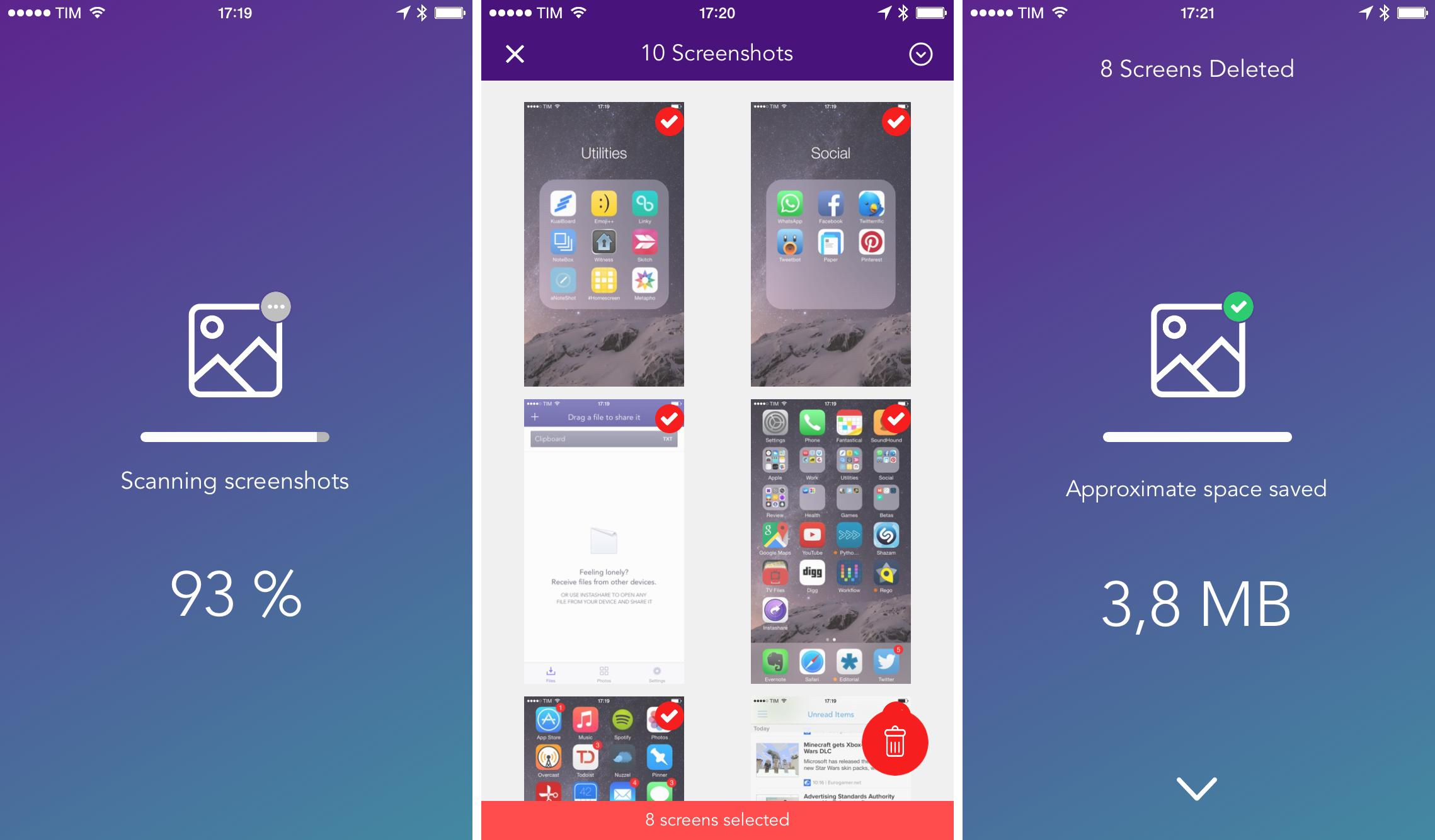
Screeny Lets You Easily Delete All Your Screenshots on iOS 8

I take a lot of screenshots on my iPhone and iPad on a daily basis. Before I upgraded to a 64 GB iPhone 6, that was a problem: screenshots would accumulate over time alongside my photos, which would easily consume the 16 GB of storage I had on my iPhone 5s. Unlike photos, I never want to keep screenshots around for future consumption, which made the process of going through all of them a lot more tedious and time-consuming (unlike photos, screenshots are harder to recognize through thumbnails in the Photos app).

Read more


Spotify: Friend Or Foe?

Spotify knows what time of day users listen to certain songs, and in many cases their location, so programmers can infer what they are probably doing—studying, exercising, driving to work. Brian Whitman, an Echo Nest co-founder, told me that programmers also hope to learn more about listeners by factoring in data such as “what the weather is like, what your relationship status is now on Facebook.” (In 2011, Facebook entered into a partnership with Spotify.) He added, “We’ve cracked the nut as far as knowing as much about the music as we possibly can automatically, and we see the next frontier as knowing as much as we possibly can about the listener.”

John Seabrook’s article on Spotify for The New Yorker is a good one. A lot of interesting details about the company’s CEO, Daniel Ek, and the way they make deals with labels.

I remember trying Spotify many years ago with a fake UK account and telling my girlfriend that it was incredible and the future of music was going to be streaming. In the years I’ve spent jumping between music streaming services, I’ve kept an eye on Spotify and their marketing efforts, which the article doesn’t mention (all my friends in Italy know what Spotify is; my mom uses it).

I’ve recently started using Spotify again as my main streaming service because of its solid iPad app and new Family accounts. I am, however, excited to see what Apple does with Beats Music. I don’t know if the entire music industry will embrace streaming eventually, but the future is definitely interesting.

Permalink

FastFeed – Multi-Tab Enhancement for Tumblr/Instagram/500px [Sponsor]

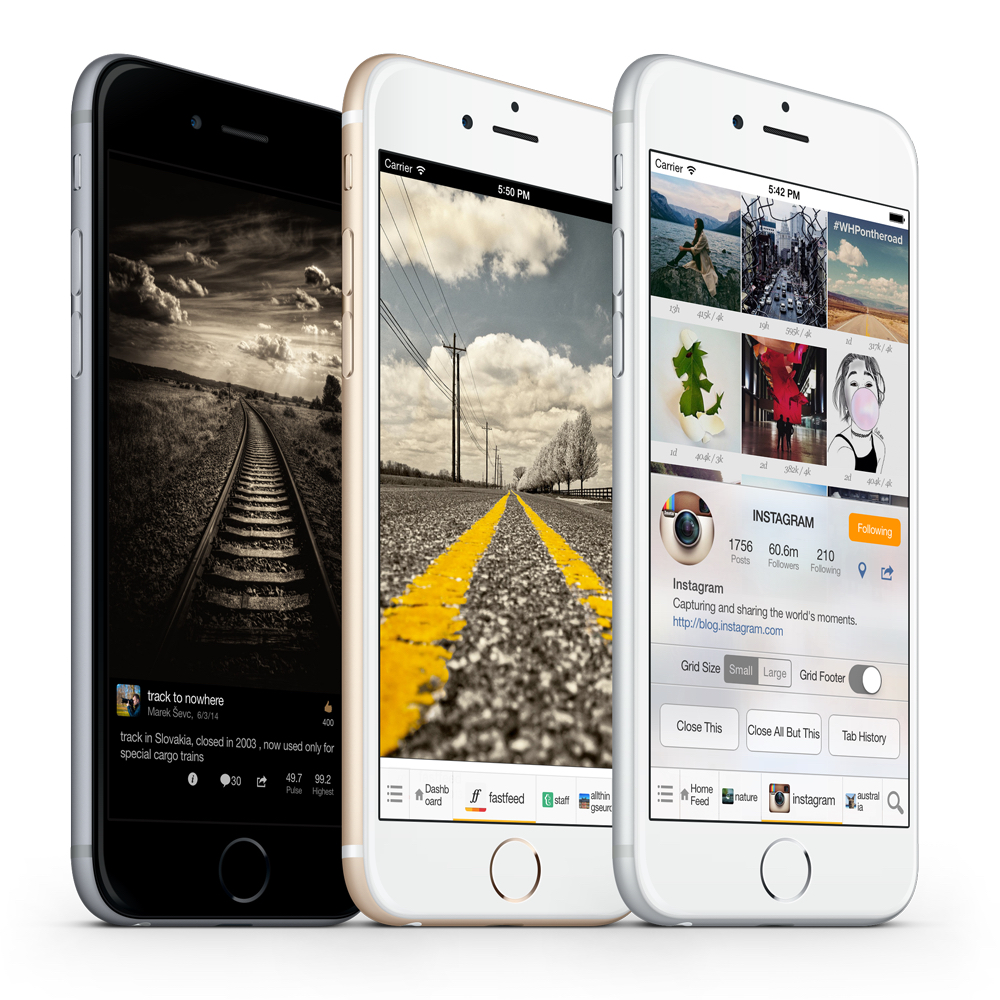
FastFeed is a series of iOS apps that brings the power of multi-tab management to Tumblr, Instagram, and 500px.

FastFeed’s versatile tab bar is designed to be unobtrusive, but it’s highly versatile and customizable: it sits at the bottom of the screen, it can be auto-hidden when you scroll, and it lets you open new feed links in new tabs so you can easily switch between them. In FastFeed for Instagram, you can have multiple tabs for user profiles and a location; in FastFeed for Tumblr, you can open the dashboard and user pages as multiple tab bars so you don’t have to constantly navigate back and forth.

Tab control gestures are supported by the FastFeed apps, and, when you tap an active tab, you’ll see a handy menu to close the current tab, close all other tabs, or view tab history. You can switch between grid and flow layouts with a gesture, and smart paging is supported in flow mode.

And for each service, FastFeed comes with unique features: you can explore photos on a map in Instagram; you can search for photos by keyword or tag in 500px; and you can post any type of content in FastFeed for Tumblr.

The three FastFeed apps are available for free on the App Store, and you can find out more here.

Our thanks to FastFeed for sponsoring MacStories this week.


#Homescreen by betaworks

Interesting new app experiment by betaworks: #Homescreen gets the latest screenshot from your library and, assuming that’s a Home screen image, it shares it at a public URL and even recognizes apps in it. You can then tap on app icons to view their description, or you can go to the website’s homepage to view other people’s Home screens and view the Top Apps found in #Homescreen screenshots.

Home Screens are the most popular section of our MacStories Weekly newsletter, and I’m constantly asked by readers to share my Home screen and show them which apps I’m using. People love to look at Home screens to discover apps, and it makes sense for betaworks – a company that’s highly invested in analytics to improve their products – to come up with something like this.

Via TechCrunch, here’s the blog post about Betaworks’ Home screen research with some fascinating data about Twitter apps:

Twitter related apps are on 85.5 percent of homescreens. Given that the sample was based on Twitter users there’s sample bias to the Twitter number, but despite that there are some interesting conclusions to draw out of the data. Seventy-nine percent have one Twitter app on their homescreen, 6.5 percent have 2 or more and 14 percent have none — presumably these users use Twitter via the browser or an app not on the homescreen. Vine is on 12 percent of people’s homescreens, which is impressive. But Twitter’s client app is only on 37% of homescreens and third-party clients are on a whopping 55 percent of devices, with one client, Tweetbot, making up a full 49.5 percent of the sampled homescreens. It’s remarkable that a non-Twitter owned client has more market share than Twitter’s client. It’s a byproduct of the early adopter sample bias, but I think it points to the fact these users — myself included — prefer using a different, and more advanced, workflow for Twitter.

Permalink