Federico Viticci

10804 posts on MacStories since April 2009

Federico is the founder and Editor-in-Chief of MacStories, where he writes about Apple with a focus on apps, developers, iPad, and iOS productivity. He founded MacStories in April 2009 and has been writing about Apple since. Federico is also the co-host of AppStories, a weekly podcast exploring the world of apps, Unwind, a fun exploration of media and more, and NPC: Next Portable Console, a show about portable gaming and the handheld revolution.

Connected: Come Grocery Shopping With Me

This week Federico and Myke talk a little about photo storage solutions, before discussing the widgets in their Today Views, what’s on Federico’s iPad home screen and his impressions of the iPad Air 2.

Following the Home screen episode for iPhone, we couldn’t avoid mentioning widgets. Myke also wanted to know about my iPad Home screen. You can find the episode with detailed show notes (including links to apps and images) here.

Sponsored by:

  • lynda.com: An easy and affordable way to help individuals and organizations learn. Free 7-day trial.
  • Clubhouse: making it easy for anyone to create and manage communities on iOS, Android, and the web.
  • Hover: Simplified Domain Management. Use code ‘SPECIALBUSINESS’ for 10% off your first purchase.
Permalink

Different Share Sheets

Alvaro Serrano makes a great point about share sheets and extensions in apps updated for iOS 8:

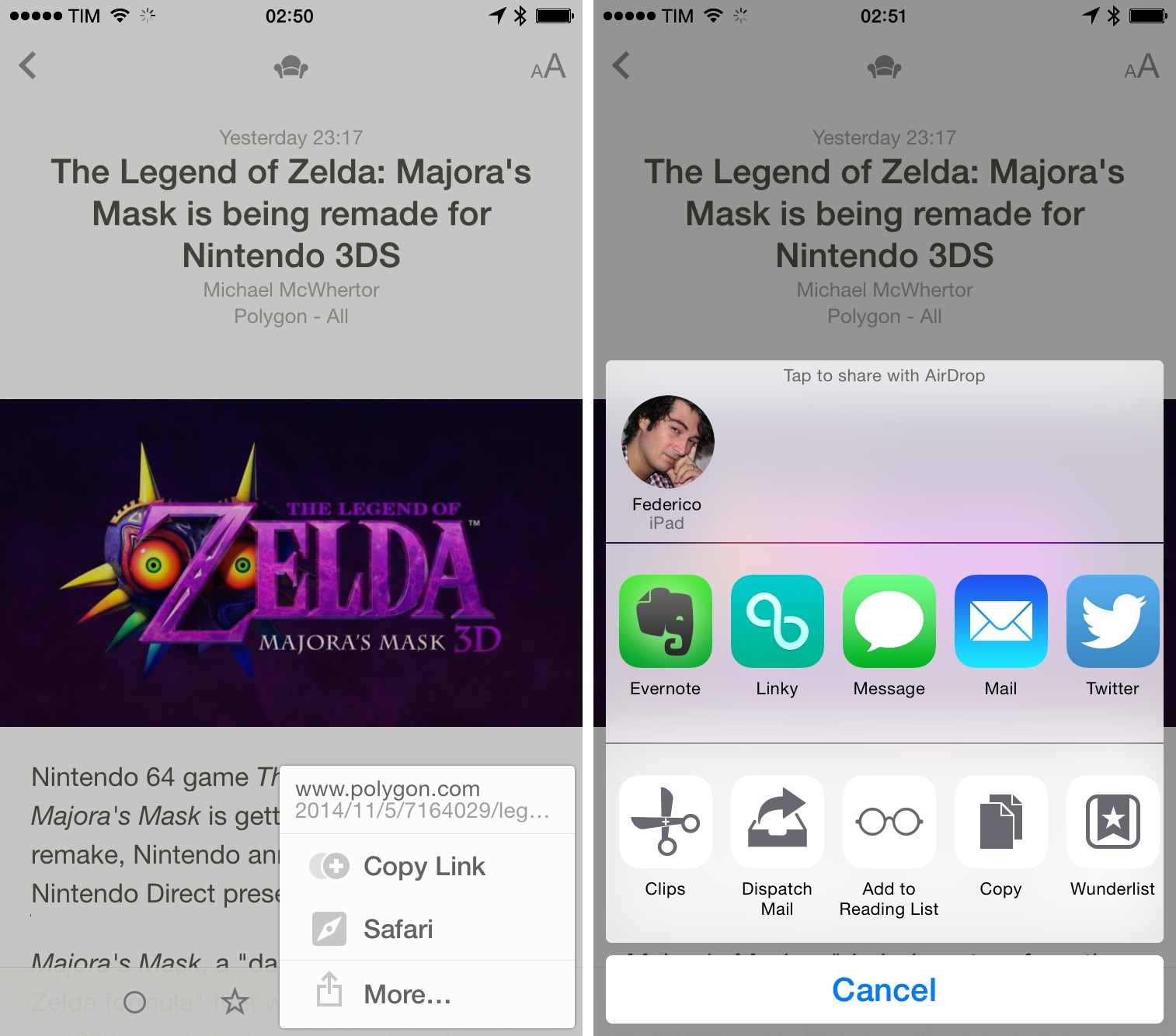
With Reeder’s iOS 8 update, this means Reeder users now have two different ways to send an article to Instapaper: they can use the app’s built-in Instapaper integration, or they can use the Instapaper Extension via the Share Sheet. This looks redundant, but there’s a catch.

In order to use the Instapaper Extension, the Instapaper app must be installed on the device. But what happens if you don’t want to have Instapaper on that particular device? What if, for instance, you browse through your RSS feeds on your iPhone but only read articles on your iPad? In order to do that using Extensions, you’d need to have Instapaper installed on both devices. Using Reeder’s built-in Instapaper integration, however, you’d only need to have it installed on the iPad, which is where you’re actually going to use it.

He uses the latest Reeder as an example, but the same is also true for Unread, Dispatch, and other apps that used to have custom sharing options before iOS 8.

For developers, there are several trade-offs involved with keeping old sharing options and implementing Apple’s new action and share extensions. Do you want to handle user credentials for web services like Instapaper and Pocket, bundling a custom sharing menu that you have to manage? That would also give you more control over the entire sharing feature – for instance, users may be able to activate the service anywhere and not just from a share sheet. As an example, think of how Tweetbot could show read-later options before the iOS 8 update.

On the other hand, extensions free you, as a developer, from the burden of asking users to enter their credentials, designing a login flow, implementing error checking, or creating a UI for each supported option. You just need to support the system share sheet and pray that it’ll work. And, obviously, iOS 8 extensions will give you all the benefits of a unified system: they’re secure, they have an interface designed by their own developer, and they work consistently with other apps.

For now, I don’t think pre-iOS 8 share sheets with hard-coded options will be going away. But as the extension system matures and developers start releasing new apps for iOS 8, I believe that the need for custom sharing options will naturally decrease, letting native extensions take over and benefiting users and developers.


Expectations for WatchKit

David Smith has been reading through Apple’s WatchKit documentation, and he believes that full apps for the Apple Watch will likely arrive at WWDC next year:

Next June at WWDC I then expect we will receive the tools necessary to build out more fully capable applications. Just like we have seen with iOS I’d guess this will be a progressive expansion of capability with each successive year. Just as early iPhone OS apps were severely constrained to save battery life, we’ll probably see strict limits on what types of apps we can build initially. We are essentially resetting the battery life equation with this new device. So no background processing or multitasking for a while (with the possible exception of music/audio playback).

According to recent speculation, the Apple Watch may be released in the Spring.

Back in 2010, a lot of developers struggled to create iPad apps between January and April without an actual iPad, so limiting WatchKit to notifications and glanceable information is probably the best strategy for now.

Permalink

Microsoft Releases New Office for iPhone Apps, Makes Office Free for Mobile Users

Following the news of Dropbox integration from earlier this week, Microsoft has today announced new Office apps for iPhone with full creation and editing capabilities and changed the entire pricing model for Office on mobile devices (iOS and Android). Office for iPhone, iPad, and Android is now free for basic creation/editing/printing features for personal accounts (that includes the new Dropbox sync), but an Office 365 subscription will still be required for advanced editing features and business users (either on OneDrive for Business or Dropbox for Business accounts).

New Office for iPhone apps (Word, PowerPoint, and Excel) have been released, bringing document editing features to smaller screens. MacRumors notes that the apps have been “designed with the existing iPad apps in mind”:

All three apps take advantage of an innovative “vertical ribbon” that puts a full suite of editing tools right within thumb’s reach at the bottom of the device’s screen. Each individual app also has built-in tools to make the viewing experience more streamlined on the iPhone’s Retina screen.

Some advanced features in the new iOS apps will require a paid Office 365 subscription: change tracking features in Word won’t be available to free users, and the same will apply to Pivot Tables in Excel.

The Verge spoke with Microsoft about today’s launch and pricing changes:

“It’s an extension of the strategy that we’ve got,” explains Microsoft’s head of Office marketing Michael Atalla. “It’s not a total strategic shift, as much of an extension of the existing strategy.” Microsoft offers free Office apps online, and Atalla argues that recent development model changes inside Microsoft have allowed the company to open up editing functionality to mobile clients. “We’re taking that same user experience we provide online to the native apps of iOS and Android. We want to make sure that our customers can be productive across all the devices they have.”

Microsoft’s new Office apps for iPhone are available now on the App Store as version 1.2 and Universal updates.


Reeder for iOS Updated with iPhone 6 Support, iOS 8 Share Sheets

Reeder, Silvio Rizzi’s popular RSS reader for iOS and OS X, has been updated to version 2.6 on iOS, adding support for the iPhone 6 larger display as well as compatibility with iOS 8’s new share sheets. Like Unread, you can now tap a “More” option in the share menu to show the system share sheet with action and share extensions, which means that you can still keep Reeder’s existing integrations around if you don’t want to use the extensions.

Reeder 2.6 with iPhone 6 support, share sheets, and a new landscape mode for iOS 8 is available on the App Store (you can find my review of Reeder 2 here).

Permalink

Google Maps for iOS Getting New Material Design

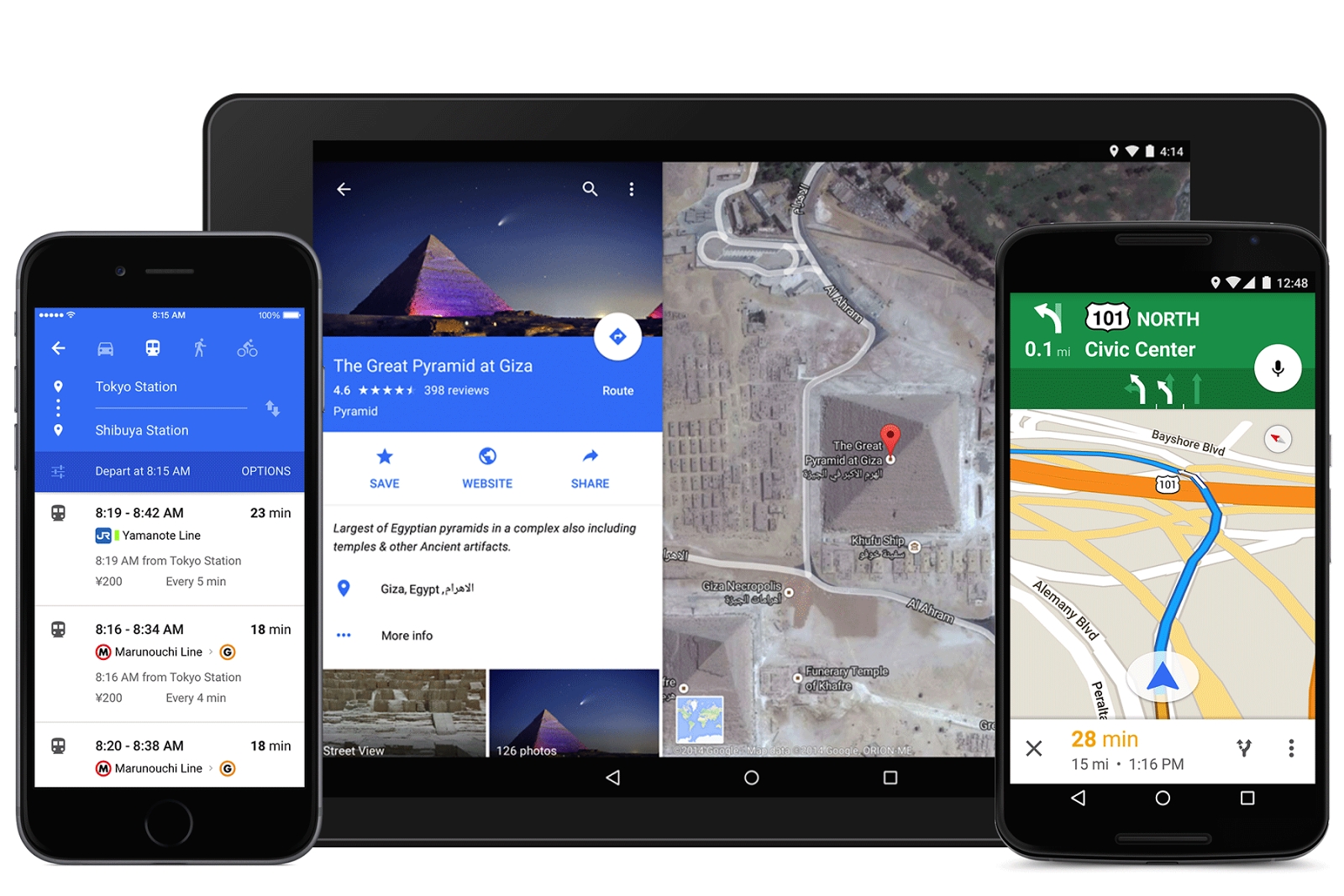
With an official blog post, Google has announced that a new look for its Google Maps app for iOS and Android will roll out “over the next few days”. Based on the company’s new Material Design aesthetic, the new app will feature a blue interface with drop shadows, redesigned buttons, and more.

Bold colors and textures are in—and Google Maps is on trend, with a slick new style to make traveling with Maps even easier. Over the next few days, when you open up Google Maps on your Android or iPhone, you’ll be greeted by bright colors and a fresh new design. This new look is all about creating surfaces and shadows that echo the real world; with Google Maps’ new material feel, layers and buttons come to life so you know just where to touch to get directions, recommendations and imagery.

In the US, the app will also integrate with OpenTable for restaurant reservation. The Google Maps app for iOS still hasn’t been updated to the new design, but you can find more screenshots here.

Permalink

Byword Updated with Handoff, Document Providers on iOS 8

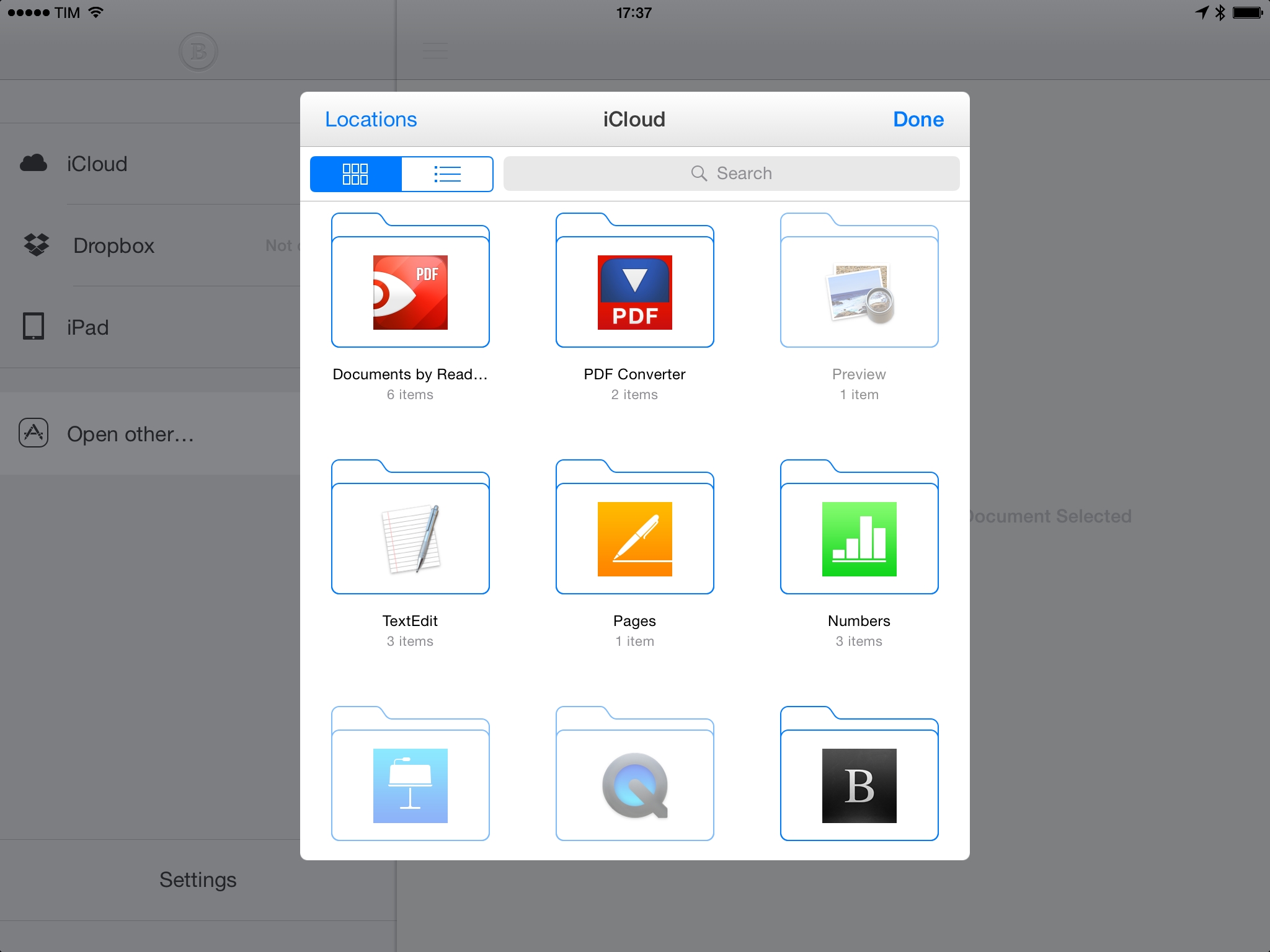
Byword, my favorite general-purpose Markdown editor for iOS has been updated today with iOS 8 features that include Document Providers, Handoff, and iCloud Drive. While I can’t try Handoff with my Mac and I’ve yet to figure out if I want to try iCloud Drive, I’ve tested Document Providers in Byword and they work as advertised. You can open documents from other apps in Byword, edit them, and changes will appear back in the originating app with no Copy or Move operations required. I tested this with TextEdit and Readdle Documents, and it worked perfectly – a nice reminder of how better document management can be on iOS 8 when compared to the old system.

Byword for iOS with the latest iOS 8 features is available on the App Store.

Permalink


Dropbox and Microsoft Team Up for Dropbox Sync in Office Mobile Apps

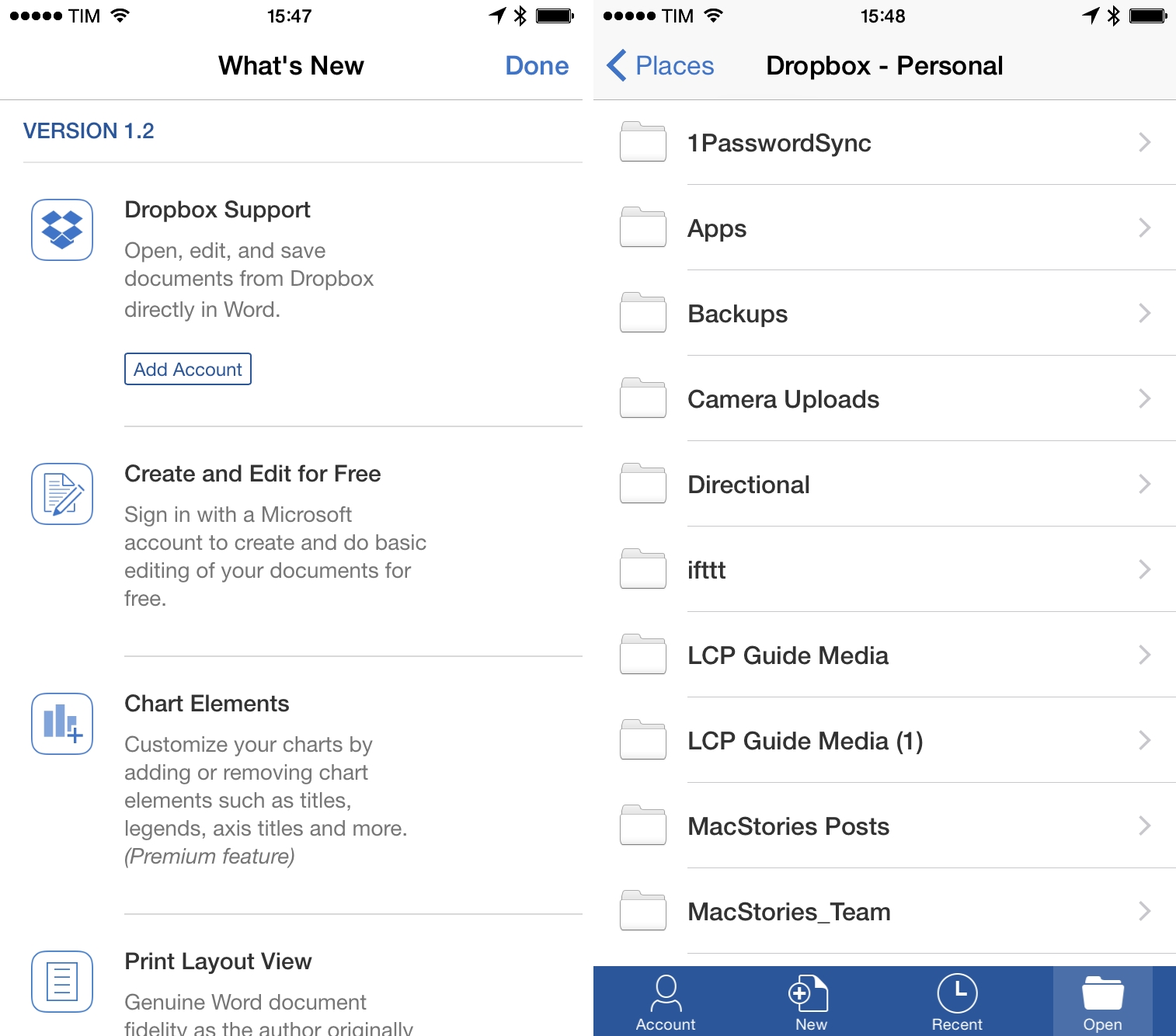
With a blog post, Dropbox today announced that they are partnering with Microsoft to extend integration with Dropbox storage to the Office mobile apps for iOS and Android. “In the next few weeks”, users will be able to open Office documents in Microsoft’s apps directly from the Dropbox app, and Dropbox sync will be bundled into Office for iPad to create, edit, and sync documents across devices. Dropbox will coexist with Microsoft’s own OneDrive service, and users will even be able to browse their Dropbox account and copy shareable links to files without leaving Office for iOS.

From the Dropbox blog:

We know that much of the world relies on a combination of Dropbox and Microsoft Office to get work done. In fact, Dropbox is home to over 35 billion Office documents, spreadsheets, and presentations. That’s why we’re partnering with Microsoft to help you do more on your phones, tablets, and the web. Soon you’ll be able to access your Dropbox directly from Office apps, and edit Office files from the Dropbox app.

Tom Warren writes at The Verge:

“Access to Dropbox content popped as one of the very first [iPad for Office] requests that customers had,” explains Kirk Koenigsbauer, head of Microsoft’s Office Engineering team. “They want access to where their content is. We’re doing it to make sure customers have a great experience.” Although Microsoft has its own OneDrive cloud storage, Dropbox will appear alongside Microsoft’s own service in the Office for iPad apps, allowing users to natively browse, open, and edit Office documents stored on Dropbox from directly within the app.

I find this interesting for a couple of reasons. First, Microsoft was long criticized for ignoring Office on mobile devices, but, under CEO Satya Nadella, they appear to be actively listening to how people want to use Office on the go – Dropbox is an obvious choice for file storage and sharing, but Microsoft still requires an Office 365 subscription to fully use the iOS apps (side note: Word for iPad is a regular fixture of the App Store’s Top Grossing chart).

It’s also notable that Microsoft has chosen to develop their own custom integration rather than simply rely on Apple’s new document provider feature of iOS 8. As you can see from the screenshots, Word for iPad will have a custom Dropbox file browser with support for multiple accounts that doesn’t require you to open a document picker to switch between file storage locations. Given the complexity of sync and the strategic importance of this partnership, it makes sense for Microsoft to control this integration with a custom, full-featured approach.

Permalink