
Federico Viticci

10804 posts on MacStories since April 2009

Federico is the founder and Editor-in-Chief of MacStories, where he writes about Apple with a focus on apps, developers, iPad, and iOS productivity. He founded MacStories in April 2009 and has been writing about Apple since. Federico is also the co-host of AppStories, a weekly podcast exploring the world of apps, Unwind, a fun exploration of media and more, and NPC: Next Portable Console, a show about portable gaming and the handheld revolution.

Vlambeer’s Nuclear Throne Early Access Adds Mac Support

Nuclear Throne, the upcoming game from Vlambeer (Super Crate Box, Ridiculous Fishing, Luftrausers) currently in development and available through Steam Early Access, will receive native Mac support today. Previously, the game was only playable through Early Access on Windows machines.

Nuclear Throne is now live and should be stable on Mac. It’s also live for Linux, but we can’t promise stability (or even functionality) just yet, but rest assured we’re working closely with YoYo Games to make sure the Linux build will be up to speed. If you own the game on Windows, the Mac and Linux builds should show up on Steam right around now, and the Humble builds will be uploaded later.

Nuclear Throne is an action roguelike title from the award-winning studio that can be played during the development process thanks to Early Access; Vlambeer is regularly hosting live streams on Twitch to offer a glimpse into the game’s creation and showcase the latest additions.

You can more on Vlambeer’s “performative development” of Nuclear Throne at Edge and watch Polygon’s demo and interview with Vlambeer from last month’s GDC. The Mac build of Nuclear Throne will be available today on the game’s Steam page.
Permalink

Directional: Shahid Ahmad Of PlayStation

This week, Myke and Federico are joined by Shahid Ahmad, senior business development manager at Sony Computer Entertainment Europe. They talk about Shahid’s role at PlayStation, indie games and PS Vita, passion for game development and video games, and the importance of human curation.

Shahid Ahmad is widely regarded as the man behind Sony’s indie revolution, and we had a fantastic chat on Directional about his career and the work he does to bring great indie games to PlayStation. You can get the episode here.

Brought to you by:

Permalink

Deep Belief Image Recognition on iOS

Pete Warden:

I am totally convinced that deep learning approaches to hard AI are going to change our world, especially when they’re running on cheap networked devices scattered everywhere. I’m a believer because I’ve seen how good the results can be on image recognition, but I understand why so many experienced engineers are skeptical. It sounds too good to be true, and we’ve all been let down by AI promises in the past.

That’s why I’ve decided to release DeepBeliefSDK, an iOS version of the deep learning approach that has taken the computer vision world by storm.

A fascinating demo, especially in how the prototype app Pete built starts recognizing his cat in real-time – through the camera – towards the end of the video. Developers can check out DeepBeliefSDK here.

Permalink

Drafts 3.6 Brings New Google Drive and Clipboard Actions, Auto-Backup

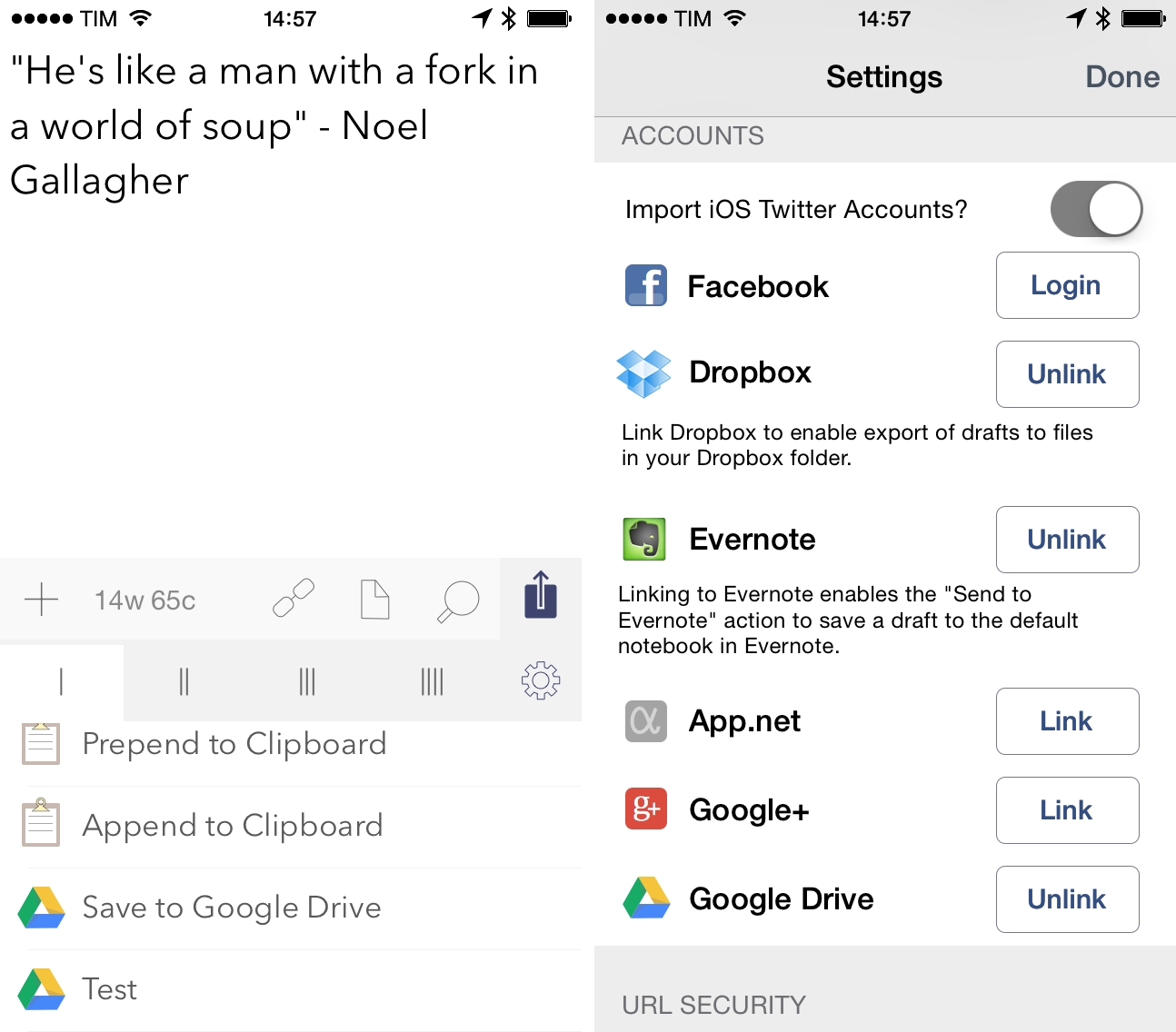
Drafts, Agile Tortoise’s note-taking app for iOS with support for customizable actions and workflows, has been updated to version 3.6 today, adding Google Drive integration, new clipboard actions, and a handy option to automatically back up a user’s action library to Dropbox every few days.

Google Drive joins Drafts’ existing Dropbox and Evernote actions as it’s based on the same concept: the app can now create text files in your Google Drive account, append/prepend text to existing files, or replace text; every tag that is normally supported by Drafts (such as placeholders for timestamps, date, draft line, or clipboard) will work with Google Drive actions that you can create in the Settings. In my tests, I was able to quickly send text from Drafts to Google Drive by adapting some of my old Dropbox actions, which created a new .txt file in Google Drive and inside a specific folder (Drafts has preference to specify a parent folder for Google Drive actions); overall, if you’ve ever wished you could easily send plain text to notes stored in Google Drive, the addition is welcome.

Append and prepend actions have also been added to Drafts’ iOS clipboard integration: just like with built-in third-party services, Drafts can now append or prepend text to the contents of the clipboard – a feature that may not seem immediately useful, but that could open some interesting possibilities when using the clipboard as a workaround for the lack of automation features in iOS apps.

Aside from adding background refresh support for iOS 7 (for notes stored in the app across the iPhone and iPad versions), Drafts 3.6 also adds a setting for auto-backup: if activated, the app will save actions every few days to Dropbox without having to remember to export an action’s library manually.

Drafts continues to be a must-have utility for text automation on iOS, and version 3.6 is available now on the App Store for the iPhone and iPad.


Hiding and Encrypting Files On OS X with Hider 2

Hider 2

Hider 2

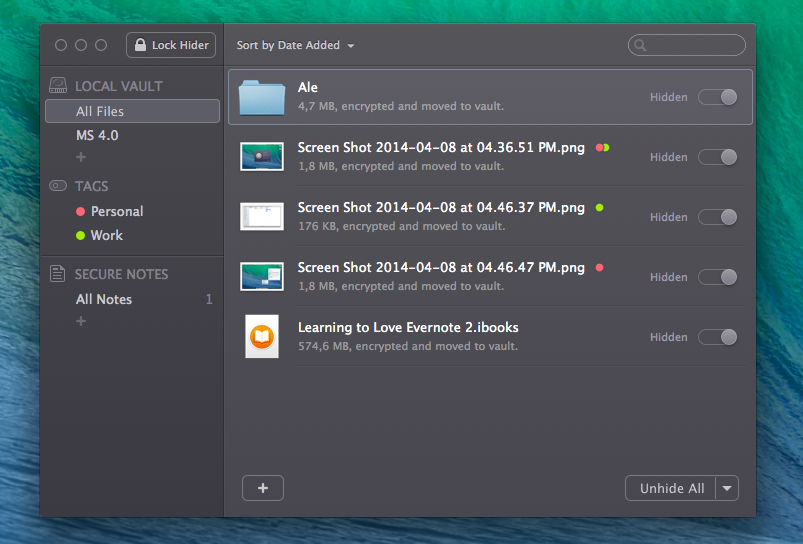
I try not to be too paranoid about the security of files I keep on my Mac, but I do enjoy the peace of mind provided by encrypting some work documents when necessary, hoping that there will be an extra layer of security for those files in case of disaster or device loss. For the past week, I’ve been trying MacPaw’s Hider 2, a new app that wants to unify and streamline the process of hiding and encrypting files in a single, intuitive interface. Read more


Learning To Love Evernote 2.0

I’ve re-recorded every video with new tips, tricks, and workflows. The Evernote iOS apps have changed drastically since the original version was released, so I hope you enjoy the free update.

My friend Bradley Chambers has released version 2.0 of his Evernote eBook (which I first mentioned last year) with updates for the new Evernote apps (the iOS one has changed a lot).

I like Bradley’s book because it gives practical examples – for instance, the screencast on scanning receipts into Evernote shows a real receipt being scanned and uploaded with Scanner Pro – and it’s only $4.99 on the iBooks Store.

Permalink

The Woman Behind Apple’s First Icons

My philosophy has not really changed – I really try to develop symbols that are meaningful and memorable. I started designing monochrome icons using a 32 x 32 pixel icon editor that Andy Hertzfeld created. Subsequently I’ve been able to take advantage of more robust tools and higher screen resolution, and also design vector images in Illustrator. But design problems are solved by thinking about context and metaphor – not by tools.

Priceonomics (via 512 Pixels) has a profile of Susan Kare, who created the icons and fonts for the original Macintosh. The interview includes a lot of tidbits, original photographs of Kare’s sketchbook, and links to Andy Hertzfeld’s Folklore website. It’s a great read.

Permalink

The Prompt: Beautiful Flower

This week, 5by5’s international trio of Apple users discuss Microsoft and Android (with an awesome special guest). They also announce a revolutionary new photo management service.

The discussion with Russell (he works on one of my favorite iOS apps) about the differences between the App Store and Google’s Play Store was particularly interesting for me. Get the episode here.

Brought to you by:

Permalink