Federico Viticci

10804 posts on MacStories since April 2009

Federico is the founder and Editor-in-Chief of MacStories, where he writes about Apple with a focus on apps, developers, iPad, and iOS productivity. He founded MacStories in April 2009 and has been writing about Apple since. Federico is also the co-host of AppStories, a weekly podcast exploring the world of apps, Unwind, a fun exploration of media and more, and NPC: Next Portable Console, a show about portable gaming and the handheld revolution.

Fix iTunes Links Not Launching iTunes in Google Chrome

Chrome

Chrome

I recently got annoyed by the fact that Google Chrome couldn’t open iTunes links in the iTunes app on my Mac, so I decided to look for a solution.

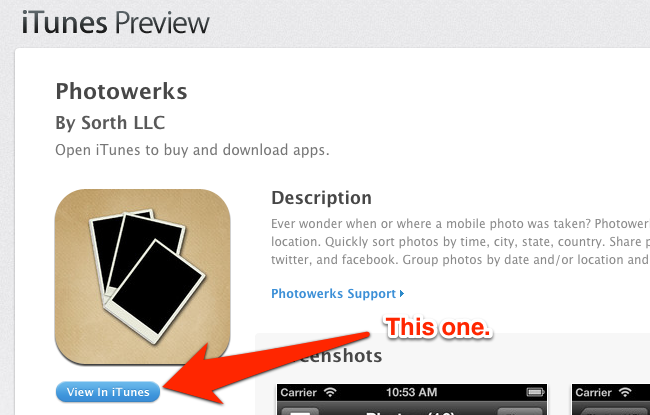
I haven’t been following Chrome’s (numerous) updates in quite a while, so I don’t remember when the app got a redesigned Settings page. In spite of the cleaner look, though, there’s still an option to manage “protocol handlers”, which are the settings that determine how Chrome should work with webpages that request to open other applications installed on a computer, such as Apple’s iTunes Preview website and iTunes. Read more


Ken Segall On Apple’s New iPhone Ad

Ken Segall, author of Insanely Simple, comments on Apple’s new “Photos Every Day” ad:

What this commercial does so well is capture the human side of technology. It’s a reflection of daily life, and it’s easy to see ourselves in it. The ad shows us how essential our phones have become, enabling us to capture the people, places and images we don’t want to forget.

Apple commercials aren’t new to this kind of theme. But I agree – Photos Every Day is one of the best ever made.

Permalink

How I Resize and Rename Images with Automator, Name Mangler, and TextExpander

Name Mangler

Name Mangler

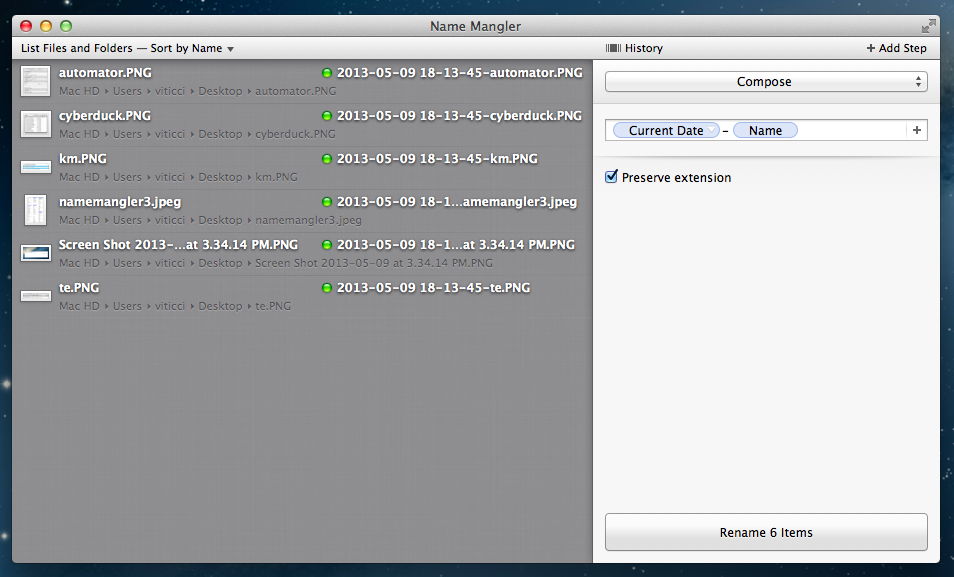
A few weeks ago, while I was preparing my coverage of Apple’s Q2 2013 earnings call, I grew tired of my system to resize and rename images on OS X, so I rebuilt it from scratch using Automator, Name Mangler 3, and TextExpander.

When I create images for MacStories, I either keep them at a single size between 600 and 650 pixels, or use two separate versions: the original larger size, and a smaller one that links to the full version. In either case, images are uploaded to our CDN with Cyberduck, which I have been using for years and that has never failed me. Until last month, the process of duplicating the larger image and saving it to a smaller size was entirely manual – something that, I later realized, was surprising considering I try to automate as many aspects of my daily workflow as possible. I decided to fix this before the Apple earnings call because I knew Excel was going to export our charts as large PNGs – but, mostly, because it really didn’t make sense to keep on manually clicking menus and selecting sizes after all these years of writing for MacStories. Read more


Jim Dalrymple Launches The Loop Magazine

The Loop Magazine

The Loop Magazine

Marco Arment’s The Magazine showed that a new way of building a profitable magazine with recurring subscriptions was possible. While it seemed “obvious” in hindsight, The Magazine proved that Apple’s Newsstand platform could be used to deliver a simpler, yet engaging magazine experience to the reader, eschewing the typical complexities of magazines that struggled in their shift from paper to digital. With its simplicity, The Magazine set a new standard.

Today, Jim Dalrymple is launching The Loop Magazine, an “extension” of The Loop with a focus on longform content. Available on the iPhone and iPad and built with TypeEngine, The Loop Magazine will publish two issues per month with a $1.99 monthly subscription; thanks to Newsstand, issues will be delivered wirelessly and automatically, with payments handled directly by the iTunes Store.

As a reader of The Loop and listener of Jim’s podcast on the 5by5 network, Amplified, I wanted to ask him about his decision to launch a standalone magazine and, why, after 20 years of writing on the web, he picked Apple’s Newsstand as the only delivery platform.

Federico Viticci: Why did you decide to build a magazine for The Loop?

Jim Dalrymple: I’ve looked at building an app for The Loop for several years, but nothing seemed to fit with my vision. I didn’t want an app that mirrored the Web site, I wanted to add value for the readers, to be able to give them something they couldn’t find on the Web site. When I saw Marco’s magazine, I knew that’s what I wanted to do. Obviously, the content is much different and that’s what will set the publications apart.

A tremendous amount of work has gone into every aspect of The Loop magazine from the fonts and design, to the writers I chose to be part of it. I want readers to enjoy every single article in a clean, ad-free environment. They should look forward to every issue because the experience was so good.

FV: How will The Loop website and magazine complement each other in the future?

JD: The Loop magazine is an extension of my interests on the Web site, so they will always complement one another. On the Web site, I will link to a story that I find interesting. In the magazine, I will go to the writer and ask them to write an exclusive article for The Loop magazine.

FV: What topics do you want to cover in The Loop Magazine going forward?

JD: I’m open to almost anything. That’s what makes The Loop Web site so unique. There could be a story on Apple and the next thing could be a video of Jimi Hendrix or Ozzy Osbourne. It could also be a story about design or user interaction with apps – as long as it’s interesting, it could find its way on The Loop or in the magazine.

FV: Do you see Newsstand as the future of mobile publishing?

JD: I began publishing on the Internet in 1994. At that time traditional media outlets were having a tough time getting their heads around publishing to that new platform, and in some ways they are still struggling. I was convinced that the Internet was a big shift in publishing and it was. There have been a lot of attempts in the intervening years to bring magazines to the digital realm, but I haven’t taken the plunge until now. None of them seemed right to me.

Apple’s Newsstand is the first time since 1994 that I’ve felt another shift in the publishing industry was upon us, so I jumped at it. Apple takes care of distribution, payments and the business side of things, leaving the publisher focus on what they do best – publishing great content.

In some ways, I feel like I’m back in 1994. The traditional magazine outlets are having a hard time wrapping their heads around platforms like Newsstand and the best way to publish content. I’m confident that offering readers exclusive long-form articles in a clean app is the way to go.

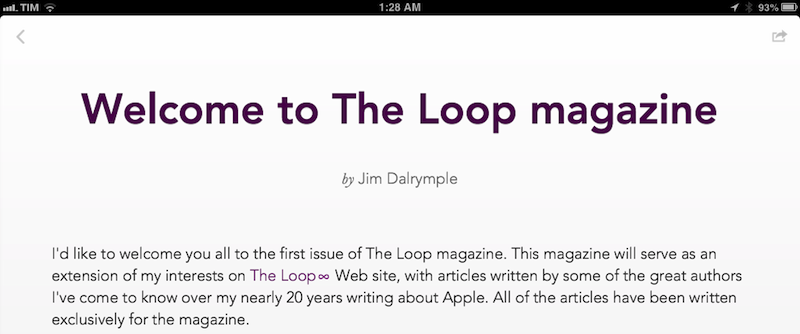
I have been able to read the first issue of The Loop Magazine in advance, and the app is exactly what you’d expect in a post-The Magazine world: using The Loop’s existing color scheme, The Loop Magazine has a clean layout, built-in sharing options, embedded author bios, and a sidebar where you can navigate issues and articles. The first issue comes with six articles – I especially liked the ones by Matt Gemmell and Flexibits’ Michael Simmons. Unlike The Magazine, the app has a built-in web browser to open URLs, but I’d like to see an option to send links to Google Chrome. Right now, supported sharing options include Safari, Twitter, Mail, and Messages.

I’m glad to see more writers experimenting with new business models and I’m happy about the fact that Arment’s The Magazine has encouraged others to move away from traditional advertising on the web. I look forward to seeing how Dalrymple’s The Loop Magazine will evolve in the future.


PDF Expert Adds New Annotation Features

Readdle’s PDF Expert has been my favorite PDF reader for iPad for a long time now. With Dropbox integration and a clean UI full of powerful options, PDF Expert is the app I rely upon when it comes to reading and editing PDF documents. The 4.6 version, released today on the App Store, adds a series of new features that make adding annotations and managing them inside a document even easier.

Annotations can now be copied and pasted inside a document and across different documents in PDF Expert: to do so, you can use a new selection tool available in the top toolbar. This new tool will let you select a single annotation/shape and use iOS’ familiar copy & paste menu – but you can also select multiple annotations at once to move them, copy them, delete them, or change their properties. PDF Expert’s selection is also smart: if you select two shapes, the popup menu will show options for shape thickness and color (also new in version 4.6); if you drag the selection on top of text annotation, the app will show properties for font, colors, and font sizes.

In this update, Readdle also included a new custom date/time keyboard (which reminded me of a similar keyboard from another Readdle app, Calendars+) that makes it easier to fill date fields in PDF forms.

While I prefer Skitch for “quick” annotations that involve shapes and callouts, PDF Expert remains my choice for text annotations and reading long documents. PDF Expert is available at $9.99 on the App Store.


Pizza Compass

Genius idea, great promo video:

Pizza Compass is a $0.99 app that lets you find pizza joints nearby. Unlike other discovery apps for local businesses, Pizza Compass uses a slice of pizza…as a compass to show the distance from a pizza joint. You can turn the slice of pizza around, and tap on a pizza joint’s name to open an embedded Foursquare page.

I have downloaded the app, and it’s surprisingly full of accurate results for Viterbo; however, local results don’t seem to feature opening and closing times here, so the bottom bar that’s supposed to be color-coded is grayed out for me.

Get Pizza Compass here.

Permalink


Tally and x-callback-url

Greg Pierce:

Tally 1.1 adds x-callback-url support to our quick-counting app for iPhone. Tally supports two actions, “increment” and “decrement” – with full support of callbacks. This allows Tally to be included in automation workflows with Drafts and other apps – should you feel like you need to keep track of how many times you executed a workflow or similar.

I’ve never had a use for Tally, but this update looks interesting. If, for instance, you were to use a Draft 3.0 action to append text to an Evernote journal, you could integrate Tally to count the times the action is fired every day – perhaps by triggering everything from a Launch Center Pro timed notification.

If you’re looking for more examples, Eric Pramono has some good ones.

Permalink

The Later Box

An interesting workflow by Jeff Hunsberger:

What Mailbox pointed out to me is that I need is a Later box. A place to stick emails that I don’t want jamming up my Inbox but I really do need to act on “later”. Ideally, the number of emails flagged in this way should be relatively few. If it is more than a handful, it is probably pointing to a different kind of problem – the last thing I need is an interim archive. I need two things – a place to hold emails until I return to my Mac and the discipline and discernment to act on them when I get there.

I like the idea of using Keyboard Maestro to automatically put emails back in the Inbox every day. I use Triage on a daily basis now, but I’m curious to see how Mailbox will change under Dropbox.

Permalink