Federico Viticci

10804 posts on MacStories since April 2009

Federico is the founder and Editor-in-Chief of MacStories, where he writes about Apple with a focus on apps, developers, iPad, and iOS productivity. He founded MacStories in April 2009 and has been writing about Apple since. Federico is also the co-host of AppStories, a weekly podcast exploring the world of apps, Unwind, a fun exploration of media and more, and NPC: Next Portable Console, a show about portable gaming and the handheld revolution.

Goalie for HockeyApp

Goalie is a $9.99 app that developers can use to manage their HockeyApp accounts on the iPhone.

I’m not a developer, but I use HockeyApp on a daily basis to install betas of apps I’m trying, and I know how the service works. So I asked for a test account, and played around with Goalie. The feature set is solid: you can view all your apps, get stats on versions (such as installs and crashes), view crash groups and full crash logs, manage team members, and even access the feedback area where you can delete or reply to threads. If you’ve been looking for a way to manage HockeyApp on the go, I think Goalie deserves a look. Make sure to check out the app’s website for screenshots and details.

Goalie is $9.99 on the App Store.
Permalink

Tweet Library 2.3

Nice update to one of my most-used iOS apps.

The new version adds compatibility with the new Twitter API, changes the calendar viewer to a thin bar that runs across the top of the timeline, and brings performance improvements alongside a clearer design.

I use Tweet Library on a daily basis to search my entire Twitter archive. The new calendar makes it easier to move between months/years, and the app is much faster when loading tweets.

Permalink

How Panic Is Using Status Board

Fascinating look at the widgets and hardware Panic is using for their own Status Board setup.

This bit caught my attention:

Units have been especially interesting since they reveal so much about the economics of (our) iOS software, as this Graph panel shows. Although (our) iOS apps sell a respectable number of units, the revenue they bring in barely charts compared to our Mac stalwarts. So far! We’re working hard on improving our iOS apps, and trying new ideas, in order to crack the iOS market a little bit more.

Diet Coda, priced at $19.99, is a fantastic piece of iPad software, and yet it doesn’t bring in much revenue compared to Panic’s Mac apps.

Just yesterday, I was thinking that it’s strange how Apple still hasn’t brought the Developer Tools category of the Mac App Store over to the iOS App Store. There are excellent examples of developer-oriented software, especially on the iPad: Textastic, xScope Mirror, Codea, Pythonista, and the aforementioned Diet Coda come to mind – plus many more. Two years ago, I asked whether the iPad needed programming apps.

Times have changed. Today, I wonder: would a Developer Tools category in the App Store help apps like Diet Coda get more exposure? Wouldn’t it make sense to give these tools another category, more specific and focused than the crowded Productivity one?

Permalink

Why I Use FoxTube

FoxTube

FoxTube

After Cody linked to FoxTube for Mac two days ago, I figured I haven’t mentioned why, after nearly a year and a major update, I’m still using FoxTube for iOS alongside the official YouTube app.

FoxTube isn’t the best looking app ever made for iOS; while the 2.0 version improved the overall design, there’s still a lot going on in terms of interface and everything feels a bit cramped, especially on the iPhone. The icon is a literal representation of the app’s name; sometimes, icons in toolbars overlap with navigation buttons. I wish the FoxTube developer could find a way to slim down the interface and make some parts more cohesive, but I understand how that can be difficult when FoxTube does so many things.

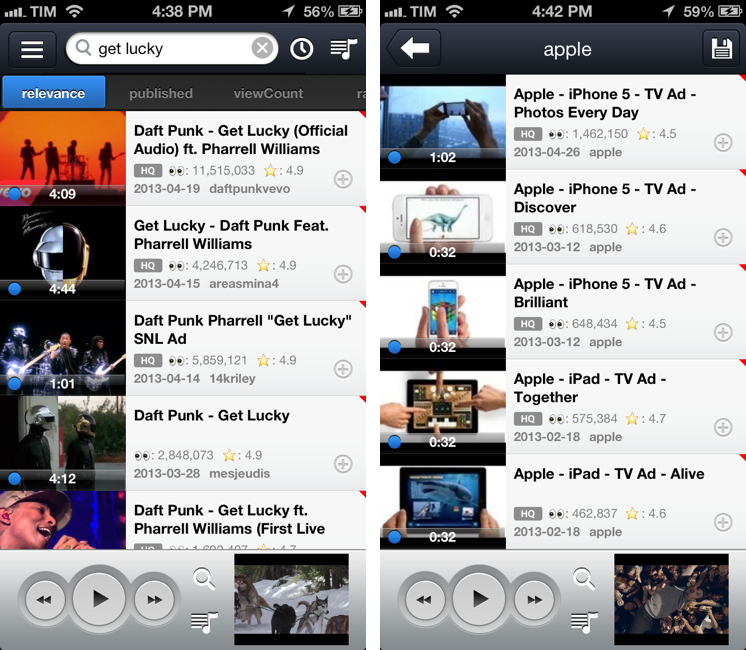
FoxTube is a supercharged YouTube client for iOS. I know what you’re thinking: you don’t need another YouTube app after the release of the (free) official client. And that is probably true – as MacStories readers know, I’m a big fan of the new YouTube app (App Store users seem to agree, too). FoxTube, however, is a great complement to the YouTube app that I recommend if you’re looking for more flexibility and customization in certain aspects of the YouTube experience. Read more


Apple Reveals New “All-Time Top Apps” Following Countdown To 50 Billion Downloads

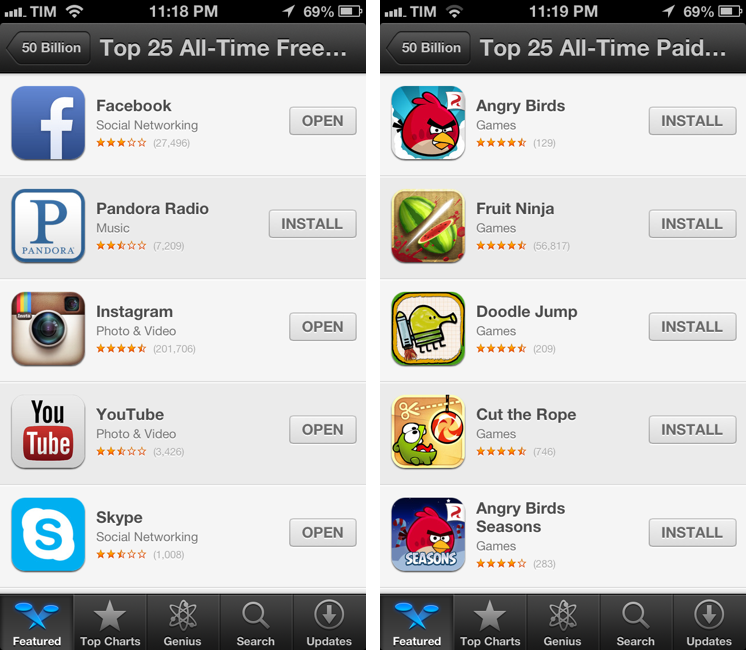
Alongside the countdown to 50 billion app downloads posted earlier today, Apple has also published a series of updated charts for the top downloaded apps of all time. Apple posted the same charts last year, after the App Store hit 25 billion downloads, and had done the same in January 2011 ahead of 10 billion downloads.

Apple’s charts of the Top 25 apps of all time provide a precious insight into the trends of the App Store for free and paid apps downloaded by iOS users on their iPhones and iPads. While the charts from 2012 and 2013 are largely similar in terms of presence of games and brands like Angry Birds and Facebook, there are some interesting differences worth noting.

Below, we have compiled the complete list of updated “all-time top apps”, alongside some notes about the differences from last year’s charts. Read more


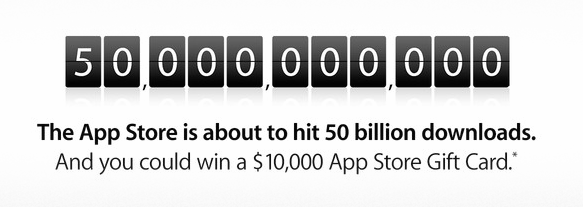
Apple Posts Countdown to 50 Billion App Downloads

With its weekly App Store refresh, Apple has today launched an official countdown to 50 billion app downloads. Through a page available on iTunes, Apple explains that they will award an App Store gift card of $10,000 to the lucky customer who will download the 50 billionth app, plus a $500 App Store gift card to each of the next 50 people to download an app.

Apps have revolutionized the way we play video games, consume news, do business, educate, communicate, create art, and so much more.

The countdown promotion is open to entrants who are 13 years of age or older and are located in one of the 155 countries where the App Store is available. There’s a limit of 25 entries per person per day; Apple specifies that the live counter is for “illustrative purposes” only.

In the App Store page, Apple has also posted links to official rules and a guide to enter to win without a purchase or download, but the links aren’t live on Apple.com yet. We will update this more with more information as it becomes available from Apple.

Apple announced 40 billion App Store downloads in January 2013, with 20 billion of them in 2012 alone. For the 25 billionth app download in 2012, Apple awarded  Chunli Fu of Qingdao, China – who downloaded  Where’s My Water? Free – with a $10,000 gift card.


Calzy Calculator

Calzy

Calzy

When it comes to iPhone calculators, I have simple needs: they have to help me when I’m buying groceries.

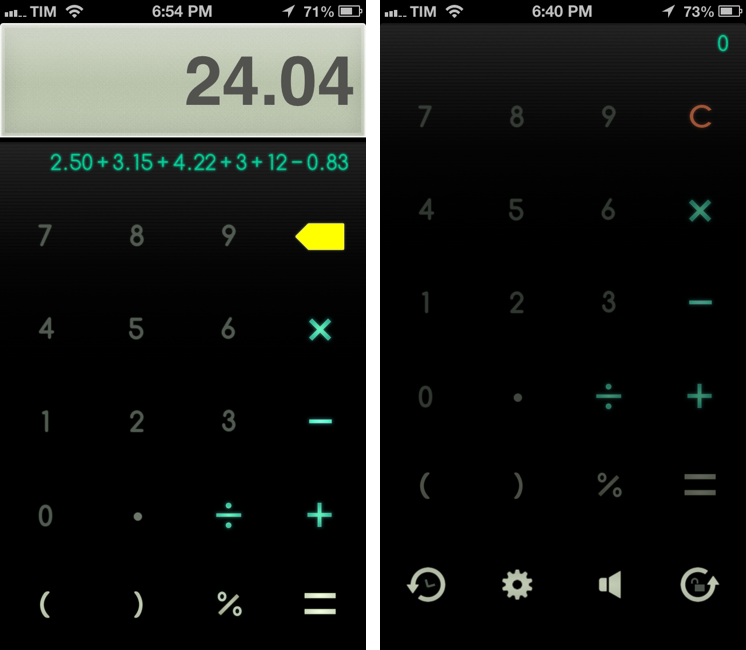
I have been using Tapbots’ excellent Calcbot app for years: unlike Apple’s built-in calculator, it comes with proper support for undo and history, which allows me to easily keep track of the items I’m buying at the grocery store. You could say that, like image editors, I seek out for non-destructive calculators: I want to have access to a stacked list of the single operations I have entered and to be able to delete items inside the expression list. The problem with Calcbot, as I tweeted in March, is that the app still hasn’t been updated for the iPhone 5’s taller screen, and, as MacStories readers know, I can’t stand looking at a letterboxed app on a daily basis. Calcbot works fine, but I wanted to see whether I was missing out on new calculator apps that were ready for the iPhone 5 and had comparable feature sets. Fortunately, I found Calzy. Read more


Apple Releases iOS 6.1.4

Today Apple released iOS 6.1.4, a minor update that is available through iOS’ software update tool and that is now propagating on iTunes. The new version, weighing at just 11.5 MB on the iPhone 5, comes with an “updated audio profile for speakerphone”. iOS 6.1.4 follows the release of iOS 6.1.3 – another minor update – in mid March.

The update (for iPhone 5, GSM) can be downloaded directly by clicking the title above. A CDMA version is available as a direct download here.

Permalink

Heads Up! By Impending

Cool new $0.99 iPhone game designed and developed by Impending for the Ellen DeGeneres Show. The game is, essentially, an iOS version of one of Ellen’s classic games: using your iPhone as a “card” to hold over your head, other players will have to help you guess the name of a celebrity, an accent, and so forth.

There are 18 themed decks in Heads Up!, and the design and interactions look fun and polished. Impending – co-creators of Clear with Realmac – have a history for producing great-looking and delightfully touch-based apps, and Heads Up is no exception. While holding a card over your head, you can tilt the iPhone up to pass, or tilt it down when you answer correctly. As shown in the announcement by Ellen, the app also records videos with the camera to capture funny moments.

It’s great to see Impending collaborating on a mainstream project like Heads Up! while keeping the same attention to detail as always. I can’t wait to play this with my friends this weekend. Check out the video below, and the game’s website here.

Permalink