Federico Viticci

10804 posts on MacStories since April 2009

Federico is the founder and Editor-in-Chief of MacStories, where he writes about Apple with a focus on apps, developers, iPad, and iOS productivity. He founded MacStories in April 2009 and has been writing about Apple since. Federico is also the co-host of AppStories, a weekly podcast exploring the world of apps, Unwind, a fun exploration of media and more, and NPC: Next Portable Console, a show about portable gaming and the handheld revolution.

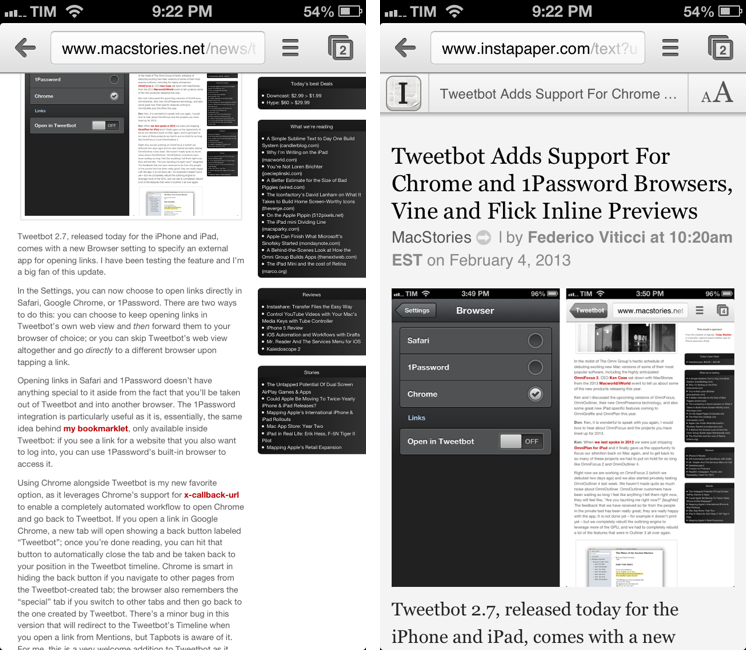
Instapaper Text Bookmarklet As Safari Reader Replacement On Chrome for iOS

Instapaper Text Bookmarklet As Safari Reader Replacement On Chrome for iOS

Ever since I switched to Chrome as my primary browser on OS X and iOS, several readers asked me if I was missing the Reader functionality of Safari. Not really, because it was an easily fixable problem for me.

I use Instapaper to save articles for later. I like the app and like its text parser. However, few people know that the Instapaper Mobilizer – used by apps like Tweetbot – can also be used as a bookmarklet in any modern browser. Simply head over this page and install the Text bookmarklet; running the bookmarklet on a webpage will display it using Instapaper’s parser, but it won’t add it to your Instapaper account.

When I’m on Chrome for iOS and I stumble across a webpage I want to read without other elements besides text, I type “text” in the address bar and tap the Text bookmarklet (remember, you have to type bookmarklet names in Chrome). The nice thing about the Instapaper bookmarklet is that it’s fast, accurate, and because it returns a regular URL, the Chrome tab showing the parsed text will also be synced back to the desktop.

Last, a quick tip: when reading with Instapaper’s text view, you can tap & hold the top bar showing a webpage’s title to copy its URL (something that Chrome makes ridiculously hard to accomplish).

Permalink

Apple Announces 25 Billion Songs Sold On iTunes

Apple Announces 25 Billion Songs Sold On iTunes

With a press release, Apple today announced 25 billion songs have been sold on the iTunes Store. The 25 billionth song was downloaded by Phillip Lüpke from Germany, who won a €10,000 iTunes gift card.

We are grateful to our users whose passion for music over the past 10 years has made iTunes the number one music retailer in the world,” said Eddy Cue, Apple’s senior vice president of Internet Software and Services. “Averaging over 15,000 songs downloaded per minute, the iTunes Store connects music fans with their favorite artists, including global sensations like Adele and Coldplay and new artists like The Lumineers, on a scale we never imagined possible.

As detailed by Apple, the iTunes Store offers a catalogue of over 26 million songs in 119 countries. As we showed in our look at various entertainment ecosystems, Apple’s iTunes Store is the most popular one worldwide. The iTunes Music Store opened on April 28, 2003, which according to Wolfram Alpha is exactly 9 years, 9 months, and 9 days ago (3572 days).

Dividing by 3572 days, the iTunes Store averaged 6.99 million downloads per day, 81 downloads per second, and 4860 downloads per minute.

Permalink

Poster Adds Improved URL Scheme and 1Password Integration

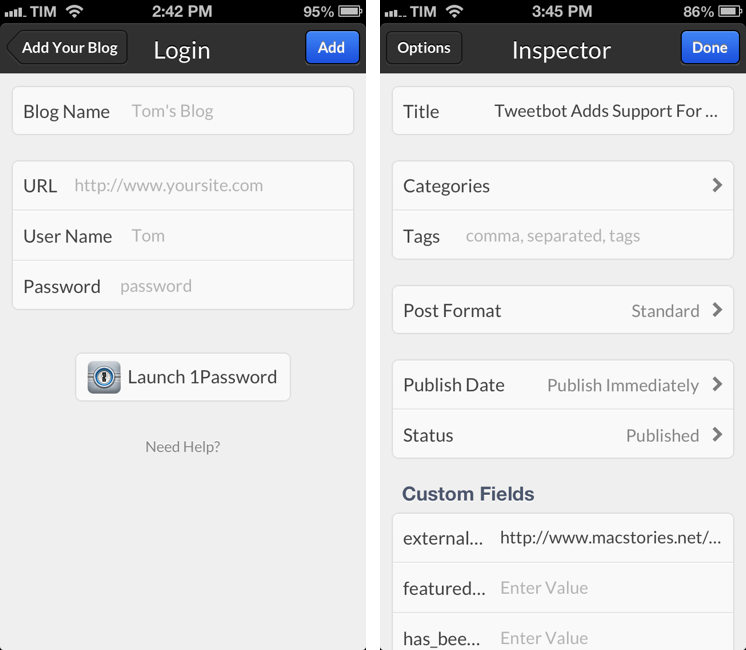
Poster is my favorite iOS app to post articles to WordPress. I recently took a look at version 2.0 and the improvements developer Tom Witkin made to further streamline the app’s posting workflow. Today, Tom released another update that adds support for custom fields to the URL scheme and brings 1Password integration.

Like other apps have done in the past weeks, Poster now sports a 1Password button when setting up a new site that requires authentication. The button will take you directly to 1Password, searching for “wordpress” by default. Once you’ve found your login item, you can copy the password and go back to Poster. I believe this sort of non-forced integration is really nice and ultimately beneficial to the end user, as it makes using multiple apps for a single task less cumbersome. Read more


Instagram Launches Feeds On The Web

Instagram Launches Feeds On The Web

Following the launch of profiles back in November 2012, Instagram today announced the public availability of “feeds on the web” – that is, the possibility to browse your Instagram feed (of people you follow) from any web browser.

Your Instagram Feed on the web functions much like it does on your mobile phone. You can browse through the latest photos of people whom you follow with updates as people post new photos. Like photos by double clicking on them or pressing the like button. Or, engage in a conversation around a photo with inline commenting. Browse through pages of the most recent images to keep up on what’s happening with the people you follow in realtime. And shrink your browser down to a single column for your feed to look more like your mobile feed. Simply put, we’ve brought a simple, powerful, and beautiful Instagram browsing experience to the web.

I like how the new web feeds maintain Instagram’s focus on simplicity. Photos in your stream are centered and the website is responsive if you resize your browser’s window, meaning that iPad owners will finally have a way to view their feeds without using a third-party app. Instagram has translated the popular “double-tap to like” command into a double-click, but that doesn’t work on the iPad’s Safari browser for now. However, it’s also possible to like a photo by hitting the dedicated “heart” icon above the comments.

There are subtle and elegant animations both when you like a photo with a double-click or through the heart icon. From the main feed, you can follow links to users’ profiles or single photos; when you reach the bottom of the feed, you can press “Load More” to continue viewing older photos.

You can read more about web feeds on Instagram’s blog.

Permalink

Integrating OmniFocus and Reminders On OS X

Integrating OmniFocus and Reminders On OS X

Daniel Jalkut and Sean Korzdorfer have been working on two aspects of the same problem: bridging the gap between OmniFocus and Reminders on OS X.

Sean put together a series of AppleScripts to send tasks from OmniFocus to Apple’s Reminders app for Mac. Daniel created (and open-sourced) an app to check Reminders for newly added items, transfer them to OmniFocus while keeping due dates, and deleting them from their original location in Reminders.

I love OmniFocus for both Mac and iOS, but it turns out that because I lean so heavily on using Siri to add items, I tend not to open OmniFocus while I’m on the go. When I come home and get to work on my Mac, I notice that OmniFocus doesn’t contain any of my recently added items, so I have to go through the cumbersome steps of opening my iPhone and launching OmniFocus just to get this theoretically time-saving trick to work right.

I have tried to get into using OmniFocus’ iCloud capture feature on iOS, but because I don’t use Siri on a daily basis, that didn’t turn into a habit. I know many rely on OmniFocus-Reminders integration, and I think these are nice solutions for the desktop.

I, however, have become a big fan of The Omni Group’s Mail Drop service. Using Drafts, I can write down a task, send it to Mail Drop, and have it in my OmniFocus inbox after a few minutes; if I want to save a link to a webpage, I can use a bookmarklet that sends a website to Drafts and then to Mail Drop. Rather than further integrating OmniFocus and Reminders, I’d like to open OmniFocus on iOS and find it already synced with all other copies of the app and Mail Drop. Right now developers have to resort to location-tricks to update information in the background, and I wish Apple will allow more background options in the future.

Permalink

TED 2.0

TED 2.0

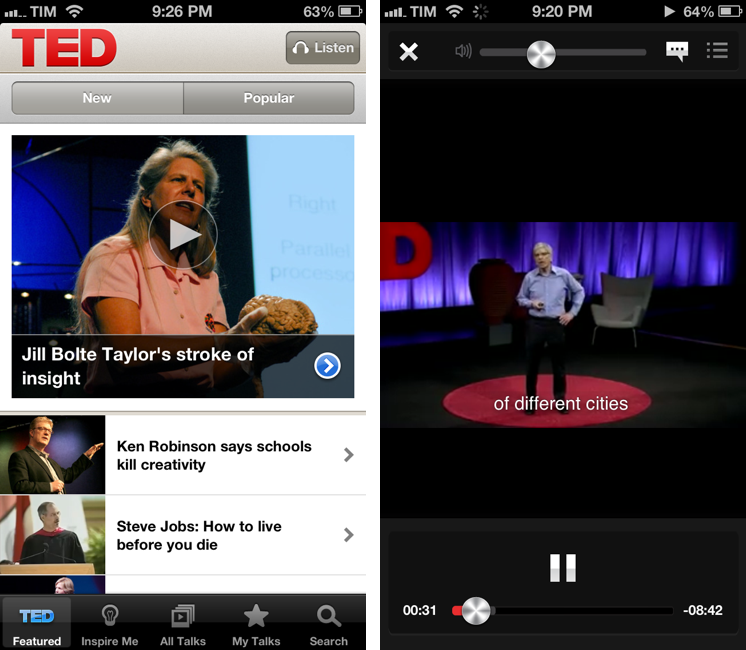
The official TED app for iPhone and iPad has been updated to version 2.0. I’ve been watching a few videos with it and it’s been a solid update so far.

The app is generally faster on 3G and videos load faster than the previous version. Living in a town where 3G is actually faster than my home DSL connection, I can confirm video buffering starts quickly. I’m a fan of TED’s video player controls that sport the same metallic elements of Apple’s Music app.

The big new feature in this update is the addition of subtitles and translations. Subtitles are available in over 90 languages and they can be enabled from the video player and they persist over AirPlay (useful if you’re going to stream TED to an Apple TV or Mac running Reflector). Languages are available in a dedicated section in the All Talks tab; localized talks come with descriptions, title, and subtitles in your native language.

TED 2.0 is available on the App Store.
Permalink

Sponsor: Today Weather

My thanks to Savvy Apps for sponsoring MacStories this week with Today Weather.

Today Weather is a clean, elegant, and intuitive weather app for the iPhone. From the creators of Agenda, Today Weather sports the same amount of care and attention to simple and fast touch interactions: you can tap on a location to enter its detail view, swipe left to get a hourly forecast of the next few days, and swipe right to see a beautiful graph for each day’s average temperature and conditions. If you live in the US, you’ll also get a radar view with storms, showing rain and snow. The Forecast view is based on NOAA gradients and the data presented is fast and accurate.

I personally keep Today Weather on my Home screen and I’ve been using it every day since its release. My two favorite features are the Today view – which gives me a quick overview of the current day – and the Forecast, as it lets me visually understand what my week will be like in terms of temperature and weather conditions. I’m a big fan of Today Weather’s design and animations, and I’m looking forward to an iPad version of the app, coming soon.

Find out more about Today Weather here.


Tweetbot Adds Support For Chrome and 1Password Browsers, Vine and Flick Inline Previews

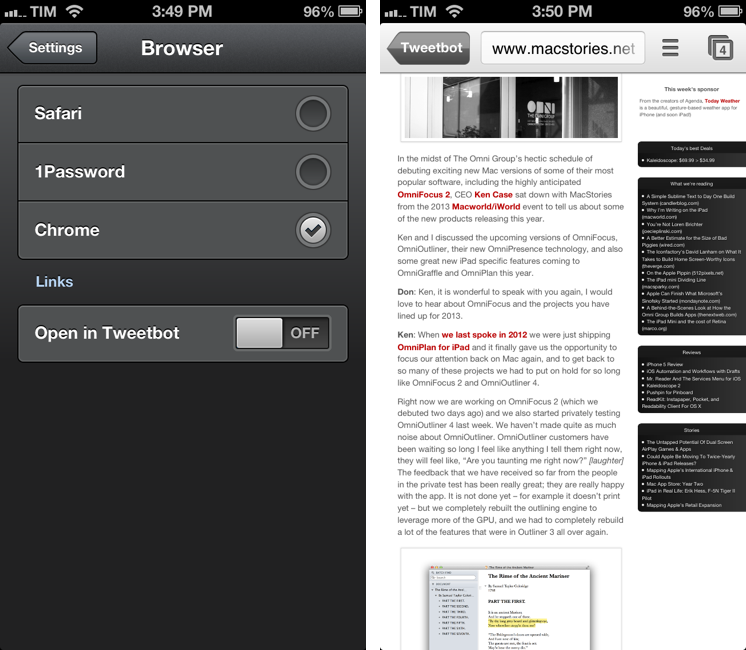
Tweetbot 2.7, released today for the iPhone and iPad, comes with a new Browser setting to specify an external app for opening links. I have been testing the feature and I’m a big fan of this update.

In the Settings, you can now choose to open links directly in Safari, Google Chrome, or 1Password. There are two ways to do this: you can choose to keep opening links in Tweetbot’s own web view and then forward them to your browser of choice; or you can skip Tweetbot’s web view altogether and go directly to a different browser upon tapping a link.

Opening links in Safari and 1Password doesn’t have anything special to it aside from the fact that you’ll be taken out of Tweetbot and into another browser. The 1Password integration is particularly useful as it is, essentially, the same idea behind my bookmarklet, only available inside Tweetbot: if you see a link for a website that you also want to log into, you can use 1Password’s built-in browser to access it.

Using Chrome alongside Tweetbot is my new favorite option, as it leverages Chrome’s support for x-callback-url to enable a completely automated workflow to open Chrome and go back to Tweetbot. If you open a link in Google Chrome, a new tab will open showing a back button labeled “Tweetbot”; once you’re done reading, you can hit that button to automatically close the tab and be taken back to your position in the Tweetbot timeline. Chrome is smart in hiding the back button if you navigate to other pages from the Tweetbot-created tab; the browser also remembers the “special” tab if you switch to other tabs and then go back to the one created by Tweetbot. There’s a minor bug in this version that will redirect to the Tweetbot’s Timeline when you open a link from Mentions, but Tapbots is aware of it. For me, this is a very welcome addition to Tweetbot as it allows my two most-used iOS apps to better communicate with each other without requiring me to manually move between apps. I can get all the benefits of using an external browser (Facebook sharing, using bookmarklets) while still being able to go back to Tweetbot seamlessly.

For Flickr and Vine users, Tweetbot 2.7 also adds inline previews. Vine’s short videos are shown with a standard iOS video player that has a play/pause button.

Tweetbot 2.7 is a minor, yet useful update for Chrome and 1Password users who have been wishing the app could open links in other browsers. You can find the update on the App Store (iPhone, iPad).


Pinbook 1.3

Pinbook is my favorite app to create and manage Pinboard bookmarks on iOS. Developer Collin Donnell released version 1.3 of the app today, which includes support for Google Chrome, x-callback-url, more editing options, and browsing tags.

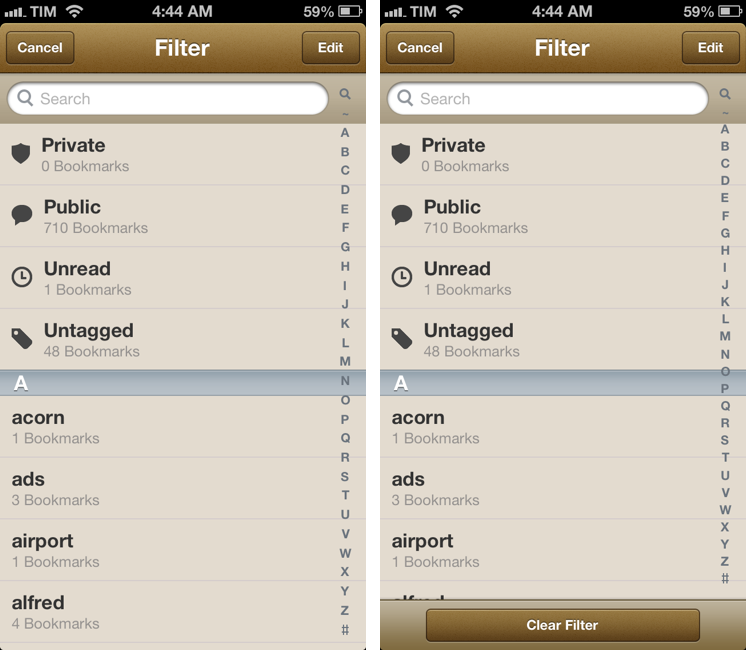
Tag browsing is probably the biggest new feature in this update. You can tap on a new button in the bottom toolbar to bring up a Filter menu containing a search bar, shortcuts for Private/Public/Unread/Untagged bookmarks, and an alphabetical list of all your Pinboard tags. Each tag shows the number of existing bookmarks assigned to it in your account and can be tapped to view them in the main screen. To go back to viewing all bookmarks without browsing by tag, you can enter the screen again and select Clear Filter. You can also tap & hold a tag to share its Pinboard URL.

I like how you can select multiple tags, but I wish the app was capable of showing me results that matched all criteria, rather than any of them; for instance, I often browse a page that contains bookmarks tagged with “python” and “pythonista”, while Pinbook will show it as “python” or “pythonista”. It’s a minor difference that I’m sure Collin will consider.

Bookmarks can now be edited from the Bookmarks screen. Hitting Edit will open an editing interface to modify single bookmarks or multiple ones at once if you want to delete them or make them as read. You can now also tap & hold a bookmark to quickly show an Edit/Mark as Read/Share menu.

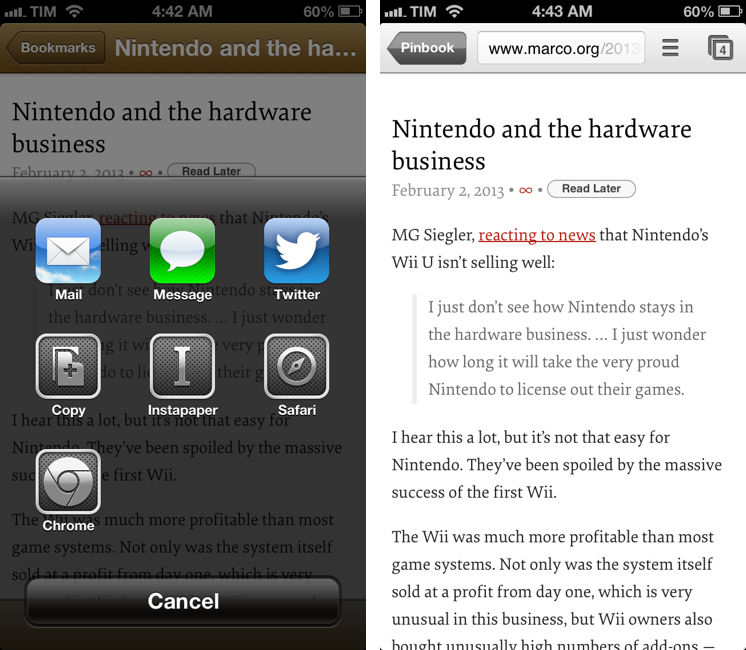
My favorite new feature of version 1.3 is the addition of x-callback-url and support for opening links in Chrome. Thanks to x-callback-url, a link opened in Chrome will show a “Pinbook” button to go back to the app (shown above); with x-callback-url built-in, you can also construct URLs that will take you back to other apps after a bookmark has been added. Therefore, I update my Safari and Chrome bookmarklets to take advantage of the new functionality.

Safari

javascript:window.location='pinbook://x-callback-url/add?url='+encodeURIComponent(location.href)+'&title='+encodeURIComponent(document.title)+'&x-source=Safari&x-success='+encodeURIComponent(location.href)+'&x-cancel='+encodeURIComponent(location.href)

Chrome

javascript:window.location='pinbook://x-callback-url/add?url='+encodeURIComponent(location.href)+'&title='+encodeURIComponent(document.title)+'&x-source=Chrome&x-success=googlechrome://&x-cancel=googlechrome://'

You can imagine the sort of workflows that are made possible by x-callback-url. Just to name two: you could create a Mr. Reader service that sends selected text from an article to Pinbook as description (alongside title and URL) and then goes back to Mr. Reader; or, you could create a Launch Center Pro action that sends a URL in the clipboard to Pinbook and then launches the Pinboard website in Safari or Google Chrome.

Pinbook continues to be one of my most used iOS apps. Version 1.3 is available on the App Store.