Federico Viticci

10804 posts on MacStories since April 2009

Federico is the founder and Editor-in-Chief of MacStories, where he writes about Apple with a focus on apps, developers, iPad, and iOS productivity. He founded MacStories in April 2009 and has been writing about Apple since. Federico is also the co-host of AppStories, a weekly podcast exploring the world of apps, Unwind, a fun exploration of media and more, and NPC: Next Portable Console, a show about portable gaming and the handheld revolution.

Flipboard’s Move From “Social Magazine” To “Internet Magazine”

Last night, Flipboard released a 1.9 update for its iPhone and iPad app that, among various fixes and new features, introduces one important addition to the social magazine: audio. As the company writes on their blog:

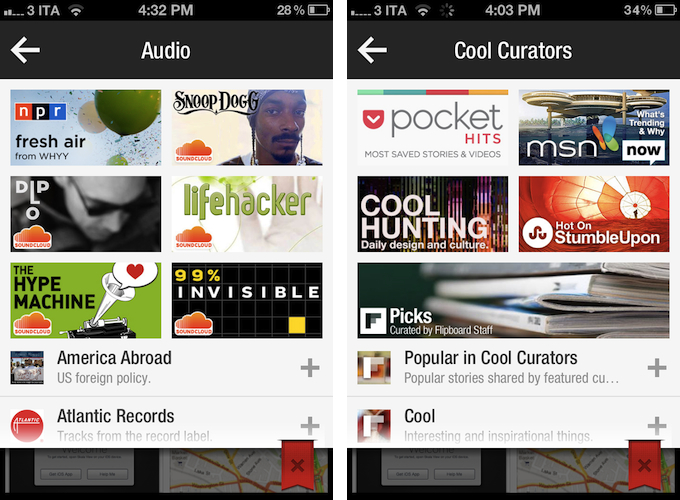
Our Content Guide is now chock-full of some of the best sounds we could find. We’ve launched new partnerships with NPR and PRI and scoured SoundCloud’s massive community of sound creators to bring you some of our favorites—artists like Snoop Dogg and Diplo; music labels like Atlantic Records and Ninja Tune; podcasts from The New Yorker and Slate; and segments from shows like Radiolab and Science Friday.

Right now, support for audio content is mainly implemented through SoundCloud, which received a new login option in the app’s settings, and NPR and PRI, which have agreed on a partnership with Flipboard to make content available in the app’s content guide, properly reformatted to fit Flipboard’s unique style and interactions. In Flipboard 1.9, support for audio means you can start playing a podcast featured in the content guide (such as TWiT or TNW Daily Dose) or any content available in your SoundCloud account, and go back to browsing links and photos as Flipboard can keep playing audio while you’re reading something else. The app will show up as an audio source in the iOS multitasking tray, and you can control audio playback from within the app itself too with a “note” icon in the upper toolbar (on iPhone) that will display a folder-like animation for viewing and pausing audio.

Looking back at Flipboard’s evolution over the past months, I think support for audio in version 1.9 is yet another example of how the company has been gradually and relentlessly drifting away from a system that simply aggregates “your social links” to embrace a broader vision that’s turning Flipboard into “an Internet magazine”, whether it’s social or not.

Flipboard started off as a neat app to give a magazine-like layout to links shared on Twitter and Facebook. Then came Google Reader, Flickr, and Instagram with more content types and visual previews. The company started announcing partnerships with publishers to display their content beautifully inside Flipboard, and with more content came an explosive growth that led to a re-imagined version 1.5, focused on showcasing “popular stories” and making more great content available to users through a content guide that wasn’t necessarily social – rather, it was aimed at letting users know that more content was available on Flipboard beyond their existing social accounts. After that, Flipboard released the long-awaited iPhone app, unifying accounts with over-the-air sync and bringing Cover Stories – a dedicated view for interesting and popular stories – over to the iPad app.

While still prominently “social” in the way it puts the focus on accounts and supported services, Flipboard has become perfectly usable and enjoyable even without necessarily configuring a Twitter or Facebook account. The company has put great effort on building a content guide that spans different countries, themes, content types, and publishers. Flipboard aggregates top content shared by Pocket, it collects the best things found on the Internet under the “Cool Curators” section, and, alongside the usual Tech and Business news, displays popular videos from YouTube, Vimeo, and even Colbert Report in a Video category. With version 1.9, audio has been brought into the mix.

The social component of Flipboard is still strong (version 1.9 also brings “related sections” for social networks, such as “tweets mentioning you”), but it hasn’t been the only way to enjoy Flipboard for quite some time, and this is more visible than ever in the latest update. Flipboard doesn’t simply create a personalized magazine out of content “being shared with me” anymore – it still does that, but at the same time, it allows me to find other great content that I wouldn’t have discovered otherwise.

More than a “social magazine”, the “Internet magazine” aggregates and reformats content that is also social, but not strictly so. Curation and APIs are keys here. Flipboard was already rumored to be considering support for movies and TV shows last year. Would it be too absurd to think the app will someday gain compatibility with Rdio and Spotify to let you find the best music from your favorite streaming service? How about YouTube and Vimeo, to let users also find videos that are bring shared in those social accounts? According to TechCrunch, ”Flipboard will look into other ways it can do more with video”.

With social accounts, APIs, search, and curation, Flipboard has become more than a social magazine: it is restructuring Internet content for the screens of mobile devices with the help of a strong social counterpart.
The iPad Is The Future Of Education

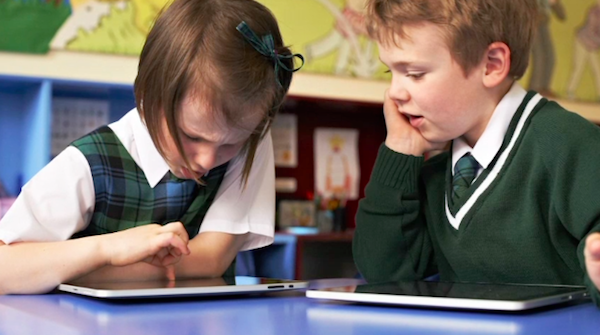
For the past years, Apple has been showcasing the educational advantages of devices like Macs, iPhones and iPods on its Apple in Education website. Since the introduction of the iPad in 2010, however, the company has been making an effort to position the device as the best tool now available to teachers and students to improve the quality of education and level of engagement. The dedicated iPad in Education webpage showcases recent moves by Apple such as iBooks Textbooks and the iTunes U iOS app.

While we have covered schools and educational institutions adopting iPads in the past, the latest profile posted by Apple today on their UK website is quite possibly the best example of iPad in education to date. Those of you who have been following the progress of iPad deployment in schools may remember Fraser Speirs’ iPad Project, which made headlines throughout 2011 as it was the first one-to-one iPad deployment to every people in a school. Speirs documented the process of giving an iPad to every teacher and student at Cedars School of Excellence (Scotland) on his personal website, and today Apple has posted a video profile showing how “Cedars students boost learning with iPad”.

The full video is available here, and it shows teachers and kids using the iPad as a modern, regular tool in their daily lives that has improved the way they create and share content of any kind. One particular segment towards the end of the video struck a chord with me:

I don’t think we could ever go back from where we are right now with the iPad. The only way’s really forward – to more access to knowledge, more empowerment, more creativity…all these things in the classroom”.

As I wrote before, Apple’s education strategy will be interesting to follow. Actually seeing kids and teachers who have been using the iPad as a real substitute for and enhancement over old learning tools for over a year now, however, reminds me that, no matter Apple’s strategy as a company, software is the future of education, and the iPad is giving our kids a bit of that future today.

Detractors of the iPad as a learning tool point at the management required by connected devices to ensure that, in the classroom, the possibilities offered by the Internet don’t get in the way of teachers’ requirements and students’ attention. Fortunately, this is something Apple has been addressing since day one, and that has recently improved with more tools.

Every major change in our society and culture will be awarded an equal amount of optimism and skepticism. As someone who’s been lucky enough to find his dream job in the possibilities offered by the Internet and software, I tend to see skepticism as a challenge, rather than a roadblock. People like Fraser Speirs are proving that, beyond analysts and blog posts, a better education for our kids is possible, today, every day, with a device that’s making kids eager to learn.

Free of the constraints of paper and old, disconnected learning material, the iPad brings new challenges and practical issues to overcome. With time, patience, and willingness to look past rules established in societies different than ours, we must make sure these devices we have built and ecosystems we have nurtured won’t be remembered for Angry Birds, because among other things, our kids deserve a better, modern education. And we have to start building it today.


Bloomberg: Apple Announcing Thinner MacBook Pro at WWDC

Bloomberg: Apple Announcing Thinner MacBook Pro at WWDC

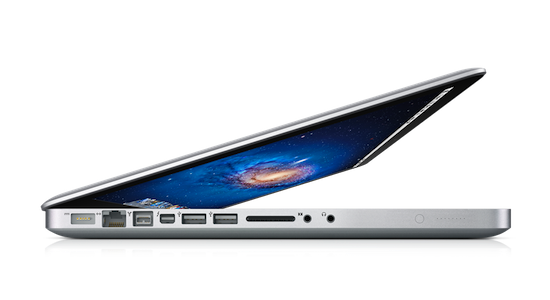
Following today’s report from The Wall Street Journal about new iCloud features set to be announced at the upcoming WWDC in June, Bloomberg has weighed in confirming a rumor posted today by 9to5Mac about the company’s new MacBook Pro line.

The MacBook Pro machines, to be unveiled at Apple’s annual developers conference starting June 11, also will feature high- definition screens like those on the iPhone and iPad, as well as flash memory to cut startup times and extend battery life, said the people, who asked not to be identified because the plans haven’t been made public.

According to Bloomberg, Apple may also announce the release of the next version of OS X, Mountain Lion, at WWDC. Previously, Apple had simply confirmed the desktop OS upgrade would be coming “late summer”, without specifying a release date. The publication also suggests Ivy Bridge chips from Intel will be used, as previously reported. Retina displays for Macs is something Apple has been experimenting with in software releases for quite some time now, too, albeit such hardware implementation will require app and website developers to update their graphics for the new screens.

As many are speculating, two distinct reports about WWDC in one day seem to suggest a “controlled leak” by Apple to set expectations for the event, something the company did in the past. Prior to the iPhone 4S’ announcement, for instance, The Wall Street Journal pinpointed the device’s release timeframe and carrier support in the US, a move that several blogs connected to a “controlled leak” amidst rampant rumors during the summer. Apple itself went on the record saying those rumors negatively impacted the iPhone’s performances during the quarter.

WWDC ‘12 kicks off in San Francisco on June 11.

Permalink

WSJ: iCloud Getting Photo Sharing and Commenting, Video Syncing at WWDC

WSJ: iCloud Getting Photo Sharing, Commenting, Video Syncing at WWDC

A new report by The Wall Street Journals claims Apple will be announcing a series of new features for iCloud at WWDC, including a revamped photo sharing system with support for user comments.

The new features, expected to be announced at Apple’s world-wide developer conference beginning June 11, will allow iCloud users to share sets of photos with other iCloud users and to comment on them, these people said. Currently, users can only store one set of photos in iCloud through a feature called Photo Stream, which is designed to sync those photos to other Apple devices, not share them.

The full report is available (behind paywall) at The Wall Street Journal. The publication also confirms iCloud.com will be getting support for Notes and Reminders web apps, as we previously detailed based on a “leaked” beta version of the service.

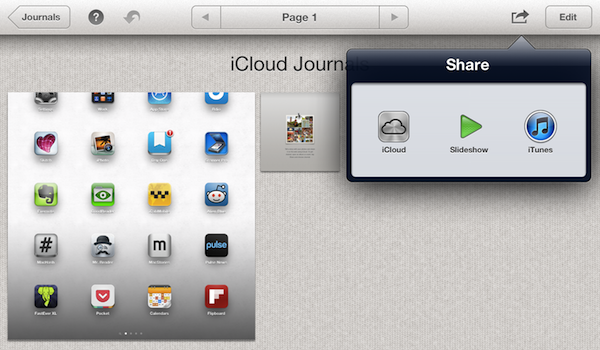
However, to say that “users can only store one set of photos in iCloud through a feature called Photo Stream” is incorrect. A feature of iPhoto for iOS called “Journals” and released in early March allows users to build sets of photos and share them publicly with a URL through iCloud. These Journals even support additional graphics such as backgrounds, text captions, and they can be viewed in any browser, allowing users to zoom in on single photos and download them. Here is an example of iCloud Journal.

Whilst it would make sense for Apple to simplify iCloud photo sharing and allow easier commenting especially from mobile devices, Photo Stream isn’t the only option to “store one set of photos”. Journals are limited to iPhoto, which is a separate app sold on the App Store that doesn’t come pre-installed on iOS devices, but they certainly show that Apple has been experimenting with iCloud-based public sharing for quite some time, even offering an API to developers for that (albeit limited to storage, with no display options as the WSJ implies here). With MobileMe approaching its deadline of June 30, it’s also worth keeping in mind that Apple’s existing solution to store and share photos, MobileMe Gallery, will stop functioning alongside the service, so it wouldn’t be a surprise for Apple to offer an alternative.

Apple’s WWDC is scheduled to kick off in San Francisco on June 11. Developers have been asking for more tools to integrate their apps with iCloud, and it’s very likely that Apple will announce additions to the service, as well as offer previews of iOS 6 and OS X Mountain Lion at its upcoming developer event.

Permalink

Sparrow 1.2 for iPhone Brings Landscape Support, Labels Management

Sparrow 1.1 brought minor enhancements to the best alternative email client for iPhone, including a built-in browser and a Send & Archive option. Sparrow 1.2, released today, adds much-requested support for landscape mode to an email app that, in this new version, also lets you manage email labels and folders.

I have been testing Sparrow 1.2, and while I am no fan of landscape mode on iOS (I never use such functionality on the iPhone), I recognize how some users are going to perform some serious typing for their email replies thanks to Sparrow 1.2. The whole compose interface has been updated to take advantage of the different orientation.

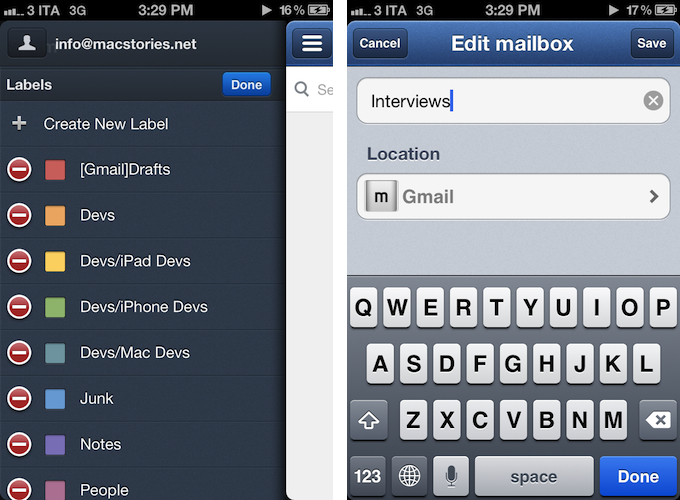
Two features that I have been enjoying in Sparrow 1.2 are proper label/folder management, and improved navigation between messages. The latter brings a nicer, cleaner design to the message “preview” you get when pulling a message up to reveal the next one. Folder/label management, on the other hand, now lets Sparrow directly create, edit, and delete labels or folders without leaving the app to use a web interface or desktop client.

I have tested the feature with Gmail (both regular and Google Apps accounts) and iCloud, and I was pleased to see Sparrow differentiated visually between labels (for Gmail) and folders (for iCloud mail). Because label management has been implemented in the mid panel – the one Sparrow uses to list an account’s mailboxes – you won’t be able to swipe-to-delete; instead, management has been assigned to a new “Edit” button that shows up in the Folders or Labels sections of a single account.

Meanwhile, the Sparrow team has also confirmed that Apple won’t allow them to implement push notifications through the VoIP framework, as they did in early betas of the app. Sparrow will have to build notification support on the server’s side, and the developers confirm this will require a yearly subscription for Sparrow users willing to use push notifications. Previously, the Sparrow developers said push support would be coming “with or without Apple”.

With proper label management, landscape mode, localization in 9 additional languages, and bug fixes, Sparrow for iPhone continues its march towards becoming the best email client for iPhone. You can find Sparrow 1.2 on the App Store today.


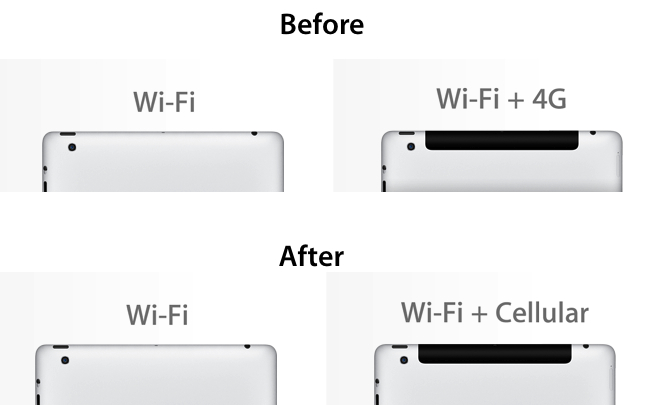
Apple Starts Changing “iPad WiFi + 4G” Name To “WiFi + Cellular”

As noted by 9to5mac, Apple has started changing the “iPad WiFi + 4G” name to “iPad WiFi + Cellular” in some countries. Currently, the change is live on several international versions of Apple.com, including the US, UK, Australia, Canada, and Hong Kong. Other countries, such as Italy or France, still report the new iPad as “iPad WiFi + 4G” in the Tech Specs page of the product in what appears to be a gradual update of the device’s name. On the websites where the change has already taken effect, a version cached by Google shows the old “WiFi + 4G” product name.

The new iPad, available in almost 90 countries, comes with “4G” networking capabilities, albeit only in some countries, and on selected carriers with support for LTE. Because of Apple’s initial marketing of the device as “4G” regardless of country availability, the company came under scrutiny from Australian and UK regulators, who claimed Apple was falsely advertising the iPad as “4G” and misleading customers without properly specifying such feature was dependent on carrier support.

In Australia, Apple was forced to change its marketing for the new iPad by stating on its website the device wasn’t compatible with Australian 4G networks. In spite of the iPad still working with 3G networks, however, Apple decided to keep the “WiFi + 4G” name even after the initial clarification. This appears to be changing now as the company rolls out an updated product name across all its international websites.

Apple’s iPad Tech Specs page carrying the new name is available here.


Paperless

Paperless

For the past year, I have been getting rid of paper to archive everything – from receipts to medical bills or business cards, everything – digitally, securely, online. In doing so, I found David Sparks’ Mac Power Users a great resource to learn more about apps and workflows I can use on my Mac and iPad to capture, organize, and archive documents I may need again someday. For the past few weeks, I have especially enjoyed using Scanner Pro on my iPad in combination with a Doxie Go for “bigger” documents and Notability, which is a fine app that lets me annotate webpages and documents and save them into Evernote. On the iPad, I keep a plethora of apps to work with PDFs, but my most used ones remain PDF Expert, PDFPen, and GoodReader.

This week, David published his first book about going paperless, aptly named The MacSparky Paperless Field Guide. Put simply, if you’re planning on removing paper from your life or you’re even slightly interested in this whole idea of digitalizing bits of paper, David’s book is the guide you need to achieve a state-of-the-art system. I have been reading the book, and it’s full of tips and broad recommendations to illustrate how you can capture documents, the apps you can use (both on OS X and iOS), and the best techniques you can rely on to future-proof your PDFs. I have already discovered a couple of new apps thanks to David’s book.

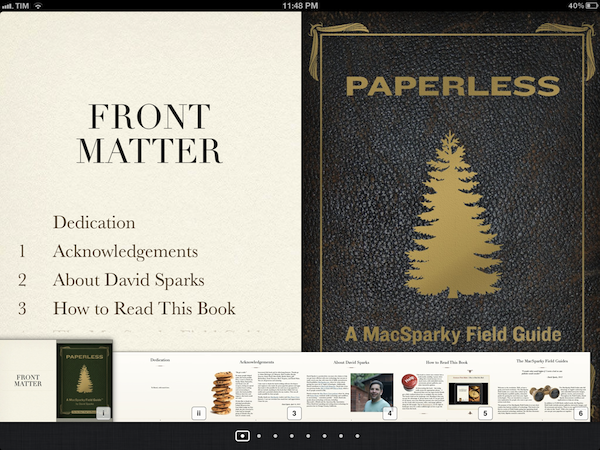
Even better, Paperless has been entirely built using iBooks Author, and it shows: it’s not exactly a “book” as much as it’s an interactive guide with support for two iPad orientations (with different layouts), image galleries, contextual menus, over an hour and a half of screencasts, and iBooks Author’s fancy touch-based navigation. This is the future of independent publishing.

Paperless is only $4.99 on the iBookstore.

Permalink

Astronut

Astronut

One of my favorite iPhone games, Astronut by The Iconfactory, was released on the iPad earlier this week. In 24 levels fully optimized for the Retina display, you can enjoy Astronut’s well-known game mechanics (a floating astronaut jumps from planet to planet avoiding enemies and obstacles) with controls reworked for the device’s larger display.

Graphics and sound effects aside (they are both top-notch), I am liking Astronut for iPad even more than the iPhone version because of its control scheme. Astronut for iPad plays in portrait mode, with buttons to jump and activate boost placed at the sides of the screen where your thumbs typically are. This is extremely intelligent game and interface design. But there’s more: you can use Astronut for iPhone as a remote – this has allowed me to prop my iPad on a stand in my living room, and enjoy the game with my friends, sharing the iPhone as a controller.

Only $1.99 on the App Store. Don’t miss the video.

Permalink

New iOS 6 Maps App To “Blow Your Head Off”

New iOS 6 Maps App To “Blow Your Head Off”

John Paczkowski at All Things Digital confirms a rumor published this morning by Mark Gurman at 9to5mac: Apple’s forthcoming iOS 6, set to be announced at WWDC, will feature a new Maps application based off Apple’s new mapping backend.

We’ve independently confirmed that this is indeed the case. Sources describe the new Maps app as a forthcoming tent-pole feature of iOS that will, in the words of one, “blow your head off.” I’m not quite sure what that means, and the source in question declined to elaborate, but it’s likely a reference to the photorealistic 3-D mapping tech Apple acquired when it purchased C3 Technologies.

That Apple was going to replace Google Maps with a different technology – and quite possibly its own – is nothing new, at least from a rumor perspective. In the past years, a series of tidbits of information and facts seemed to suggest that Apple was on track to deliver a different Maps application for iOS in the future. Last summer, a series of legal disclaimers pointed at various mapping technologies being used by Apple in iOS, but the rumored new mapping tech that was allegedly meant for iOS 5 didn’t ship with the major update in October, as Apple and Google renewed a deal to use Google Maps in iOS.

In April 2011, Apple confirmed they were ”collecting anonymous traffic data to build a crowd-sourced traffic database”, although without specifying whether such service could see a public implementation in a new Maps app for iOS. More than a year ago, we wrote how “in the past years, several job listings on Apple’s website hinted at open positions in the iOS team for map engineers and navigation experts, suggesting that Apple was working on its own proprietary solution to ditch Google Maps on the iPhone, iPod touch and iPad. The acquisitions of mapping companies Placebase and Poly9 in 2009 and 2010, respectively, gave some credence to the reports that pointed at Apple willing to become the next major player in the mobile mapping scene.”

Most recently, Apple officially acknowledged they are using OpenStreetMap data in iPhoto for iOS.

Permalink