Federico Viticci

10804 posts on MacStories since April 2009

Federico is the founder and Editor-in-Chief of MacStories, where he writes about Apple with a focus on apps, developers, iPad, and iOS productivity. He founded MacStories in April 2009 and has been writing about Apple since. Federico is also the co-host of AppStories, a weekly podcast exploring the world of apps, Unwind, a fun exploration of media and more, and NPC: Next Portable Console, a show about portable gaming and the handheld revolution.

Rovio Officially Announces “Angry Birds Space” with New Trailer

The first new game by Rovio in over a year, Angry Birds Space is the next step in the company’s franchise, and it’s coming out on March 22. Previously teased online, Rovio has now updated the game’s webpage with an official trailer featuring a NASA engineer talking about the game and the new physics engine behind it. Based in a weightless environment, the basic gist of the game seems to be that in such conditions, trajectories are affected by gravity, and objects end up following curves, rather than straight lines. Using a “galactic slingshot” in footage shot on-location at the International Space Station, NASA’s Don Pettit explains how astronauts and scientists have to consider these changes in physics and gravity when they are in outer space; apparently, this mechanic will be brought to Angry Birds Space in a fairly accurate representation.

Angry Birds isn’t new to physics. In fact, we could say that the entire franchise has been so successful thanks to its user-friendly implementation of actual law of physics that take into account gravity, weight, trajectories, and speed through a multitouch interface. From what we can see in the trailer, surprisingly demoed on a Galaxy Note, the new Angry Birds will work as a crossover between the original game and Super Mario Galaxy – those who have played Nintendo’s Wii game might remember how planets affected Mario’s jumps and moves when floating in space. It looks like Angry Birds Space will somehow translate that gameplay in 2D scenes while mixing it with new birds, new pigs, and new actions with the ultimate goal of giving the franchise a new spin and an entirely new set of physics users will have to adapt to.

Angry Birds Space will be released on March 22 on iOS, Android, Mac, and PC. Check out the official video below.

Update: More screenshots and information directly from Rovio.

Features:

  • 60 interstellar levels!
  • Regular free updates!
  • Brand new birds!
  • Brand new superpowers!
  • Zero-gravity space adventures!
  • Trick shots using planets’ gravity!
  • New in-app purchases for iOS!
  • Hidden bonus levels!
  • Beautifully detailed backgrounds!

Description:

After a giant claw kidnaps their eggs, the Angry Birds chase it into a wormhole and find themselves floating in a strange new galaxy – surrounded by space pigs! Luckily the Angry Birds have super powers of their own…

Angry Birds Space features 60 interstellar levels on planets and in zero gravity, resulting in spectacular gameplay ranging from slow-motion puzzles to lightspeed destruction. With regular free updates, new in-app purchases, brand new birds, brand new superpowers, and a whole galaxy to explore, the sky is no longer the limit!

Screenshots


Read more


iPhoto for iOS Review

iPhoto for iOS was released on the App Store earlier today, and after an enthusiastic introduction at Apple’s media event in San Francisco, the latest photo editing app from Cupertino received a controversial “welcome” on various blogs and Twitter streams as users got their hands on the all-new interface and photo management system. So what’s all the fuss about iPhoto for iOS?

I have been trying the app on my iPad 2 and iPhone 4S (running iOS 5.1, of course, as it’s a requirement) for the past few hours, and I think that it is very powerful. As I’ll illustrate in a bit, Apple did manage to squeeze some advanced photo editing and refinement technologies in the mobile version of iPhoto, putting it on the same level if not above iPhoto for Mac when it comes to editing, making quick adjustments, and interacting with your photos. Once mastered, the new gestures and tap commands can be quite powerful, although the app can have a steep learning curve. I also believe, however, that iPhoto for iOS suffers from a serious file management problem, in that it’s the best example of iOS’ lack of a centralized file system where apps are able to easily “talk” to each other and share files or modifications to them.

I want to get this out of my system before I get to the (very) good stuff. If you were hoping to see Apple coming up with an effortless way of importing photos avoiding duplicates and manual management, well, I’m sorry, you’ll be disappointed with iPhoto for iOS. This version of iPhoto is yet another data silo that is self-contained, and won’t simply “sync” the changes it makes to photos out of its closed environment.

I say “simply”, because there are exceptions in iPhoto for iOS, as it doesn’t use the exact same system of iPhoto for Mac when it comes to finding photos on your device. Because iOS devices come with a systemwide “Camera Roll” that’s accessible by other apps, Apple engineers had to make sure iPhoto could access such location – and here’s where I started to run into issues. Read more


Apple to Developers: Update Your Apps for iOS 5.1

Following the release of iOS 5.1 earlier today, Apple has updated its developer portal with a new “Create Apps for iOS 5.1” webpage, asking developers to start submitting apps written specifically with the iOS 5.1 SDK. The checklist includes links to the iOS 5.1 SDK release notes, Xcode 4.3.1 for developers, and a detailed explanation of the various functionalities introduced in iOS 5.

iOS 5.1, the latest version of the world’s most advanced mobile operating system is now in the hands of millions of iOS customers. Install iOS 5.1 now and download Xcode 4.3.1 with iOS 5.1 SDK from the Mac App Store, so you can test and submit your iOS 5.1 apps today.

Furthermore, Apple has updated the iOS Human Interface Guidelines with new icon size information, as well as the iOS App Programming Guide.

Developers can head over this page to check out Apple’s resources for developing and submitting iOS 5.1 apps.


“Apple Configurator” Released To Mass Configure iOS Devices

“Apple Configurator” Released To Mass Configure iOS Devices

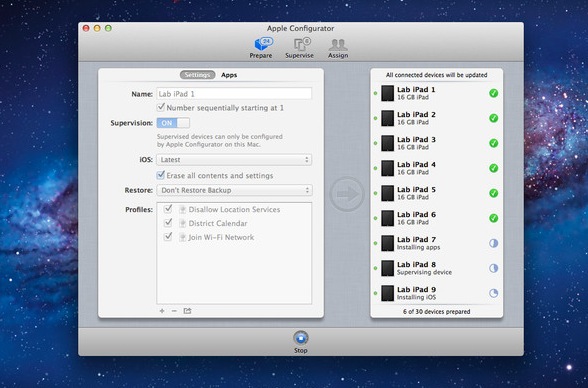
Apple has released a new free app on the Mac App Store, a utility called “Apple Configurator” to ease the mass configuration process of iOS devices for businesses and schools. Whilst the support page for the app still has to become available, it appears the app will allow those who are looking for a simple deployment solution to set Profiles for iOS devices, update iOS, install apps, and set restrictions. It’s certainly a welcome addition that confirms Apple’s focus in education, and in helping schools manage iOS devices and distribute applications.

Apple Configurator makes it easy for anyone to mass configure and deploy iPhone, iPad, and iPod touch in a school, business, or institution.

Apple Configurator is available for free here.

Permalink

Apple Releases iTunes 10.6

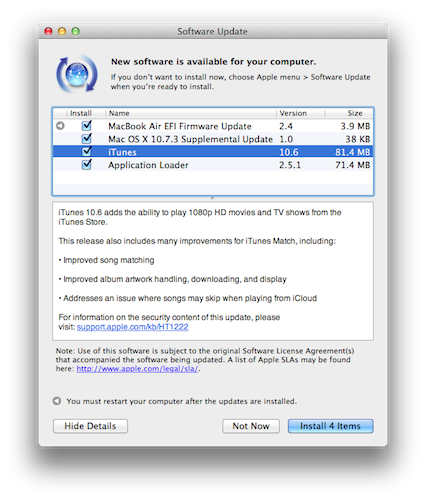
Following today’s new iPad announcement, Apple has released a new version of iTunes, which reaches 10.6. The update is now available through Software Update, and will be up soon on Apple’s website. iTunes 10.6 brings the possibility to play 1080p HD movies and TV shows from the iTunes Store, and “many improvements” for iTunes Match, listed below.

  • Improved song matching
  • Improved album artwork handling, downloading, and display
  • Addresses an issue where songs may skip when playing from iCloud

iTunes 10.6 is out now in Software Update.


Apple Releases iOS 5.1 [Direct Links, Screenshots]

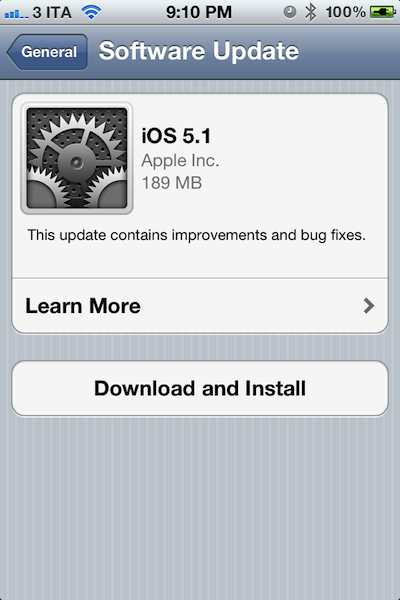
Apple just released the new version of iOS, iOS 5.1, through Software Update. Notable new features in this update include Siri support for Japanese users, a new camera shortcut, and new Camera app for iPad. Full changelog below.

This update contains improvements and bug fixes, including:

  • Japanese language support for Siri (availability may be limited during initial rollout)
  • Photos can now be deleted from Photo Stream
  • Camera shortcut now always visible on Lock Screen for iPhone 4S, iPhone 4, iPhone 3GS and iPod touch (4th generation)
  • Camera face detection now highlights all detected faces
  • Redesigned Camera app for iPad
  • Genius Mixes and Genius playlists for iTunes Match subscribers
  • Audio for TV shows and movies on iPad optimized to sound louder and clearer
  • Podcast controls for playback speed and a 30 second rewind for iPad
  • Updated AT&T network indicator
  • Addresses bugs affecting battery life
  • Fixes an issue that occasionally caused audio to drop for outgoing calls

At the moment of writing this, the update server can’t be reached with iTunes, but the over-the-air update is working through iOS devices. We’ll update this story with more details as we install iOS 5.1 on our devices. Read more


New iPad & Tablet Comparison Chart


The new iPad (our March 7 news hub) is a thing of beauty. As we’re detailing in our complete overview right now, the device features a high-res Retina display, supercharged dual-core A5X processor with improved graphics for smooth gaming performance and video playback, Bluetooth 4.0 connectivity, LTE, and a bunch of new apps from Apple. Together, these new features complete a package owners of the original iPad will likely have a hard time saying “no” while considering an upgrade this year. And what better way to put this upgrade question many will face later this month with a handy comparison chart?

At MacStories, we typically don’t care about tech specs as much as others do. We value the experience more than speeds and feeds. But we also think that, for the sake of information, tech specs are a set of data worth reporting and disclosing to those who care – that’s what Apple does with its Tech Specs page on every product.

So here’s what you’ll find below: a comprehensive chart comparing the new iPad to previous models. We have included specs and price – as well as a bunch of other tablets so you’ll get the big picture of what Apple has to offer with its latest iPad.

Last, make sure to check out our March 7 news hub for a roundup of everything that went down at the Yerba Buena Center today, as well as our New iPad Overview.

Full-size comparison image here.


Apple Posts “New iPad” Event Video

Apple has posted a video for its new iPad event that took place in San Francisco earlier today. The video can be streamed here, and a higher quality version should be made available in a few hours through iTunes.

StreamingApple Events

Also, here’s a recap of our coverage for today’s event:

The Apple TV Gets A Refresh: New UI, 1080p Playback, Available on March 16

This Is The New iPad: Our Complete Overview

Apple Announces iPhoto for iOS: Coming Today at $4.99

We will post additional news on the site’s homepage, or tweet as @MacStoriesNet throughout the day.

Update: The keynote is now available for download in iTunes.


Apple Announces iPhoto for iOS: Coming Today at $4.99

At the media event in San Francisco, Apple today announced an all-new version of iPhoto for iPad. Giving users new ways to organize and browse their photos, iPhoto for iPad comes with new effects, new gestures, multi-touch editing, and a new feature to seamlessly share photos between devices.

With a dark interface completely rebuilt for the iPad, iPhoto makes heavy use of gestures to browse and edit photos. With a simple swipe gestures from the side of the screen, users can bring up a list of photos to edit. A double-tap will allow users to automatically find similar pictures, or enter full-screen mode. With support for EXIF information and sharing on various social networks including Flickr, iPhoto for iPad is set to become a great mobile companion to photographers – the app even features an auto-enhance mode to instantly enhance various aspects of an image, as well as other advanced effects. Brushes, white balance, cropping – they can all be accessed through multi-touch gestures and commands in the new iPhoto for iPad.

Aside from skeuomorphic brushes, iPhoto for iPad comes with a new Photo Journals functionality that lets users build “journals” using photos and additional information such as location and weather data using the stored GPS info and various EXIF data from images. Users can move photos around, add captions, choose favorites, and share the results with their friends.

iPhoto is a universal app (runs on the iPhone as well), and it will be released today at $4.99. Check out our complete March 7th coverage here.

[image via]