Federico Viticci

10804 posts on MacStories since April 2009

Federico is the founder and Editor-in-Chief of MacStories, where he writes about Apple with a focus on apps, developers, iPad, and iOS productivity. He founded MacStories in April 2009 and has been writing about Apple since. Federico is also the co-host of AppStories, a weekly podcast exploring the world of apps, Unwind, a fun exploration of media and more, and NPC: Next Portable Console, a show about portable gaming and the handheld revolution.

Apple Releases OS X 10.7.2

As part of this week’s iOS 5 and iCloud rollout, Apple has released OS X 10.7.2, an update for OS X Lion users that brings full iCloud compatibility to the Mac, as well as various new features and bug fixes.

From the changelog:

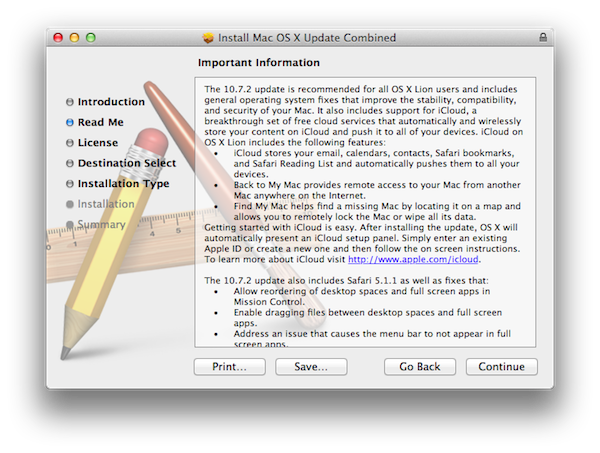
The 10.7.2 update is recommended for all OS X Lion users and includes general operating system fixes that improve the stability, compatibility, and security of your Mac. It also includes support for iCloud, a breakthrough set of free cloud services that automatically and wirelessly store your content on iCloud and push it to all of your devices.

Getting started with iCloud is easy. After installing the update, OS X will automatically present an iCloud setup panel. Simply enter an existing Apple ID or create a new one and then follow the on screen instructions. To learn more about iCloud visit http://www.apple.com/icloud.
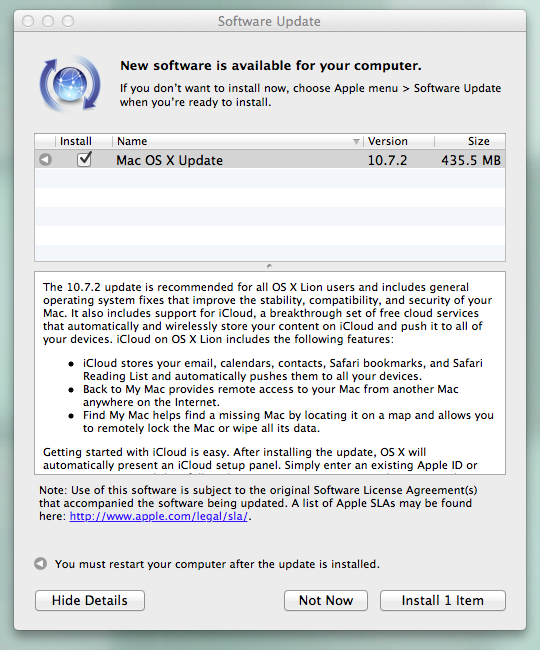
With 10.7.2, Apple is now allowing Lion machines to integrate with iCloud for email, calendars, contacts, Safari bookmarks and Reading List; these items will automatically be stored in the cloud, and pushed across all your devices. As Apple previous detailed in the iCloud transition Q&A, some features of the old MobileMe service have been maintained in iCloud, such as Back to My Mac (remote access to a Mac from another Mac on the Internet) and Find My Mac, a new feature integrated with Find My iPhone that will allow Mac users to find a missing Mac by locating it on a map through iCloud.com or the Find My iPhone app. Find My Mac works similarly to its iOS counterpart in that owners of a stolen or missing Mac can locate it, track it, and send messages to the Mac’s screen remotely. It’s also possible to lock a Mac and remotely wipe it. Read more
Apple Releases iOS 5 [Direct Links]

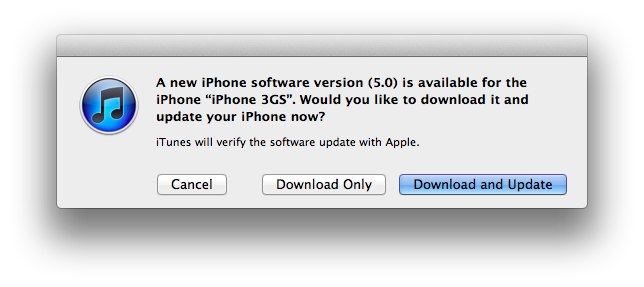
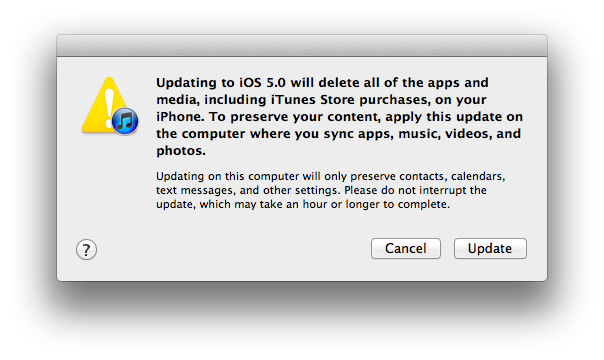
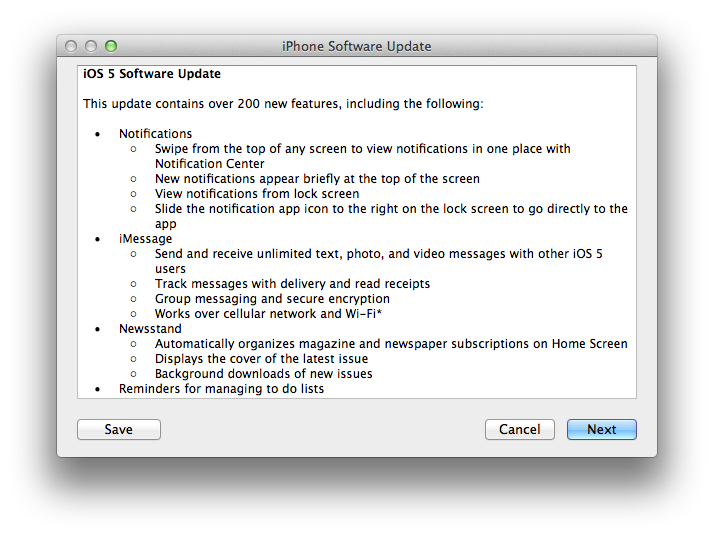
Apple today released iOS 5, a major update for the iPhone, iPad and iPod touch that adds over 200 new user features including Notification Center, iMessage, iCloud support and PC Free. iOS 5 is now available for download in iTunes; to install the new software on your iOS device, connect it to iTunes via USB and “Check for Updates” in the device’s info screen.

Originally previewed and seeded to developers at WWDC in June, iOS 5 is a major update that enables developers to implement thousands of new APIs to take advantage of Apple’s latest technologies in their apps. Apple has already started approving third-party apps built for iOS 5, with several of them available in the App Store today. iOS 5 introduces new functionalities like Notification Center, a new systemwide interface for keeping track of missed notifications; iMessage, a free text messaging solution for iOS 5 users; Twitter integration built into Safari, Photos, YouTube and Maps; iCloud, a new cloud service that automatically stores your content and wirelessly pushes it to all your devices, including Macs and PCs. iCloud, expected to roll out today as well, will allow users to keep their contacts, calendars, bookmarks, mail, notes and more in sync across multiple devices; the service is integrated into iOS apps and comes with a web counterpart available at iCloud.com.

Other features of iOS 5 include Mail and Safari improvements, a new camera button in the Lock Screen, AirPlay Mirroring to an Apple TV and a systemwide split keyboard to make it easier to type on the iPad.

For a complete overview of the new features of iOS 5, iCloud and editorial pieces on today’s software updates, visit this page on MacStories.

iOS 5 direct download links:


AirPort Utility Now Available for iOS 5

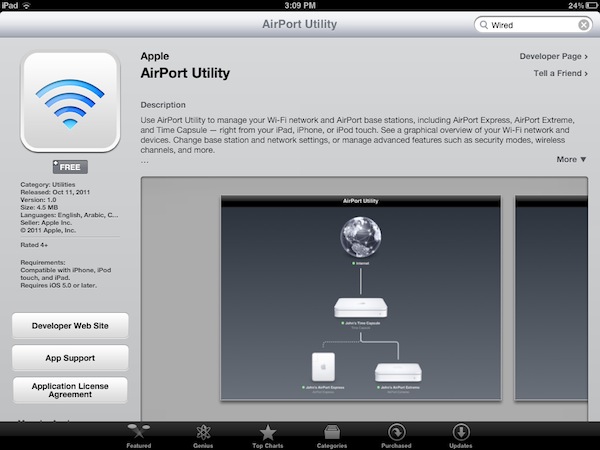
Apple today released AirPort Utility for iOS, an app to configure and manage AirPort devices on a local network. An early beta version of iOS 5 showed that Apple was building support for managing AirPort stations (such as the AirPort Express and AirPort Extreme) right into the operating system; however, as we noted last week the Golden Master release of iOS 5 included a link to download AirPort Utility for iOS from the App Store, which wasn’t available.

AirPort Utility requires iOS 5, which will become available publicly later today. You can install the app by clicking on “Manage This Network” on your iOS device’s WiFi settings for an AirPort station.

The app isn’t showing up in iTunes search yet, but here’s the direct link that should be available shortly: AirPort Utility

AirPort Utility provides a straightforward interface to manage AirPort devices on a local network. The app shows AirPort stations that are connected to the Internet, and on the iPad gestures are supported to zoom out the view and get a better visual of all the available devices. Tapping on the Internet icon will let you see the status of your connection with Router Address, DNS Servers and Domain Names; tapping on an AirPort Device will show a popover menu with the device’s name, IP Address, Serial Number, Software Version, Network and connected Wireless Clients. You can check out the connection status, IP Address and Hardware Address for each connected client.

Tapping the Edit button will enable you to configure various settings of an AirPort device, including File Sharing and Disks for an AirPort Extreme, DHCP and NAT, WAN Setup and Access Control. You can restart a base station from the app and restore it to default settings. You can manage the Internet Connection settings for the device, activate a Guest Network and change the WiFi Mode of an existing network. Overall, it appears the AirPort Utility app for iOS 5 has implemented much of the options available in its Mac counterpart.

More screenshots after the break. Read more


Apple Releases Find My Friends

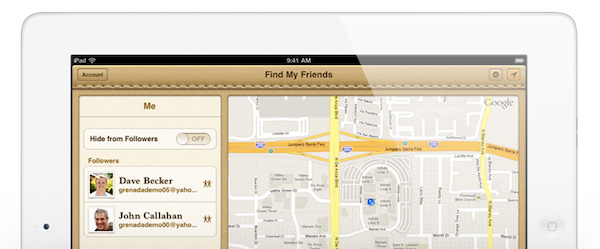
Apple today released Find My Friends, a new iCloud-based application that allows users to locate their friends on a map, and share their location with them. The Find My Friends app enables you to share your location with selected contacts, and see where they are  and what they’re up to on a convenient map interface. Find My Friends is integrated with Maps and Contacts, so you’ll be able to find routes to a specific place or check on the location of someone that’s already in your Address Book.

One of the key features of Find My Friends is temporary sharing, a functionality that enables users to share their location with a group of people for a limited period of time. Users can share location for a few hours, days, or weeks, and when the time’s up the app will automatically stop sharing. Users can accept and decline friends requests easily from Find My Friends, and Apple has also implemented Parental Controls for parents who’d like to restrict access to location settings.

Find My Friends can be installed by visiting iCloud.com on an iOS device and tapping on the link to install the app. The iCloud.com website was updated last night, allowing access to everyone with an iCloud account, also removing the “Beta” label from the homepage.

iOS 5 is required for the Find My Friends app. iOS 5 is expected to become available later today. If Find my Friends isn’t showing up in iTunes search yet, here’s the direct link that should become available shortly: Find My Friends

More iOS 5 coverage here.

Read more


Twitter Updates iOS App with iOS 5 Twitter Integration, New iPad DM Interface

Twitter released an update to its official iOS client today, adding an improved sign up experience, integration with Twitter’s own picture service, and a redesigned Direct Message view on the iPad. As we detailed with our coverage of Tweetbot 1.7 earlier today, iOS 5 is now allowing developers of Twitter-enabled apps to fetch account credentials directly from the iOS Settings app, rather than forcing users to re-authenticate with their accounts every single time. The official Twitter client, as we expected, implemented iOS 5’s single sign-on to allow users to get already-configured accounts from the Settings. The feature is optional and new accounts can still be added manually, but as I wrote with the Tweetbot update, it’s very convenient to be able to add accounts without entering usernames and passwords anymore.

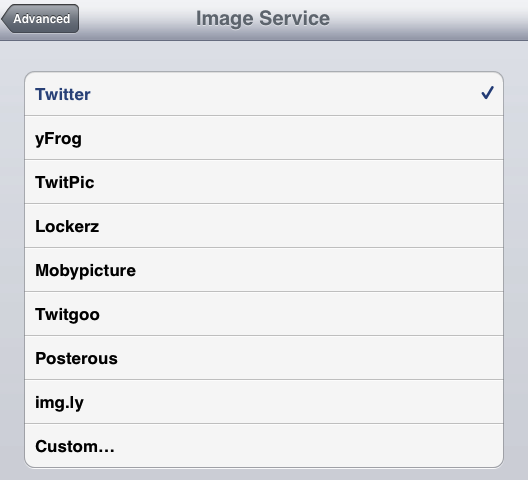
Also new in Twitter 3.5 is direct upload of photos to Twitter’s photo sharing service, available at pic.twitter.com. This can be configured in Twitter’s Preferences both on the iPhone and iPad. What’s new to the iPad is a much improved Direct Messages interface, which has been updated to order DMs chronologically and by thread with a new clean design. Gone is the DM popover from the app’s sidebar, too. iPad owners can now also tap on a location to show tweets nearby.

Twitter 3.5 is available on the App Store now.


Apple Releases iTunes 10.5

Apple today released iTunes 10.5, a new version of its media manager that adds a number of improvements and official support for devices running iOS 5. The next major version of Apple’s iOS is coming out this week on Wednesday, October 12th, and iTunes 10.5 will be required to sync devices that will be upgraded to the new software. For iOS 5 devices, iTunes 10.5 brings WiFi Syncing, a new feature that will allow owners of an iPhone, iPad or iPod touch to sync apps and media wirelessly through iTunes.

iTunes 10.5 was originally seeded to developers in June, when Apple also released the first beta version of iOS 5. Since then, we noted iTunes 10.5 included some minor graphical updates to the interface; this summer Apple also rewrote iTunes’ codebase to take advantage of Lion with full 64-bit support, and this new version of the app includes the changes we originally reported here. iTunes 10.5 also adds support for iCloud, Apple’s new cloud service that allows users to store digital purchases in the cloud, and re-download them at any time on any device. This functionality was previously activated as “beta” and called iTunes in the Cloud; as Apple notes, “iTunes in the Cloud is now part of iCloud”, but that doesn’t change the way songs and apps have been able to be pushed across devices since last June. iCloud will also be officially launched on October 12th alongside iOS 5.

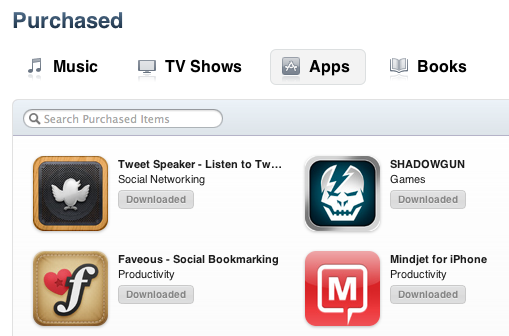
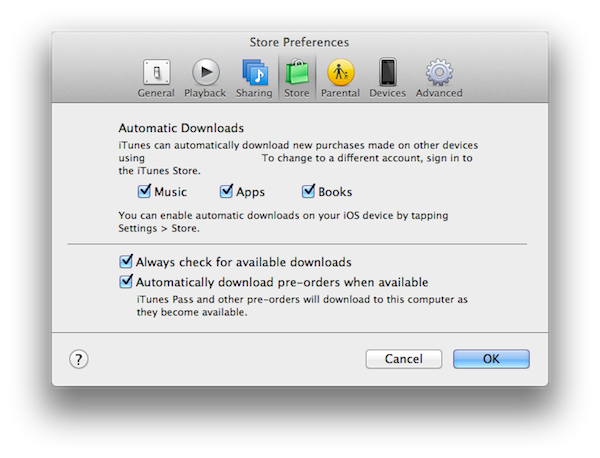
As we detailed in June with the release of “iTunes in the Cloud” as beta for iOS 4.3 and iTunes 10.3, iCloud support in iTunes allows users to re-download all previously purchased songs, TV shows, apps and books at no additional charge. In the new Purchased section of iTunes, users will find a link to browse previous downloads and re-download them at any time. Another option to automatically fetch all new downloads from any device and save them on a Mac or PC – called Automatic Downloads – is also enabled with iCloud on iTunes 10.5.

The ‘Purchased’ screen is a really handy feature to easily and quickly find a previous purchase and instantly download it or even download all of your previous purchases with just one click. The feature, which is also included in iOS 5, is part of Apple’s iCloud, which was unveiled at yesterday’s WWDC keynote. The ‘Purchased’ screen also gives you some fairly powerful tools to find the exact purchase you want, either from just searching, only displaying items not downloaded to your iTunes library or just list the purchases alphabetically.

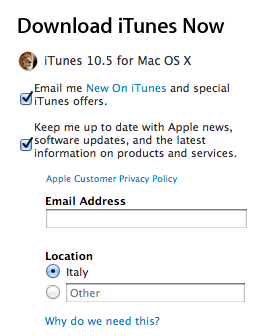
You can download iTunes 10.5 from Apple’s website, or directly on your Mac through Software Update.

Update: Full changelog of iTunes 10.5 below.

What’s new in iTunes 10.5

  • iTunes in the Cloud. iTunes now stores your music and TV purchases in iCloud and makes them available on your devices anywhere, any time, at no additional cost.
  • Automatic Downloads. Purchase music from any device or computer and automatically download a copy to your Mac and iOS devices.
  • Download Previous Purchases. Download your past music, TV, app, and book purchases again, at no additional cost. Previous purchases may be unavailable if they are no longer on the iTunes Store.
  • Sync with your iPhone, iPad, or iPod touch with iOS 5.
  • Wi-Fi Syncing. Automatically sync your iPhone, iPad, or iPod touch with iTunes any time they’re both on the same Wi-Fi network.

Update #2: It appears iTunes Match has been removed from this public version of iTunes 10.5 – iTunes Match is still developer-only and launching at this end of this month.


Tweetbot Gets iOS 5 Twitter Integration with Single Sign-On

iOS 5 is officially launching tomorrow, and the App Store’s review team has been busy these past few days quickly approving app updates that take advantage of the new features available to developers. A first example was OmniFocus for iOS, updated to include the location reminders Apple will make popular with its own native Reminders app. Today another popular third-party app for the iPhone, Tweetbot, has been updated to include bug fixes and a new iOS 5-only feature – Twitter integration.

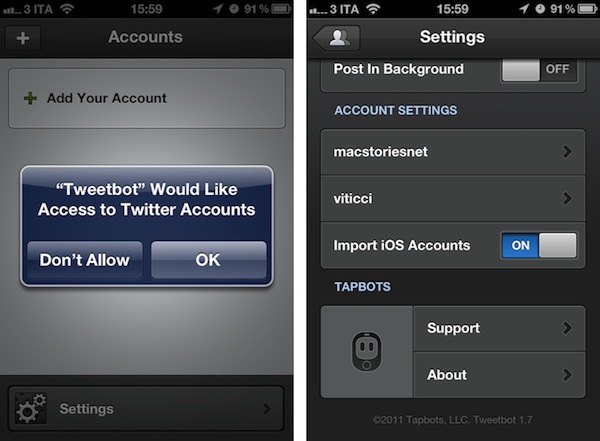
Whilst we’ll have a detailed overview of Twitter integration in iOS 5 tomorrow, Apple has already announced that developers will be able to use a feature called single sign-on to let their apps fetch Twitter credentials directly from the operating system, which has a new Twitter panel inside the Settings. Thanks to single sign-on, if a Twitter account (or multiple ones) are already configured in iOS 5’s Twitter settings, third-party apps like Tweetbot won’t need to re-authenticate users through a clumsy web view as they’ve been forced to do until today. They can simply get the account-related information from iOS’ Settings app.

So when you’ll install iOS 5 tomorrow, try to add your Twitter account to the iPhone’s settings – this will enable other functionalities that we’ll also cover tomorrow in our overview. Then install the new Tweetbot 1.7, which is already available, and you’ll notice you won’t have to re-enter your Twitter credentials again – Tweetbot will ask you if it’s okay to add the accounts already on your device. The procedure takes seconds, and is managed by an “Import iOS Accounts” option in Tweetbot’s settings. The best part is that because third-party apps are deeply integrated with Twitter in iOS 5, new accounts you’ll add through Tweetbot will also be carried over the system’s Twitter settings.

This kind of Twitter integration with the OS makes for a better first launch experience as users don’t need to go find their Twitter passwords again and re-authorize every account on each Twitter-enabled app. Tweetbot is the first popular third-party client to take advantage of this, and you get it now on the App Store for $2.99.


iPhone 4S Starts Arriving to German Customers Ahead Of Launch

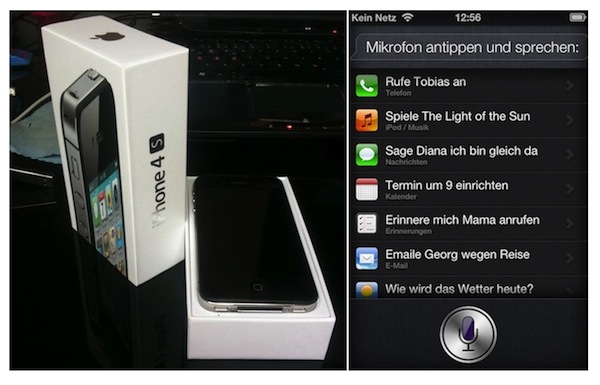
The iPhone 4S isn’t officially launching until Friday, October 14th, but a few lucky German customers have apparently received their shipments early, as reported by German website Macerkopf.de. The article explains an iPhone 4S pre-ordered through Deutsche Telekom arrived this morning at a customer’s house, who promptly shared photos of the packaging, device and Siri. The packaging looks fairly similar to the existing iPhone 4 box, and a screenshot shows Siri working in German – indeed, Apple has confirmed that the first beta version of its new voice assistant software will be available in English, French and German, with more languages to come in the future. More photos are available at Macerkopf.de.

This isn’t the first case of iPhone 4S photos ahead of October 14th – just yesterday we posted a video of someone showing off the iPhone 4S’ Siri settings and browser benchmarks.

Customers in the US have received shipment notifications by Apple and various carriers including Sprint, with delivery dates set to October 14th, when the iPhone 4S officially launches. Apple has announced 1 million iPhone 4S pre-orders in the first 24 hours of availability, and shipping times on the US Apple Store are now set to 1-2 weeks.


AirServer 3.0 Brings AirPlay to the Mac With Full iOS 5, Lion Support

When I first reviewed AirServer for Mac back in May, what I saw was a very simple and fairly stable utility that allowed users to transmit audio, photos and videos from an iOS device to a Mac’s screen on a local network. Since the launch of AirPlay in November 2010, a number of unofficial apps and hacks have surfaced enabling users to enjoy Apple’s streaming technology on otherwise unsupported devices: AirServer aside, we’ve seen other apps to turn iOS devices into AirPlay receivers and even popular apps for the Mac adopt AirPlay’s streaming for music.

AirServer, initially released as a simple menubar app, has always been the app that aimed at bringing “AirPlay for everything” to the Mac since its first version. Whereas similar hacks from other developers focused on turning the Mac into a receiver for photos or video, AirServer has been improving on the concept of a standalone solution for sending anything via AirPlay from iOS to OS X. The app eventually made the leap to iOS for jailbroken devices, and gained initial iOS 5 and Lion support earlier this year.

With AirServer 3.0, released yesterday, the developers have completely re-engineered AirServer to fully take advantage of iOS 5’s AirPlay and Lion compatibility. I’ve tested the app last night, and it’s already working fine on the Golden Master releases of iOS 5 and OS X 10.7.2. Once you’ve installed AirServer 3.0 as a preference pane (it’s also got a new iCloud-like icon) and assigned a name to your Mac (the one that will show up in the list of AirPlay devices on iOS), you’ll be able to send music, photos and videos to your Mac. Unlike the previous versions of the app, however, support for AirPlay streaming has been dramatically improved: music never dropped on my connection, not even once, and it’s possible to send photos and music at the same time. Thanks to iOS 5, AirServer has integrated seamless streaming transitions between photos, slideshows and videos – the app supports AirPlay slideshows from the Photos app on iOS, including animations that will be displayed on your Mac’s screen as AirPlay switches between photos. The transition between songs, photos and slideshows is smooth and much more natural than AirServer 2.

The big change in AirServer 3.0 is video streaming. With the new version the developers have replaced QuickTime Player with their own video player based off Perian, which is optimized for network streaming and multiple displays. I have tried the new AirPlay video streaming with several videos from my Camera Roll, YouTube and Safari, and it’s incredibly better than the old QuickTime-based streaming. The player looks nice, but more importantly it’s fast and loads videos coming from an iPhone or iPad much quicker than before. You can use the video player in full-screen mode, or resize its window to fill a portion of the screen.

At $7.99, AirServer is a complete solution to turn your Mac into an AirPlay receiver for music, photos and videos. Get it here.