Federico Viticci

10804 posts on MacStories since April 2009

Federico is the founder and Editor-in-Chief of MacStories, where he writes about Apple with a focus on apps, developers, iPad, and iOS productivity. He founded MacStories in April 2009 and has been writing about Apple since. Federico is also the co-host of AppStories, a weekly podcast exploring the world of apps, Unwind, a fun exploration of media and more, and NPC: Next Portable Console, a show about portable gaming and the handheld revolution.

“iPhone 4S” Name Shown On OtterBox Case Packaging

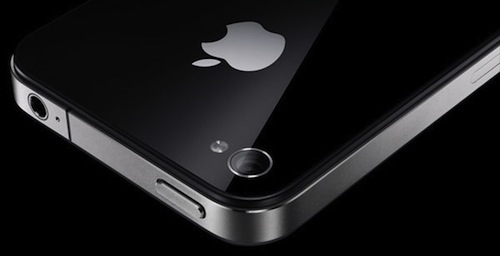
According to a series of tweets posted earlier today by @chronic on the @chronicwire Twitter account, accessory maker OtterBox has built over 3 million cases for a rumored upcoming “iPhone 4S” device. As seen in the photos posted online, the packaging of one of such cases depicts the “iPhone 4S” name, as well as what appears to be a redesigned position for the iPhone’s volume buttons, seen on the right of the device. You can check out more photos over at Twitter.

Chronic has been a source of Apple-related “leaks” in the past. For instance, he posted screenshots of several internal iOS 5 settings (high-quality YouTube and FaceTime over 3G), as well as information in the weeks that lead up to Apple’s Back to School promotion in June. Chronic was, however, incorrect in reporting MacBook Air updates weeks before Apple actually shipped the refreshed models.

There’s been a controversy in iPhone-related rumors in the past months as to whether Apple will ship a “completely redesigned” iPhone 5 in October, an iPhone 4-like “iPhone 4S” device (such name was first used by 9to5mac in discussing an A5-powered iPhone 4), or both. According to recent speculation, Apple is set to hold a media event to introduce the next iPhone on October 4th. A number of cases from third-party manufacturers have surfaced in the past months, showing both signs of a redesigned device and something very similar to the iPhone 4 – thus the discrepancy in iPhone 4S-iPhone 5 rumors. You can read more about this in our iPhone rumor roundup and retrospective.



Labeling iOS’ Back Button

Labeling iOS’ Back Button

Neven Mrgan shares a solid piece of advice for iOS app designers and developers: A Back button labeled “Back” is never a good option.

As he notes, Apple never labels the “Back” button – the left-pointing arrow at the top of most iOS apps – “Back”. They provide context as to how a parent view (the previous screen) should be shown in the button’s label.

This is a widespread issue, present in many extremely popular apps.

This is redundant and it provides no context. Note that Apple never does this, not in any app. Instead, they provide either the full title of the previous view, or an abbreviated/truncated version of it.

He offers some do/don’t examples in his blog post. Here’s a series of screenshots from my iPhone, showing apps that correctly use the “Back” button:

One of my favorite examples, the Rdio app for iPhone:

And here’s Apple in the Apple Store app:

The button itself means “back”, so the additional “Back” label is not an option. These are the minor details that make great apps, well, great.

Permalink

Gmail Mobile Web App Gets Multiple Sign-In

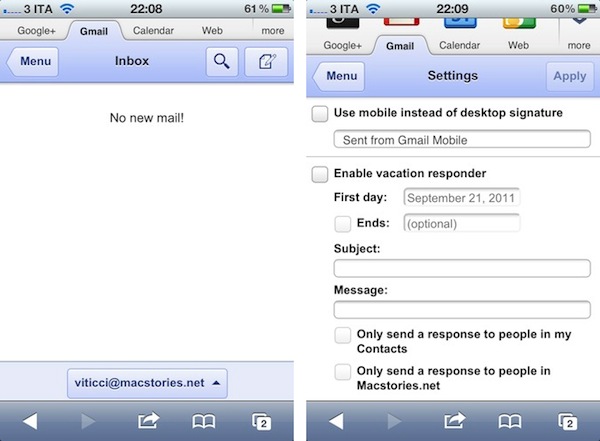
In the past months, Google has released a series of updates to improve the overall experience of the Gmail mobile web app, which works on iOS devices such as the iPhone and iPad, as well as other smartphones and tablets. Google made the mobile web app more accessible and usable with notifications, undo bar, Retina graphics and “pull to refresh”, and today they’ve announced another update that brings Preferences and multiple sign-in to the service when viewed from mobile devices.

Multiple sign-in has been around in the Gmail desktop website for quite some time, and it’s a useful shortcut to quickly switch between multiple Google accounts (and thus Gmail inboxes or Google+ profiles). Starting today, a new sign-in button will appear at the bottom of the iOS web app, allowing you to jump to another account, which will automatically load its Gmail inbox. The feature is already live in Mobile Safari (tested on an iPhone 4 running the latest iOS 5 beta).

Furthermore, Google is now allowing users to set Preferences directly from the mobile web app. The company is highlighting the possibility to create a mobile-only signature, so your friends will associate typos to a smartphone’s keyboard. Also, the Preferences come with vacation auto-responder settings, and a few more options.

We know that autocorrect and other mobile spell-checks can be frustrating as you are typing on the go. Let your friends know that you are responding via your mobile phone so that they understand why you might have sent a message that you are meeting for “monitors” and not “mojitos”. It’s an easy way to make them understand why your message might be short or have a few typos. To create a mobile signature, from the menu view, press the new settings icon, choose your signature, and then check the box that tells us you want to activate it. If you ever want to disable the mobile signature, you can uncheck the box and we will use your desktop signature instead.

Google notes that each Gmail account can have a separate bookmark. On iOS devices, you can save a Gmail shortcut to the Home screen by tapping on the Action icon in Mobile Safari, and then Add to Home Screen (Gmail’s webclip icon has been optimized for the Retina Display as well).


Bill Gates Still Richest American, Steve Jobs Ranks at No. 39

Bill Gates Still Richest American, Steve Jobs Ranks at No. 39

From the press release about Forbes’ annual list of 400 Richest Americans: [via]

Bill Gates (No. 1) retains his top spot on Forbes’ 2011 ranking of the richest people in America (“The Richest People In America,” p. 39 and p. 210) with $59 billion, followed by Warren Buffett (No. 2) with $39 billion and Larry Ellison (No. 3) with $33 billion. George Soros (No. 7) joins the Top 10 for the first time, with $22 billion, and is one of several of the 27 hedge fund managers – 7% of the Forbes 400 – featured in “Hedged Fortunes,” p. 82.

Former Apple CEO and now Chairman of the Board Steve Jobs ranked at #39 with $7 billion. Jobs ranked at No. 42 last year with $0.9 billion less; globally, Forbes ranked Steve Jobs at #110 earlier this year. Also seen in this year’s list: Amazon’s Jeff Bezos (#13), Facebook’s Mark Zuckerberg (#14). Zuckerberg is this year’s “biggest dollar gainer” by adding $10.6 billion in the past 12 months. Google’s Sergey Brin and Larry Page ranked both at No. 15 with $16.7 billion each.

Forbes has a complete analysis of their list here. Combined, the nation’s wealthiest are worth $1.53 trillion.

Permalink

FaceMan, Unofficial Photo Booth for iPhone, Gets 3.0 Update

Here’s a fun app that, for some reason, Apple still hasn’t delivered to iPhone and iPod touch users. FaceMan, created by fellow Italian developer Libero Spagnolini, is an unofficial alternative to Apple’s Photo Booth, which allows users to apply funny effects and distortions to their faces in real-time using the iPhone’s rear or front-facing camera. I first reviewed the app in January, but since then lots of work has been put into FaceMan – and a major 3.0 update released today adds a completely redesigned UI, a faster engine, and many optimizations to the code.

The new FaceMan lets you scroll between effects at the bottom (with live previews both on the effect’s thumbnail, and the bigger camera view at the top), and swipe vertically to change between effects, camera controls, and intensity slider. A new effect has been added, camera controls now rotate properly in landscape mode, and recording performance (FaceMan does both photos and videos) has been improved by 200%, the developer says. I haven’t been able to verify such percentage, but it’s clear FaceTime 3.0 is faster than the previous version on the same hardware (my iPhone 4). The app runs on the iPhone 3GS and iPod touch 4th generation, too, and requires iOS 4.1 or later. I have tested the app on iOS 5 beta 7, and it worked with no issues, although the developer told me more iOS 5-related fixes are on their way.

It’s not completely clear to me why wouldn’t Apple create a simpler port of Photo Booth for the iPhone and iPod touch. The software was previewed at the March 2 event as an addition to iOS for the iPad 2, and has proven to be a fun and delightful way to snap and share silly pictures with friends and family. The iPad 2 runs on Apple’s faster A5 processor, however, so that might be the reason why Apple’s official Photo Booth app hasn’t made it to existing A4-based hardware yet.

Still, FaceMan works nicely on the iPhone 4, and the new interface is fast and fluid at applying and switching between effects. If you’re looking for a Photo Booth alternative now, you should give FaceMan a try. It’s only $0.99 on the App Store.


Apple’s Next Keynote Scheduled for October 4?

According to AllThingsD, Apple’s next media event – where the company is set to officially unveil the next-generation iPhone – will be held on Tuesday, October 4th.

That’s the day Apple is currently expected to hold its next big media event, according to sources close to the situation, where the tech giant will unveil the next iteration of its popular iPhone.

AllThingsD previously claimed the new iPhone would be announced in mid-October, and whilst Apple hasn’t publicly disclosed plans of any new iPhone or device in any time frame, the timeline seems likely at this point. Apple usually sends invites to the press a week ahead of the event, and multiple rumors are suggesting iOS 5 – which the iPhone 5 will likely run out of the box, like new Macs come with Lion pre-installed – is approaching the GM status by the end of this week.

AllThingsD also claims newly-appointed CEO Tim Cook will preside over the event, and that the plan is to release the iPhone 5 a few weeks after the announcement. Previous rumors pointed at the next iPhone being available on AT&T, Verizon, and Sprint in the United States in mid-October.

Update: The Loop’s Jim Dalrymple, who has a solid track record when it comes to Apple news and rumors, has commented on AllThingsD’s article with a single “Yep”, suggesting that the original report is indeed accurate.


Apple Releases Updated ProApps QuickTime Codecs

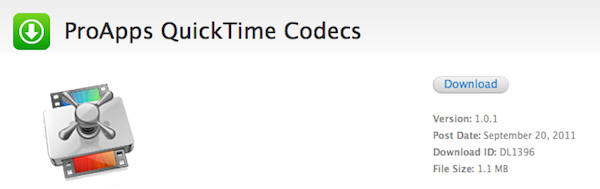
Following the release of Final Cut Pro 10.0.1, Motion 5.0.1 and Compressor 4.0.1 earlier today on the Mac App Store, Apple has pushed a separate update for ProApps QuickTime Codecs. This download is recommended for all users of Final Cut Pro X, Motion 5, or Compressor 4, and it adds the following codecs to QuickTime-based apps:

  • Apple Intermediate Codec
  • Apple ProRes
  • AVC-Intra
  • DVCPRO HD
  • HDV
  • XDCAM HD / EX / HD422
  • MPEG IMX
  • Uncompressed 4:2:2

The update is available now through Apple’s Downloads website. Updates to FCP X, Motion and Compressor are available now on the Mac App Store.

ProApps QuickTime Codecs (1.1 MB)


Mophie Unveils New iOS External Batteries, Pulse for iPod touch

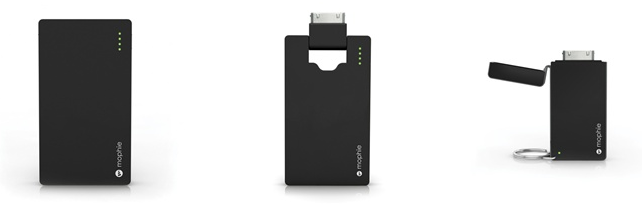
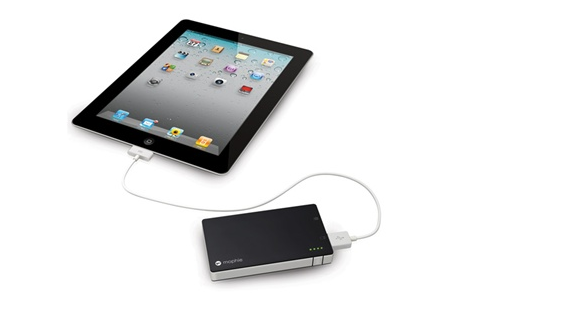
With a series of tweets posted on the company’s official account earlier today, accessory maker Mophie has unveiled a new line of external batteries for iOS devices, as well as Pulse, a gaming accessory for the iPod touch we first covered in July. The new line of external batteries is showcased on Mophie’s website here, with all the items available for pre-order today. The redesigned Juice Pack Universal line includes:

Juice Pack Reserve: Small battery pack that’s lightweight and portable. Charges an iPhone or iPod with no cables (it connects through a device’s dock) with a 700 mAh battery (twice as fast as 500 mAh batteries). Shipping September 30th. $34.95.

Juice Pack Boost: External battery for iPhone and iPod that doubles as a stand, and features a 2000 mAh high output battery. An integrated LED indicator lets you track battery status, and the ultra slim design make sure the unit is extremely portable, too. Shipping September 30th. $49.95.

Juice Pack Powerstation: 4000 mAh external battery that can charge iPhones, iPods, and iPads, as well as “virtually” any USB device. The Powerstation is also compatible with several Android and BlackBerry handsets – a full list is available on Mophie’s website. Shipping September 30th. $79.95.

Today, Mophie has also confirmed the availability of Pulse, a gaming grip for the iPod touch 4G that brings enhanced sounds and feedback to the device. Gaming feedback is provided by ViviTouch Technology, and Mophie claims the Pulse will increase usability of all kinds of apps, not just games. It’s difficult to imagine how a gaming grip would enhance, say, a note-taking app, but we applaud Mophie for the effort nonetheless.

Demo video is available here. The Pulse is $99.95 on Mophie’s website.


The Mac App Store, Two Months After Lion’s Launch

The Mac App Store, Two Months After Lion’s Launch

Dan Frommer at SplatF takes a look at the Mac App Store, two months after the public debut of OS X Lion:

What we haven’t seen are big moves by companies like Microsoft or Adobe into the Mac App Store. Adobe launched Photoshop Elements in July, and it seems to be doing pretty well, as the no. 7 highest-grossing app. But it’s still not clear if more of the Creative Suite or Microsoft’s Office suite will eventually make it into the Mac App Store.

In general, though, it seems as if app selection is growing nicely. And now that Lion is the default OS installed on new Macs, and as more Mac users upgrade, App Store sales should continue to grow.

You can look at the data on Dan’s blog, but to sum up: average prices are up and there’s less Apple software in the top charts. I’d argue that Apple has been relatively slow with software updates in the summer (before the big wave that hits with iCloud this Fall) and thus committed third-party developers have jumped the charts, but let’s focus on another aspect of the story – availability. Dan notes that big names like Microsoft and Adobe have shown little or no interest in releasing specific Mac App Store versions of their productivity suites. However, with almost 7,000 apps, there’s a high chance you’ll find your new favorite image or text editor in the Mac App Store, which is empowering less popular third-party Mac devs to make their apps available to a greater audience.

That was the point of the Mac App Store all along – to offer a centralized way for any kind of Mac developer to release and easily update apps. Recent releases like the successful launch of 1Password seem to confirm that there’s plenty of room for smaller companies and independent devs in the top charts. I also look forward to the upcoming launch of Pixelmator 2.0 – you may remember version 1.0 earned $1 million on the Mac App Store in the first 20 days (with the promise of a free 2.0 update).

That’s not to say Apple has achieved the perfect formula with the Mac App Store. Delta updates are nice, but there’s still no way for developers to implement easy upgrade options, or free trials (this is true on the iOS App Store as well – meanwhile, Windows Phone 7’s marketplace features free trials alongside “full versions” of apps). Similarly, there should be a better way to browse in-app purchases, or even manage a basic wish list.

I’m looking forward to some possible tweaks and changes in the next weeks, and I’ll check back in two months.

Permalink