Federico Viticci

10804 posts on MacStories since April 2009

Federico is the founder and Editor-in-Chief of MacStories, where he writes about Apple with a focus on apps, developers, iPad, and iOS productivity. He founded MacStories in April 2009 and has been writing about Apple since. Federico is also the co-host of AppStories, a weekly podcast exploring the world of apps, Unwind, a fun exploration of media and more, and NPC: Next Portable Console, a show about portable gaming and the handheld revolution.

The iPad: Now Used To Write The Hungarian Constitution

Of all the clever and original uses for the iPad we’ve seen in the past months, there was nothing quite like what’s going on with Jozsef Szajer’s iPad. In a video first showed at the iPad 2 keynote, Apple proved that the tablet has been deployed in a variety of markets and segments in 2010: from education to hospitals, enterprise, small businesses, restaurants and musicians the iPad and, most of all, the 65,000 apps that run on it have changed many people’s professional and personal lives. But Szajer, ruling party lawmaker in the European Parliament, is using the device to draft Hungary’s new constitution.

You heard that right. The Hungarian next “magna charta” is being written on the iPad as we speak – we don’t know through which applications exactly, but Szajer says [Google Translation] the best feature of the iPad is its “instant on”, the fact that he doesn’t have to wait for it to load and is always available. This is indeed one of the aspects Apple also heavily promotes on the product’s webpage. Szajer also goes on to specify that he’s writing different drafts on the iPad, reviewing proposals received from fellow parliament members, assistants and citizens and quickly copying and pasting text around as he wants. The new constitution focuses on ” raises the level of public services, greater transparency in public affairs and equal opportunities for citizens to seek new technological solutions”. New solution like the iPad, apparently.

We wish the best of luck (and congratulations) to Szajer in his effort to rewrite the rules with a piece of technology that has already rewritten many tech industry rules. And if he’s going to get an iPad 2, typing should be much better with the lighter and thinner form factor. [via Bloomberg]


Explor: It’s Like Ping, For Apps

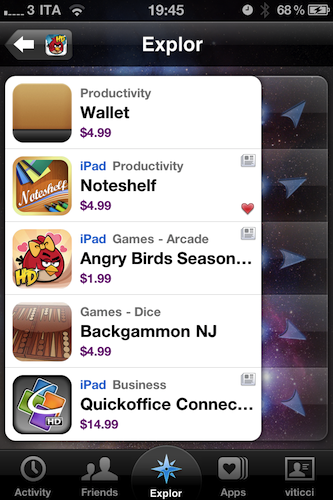
I’ve never been a loyal user of “app discovery” tools for iOS: I’m talking about those apps that help you find out about new apps and share the results with your friends. Sort of meta, I know, but apparently there’s a huge market for these things now that the iOS App Store has crossed the mark of 300,000 apps available for the iPhone. In the sea of applications that’s inundating our inboxes, it seems like there’s plenty of room for alternatives to the default App Store app.

Explor, a free app by Hello,Chair released today, is the latest (and possibly greatest) addition to iOS software discovery panorama that comes with interesting features I haven’t seen anywhere else. Read more


This Video Was Shot With The iPad 2

With all the hands-on videos and first impressions about the iPad 2 we collected from around the web last week, we didn’t have the chance to take a look at the actual quality of videos recorded through the new device’s cameras. The iPad 2 features both a rear and front-facing camera to shoot videos and photos, use Photo Booth and have video calls with your friends and family using FaceTime. The front-facing camera is a VGA one, whilst the rear one allows for 720p HD video recording at 30 frames per second, with zoom up to 5x for stills. Apple didn’t provide detailed specs on the megapixels of the rear camera, but it appears that it will be a 1 MP one similar to the camera found on the iPod touch 4th gen.

So how will videos shot on the iPad 2 look, exactly? We don’t know yet, but the video embedded below was indeed recorded with the iPad 2’s back camera. The video doesn’t offer precise indication of how videos will look on the new tablet, mainly because it was shot in low-light conditions, shared via email and then uploaded to Youtube – which applies compression to video files.

Some quality got lost in the process, but it’s one of the first examples of how iPad 2 videos will look on Youtube, right? Check it out. [via iPadevice] Read more


iOS 5 and MobileMe Media Event in April?

According to German website Macerkopf.de, Apple will hold a media event at the corporate headquarters in Cupertino to give a sneak peek of the upcoming major version of their mobile operating system, iOS 5, and the new MobileMe. The website reports [Google Translation] invitations will be sent out in the second week of April, and admittedly this rumor corroborates several blogs’ speculation that Apple wanted to save iOS 5 for a proper dedicated event instead of a quick preview at the iPad 2 event on March 2.

Previous rumors suggested iOS 5 would get a completely new notification system, deeper integration with the cloud (thanks to the data center in North Carolina) and several location-based features. As for design changes, patents Apple had been awarded showed new scrollable menus and other interface styles. MobileMe is also widely believed to come with a new, free version for all customers with cloud backup support for iTunes and other media. Steve Jobs once said in an email to a customer that MobileMe would get “a lot better” in 2011.

Code references found in early iOS 4.3 betas pointed to a new feature in development called MediaStream for photos and videos. In the past months speculation also indicated Apple was working on a smaller version of the iPhone strongly based on cloud services, although the rumor has been debunked from various sources since then.

There is no doubt, however, that Apple will prefer holding a single event focused on iOS 5 rather than including the preview in other product announcements. With an iOS 5 preview and beta likely to ship in April, developers will have plenty of time to update their applications for a possible launch of the new OS at the WWDC in June alongside the new iPhone.


SK Telecom Gets iPhone 4, CDMA?

Update #2: MacRumors and others report the iPhone 4 on SK Telecom is a CDMA one. We’ll see.

Update: It looks like Electronista incorrectly reported the iPhone 4 on SK Telecom was CDMA, and has updated the article. We indeed noticed the lack of CDMA details, and as also noted by our friends over at SetteB.it the iPhone 4 on SK Telecom will be a GSM unit because of the mention of a SIM slot in the device’s FAQ.

As reported by Electronista, South Korean carrier SK Telecom has officially announced they are bringing the iPhone 4 to South Korea on March 16 with online and retail store pre-orders starting on March 9. Although no technical details have been provided by Apple or SK Telecom’s website in the press release, it is widely believed that the CDMA version of the iPhone will be released in South Korea, thus ending the temporary “exclusive” availability of the device on Verizon Wireless’ network in the United States.

“SK Telecom is proud to offer iPhone 4 on the nation’s top network,” said So Jin-Woo, President of Platform Business and Co-CEO of SK Telecom. “Our customers will benefit from flexible tariff plans tailored to their unique usage needs along with a high level of customer care.”

Customers may pre-register for iPhone 4 beginning March 9 at 7:00 a.m. at SK Telecom’s official online store, T Smart Shop, or at one of 1,500 authorized SK Telecom T World retail stores.

Full pricing and availability details for iPhone 4 in Korea will be available soon.

The release of the CDMA iPhone on a network outside the United States opens, of course, to the possibility of other countries getting the CDMA device relatively soon. For instance, it was rumored that China Mobile might be getting the iPhone (and LTE) this year – a great opportunity for Apple to expand the iPhone’s addressable market in Asian countries typically relying on CDMA networks instead of GSM. Apple’s move to South Korea could also mean big trouble for manufacturers like Samsung, which has maintained a strong grip on the market in the past years.

The launch comes late into the iPhone 4’s lifecycle but could have a major impact on the spread of Android in the country. Although KT has sold over two million iPhones since it began carrying the iPhone 3GS in November 2009, its role as the third-largest carrier has limited its reach and, similar to AT&T’s US exclusive, given Android free rein.

A teardown of the CDMA iPhone revealed the device is running a dual GSM-CDMA chip with worldphone capabilities, and yesterday it was reported a software hack can make the CDMA Verizon iPhone run on pay-as-you-go US network Cricket.


Former Apple VP Shares Thoughts on Steve Jobs

Former Apple VP Shares Thoughts on Steve Jobs

Former senior vice president at Apple Jay Elliot shares some details and thoughts about Steve Jobs’ “modus operandi” in a recent article at Forbes. That’s an interesting read that, overall, seems to confirm what most people think about Jobs’ way of leading Apple to success:

Rare among corporate leaders, Steve has never made decisions based on a concern for market reaction. He simply is not influenced by whether investors and market analysts will think he’s doing the right thing. But the financial community has come to have confidence in him: his track record for making the right decisions is hard to argue with.

Now Steve is following the same frustrating modus operandi about the question of who will take over the helm of Apple should be be forced to step down for health reasons. Everyone who has ever worked closely with Steve knows that, for him, relinquishing control over any aspect of the company or its products is — well, difficult, to put it politely.

The key point, however, is this:

Over the years, Steve has generated a nearly uncanny ability to recognize talent and to recruit almost everyone he has ever set his eye on. The result is a team that inspires confidence for the future.

Many people still think Steve Jobs does everything at Apple from coding to design to marketing and app development, but they don’t understand Apple as a company is “simply” a well-oiled and functioning machine made of talented people.

Permalink

Google Launches Instant Previews, Available for iOS

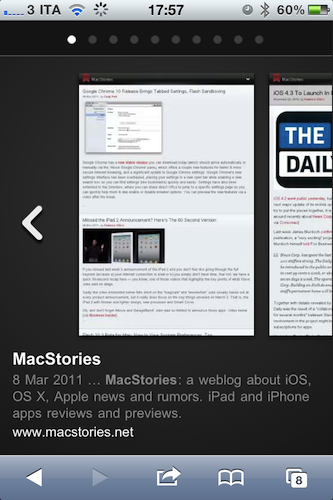
A few minutes ago Google announced the availability of Instant Previews for mobile devices, a new way to quickly preview the contents of a webpage by simply tapping with your finger on a magnifying glass icon next to search results. Instant Previews, perfectly compatible with the iPhone and iPod touch, allow you to flick through a series of thumbnails for a specific webpage like in the iOS photo app, without actually following the link in Mobile Safari.

As soon as you tap on a link from the visual preview gallery, Mobile Safari will open the webpage. Hit the back button, and you’re brought to the gallery again. The animations are very neat and fluid from what we can see now, and there’s even some kind of rubber-banding elastic effect when you scroll thumbnails. Sadly, there’s no support for Instant Previews in mobile Youtube videos – just webpages.

For example, if you’re looking for a webpage that has both photos and descriptions, you can use Instant Previews to quickly identify these pages by navigating across the visual search results with a few swipes of your finger. Or perhaps you’re looking for an article, a step-by-step instructions list, or a product comparison chart—with Instant Previews, you can see easily spot pages with the right content without having to navigate back and forth between websites and search results.

iOS 4 or later is required for Instant Previews, and you can try them on your iPhone now. Promo video and another screenshot below. More information available here. Read more


Missed the iPad 2 Announcement? Here’s The 60 Second Version

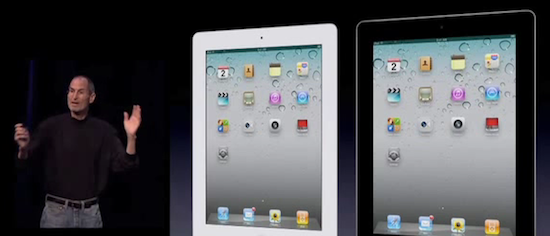
If you missed last week’s announcement of the iPad 2 and you don’t feel like going through the full keynote because a) your internet connection is slow or b) you simply don’t have time, fear not: we have a quick 60-second recap here – you know, one of those videos that highlights the key points of what Steve Jobs said on stage.

Sadly the video embedded below falls short on the “magicals” and “wonderfuls” Jobs usually hands out at every product announcement, but it really does focus on the key things unveiled on March 2. That is, the iPad 2 with thinner and lighter design, new processor and Smart Cover.

Oh, and don’t forget iMovie and GarageBand! Jobs was so thrilled to announce those apps. Video below. [via Business Insider]
Read more


Flash 10.3 Beta for Mac: Now In Your System Preferences, Too

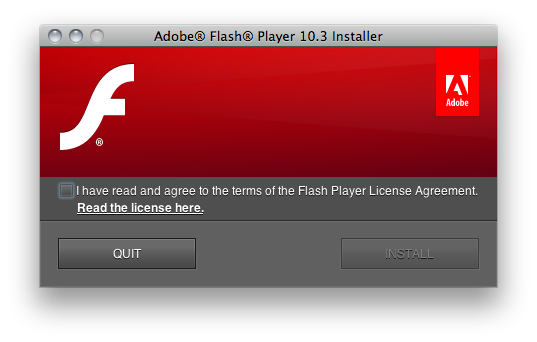
If you’ve always been wondering why Adobe’s Flash Player don’t let you easily manage privacy and storage settings, then you must be pleased to know that’s about to change with the beta of Flash 10.3 for Windows, Mac and Linux. As noted by Lifehacker, version 10.3.180.42 (let’s just call it 10.3 beta) allows you to directly modify Flash Player’s cache, privacy and other settings (such as the microphone or camera) without having to visit a special web link to a webpage hosted on Adobe’s servers.

With Flash 10.3, it all (finally) happens with a settings window that appears to be accessible from the Control Panel in Windows, and a prefpane in your Mac’s System Preferences (see screenshots below). The panel has got a tabbed interface to switch between Storage, Camera and Mic, Playback and Advanced settings with lots of options to delete private data, de-authorize a computer from protected content, tweak the camera’s settings on a site-by-site basis.

Clearing out your Flash cache will be much easier in the new version, currently available for download and testing on Adobe’s website. These new user and OS-friendly settings will also be integrated into each browser’s own Preferences. Go download Flash 10.3 beta for Mac here. Read more