Federico Viticci

10804 posts on MacStories since April 2009

Federico is the founder and Editor-in-Chief of MacStories, where he writes about Apple with a focus on apps, developers, iPad, and iOS productivity. He founded MacStories in April 2009 and has been writing about Apple since. Federico is also the co-host of AppStories, a weekly podcast exploring the world of apps, Unwind, a fun exploration of media and more, and NPC: Next Portable Console, a show about portable gaming and the handheld revolution.

Sparrow for Mac Update: Faster, AppleScript Support

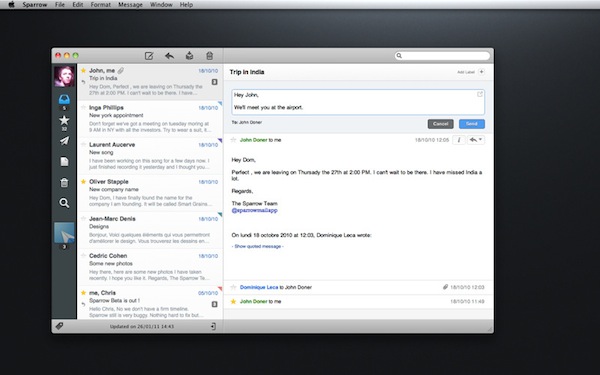
Since its release in the Mac App Store last week, Gmail desktop client Sparrow has been sitting among the top paid software charts and has gained a huge userbase. The app is clean, minimal and it perfectly blends the typical Gmail environment into a Mac-like package that reminds us of Tweetie. I like Sparrow, and although general IMAP support is still nowhere to be seen I have been using as my default email client for the past week (I use Gmail on a daily basis, more specifically Google Apps).

The developers are working hard on making Sparrow a full-featured email app for the desktop, and this begins today with the first update – available now in the Mac App Store. Sparrow 1.0.1 comes with improved sending speed for outgoing messages (it used to takes a few extra seconds to send an email in version 1.0), a finally-working menubar mode, basic AppleScript support – which I’ll make sure to try out. Loading times of conversation threads have been improved as well.

Sparrow 1.0.1 is available here. We look forward to version 1.1, which should bring IMAP compatibility and more.


The Untold Story Of The First Mac

The Untold Story Of The First Mac

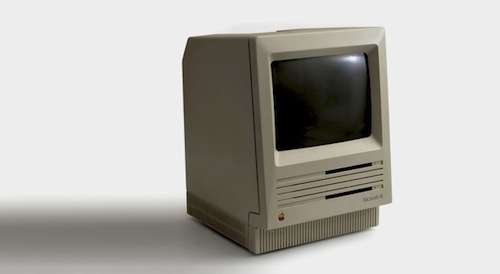
Aza Raskin shares a memo from his father Jef Raskin, one of the creators of the original Macintosh. An interesting tidbit about the vision of an integrated system, already growing at Apple back in the 80’s:

There were to be no peripheral slots so that customers never had to see the inside of the machine (although external ports would be provided); there was a fixed memory size so that all applications would run on all Macintoshes; the screen, keyboard, and mass storage device (and, we hoped, a printer) were to be built in so that the customer got a truly complete system, and so that we could control the appearance of characters and graphics.

Full document is available here, and it’s a must read. Thirty years ago, designers and engineers at Apple were already thinking about issues like software fragmentation and user’s ability to tinker with a device.

Permalink

AT&T Loves iPhone Users, Increases DataPro Plan to 4GB

It looks like AT&T keeps saying “thank you” to loyal iPhone users. As you can see in the screenshot above, some users are receiving a message from the carrier about the automatic increase of the DataPro Tethering Plan from 2GB to 4GB. The monthly plan won’t change, and no action is required from users. A similar change in the DataPro plan was spotted by Cult of Mac earlier today, though it appears AT&T has started sending SMS notices this afternoon.

The change clearly is a move by AT&T to face the buzz generated from the Verizon iPhone, and keep users happy on their network. AT&T’s website doesn’t provide any info on this change at the moment, and it’s unclear whether all iPhone users are getting upgraded to 4GB or just a small section.

[Thanks, Willy]


How To: Send Any Webpage From iOS To Your Mac Browser

Yesterday, I asked on Twitter if there was an easy way to send a webpage from the iPhone to the Mac. Currently, there are several iPhone apps that allow you to get links from your Mac browser onto the iPhone or iPad: most of them either work with a bookmarklet or browser extensions that, with just one click, let you “push”  webpages to iOS. Apps like Handoff (review) and Push The Page even work remotely with the iPhone on a 3G connection. But the other way around, iOS to Mac, is not just as easy to achieve.

In my Twitter poll, many followers recommended AirLink, a web service that, once installed on the Mac and iOS, allows you to send an receive webpages remotely. AirLink, however, requires you to visit a special webpage on your browser to retrieve the link you have shared. What I’m looking for, and what I’m sure others like me have dreaming of for a while, it’s a simple system that allows me to send with a few taps any webpage from the iPhone (on WiFi and 3G) to the Mac, and have a new browser tab open on the desktop. So when I get home, I’ll find the link I shared on iOS ready in my browser. It turns out though, this “simple system” wasn’t so simple to achieve but now, thanks to the help of my friend @MisterJack, I think I’ve got something here that just works and does exactly what I need. Most of all, it requires three taps to be activated. Read more


iOS Developers Making Leap to the Mac

iOS Developers Making Leap to the Mac

Chris Foreman at Ars Technica reports about several iOS developers porting their apps to the Mac App Store:

These developers warned, however, that it wasn’t fair to make direct comparisons with the iOS App Store at this early stage. For one, every iOS device has access to the iOS App Store, while only those who applied the Mac OS X 10.6.6 update can access the Mac App Store. And, as Crawford pointed out, there are more iOS devices in active use than there are Macs.

Frampton compared initial sales volumes to the early days of the App Store on the iPhone. “The overall size of the market seems very similar to the early days of the iOS App Store, and in fact I get a very distinct feeling of déjà vu,” he said. “The Mac App Store market may never catch up, but it certainly has a lot of room to grow.”

“Sales tend to eventually level out and that’s yet to happen on the Mac App Store,” Comi agreed.

As more users upgrade to 10.6.6 (a friend of mine ran Software Update a week ago, almost a month after the Mac App Store introduction), there will still be a considerable userbase stuck on previous versions of Snow Leopard. That’s the problem with the Mac App Store coming as an “add-on” to the OS. However, I believe that, in the end, apps will be the reason why these people will be “forced” to upgrade to the latest SL version. The more great apps are released in the Mac App Store, the more people will say “Hey, maybe I really need to update”.

It’s not the Mac App Store as a “feature” by itself, it’s the ecosystem of a platform for great software.

Permalink

Tap-Translate Does Inline Mobile Safari Translations

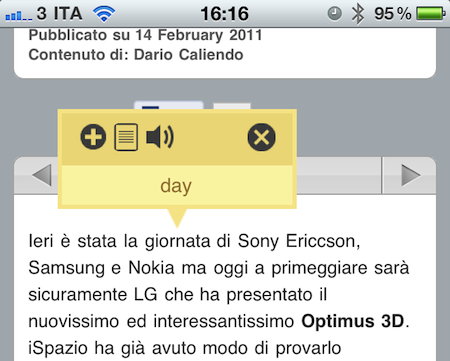
Tap-Translate, a $1.99 universal app by developer Ronen Drihem, brings an interesting approach to translations on iOS, and more specifically in Mobile Safari. Tap-Translate, in fact, isn’t exactly an “app”: it’s an app whose only function is to let you install a bookmarklet in Safari that will let you tap on a word on any webpage to get an instant translation inside a cute yellow popup menu.

It works like this: once you’ve followed the steps provided by the app to install the bookmarklet (which allows you to choose from a variety of languages), you’ll find the bookmarklet in Mobile Safari (works on any iOS device, but I’ve also tested it in Chrome and Safari on the desktop) ready to give you inline translations on tap. The translation’s popup allows you to “speak” a selected word, or jump directly to the Google Translation page. Tap-Translate can also do entire paragraphs, and be dismissed at any time. It’s fast, easy to use and convenient.

At $1.99 you could argue you’re spending money to install a bookmarklet. The thing is, Tap-Translate works really well and, most of all, it’s integrated with Safari and it’s unobtrusive. Recommended.


iPhone Nano To Have No Storage? Stream Media and Documents?

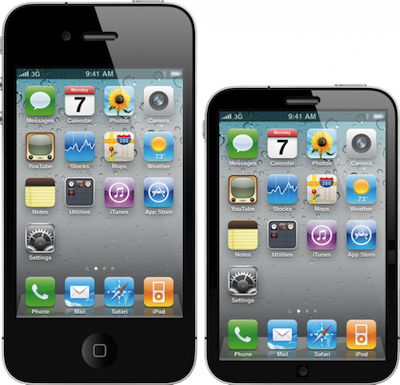
A number of reports last week from Bloomberg, TechCrunch and the Wall Street Journal suggested Apple has been working on a smaller and cheaper model of the iPhone 4, which is set for a summer release and will be available alongside the current line of iPhones. The WSJ also reported that, according to their sources, MobileMe will go under a major overhaul this summer to introduce streaming for music stored in iTunes in the cloud. The new MobileMe will be free, and Apple was planning a launch last year. Read more


Friends 1.5 Released, Adds Read It Later Support and Improves Notifications

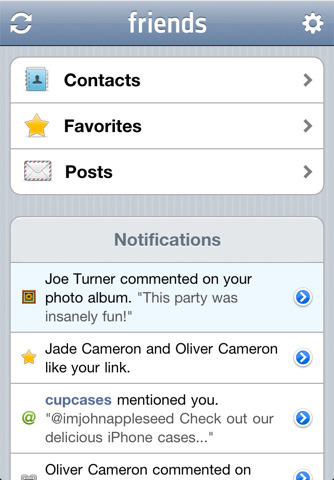
Friends, the “social contact manager” by Taptivate we reviewed a few months ago, was updated today to version 1.5, which includes a number of highly requested features from users and several optimizations and design improvements to make the app faster and easier to use. Friends, in case you haven’t heard, is an app that aggregates contacts from your Twitter, Facebook and LinkedIn accounts and matches them with your existing Address Book to allow you to always stay in touch with your friends, and find who’s online instantly. The app can serve as a Twitter client and Facebook application, also allowing you to place calls through a custom dialpad UI and organize your contacts in groups and favorites. Friends, overall, is an app built on top of various social networks that’s compatible with your iPhone’s Address Book and doubles as a lightweight client.

The 1.5 update lets you view all your Facebook and Twitter notifications in the main menu – something that was among the top requests from users and that now simplifies the way you can be notified of your friends’ activity in a single place. To streamline the experience, some parts of the UI have been redesigned and a new “mode switcher” in the top toolbar lets you easily navigate across the multiple sections of the app.

Other features in Friends 1.5 include Read It Later support, sync for LinkedIn contacts and “sort by first name”. Lots of bugs have been fixed and the underlying engine improved to be faster and more reliable. Friends is available at $0.99 in the App Store.


This Is The iPhone 4 Like You’ve Never Seen It Before

Italian photographer Paolo Rossi realized a series of macro shots with his Canon cameras that show the details of the iPhone 4 as close as possible. The photos show the rear and front facing cameras, the speaker, the amazing design of the iPhone’s flashlight. On Rossi’s website, you can also check out some 3D views of the shots.

The flash and front-facing camera macro shots are simply incredible. It’s hard to believe we actually hold these things in our hands every day, unable to take a look at these (beautiful) details.

Check out more photos here. [via iSpazio]