Federico Viticci

10804 posts on MacStories since April 2009

Federico is the founder and Editor-in-Chief of MacStories, where he writes about Apple with a focus on apps, developers, iPad, and iOS productivity. He founded MacStories in April 2009 and has been writing about Apple since. Federico is also the co-host of AppStories, a weekly podcast exploring the world of apps, Unwind, a fun exploration of media and more, and NPC: Next Portable Console, a show about portable gaming and the handheld revolution.

Bump for iPhone Updated With App Sharing

Bump, a popular iPhone app to share data like music and contact information between devices, was updated earlier today to include support for app sharing. The app, which is a free download in the App Store and was listed among the most popular apps for iPhone, revolves around the simple concept of “bumping” your iPhone with another person to share various kinds of information, locally and within seconds.

The new app sharing functionality allows you to build a list of your most used iPhone apps and select the ones you want to recommend to a friend. Once the list is created, bump your iPhone and your friend will receive the apps you chose as direct links to the iTunes Store. Bump doesn’t of course share the actual application file, but it comes quite in handy if you have lots of interesting apps to share with someone and you don’t feel like sending him an email with all the apps’ names.

What’s really cool is that, unlike app recommendation services that plug into your Facebook or Twitter accounts, Bump does everything locally with people you really know are interested in what you’re sharing. You don’t have to “like” or “upvote” recommendations, you just share items you know the recipient will be interested in.

As the developers write on the company blog:

This has been our biggest feature request of late, and it makes sense as to why.  With more than 300,000 apps in the iTunes App Store, finding the best apps has become quite difficult.  Who wants to sort through the 100 weather apps just to find WeatherBug?  But what is the most common conversation among a group of iPhone users?  ”Hey, what cool apps do you have?”

You can download Bump for free here.


Apple’s Design Director Goes To Paypal

All Things Digital reports Paypal has hired former Apple Design Director Sarah Brody as VP of Global Design. The new position at eBay-owned Paypal will allow the former Apple designer to make “sure that its payment platform is easy to use”.

Sarah Brody worked on the original iPhone, the first iPod nano and a series of Apple’s professional applications like Logic and Final Cut.

From her LinkedIn profile page:

For almost a decade, Sarah has developed and designed numerous projects and products for the Apple developer ecosystem—as individual contributor, as creative director, as well as hiring manager.

At Apple, Sarah achieved a track record of consistently delivering ground breaking products that helped redefine the way Apple’s applications look and feel.
Her unique, hands-on design approach and ability to build and manage teams that execute consistently is widely respected at Apple. Under her design direction and cross-functional partnerships with company executives, product management, marketing, engineering, and quality assurance, Apple conceived and shipped more than a dozen different products including foundation software for Mac OS X/ ProKit, MobileMe, iPhone, Aperture, Final Cut Studio, Logic Pro and products still yet to be unveiled.

On many occasions Sarah played a key role in creating new projects from inception and prototyping, through formal proposal, executive review for funding, to development and launch.

Sarah Brody started working at Apple in July 2001.


Portal: A Revolutionary Browser for iPhone

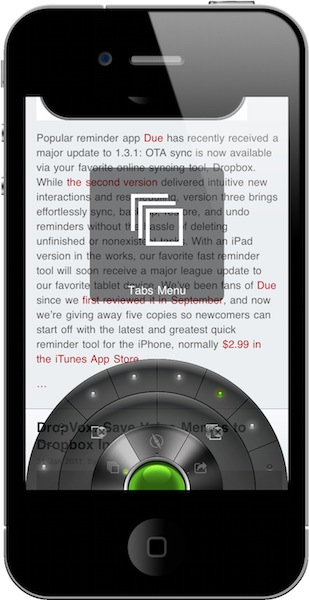
Over the weekends, I usually spend a bit of my free time browsing the App Store and AppShopper, looking for new apps to try on my iPhone and iPad. Sometime I find interesting new things to test; sometimes I find great apps. Other times – but this is a very rare exception – I find really great apps I can’t stop using. This is the case with Portal Browser for iPhone.

I have been trying a lot of alternative browsers for iOS over the past months, as you may have noticed. Thanks to tweaks available in Cydia, I also installed several modifications to make Apple’s Safari a better, faster, more functional browser. Still, testing new browsers from third party developers has become one of my favorite “work hobbies”, as I believe there’s great room for experimentation and innovation in a mobile app to browse the Internet. I do believe we have only scratched the surface with mobile browsers on iOS and Android which, if you think about it, haven’t done much besides porting the desktop experience to a smaller screen. Portal for iPhone is the first step towards a much better approach to mobile browsing, entirely based on touch interactions, features and menus developed with the iPhone in mind. Don’t get me wrong: Safari is an excellent browser. But Portal, which is sold at $1.99 in the App Store, is more than the usual alternative: it’s a completely different take on mobile browsing. Read more


DropVox: Save Voice Memos to Dropbox In Seconds

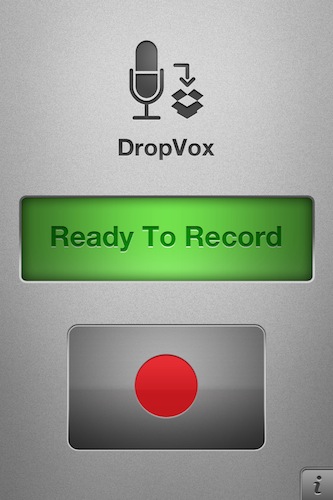
DropVox is an iPhone app I discovered in the App Store over the weekend, it’s incredibly simple yet I wonder why I didn’t think of using something like this before: DropVox uploads voice memos instantly to the cloud, and more specifically to Dropbox – the service I use on a daily basis for almost anything in my workflow, from music to app libraries.

Developed by Irradiated Software (the same folks behind MacStories’ favorite Cinch for Mac), DropVox works like this: you fire it up for the first time and log in with your Dropbox account. Every time you want to record a voice memo, open the app, hit the huge Record button, then stop and wait for the file to land in your Dropbox. Boom, just like that. No file management, no renaming features, no time stamps – just record and upload.

DropVox is a microphone for DropBox. Get it now, while it’s still priced at $0.99 as a limited time offer.


Nottingham 2.0 Beta Available, Simplenote Client For The Desktop

Nottingham is a note taking application for the Mac we first reviewed more than a year ago, and lots of things have changed since then. The application went under a private beta testing stage, and Nottingham 2.0 is now finally available as a public beta. Nottingham, for those who missed it, is a desktop app that plugs into the popular service Simplenote (which we love here at MacStories) to retrieve notes stored online and continuously backed up through the cloud.

Version 2.0 of the app, released a few minutes ago, adds a completely redesigned user interface that’s heavily inspired by the iOS Notes app with yellow notebook-like background and the possibility to switch between landscape and portrait mode. The notepaper design can be disabled in the Preferences and you can switch to the Notational Velocity-like vertical layout using a button in the top toolbar. Not very intuitive at first, as it looks like a “sharing” button. The app can sync with Simplenote and pick any folder to read notes from – put the folder in your Dropbox and you have cross-platform syncing with Simplenote and Dropbox at the same time. Similarly to Notational Velocity, the app can read multiple file types and be assigned a keyboard shortcut. The app is entirely keyboard-friendly and the developers promise more features will be added in the final release.

You can download Nottingham 2.0 public beta for free here.


Hipstamatic Photos Come To Life In UK Exhibition

Hipstamatic is one of the most popular and successful camera apps ever released for the iPhone: Apple included the app in the iTunes Rewind top selection of 2010 and even The New York Times ran a story on the front page featuring a photo by Damon Winter, shot using Hipstamatic for the iPhone 4. The application mimics the appearance of the original Hipstamatic 100 toy camera, created by the Dorbowski brothers and released in 157 limited edition models between 1982 and 1984.

At the Orange Dot Gallery in London, the “Exhibition for Hipstamatics” features 157 prints of photos realized with Hipstamatic for iPhone and selected from the fan-made website Hipstamatics, where users can submit images uploaded from their iOS devices. The iPhone photo gallery will be held until February 13th, and it’s surely a big improvement over the (hilarious) world’s smallest Instagram gallery we covered a few weeks ago.

We think it’s great that photos coming from a smartphone camera are being showcased in real-life exhibition, inside an actual photo gallery. In case you had any doubts, this once again proves that software is the best addition to Apple’s hardware. [via The Apple Lounge]


Motorola Prepares Another Jab at Apple with Super Bowl Commercial

It looks like Motorola is back to its usual business of launching commercials with clear and direct pokes at Apple’s products. After the “giant iPhone” argument for the iPad, here comes a teaser of the ad Motorola will run during Super Bowl for its upcoming Honeycomb tablet, the Xoom.

The ad / teaser, called “Goodbye 1984”, says:

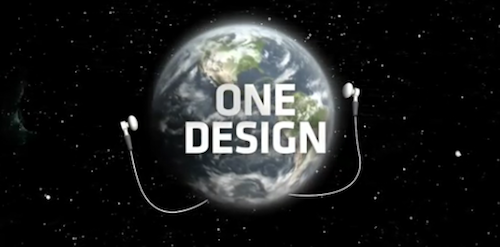
2011 looks a lot like 1984. One authority. One design. One way to work.

It’s time for more choices. It’s time to explore. It’s time to live a free life.

In the video, you can see planet Earth wearing Apple-white earbuds slowly fading from colors to black & white. The “one design” and “one authority” Motorola mentions is an obvious reference to the popular Super Bowl commercial Apple ran in 1984, quite possibility the most famous tech commercial of all time. Tech specs of the Xoom are presented in the ad, like Android Honeycomb support, 5 MP camera and 3G connectivity upgradable to 4G.

Check out the video below. [Youtube via Engadget] Read more


MacBook Air Finds Its Natural Habitat: Floating In The Air

Sometimes Apple can take its product line a little too literally. That’s the only reason we can think of behind Apple’s latest storefront setup in various Apple Stores, where a MacBook Air is gently floating in the air, attached to a balloon.  Sure, a metal wire is attached to the balloon – but the trick works. The whole setup looks pretty cool.

Most of all, Apple put an end to all those MacBook “air” jokes. Check out the video below. [Obama Pacman via 9to5mac] Read more


From Russia With Love: Old Films Become Illegal Apps

For as much as Apple wants to curate the content of its App Store, it’s becoming increasingly difficult for the app review team at Cupertino to filter apps based on illegal content with no copyrights from the genuine ones. A new report on the BBC points to several apps being sold in the App Store with no consent from the Russian company that has rights on the content of these apps. The apps, in fact, are based on old Russian films like Gentlemen of Fortune, Assa, The Diamond Arm, Kin-dza-dza and Cheburashka.

The films and cartoons, as noted by the BBC, are still protected by copyright. Russian film studio Mosfilm and the Joint State Film Collection confirmed that they didn’t approve the release of those apps in Apple’s App Store:

It is illegal to present our films as applications either in iTunes or on any other internet site. It is permitted only on our own Mosfilm site”, Svetlana Pyleva, Mosfilm’s deputy director-general, said in an interview with bbcrussian.com.

“The only official internet site where you can watch legal Mosfilm content is the Mosfilm site.,” she said. “There are no third parties which we have permitted to use our content.

An Apple spokesperson told the Russian BBC that the company “understands the importance of protecting intellectual property”, so it won’t be a surprise to see the apps pulled soon. After all, this is not an isolated case of apps sold without consent of the original copyright owners: just open the App Store and look for clones of Nintendo’s Super Mario, Angry Birds or other 1980’s hits. The truth is most companies don’t care about the rip-offs, and some file complaints to get the apps removed. Overall, the App Store is a crowded place with more than 350,000 apps and it’s incredibly difficult, if not impossible, for Apple to check on every copyright agreement ahead of the app’s approval. At least it’s fairly easy to contact the iTunes team and claim copyright infringement.