Federico Viticci

10804 posts on MacStories since April 2009

Federico is the founder and Editor-in-Chief of MacStories, where he writes about Apple with a focus on apps, developers, iPad, and iOS productivity. He founded MacStories in April 2009 and has been writing about Apple since. Federico is also the co-host of AppStories, a weekly podcast exploring the world of apps, Unwind, a fun exploration of media and more, and NPC: Next Portable Console, a show about portable gaming and the handheld revolution.

FaceMan Is Like Photo Booth For Your iPhone

I should have seen this coming. With iOS 4.3 rumored to introduce Photo Booth-like features for FaceTime or the Camera app, a developer created a full-featured alternative to Photo Booth that’s called FaceMan and it’s available now in the App Store at $0.99.

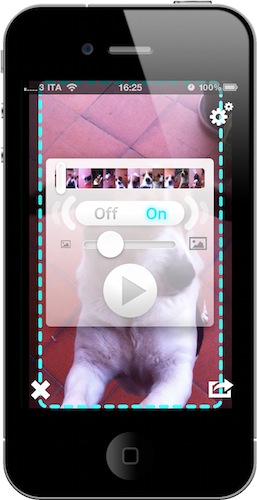
Put simply: FaceMan is great. It comes with 20 effects from the most popular Squeeze and Bent to a geek’s dream like Broken TV and LED; it’s got a slider to adjust the strength of effects; it can do both photos and videos WITH effects applied. Videos don’t have audio right now, but it’s coming with the next update, almost ready to be submitted to Apple. The interface is clean and polished, supports the Retina Display and you just need to flick through pages of effects to pick one and snap a picture. I did, and the terrible result can be viewed in the screenshot above. Full effect list includes: Swirl, X-Ray, Stretch, Heat, Sketch, Sepia, Dent, Led, Emboss, LightTunnel, Bulge, Squeeze, BrokenTv, Mirror, Toon, BlackAndWhite, AsciiArt, ModernArt, 100Me and NightVision.

Last, you can share photos on Twitter, Facebook, email and Tumblr. The app has a dedicated album to view all the photos and videos without having to open the iOS camera roll. I don’t know what else will Apple add in their own Photo Booth app, but FaceMan is an excellent alternative, available now. And it does videos. Go get it.


Macworld Releases “Daily Reader” Free iPad App

Macworld, the decade-long printed and digital publication on all things Apple, has released a free app for the iPad today that takes full advantage of the tablet’s unique form factor and brings the best of Macworld.com to the device. The Daily Reader app, in fact, is a selection of the best content from the website, and not a replica of the printed magazine available to subscribers every month. In Daily Reader, you’ll find popular content from Macworld organized in sections you can also access from a navigation bar at the top.

I’ve just tried the app for a few minutes and it’s quite nice. You can increase / decrease font size, flick through sections with a swipe. I did not like the poor layout of some article clearly taken out of Macworld’s RSS feed without formatting for the iPad; this was an isolated issue though. Most of the articles have been updated with graphics and banners that look really great on the iPad. The app takes a few seconds to load contents and images, there is advertising between articles and sections but, again, it feels good. I also like the fact that there is a box on the right side to access a live feed of authors from Macworld. You can share articles on Twitter / Facebook / Email and bookmark them for later reading into a specific page inside the app.

Unlike many blogs’ apps for the iPad and iPhone, Macworld Daily Reader is really, really nice in my opinion. The layout is clean and there’s lots of information to look at. Here’s to hoping the app will be regularly updated with new content. In the meantime, go download the app here and take a look at more screenshots and promo video below. Read more


Google Improves Weather Results on Mobile Safari

There is no shortage of weather apps on the iPhone, from the most professional ones to beautiful user-friendly software like Outside, but Google thinks you should just head over google.com and check out their new, mobile-optimized weather forecast view. The feature, which should work both on iOS and Android phones, will be activated once you open google.com on your browser and search for “weather”. The browser will ask you to give location permissions to Google, and you’ll be presented this neat search result page with fancy graphics for your location’s weather on top of everything. Fortunately, you can also enter a location manually inside a dropdown menu (Google got my location wrong, and I don’t know why).

The information displayed on screen are pretty useful and well designed. Google even bothered to add a slider that flicks through hourly updates and changes the background gradient from darker (night) to lighter blue (day). You can visualize temperature in Celsius or Fahrenheit degrees, check on humidity and wind strength.

Well done, Google. We look forward to better Twitter integration in your search results now.


Movie Stiller: Video Stabilizer for iPhone

In the past, there have been a couple of times I wished that video I shot with my iPhone turned out to be stable. Camera shakiness, in fact, is the first problem for users addicted to shooting flicks with their mobile devices; and especially in situations when you need to be quick to capture a special moment, you’ll be disappointed to find out the video is un-watchable due to your not-so-stable hand. Whoever hasn’t experienced this at least once either has non-human hands or uses a tripod.

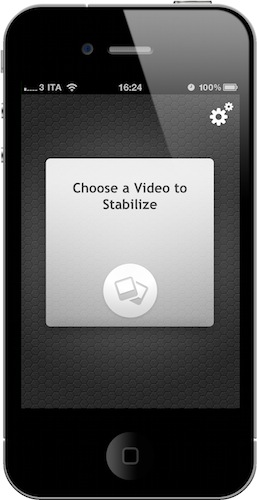
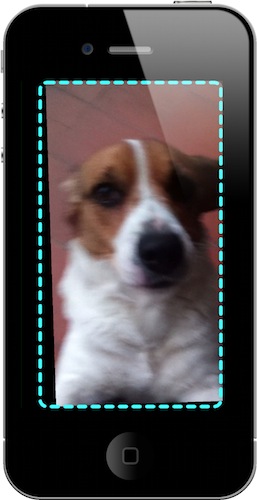
Movie Stiller, a new app from Creaceed (the same developers behind Prizmo), aims at helping you get better videos by stabilizing the ones you have in your Camera Roll. Once you fire up the app, choose a video and wait for Movie Stiller to load it and compute it; in the Settings, you can set a stabilization strength, a default scale and process rotation. Movie Stiller works like this: the more you stabilize a video to avoid shakiness, the more Movie Stiller will add black borders around the current frame. You can then make the image bigger to avoid borders, but that will let the video lose some details. Thus the need of achieving an optimal setup depending on each video.  In my tests, I’ve found the app to work fairly well with videos that had “average shaking”. Don’t expect to optimize your adventurous tornado shoot with Movie Stiller.

The UI of the app is minimal, but stylish. A few taps are needed to get through the stabilization process and you can also export directly to the Camera Roll once it’s finished. Overall, it’s a pretty nifty app to enhance the quality of videos that “could have been better”. Get it here at $2.99.


CleanMyMac’s New Feature: Mac App Store Uninstaller for Apps

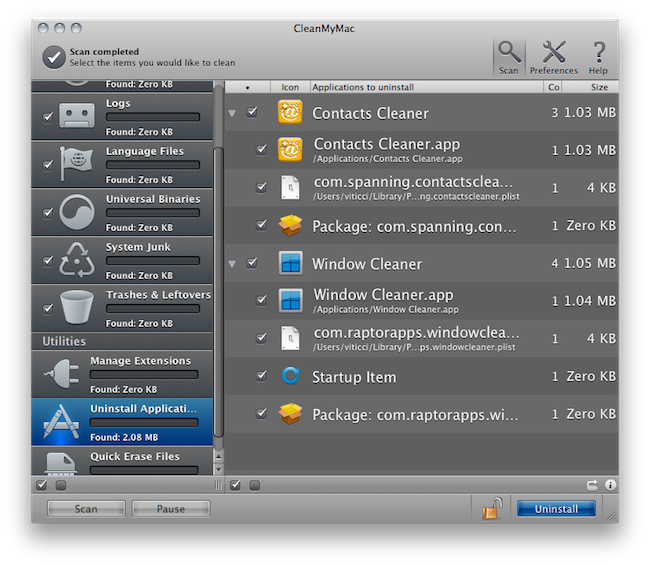
An update to MacPaw’s popular cleaning and maintenance software CleanMyMac (our review here) was released a few hours ago to include an interesting new feature: an uninstaller for applications installed through the Mac App Store. The new update also includes iOS firmware cleanup and a new “Ignore list”.

The uninstaller feature works as expected: you drag an app into CleanMyMac’s window and MacPaw’s app finds all the associated files and preferences to put them into the trash. It is unclear what exactly did MacPaw implement into CleanMyMac to introduce official Mac App Store support, but it works. As you may have noticed, the current version of the Mac App Store doesn’t provide an option to uninstall apps, only a neat feature to easily re-install apps on all your machines. If you want to delete apps on your Mac the old way is still good: just manually drag one from /Applications to the Trash. With this easy method, though, is very likely that additional files like preferences and databases will be left behind. MacPaw’s app now takes care of everything.

In the future, I’m pretty confident Apple will implement easy and complete uninstallation into the Mac App Store. For now, you should give CleanMyMac a try.


Apple’s Latest Patent: The Hitchhiker Gesture

It’s no secret Apple is looking for ways to better integrate multi-touch gestures into iOS devices and the Mac platform: the latest iOS 4.3 beta allows developers to set up “multitasking gestures” (which won’t ship with the final version of 4.3) and OS X Lion will make extensive use of gestures as well through the Launchpad and full-screen apps. Clearly, and we all know this, Apple is shifting user interaction with a computing device from pointing to touching.

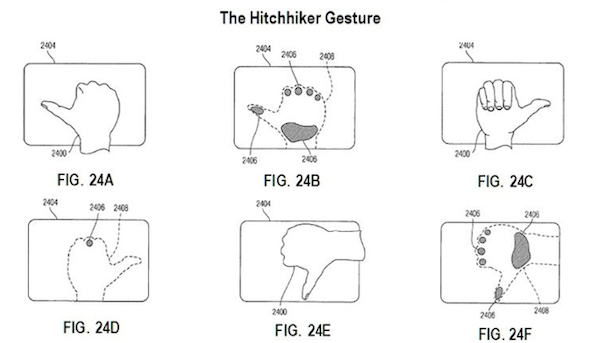
That said, the latest gesturing patent Apple has been awarded left us kind of surprised initially. As reported by Patently Apple, Apple has patented as series of “real world and security” gestures for touch and hover-sensitive devices. While we’d leave the hover-sensitive design to geek dreams for the next decade (imagine interacting with a device without even touching it, like this), the new gestures surfaced in the patent are surely original. Among them, a “hitchhiker” gesture for scrolling, panning, windowing and general directional input. Read more


Pixelmator and Mac App Store: $1 Million in 20 Days

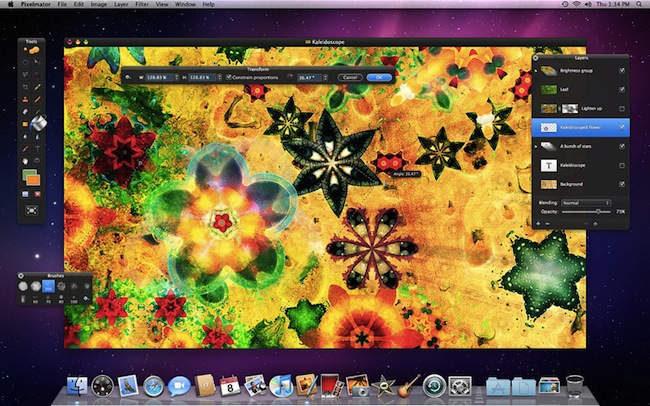
The first stories of success in the Mac App Store are starting to come in. First came Evernote, with its impressive Mac adoption rate thanks to the new Store; then Compartments, from a developer who went from 7 sales a day to 1500. Now the Pixelmator developers have posted a new entry on the company’s blog announcing that their graphic editing app has grossed $1 million in less than 20 days into the Mac App Store.

Taking Apple’s 30% away out of the equation, that leaves $700,000 to the Pixelmator team. Or maybe it’s $1 million after Apple’s cut? We don’t know. Either way, it’s an impressive result that we’re sure wasn’t possible back in the days when there was no Mac App Store.

This is a well-deserved milestone for the Pixelmator devs and we’re looking forward to what’s next for the app. The Pixelmator team, for instance, implemented a clever Mac App Store transition policy that forces existing customers to buy the app again, but will give them Pixelmator 2.0 for free once it’s released later this year.

Pixelmator is available at $29.99.