Federico Viticci

10804 posts on MacStories since April 2009

Federico is the founder and Editor-in-Chief of MacStories, where he writes about Apple with a focus on apps, developers, iPad, and iOS productivity. He founded MacStories in April 2009 and has been writing about Apple since. Federico is also the co-host of AppStories, a weekly podcast exploring the world of apps, Unwind, a fun exploration of media and more, and NPC: Next Portable Console, a show about portable gaming and the handheld revolution.

Google Launching Cloud Print with iOS Support

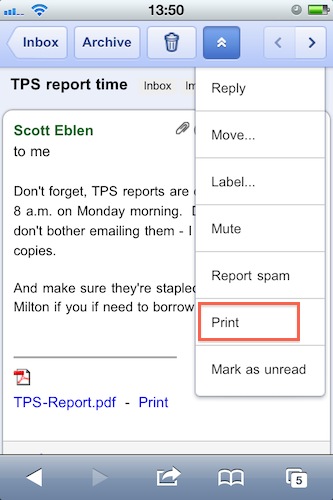
With an official post on the Gmail blog, Google has announced that in the next few days they will launch the Google Cloud Print online service with initial support for iOS devices and Windows operating system. Cloud Print allows you to print any kind of document and supported Gmail attachment by configuring a local printer with Google’s remote system. Once a printer is connected to Cloud Print, an iOS device can remotely send a document to the printer from the Gmail webapp in Mobile Safari. Support for Mac OS X and Linux is coming “soon.

To get started, you’ll first need to connect your printer to Google Cloud Print. For now, this step requires a Windows PC but Linux and Mac support are coming soon. Once you’re set up, just go to gmail.com from your iPhone or Android browser and choose “Print” from the dropdown menu in the top right corner. You can also print eligible email attachments (such as .pdf or .doc) by clicking the “Print” link that appears next to them.

It all sounds fairly interesting, especially considering that it happens in the cloud, in the background. Will Google manage to pull off real driver-less, wireless printing?


iPhone 4 Game Boy Decal? $13

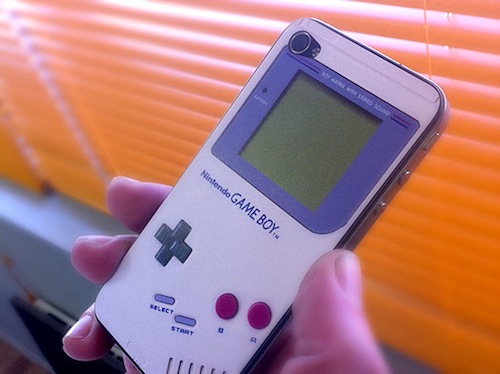
In the past months, we have covered different Game Boy decals for the iPhone 4. Reproducing both the original Game Boy and the “Color” version released a few years later, these decals never went up for sale officially and when they did, they were sold on Etsy and quickly disappeared.

Now you can get a Game Boy decal for the iPhone 4 thanks to website Mysticker, which is selling the decals at 9.95 Euros each, about $13. The decal covers the back of the iPhone and it’s got a hole for the camera and flash light.

Go buy it here if you feel like going through a Spanish product description and ordering process.


Extra Security For Your Mac with Hands Off

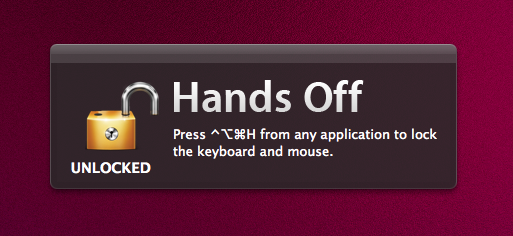
Available at $0.99 in the Mac App Store, Hands Off is a very simple, yet clever utility that will come in handy if you’ve always wanted an easy way to block access to your Mac when you’re not around – without having to turn the computer off or log out. How does that happen? Well, Hands Off can block the keyboard and the trackpad with a shortcut that can be activated at any time. Say you’re going away from your Mac for a few minutes and you don’t want your kids, or anyone, to press keyboard keys and create problems, Hands Off can help you by completely blocking keystrokes and trackpad recognition. When in “Locked” mode, the keyboard and trackpad won’t do anything.

For extra security or “keyboard cat” prevention, Hands Off is just great. You can use “readable hotkeys” (CMD instead of ⌘), change the global shortcut and even turn on Growl notifications. Combine this with Prowl, and you’ll get remote notifications if someone ever finds the right combination to unlock your Mac’s keyboard and mouse.

Hands Off works as advertised, although I noticed things can get pretty messy if a VNC client tries to remotely access your Mac when the computer is locked. I had to kill the app from the VNC client before actually being able to use my Mac, but it took a minute for the app to quit because it started beachballing in the dock. I guess an update is needed to fix this little inconvenience with VNC clients and local blocking. Anyway, Hands Off just works and it’s available at .99 cents.

Go get it.


“Theme It” Store for Jailbroken Devices Released

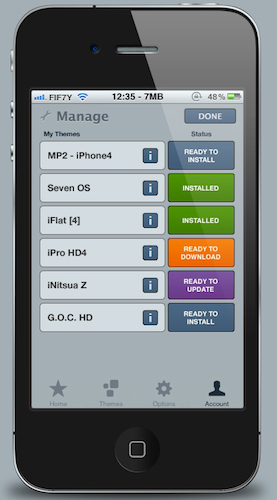
Right after a major improvement to the Themes section on Cydia, here comes Theme It, a new store for themes iOS users can install on their jailbroken devices. Theme It offers a curated collection of premium, paid themes from designers who have created full replacement for the standard graphic elements on iOS. If you’re familiar with Cydia and Winterboard – the tool to apply themes to the iPhone – starting to use Theme It shouldn’t be really difficult. The store now only has paid themes, and the developers promise free ones will be added soon. To use the store, an account is required, and the app must be downloaded either manually or installed through a dedicated Cydia repository.

A full list of currently available themes can be viewed here. Users can browse themes either on the app or the website, they can vote themes and read through the descriptions provided by the creator. The app’s design looks clean and elegant, although we don’t know the technical details of the app – namely, whether or not it uses the same Winterboard system to apply themes to iOS.

There’s also some controversy in the launch of Theme It. Apparently, Cydia’s owner and main developer Jay Freeman asked the Theme It folks to “back down” and not launch the app, claiming “competition is bad”. After the break, you’ll find the response from Theme It’s developers (courtesy of ReadWriteWeb) and a promotional video for the new Store. Read more


Sparrow Email Client Is Coming To The Mac App Store

Sparrow Email Client Is Coming To The Mac App Store

Here at MacStories, we’ve been following the development of the Sparrow email client for Mac very closely. The app first came out as public beta in October of last year, and many quickly dismissed it as a “clone of Tweetie” built for Gmail. The developers listened, improved the client and fixed bugs. The app really grew to become a full-featured Gmail client for the desktop.

With a blog post this morning, the developers announced Sparrow is coming to the Mac App Store in the next weeks, with the app already submitted to Apple for approval.

2 versions of Sparrow will be released. They’ll both be available in the Mac AppStore and on our website:
Paid: Sparrow will cost $24,99 but early birds will benefit from the $19,99 introductory price.
Free: Sparrow Lite will be ad-supported. Carbon Ads is providing the nice ads you have certainly seen in the latest Beta version. The free version will allow one-account creation only.
We can’t provide any precise release date yet as the application has to be approved by Apple.

We are looking forward to the debut of Sparrow in the Mac App Store. Also, the new application icon you see above looks pretty sweet.

Permalink

MacStories Product Review: Sonos S5 Wireless Music System

I can’t live without my music. Every day, I need to get my “fix” either through iTunes, Youtube (it’s good for rare live performances) or Spotify. I also scrobble the songs I listen to towards last.fm, although I’m no huge fan of the service as a social platform. I just keep an archive of my musical tastes in there. Still, as far as music is concerned, most of the times it’s not the system or the platform that really matters. It’s the quality. And for quality, you need good gear.

Over the years, I’ve always tried to save money and purchase great-quality earbuds to ensure high-fidelity playback while on the go. I’m still happy with my Sennheiser CX 300 bought years ago, but home stereo systems have been a dilemma for me, in spite of my obsession for top-notch hardware. I’ve changed setups too many times, jumped from speakers to stereos and all-in-one solutions without really sticking to one for more than 6 months. When music becomes an obsession, good gear is a necessity. Recently, the audio technologies implemented by Apple in iOS forced me to reconsider everything once again.

See, wireless streaming spoiled all the fun I had accomplished. First came audio via Bluetooth, then Airport Express stations and AirPlay. I changed devices: I went from a classic iPod to an iPod touch to iPhone + iPad. I subscribed to Spotify Premium to use the mobile app (with streaming and offline access), I became addicted to Apple’s own iPod app and third party replacements like My Artists, or external controllers like Coversutra, Bowtie and SongSwiper. Put simply: music became deeply integrated with iOS, and iOS grew at the same time to accomodate features like AirPlay. Music became connected.

So when I was offered the chance to review the Sonos S5, I immediately said “yes” and eagerly started waiting for the two review units to show up at my doorstep. The Sonos S5, for those unaware of this mythical gadget, is a wireless speaker internally powered by a series of amps that a) provides great sound quality and b) is truly connected with iOS, OS X and the Internet. The S5 offers the best of both worlds: local playback backed up by high-quality manufacturing and remote functionalities that allow users to “log into” the speaker and customize the entire experience. After the break, you’ll find my impressions of two months with two Sonos S5 units and a Sonos ZoneBridge connector. Read more


White iPhone 4 Shows Up On AT&T’s Online System

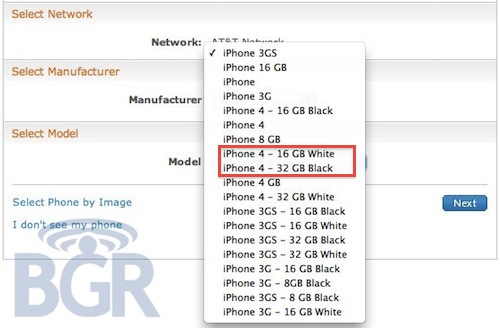
Here we go again. After a brief appearance on Verizon’s website right after the official announcement of the new CDMA iPhone 4, the mythical white iPhone 4 has been spotted on AT&T’s online management system, BGR reports.

It looks like Best Buy isn’t the only retailer with white iPhones popping up in its system. AT&T is now showing two versions of Apple’s unicorn-colored iPhone. The entries appear in AT&T’s Online Account Management system (OLAM), and read as “iPhone 4 – 16GB White” and “iPhone 4 – 32GB White.

Of course, this may just be a mistake or a prank from an AT&T employee – we don’t know what to think about the white iPhone at this point. Still, it keeps showing up. Read more


iPad Retina Display? Maybe With iPad 3…

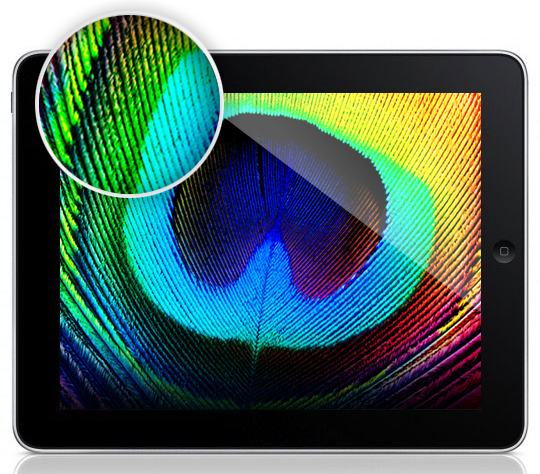
With the iPad 2 set to come out sometime in April and Apple reportedly about to announce a media event to unveil the new device in February, the Apple rumor mill is in fully-working state. And when it comes to the next-generation iPad, two are the kinds of rumors that blogs and publications are reporting: Retina Display and faster processor. Lately, we have noticed a rapid increase in the presence of “iPad Retina Display” rumors on the Internet. Read more


Woman Tries To Commit Suicide Because She Lost Her iPhone

You can file this in the “just wrong” category we have seen appear from time to time here on MacStories. Mrs. Wong, iPhone 4 owner from Hong Kong, was really happy about her purchase; she was so glad she got an iPhone, in fact, that when she accidentally lost it she went asking her husband to immediately get a new one. Her husband is a bus driver, and the couple has two daughters to think about, too. For an average family, getting two iPhones in the same week might be a little too much.

So her husband said no, and Mrs. Wong went crazy about it. She left home at 6 in the morning, only to try to jump from the 14th floor of the building. All of this because she was upset about the lost iPhone. Luckily, her husband noticed her weird behavior, called the police and went up to the 14th floor to stop her.

Now, I’m not here to judge people, but this is just wrong. Wrong. Committing suicide for an iPhone? For as much as I love Apple device, I would never put my life at risk because I lost one. Also: the free Find My iPhone works great. [iPhoneShine via OrientalDaily]