Federico Viticci

10804 posts on MacStories since April 2009

Federico is the founder and Editor-in-Chief of MacStories, where he writes about Apple with a focus on apps, developers, iPad, and iOS productivity. He founded MacStories in April 2009 and has been writing about Apple since. Federico is also the co-host of AppStories, a weekly podcast exploring the world of apps, Unwind, a fun exploration of media and more, and NPC: Next Portable Console, a show about portable gaming and the handheld revolution.

Hint At iWork ‘11 Coming Tomorrow On The Mac App Store?

As noted by 9to5mac, some graphic files found in the latest update to Keynote Remote, released today together with new Keynote features for iWork.com, hint at the presence of the iWork ‘11 suite on the Mac App Store tomorrow. Rumors of a new version of iWork have been going around since November, when AppleInsider suggested that, according to their sources, iWork ‘11 should have been released together with iLife ‘11 but was put on the shelf at the last minute and saved for a Mac App Store launch in January.

Today’s update to Keynote Remote includes two slightly changed Keynote icons that have “2011” on them. Traditionally, Apple updates the Keynote icon with a new year on it as a new version is released – it happened in the past with Keynote ‘09 as well, for example.

Of course, Apple might just have included these updated files and then release iWork ‘09 as standalone apps in the Mac App Store tomorrow. With all the rumors that have been going around recently, though, and the fact that Apple has heavily featured iWork apps in its Mac App Store promo material, there might be the possibility of seeing iWork ‘11 showing up tomorrow as a digital download in the new Store.

Mac App Store Preview: Filr, The Simple File Tagger & Renamer

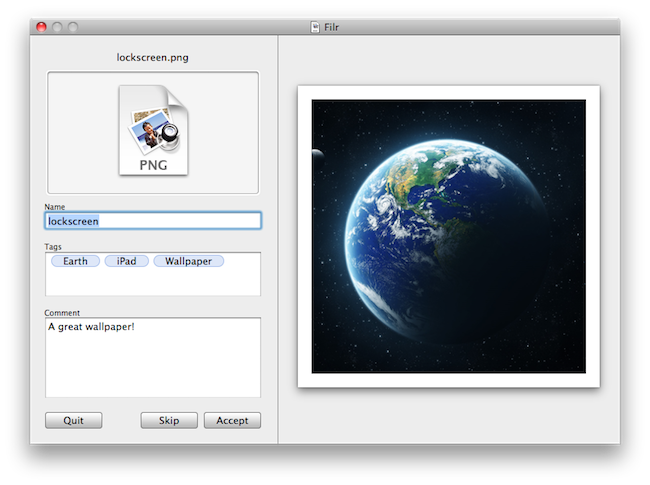
Developed by NovaStorm Software, Filr is a new simple utility for OS X that will be released tomorrow in the Mac App Store. The app, very user-friendly and straightforward in its approach, will let users do three things: rename files, tag them and apply comments to them. Unlike many other batch renaming tools available online, Filr will be focused on letting users modify one file at a time.

Tags you apply to files will be based on the OpenMeta standard, and thus will be compatible with most tagging softwares available for the Mac such as Ironic Software’s Leap 2. The Spotlight comments you’ll be able to attach to files will also be compatible with a variety of Mac apps such as Yojimbo or DEVONthink.

Overall, Filr looks like a really simple and focused app to quickly get more metadata into your Mac files, for more organization and better search functionalities in combination with other apps. Looking forward to it tomorrow, on the Mac App Store.


Mac App Store and OS X 10.6.6 Coming Tomorrow at 12 PM ET

We know the Mac App Store is launching tomorrow, on January 6. We also know that Mac OS X 10.6.6 will be required to use the Mac App Store. Jim Dalrymple over at The Loop, however, confirms that according to his sources (and when Jim says “my sources tell me” he always means “someone at Apple told me”) the Mac App Store is launching tomorrow at 12 PM ET, 9 AM Cupertino time.

According to my sources, the Mac App Store will be available at 12:00 pm (noon) ET on Thursday. That puts it at about 9:00 am PT where Apple is headquartered in Cupertino, Calif.

Of course, this means that come 12 PM tomorrow we should fire up Software Update and find a 10.6.6 update that, among fixes, will include the Mac App Store as a new system app. It is still unknown whether or not Apple will also offer a standalone Mac App Store download for 10.6.6 users on its website.

So anyway, get your credit cards ready: we’re 23 hours away from the Mac App Store.


Skype 5 Out of Beta?

As noted by a poster on Italian forum Italiamac, it appears that Skype 5, launched as beta in November, has now gone “public” – out of beta – for everyone. When trying to download Skype for Mac from its usual download page, the website doesn’t return a download of Skype 2.8 (which is still featured as the latest public release for Mac) but “forces you” to download a new version of Skype 5.

The beta version, indeed, has build number 5.0.0.6378, while the new version we just downloaded is 5.0.60.7598. Build number aside, there doesn’t seem to be anything new in the Mac app. This is a direct link to the download of the new version of Skype 5 for Mac.

Of course this might just be an error on Skype’s end, but with the recent release of video calling for iPhone and iPad we’re hoping for an announcement of Skype 5 final later today. Read more


Realmac Announces Mac App Store Pricing, Courier Becomes App Store Exclusive

Our friends over at Realmac have been busy deciding the approach to take for the Mac App Store, which in case you somehow missed by living under a rock for the past three months, is launching tomorrow as a free update for every Snow Leopard user. The Realmac team has evaluated all the options on how to best port all their applications to the new Store, while retaining the possibility to sell software to customers through their own website.

There’s been plenty of discussion about what developers will do with their apps and pricing, so today we’re announcing some pricing changes that will come into effect once the App Store goes live. Customers who purchase one of our applications via the Realmac Store will not be affected by these changes as, where applicable, they’re being applied to our own store.

First off, Courier – a beautiful app to send any file to a variety of online services we reviewed here – is going to be a Mac App Store exclusive priced at $4.99. The great news is, if you purchased Courier at full price in the past and you’re willing to re-download the app from the Mac App Store (you know, to keep a neat app library and forget about manual updates) the developers are offering a full refund. Just buy the app from the Mac App Store and send both the receipts (the old one, and the new iTunes receipt) to Realmac’s email address to get a refund for the old, full price. More details here.

As for Realmac’s other apps, RapidWeaver 5.0 is going on sale at $39.99 for a limited time, with LittleSnapper seeing a price drop as well to $24.99. The new prices will be effective tomorrow both on the Mac App Store and Realmac’s website.

Realmac is another example of long-time OS X developers that are believing in the new platform as the best new way to reach millions of new customers and Mac users. For other app previews and details, check out our Mac App Store hub.


First-Gen Apple TV Gets AirPlay Support with Remote HD

Remote HD is a new app developed by the Fire Core guys – the same folks behind the ATV Flash browser / utility – which brings AirPlay streaming to the original Apple TV, the first-generation silver model. Once installed on your iOS device from the App Store and on the original Apple TV through the Install Extras menu, you’ll be able to beam videos, Youtube, video podcasts and photos from your iPhone or iPad to the Apple TV.

If your iOS device is jailbroken and has AirPlay enabled for 3rd party apps, you’ll get the possibility to stream video from anywhere. Remote HD also lets you stream videos from iTunes on your computer.

Remote HD for iOS is available at $3.99 here.


Mac App Store Preview: WordCrasher

Coming tomorrow for the Mac App Store launch, WordCrasher is an addictive game already available on the iPhone and iPod touch which is based on a simple concept: create words out of letters falling from the top of the screen. Yes, it sounds a lot like Tetris’ bricks, only you have letters and you have to combine them to create words and empty the screen. As the screen is filled up with blocks, it’s game over.

The Mac version of WordCrasher will take the iOS experience and add some new features to make suitable for the desktop. Together with redesigned graphics and new sounds, Mac users will be able to create words not just by catching letters with the trackpad: you can use the keyboard for fast typing and gaming.

WordCrasher will be available tomorrow and I believe it will be one of the many iOS games ported to the Mac platform. Whether or not this will turn out to be a great or terrible idea, we’ll find out in less than 24 hours.


Mac App Store Preview: Todolicious, The Simple To Do App

Of all the new apps that are coming out tomorrow in the Mac App Store, Todolicious by Mustacheware is among those we’re most excited about. Created by our friend Steve Streza, who also happens to be the guy behind the great iPhone webapp Swearch.me, Todolicious wants you to stop wasting time organizing your to dos and tasks. Todolicious is a simple app that’s also customizable, and it’s aimed at those people who just want an app to quickly write down the things they need to do. No projects, tags or contexts. Todolicious is a sexy, digital version of the classic sticky notes.

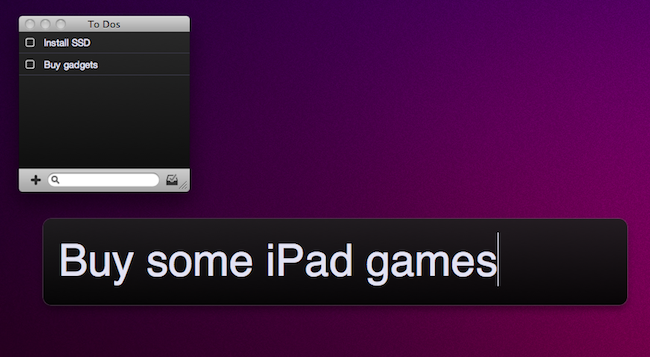
Without giving away all the details just yet (you should be able to play with the app in less than 24 hours), I want to focus on the single most intriguing aspect of the app: the new to do entry field. Instead of displaying a popup window with dozens of options, text fields and buttons, Todolicious provides a simple panel that asks you “What do you need to do?”. It reminds me of Alfred’s straightforward search interface, and you can assign a system-wide shortcut to it so you can enter new to dos no matter what you’re doing with your Mac.

Todolicious will be available tomorrow at $4.99 in the Mac App Store. It’s a simple app we’re really excited about, and we bet that thousands of Mac users who don’t need the functionalities of Things or OmniFocus will give Todolicious a try. Check out the website here, or follow @todolicious for updates.


The iPad Dock That’s Also A Projector

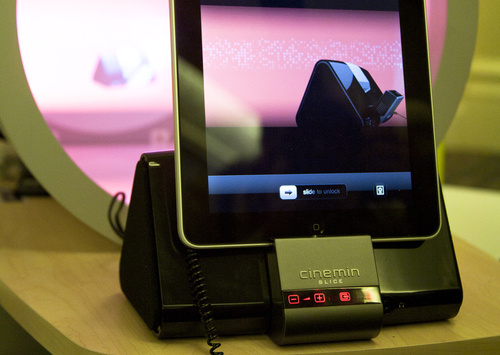
We have seen hundreds, if not thousands, of simple or original stands and dock stations for the iPad. From those that just hold your iPad upright while charging it, to the more sophisticated units that come with additional ports and connections, there’s wide range of possibilities to consider. If you’re looking for an iPad dock that also happens to be a Pico projector, though, you might just consider the WowWee Cinemin Slice.

It’s a dock, but it’s got a projector built in. As you put the iPad in there, the Cinemin Slice will take care of projecting your iPad’s screen wherever you like. Available for pre-order at $429, WowWee says it’s perfect for media and for small groups of friends, where TVs can’t go. The unit has mini-HDMI and AV ports for media players and a VGA ports for PCs and laptops. It supports the 16:9 aspect ratio and it has a resolution of 854 x480. An infrared remote control is included in the package, together with 5 docking trays for iOS devices.

If you’re thinking about getting one, head over WowWee’s website. [Gizmodo via WowWee]