Federico Viticci

10804 posts on MacStories since April 2009

Federico is the founder and Editor-in-Chief of MacStories, where he writes about Apple with a focus on apps, developers, iPad, and iOS productivity. He founded MacStories in April 2009 and has been writing about Apple since. Federico is also the co-host of AppStories, a weekly podcast exploring the world of apps, Unwind, a fun exploration of media and more, and NPC: Next Portable Console, a show about portable gaming and the handheld revolution.

Eye Scope Adds 8x Optical Zoom To Your iPhone

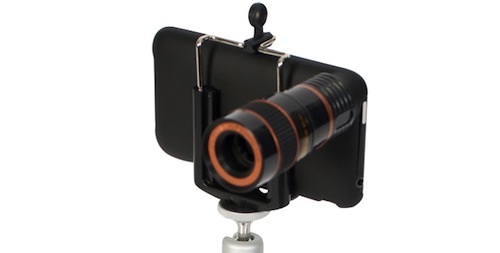
If you’ve ever wished you could spy on your neighbor’s house or simply take better photos of distant objects with your iPhone (yes, we’re going to pretend your never thought of spying on people using an Apple device), you might want to consider the Eye Scope, a $45 (£29) accessory that can add 8x optical zoom to the iPhone’s lens.

Available for iPhone 3G / 3GS / 4 owners,the Eye Scope is basically a case with an attached optical lens that promises to cover 246 meters ahead of you and your iPhone. Not bad, huh? In the package, you’ll also get a tripod mount and a lens cloth to keep everything clean and well focused.

If you want to go ahead and buy it, the Eye Scope for iPhone is available on online retailer Firebox. [via Ubergizmo]


Firemint Acquires Puzzle Quest’s Infinite Interactive

Looks like iOS game company acquisitions are the new “Google has acquired”: in an unexpected turn of events, popular game studio Firemint (creators of award-winning iOS titles such as Flight Control or Real Racing) has acquired the company behind Puzzle Quest, the Infinite Interactive team. Both companies are based in Australia, and a press release went live last night to announce the deal and the fact that “Firemint is welcoming Steve Fawkner”, founder of Infinite Interactive in 1989. As you can see in the graphics above, the companies are already joking about the games that will come as a result of this acquisition, whether or not we’ll be able to put our hands on “Puzzle Control” or “Flight Quest”.

A curious detail is hidden in the press release (which we’ve embedded below): apparently, Firemint’s Rob Murray and Steve Fawkner are long-time friends, and Fawkner showed Murray an early prototype of Puzzle Quest in 2003, receiving feedback from him. Now, he will be able to get feedback on a daily basis and who knows – maybe we are really going to see a more RPG-oriented Real Racing or puzzles in Flight Control. The idea sounds awful, I know, but game designers can usually make awful ideas happen. Read more


Clickfree Unveils $249 Time Capsule Alternative

Looking for an unofficial, cheaper, black-er Time Capsule alternative? Perhaps you just don’t want your Time Capsule to die prematurely while you were just getting to love it? You’re in luck. Amongst CES fever, new gadgets and weird round-shaped televisions, Clickfree has announced a wanna-be Time Capsule competitor that’s basically a hard drive with a built-in 802.11n radio that automates backups from your Macs and PCs.

If you’re familiar with Apple’s Time Capsule, or like me you own an AirPort Extreme with an attached USB external drive, you know how it works: in your Mac’s System Preferences you set the external network drive as a Time Machine destination, and backups will happen wirelessly in the background all the time. It’s unobtrusive, smart and pretty damn awesome. Clickfree is showcasing the product at CES as we speak, and they say no software is needed to run the backup system after an initial setup. One of the Time Capsule and AirPort Extreme advantages is the AirPort Utility app Apple gives you to configure almost anything in the device, so I don’t know about Clickfree’s approach. Maybe it’s one of those things that really just works without manual setup.

The Clickfree Wireless comes in two flavors: a 500 GB one that retails at $179, and a 1 TB one that can be yours at $249. [via Engadget]


Why Is Saudi Arabia Blocking MobileMe?

As noted by 9to5mac and Arabic website Apple-wd, it’s currently impossible to access MobileMe’s web interface available at www.me.com from the web browser in Saudi Arabia. Since a few hours, the webpage returns an error and a message asking if “you think the requested page should not be blocked”. No word yet from Apple on this, but apparently thousands of users in Saudi Arabia are experiencing the issue.

MobileMe’s web interface allows users to check on email accounts and calendars, contacts, iDisk and even the Find my iPhone feature, which is Apple’s tracking service for stolen or lost iOS devices. Some users are reporting that only the http:// version of Me.com is blocked, while the https:// is working just fine. Others claim both http:// and https:// are being blocked. Direct links to MobileMe’s services (me.com/mail, for example) are reportedly unavailable as well.

In October, Saudi Arabia was one of the countries that didn’t get the FaceTime functionality on the iPhone 4. As of today, it’s still unknown what the real cause of the block was.


Real Life Angry Birds: LEGO, Cake, Arcade Booth

In the past weeks, terrific App Store sales aside, we saw the Angry Birds franchise making its way to Apple Retail Stores with official cases for iPhones and iPod touches and custom MacBook Air skins realized by loyal fans of the birds and pigs. Today, we’ve got more real-life Angry Birds creations and mods to share.

First off, an Angry Birds arcade booth spotted by MIC Gadget in China which lets you defeat actual pig plush toys using a slingshot. Looks like fun, too bad I think we won’t see this become available in Europe or the US anytime soon.

Other fan-made creations found on the Internet today include a full-featured Angry Birds set made of LEGO bricks and a birthday cake for the real iOS aficionado. Great stuff, and I bet the cake was delicious.

The only downside? There’s no achievement to unlock for when you eat it. Read more


Geohot To Release Untethered iOS 4.2.1 Jailbreak?

Last week we reported Internet celebrity hacker Geohot might call his next jailbreak tool / utility rubyra1n, basing on some speculation from the domain he registered and the fact that (PS3 hacking aside) he’s been quiet in regards to the iOS jailbreak scene since the release of iOS 4.1 and limera1n.

As noted by Covering Web, it looks like the Dev Team itself knows something about Geohot’s effort to bring a proper untethered jailbreak to iOS 4.2.1. Currently, owners of jailbroken devices running the latest OS from Apple are forced to boot through redsn0w, an app for Mac and Windows that loads the iOS firmware file and allows a device to boot in “tethered” mode. This is not really convenient, and an untethered tool might simplify things a lot by letting users install Cydia and boot their iPhones and iPads normally.

A recent tweet from Musclenerd says:

I hear geohot does have an untether actually! Though not for all devices.

Take this with the proverbial grain of salt, but we wouldn’t be surprised to see Geohot coming out from his silence and release a brand new jailbreak tool for the latest version of iOS. The guy plays his own game, as seen with limera1n before.


iPhone Alarm Still Not Working? Try A Reboot or Reset

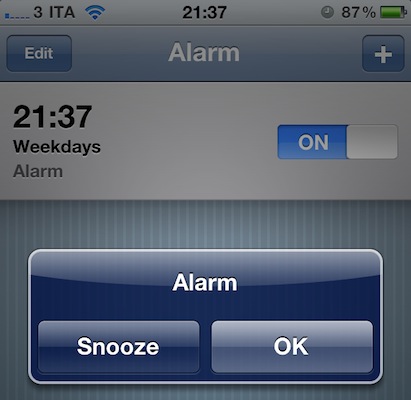
The New Year broke the iPhone’s built-in alarm clock app. After much of a backlash on the Internet (and too good reason, people depend on alarms to wake up in the morning and, you know, do stuff like go to work) and a temporary fix that involved setting a repeating alarm on the device, Apple then reassured everyone that the bug would auto-magically fix itself on Januar 3rd. That didn’t happen for many, as seen both on Reuters and Apple’s own Discussion boards. If you’re running an iPhone or iPod touch and you still can’t manage to get the device to work with alarms, the solution might be easier than you think.

Several users on Apple Discussions are suggesting that a simple power cycle (reboot) or “soft reset” can fix the iPhone software to work correctly with alarms after January 3rd. By “soft reset” they mean the procedure that involves pressing both the sleep / wake and home buttons until the Apple logo appears on screen. This will force the iPhone to dump its temporary stored files and should fix the alarm clock app woes. If you rebooted your iPhone before today and it didn’t fix the problems, do it again now.

The clock app on my iPhone 4 (with iOS 4.2.1) is working just fine both with single and repeating alarms, but I think a reboot or two happened in these past days. I have a jailbroken device so reboots and “resprings” are very frequent. If you’re still experiencing the alarm issues, you can give the method above a try and report back.


Draftpad, The Simple Notepad That Works With Any App

On your iPhone or iPad, I bet you’re using a note taking app like Simplenote, PlainText or Writings to organize your notes and have them backed up online. There are hundreds of alternative note-taking applications available in the App Store, and I’m not going to pretend I haven’t thought about trying a different one each week at least a couple of times. They all look so attractive. But I sticked with Writings, in the end. Still, aside from those users who are firmly convinced Apple’s own Notes app is the best you can have on the iOS platform no matter what, the note-taking app genre is strong and alive in the App Store.

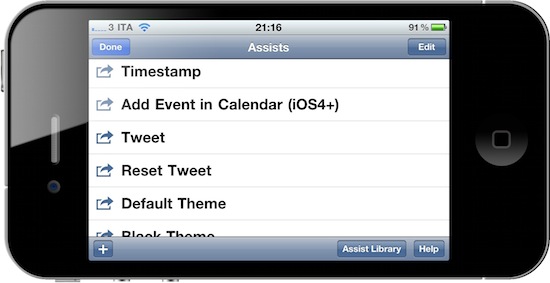
Draftpad, developed by Manabu Ueno, might look like yet another take on mobile note capturing, but it’s not. Indeed it is a notepad that lets you jot down quick notes and thoughts, but it hasn’t got built-in online sync nor any other tagging or folder management capability. Instead, Draftpad is all about doing stuff with the text you just wrote. This app can “route” text to a plethora of external native / 3rd party apps, like Apple’s SMS app or Facebook. You can write text and then share it via email or Twitter, search on Google, add it as a Calendar event or make it the body text of a new SMS, send it to Facebook or search in Maps. The “assist library” (the commands you can perform on text) can be extended and you can even write your own actions if you know how to play around with custom URI handlers.

Draftpad comes with a bunch of non-app related actions, too, like “insert timestamp” or “copy all text”. There’s also the possibility to switch to a black theme and check on your previous notes by tapping on the History button in the main page. What I really like, though, is that the app comes with support for multiple Twitter clients out of the box, and if you know how to find your way around iOS you can make Draftpad work with any app that supports text input. It’s really neat. And all of this for free, both for iPhone and iPad.

Draftpad won’t become your new Simplenote but it’s a great addition to iOS – a notepad that’s customizable and you can extend to work with your favorite apps. This is exactly what I’d like to see in a “Services” menu in iOS 5.


With The 1.4 Update, Dialvetica Aims At Replacing Apple’s Phone App

Dialvetica is a “contact contacter” for the iPhone developed by the same creators of the hugely popular Calvetica calendar application. In his review of the first version of Dialvetica, Chris wrote:

Dialvetica is such a breeze to use, and once you get your contact defaults set up, prepare to move your Contacts.app to a folder and off the home screen. Where else can you email, call and SMS within the same app and keep it clean and simple? It’s also faster than using iOS’s Spotlight too.

Dialvetica is faster than Apple’s contacts app, but most of all it allows you to quickly call, email or text someone with just a few taps. Thanks to a custom “sticky” keyboard that sits at the bottom of the app, you’ll be able to filter out your contacts list and get to the friend you need to email the party invitation to. Dialvetica learns from your habits and will display the most contacted people at the top of the window over time.

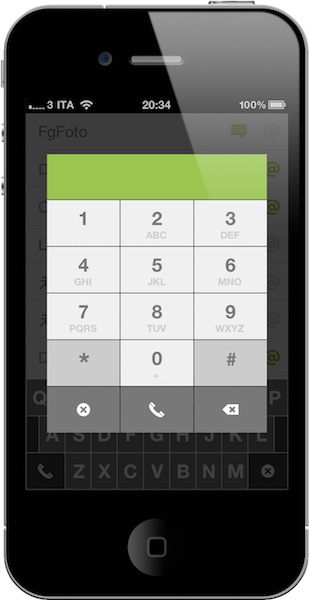
With the latest 1.4 update, which is propagating in iTunes now, Dialvetica aims at completely replacing Apple’s Phone app in your dock. With the introduction of a custom dialpad, the app now lets you compose phone numbers, but as you can guess relies on the Phone app to initiate the actual calls. The advantage is that if you’ve been using Calvetica to quickly go through your contacts, you can now use it to make phone calls, too, and put Apple’s phone app in a folder away from your homescreen.

I don’t know if I’m going to replace Favorites on my iPhone with this, but I’m pretty sure thousands of users will find Dialvetica 1.4 the best alternative to the stock phone application. Give it a try.