Federico Viticci

10804 posts on MacStories since April 2009

Federico is the founder and Editor-in-Chief of MacStories, where he writes about Apple with a focus on apps, developers, iPad, and iOS productivity. He founded MacStories in April 2009 and has been writing about Apple since. Federico is also the co-host of AppStories, a weekly podcast exploring the world of apps, Unwind, a fun exploration of media and more, and NPC: Next Portable Console, a show about portable gaming and the handheld revolution.

RetinaPad Enables Retina Graphics for iPhone Apps in 2x Mode

The iPad can run iPhone apps in compatibility mode, and we all know Apple implemented this feature to allow iPad owners to access a huge catalogue of apps on day one. The fact that the iPad App Store got to more than 40,000 apps in a few months is a different story. What is not great about iPhone compatibility mode is that, when an iPhone app is blown up to 2x mode, the graphics become fuzzy. Even if you’ve installed on your iPad an app that’s got Retina Display-ready graphics on the iPhone, you’ll get the pixelated graphics.

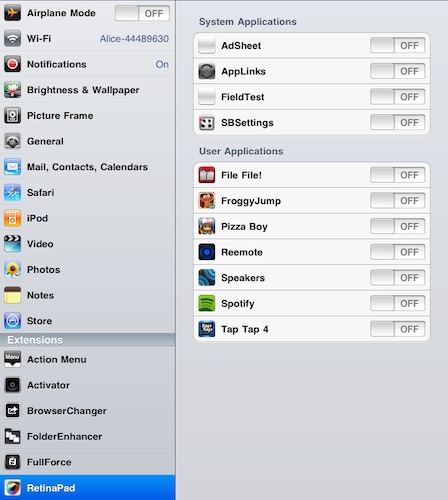
RetinaPad, a new Cydia tweak by Ryan Petrich, fixes this problem, and it works great with basically any app or game that’s got Retina graphics. Once installed, you’ll have to choose the iPhone apps that you’d like to run with the new 2x mode. Fire up the app, tap on 2x and you’ll notice that the iPad will display clean graphics without pixelation. If the iPhone app has been updated for the Retina Display, it most likely works with RetinaPad out of the box. It’s really neat.

I’ve been able to successfully run in the 2x mode Spotify, Voices 2, Calvetica – they all look great on the iPad now. RetinaPad is available at $2.99 in the Cydia Store. More screenshots below. Read more
The iToiletstand Is Exactly What You Think

Some ideas are just plain wrong. Yet, you have to admit sometimes you’ve thought about these wrong and silly ideas as some sort of a geek dream you don’t want the world to know about. Like iOS gadgets for the toilet. You know, this is especially true for the iPad, which is a great device for reading.

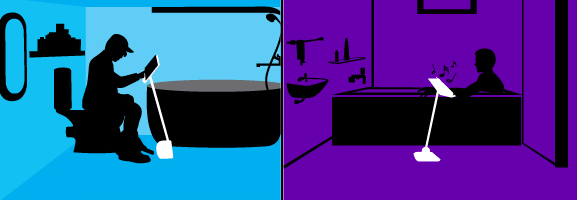
It looks like your prayers for a comfortable iPad stand to use you-know-where have been answered: the Angled Stand is an “adjustable, angled stand for iPads, tablets & other electronic devices”.

What are the features: top is adjustable, pole can be moved back & forth, easily tightened at various angles making it flexible & user friendly. Pole has an adjustable height between 26-46 inches which is starting from around your knees on up. Pole angle various to around 45 degrees. Top is just a bit wider and taller than an ipad and device is foldable.

The product is coming in early 2011 and, bath and toilet aside, can be used a stand for when you’re in bed, by the barbecue, in the kitchen, in hospital…wherever you think it’d be nice to have an iPad following you by on a stand.

I guess Steve Jobs is already using something like this for his iPad 2 in his home office. [CultofMac via iToiletstand]


Redsn0w Beta For iOS 4.2.1 Untethered Jailbreak Available

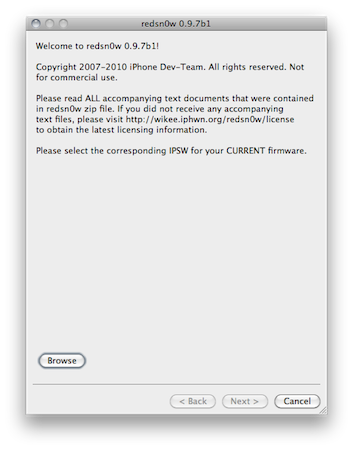
As promised on Twitter a few days ago, the Dev Team released a beta of Redsn0w for Mac to provide an untethered jailbreak solution for iOS 4.2.1. Redsn0w 0.9.7b1 should allow you to jailbreak your iPhone 4, iPad and iPod touch 4th gen without having to plug your device in your computer on each reboot or shutdown. iPhone 3G, old-bootrom iPod touch 2nd gen and iPhone 3GS owners don’t need this new Redsn0w as they already have an untethered jailbreak.

This beta version of Redsn0w (or as the Dev Team calls it, the “backup plan”) is meant for testers willing to provide useful feedback on this new jailbreak. To use it, you’ll need iOS 4.2 beta 3 hashes saved on Cydia and the iOS 4.2 beta 2 IPSW file saved on your computer. In this beta the bluetooth functionality is disabled, the task switcher will make the Springboard crash and the iPod player is only enabled on the iPod touch 4th gen.

Redsn0w 0.9.7b1 is available here.


iTunes 12 Days of Christmas: Day 1

As announced two weeks ago, today Apple launched the “iTunes 12 Days of Christmas” promotion across European iTunes and App Stores. Every day from December 26th to January 6th, users will be able to download a “fantastic selection of songs, music videos, apps, books, TV episodes and a film” completely for free on iTunes.

The free app for iPhone and iPad that lets you receive push notifications for daily offers is available here.

While a first free download showed up on December 17, the promotion officially starts today with “Day 1”. Today, you can download “Promise This - Christmas Bundle” by Cheryl Cole entirely for free. At least in the UK Store, as it appears a Vasco Rossi is given away in the Italian iTunes Store. The Cheryl Cole bundle includes a song and a video to download from the iTunes app.

Stay tuned for promotions coming every day until January 6.


Gorillaz iPad Album Now Available for Streaming

As announced by Damon Albarn in November, the new Gorillaz album “The Fall” is now available online for streaming and will be released as digital download tomorrow, December 25th. What’s so special about The Fall that we’re covering it on MacStories? It was entirely recorded on an iPad.

Albarn first told the NME:

I’ve made it on an iPad – I hope I’ll be making the first record on an iPad. I fell in love with my iPad as soon as I got it, so I’ve made a completely different kind of record.

The Fall contains 14 new songs and it was recorded using apps such as SoundyThingie, AmpliTube, iOrgel HD and iElectribe. Full list of songs and apps used in the album is embedded below. You can stream the record for free now by hitting this link, which requires you to subscribe to the band’s mailing list. From a first listen, it all sounds pretty…digital and electronic. Perhaps different from previous Gorillaz records, but interesting nonetheless considering the setup being used to produce it. Check out the video of “Phoner to Arizona” below.


Read more


MobileMe Calendar Webapp Now With Alerts

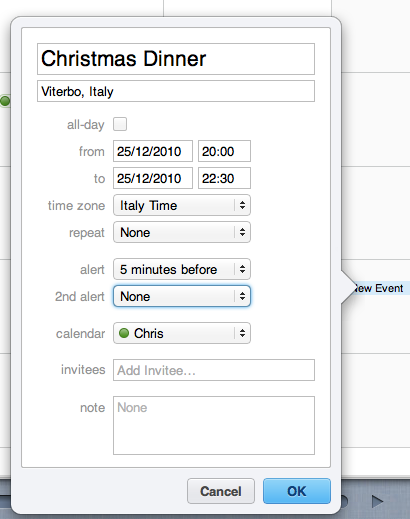
A few minutes ago Apple announced the availability of calendar alerts on me.com. Just like on any iOS device, you’ll be able to set up alerts for upcoming events and be reminded in the-browser as long as the Calendar webapp is running:

The new MobileMe Calendar web application now includes the ability to set and edit alerts to remind you of upcoming events. Like the calendar alerts you can already set on iPhone, iPad, iPod touch, Mac, and PC (with Outlook), they will be displayed on whichever device you’re using to remind you that an event is about to start.

The redesigned and improved MobileMe Calendar went public for all users in October.


Apple: Everything That Happened in 2010 [Video]

We know 2010 has been a terrific year for Apple. New MacBooks, New iMacs / Mac Minis and Mac Pros, the iPhone 4, the iPad. Not to mention the new & improved Apple TV, iOS 4, Retina Display on the iPod touch, the fiscal results….overall, it’s been a good year. One of those that will end up on Wikipedia someday.

The video below puts all of this in perspective by placing all the events that marked Apple’s 2010 in chronological order.

“We think it’s great.”

[via Seth Weintraub]


Financial Times: Steve Jobs ‘Person of the Year’

Financial Times: Steve Jobs ‘Person of the Year’

When Steven Paul Jobs first hit the headlines, he was younger even than Mark Zuckerberg is now. Long before it was cool to be a nerd, his formative role in popularising the personal computer, and Apple’s initial public offering on Wall Street – which came when Mr Jobs was still only 25 – made him the tech industry’s first rock star.

Now, three decades on, he has secured his place in the foremost ranks of the West Coast tech titans who have done so much to shape the world around the turn of the millennium.

And here’s why: “The worst thing that could possibly happen as we get big and a get a little more influence in the world is if we change our core values and start letting it slide. I can’t do that. I’d rather quit.”

Permalink

Apple’s Antenna Fix? Hide It Behind The Apple Logo

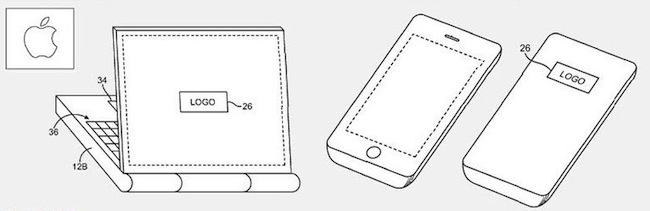
According to Patently Apple, the antenna engineers at Cupertino might have figured out a better placement for 3G antennas in future iPhone and “telephonic” MacBooks: hidden behind the Apple logo.

As Patently Apple reports, while the whole Antennagate story was spreading like a virus on the Internet and general media, Apple was busy thinking about a new patent they call the “logo antenna”. Placed behind the famous logo that’s on the back of computers, iPhones and iPads, such location would allow to “gain a stronger signal without intervening metal or other conductive housing walls interfering”.

It is difficult to place antennas in small and lightweight mobile devices, and the solution detailed in this patent would imply a “conductive antenna cavity” with “vertical sidewalls and a planar rear surface or may have other suitable cavity shapes”. Technical details are provided in Patently Apple’s coverage of the patent.

To regular users, this means that Apple has been thinking about new ways to improve antenna placement in mobile devices, and they’ve been thinking about MacBooks with built-in 3G connection, too. Me? I just want a glowing Apple logo on my iPhone.