Federico Viticci

10804 posts on MacStories since April 2009

Federico is the founder and Editor-in-Chief of MacStories, where he writes about Apple with a focus on apps, developers, iPad, and iOS productivity. He founded MacStories in April 2009 and has been writing about Apple since. Federico is also the co-host of AppStories, a weekly podcast exploring the world of apps, Unwind, a fun exploration of media and more, and NPC: Next Portable Console, a show about portable gaming and the handheld revolution.

Is This The Finder You Want in OS X Lion?

With the Mac App Store reportedly around the corner and OS X Lion set to ship sometimes next summer, we are going to see hundreds of new apps coming to the Mac in the next months. Thanks to a unified purchase system modeled after the insanely successful iOS App Store and all the excitement around a major new version of OS X, developers are jumping to the Mac once again. The interesting apps released in these past weeks confirm that the Mac is far from “dead”.

Still, there’s one application users would like Apple to slightly tweak and / or completely change: the Finder. Some would be fine with a tweaked version inspired by TotalFinder, some claim Apple is going after a Finder-less model just like on iOS. And while we don’t think Apple is going to kill the Finder just yet, we’re definitely playing around with the idea of a massive update to OS X default file manager come Lion next year. Read more
Pure Reader: Amazing Google Reader Mod

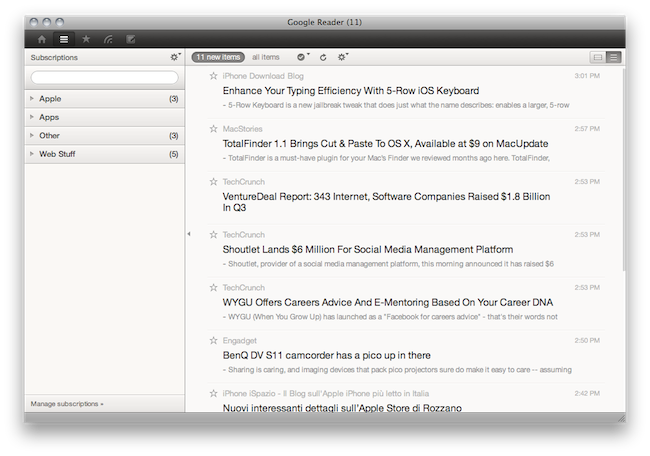
A lot of people started using RSS once again when Reeder for Mac (public beta) came out last week. It is a beautiful app that brings the power of Google Reader to the desktop with a lot of additional functionalities such as support for sharing on multiple social networks and background loading of webpages. But many users are still tied to Google Reader in the browser, that pinned tab that they just can’t close.

If so, take a look at Pure Reader, a browser extension by designer Na Wong. Read more


TotalFinder 1.1 Brings Cut & Paste To OS X, Available at $9 on MacUpdate

TotalFinder is a must-have plugin for your Mac’s Finder we reviewed months ago here. TotalFinder, developed by Binary Age, brings a lot of additional functionalities to Apple’s default file manager, including the possibility to open multiple tabs, a “visor” feature to open the Terminal as a transparent layer on top of any window, folders on top, dual mode and many other tweaks.

It’s a massive extension to the original Finder which I’ve been using for months now, and haven’t really looked back. It doesn’t get in the way like many other alternative file managers do, as it perfectly blends with the Finder itself.

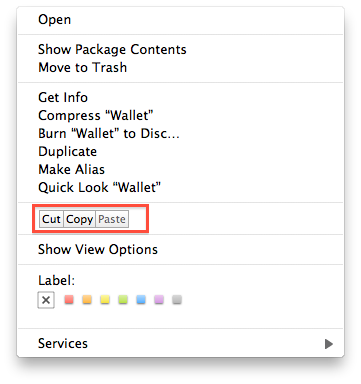
Today Binary Age released a major update to TotalFinder, introducing a variety of bug fixes and improvements but, most of all, a new icon and proper cut & paste support. To activate cut & paste for files in the Finder (which doesn’t ship by default with OS X machines) you just have to open the preferences and check an option. Once activated, you’ll find a cut & paste menu in the Finder’s default contextual menu. The 1.1 update also brings much smoother tabs animations, sidebar tweaks in dual mode, fast toolbar hiding.

TotalFinder was a must-have on its version 1.0, and it still is now that the first major update is out. Actually, I can’t recommend this more now that cut & paste is a go and lots of bugs have been squashed. Plus, the app is available today at $9 on MacUpdate Promo – you can’t miss it.


Mac App Store To Launch Next Week?

According to a rumor posted by Appletell, Apple may launch the Mac App Store as early as next week:

An inside source has just told us that Apple is targeting a Monday, December 13th launch of the Mac App Store. The company apparently told developers to have their software prepared for a launch as early as Monday the 6th of this month, but our contact would be shocked if that happened at this point. Apple has made no official announcements regarding this, and delays could always happen, but there’s a push to be launched before Christmas, well ahead of the previously estimated January release. Guess from where this push has come.

The website claims that Apple is ahead of its schedule for the new store opening, and Steve Jobs wanted a December 6th launch, but it didn’t happen. We didn’t hear anything from developers about a December 6th release, we just know that there’s a deadline for apps to be submitted that should end sometimes later this month.

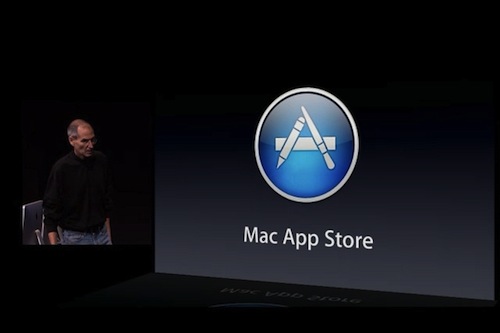
At the Back to the Mac event on October 20th, Steve Jobs said the Mac App Store would launch in 90 days – which made us think of a late January 2011 opening. Last week, Apple seeded a new build of OS X 10.6.6 to developers to ensure Mac App Store compatibility and even clarified its position on the availability of trials and beta apps in the new Store.

[via MacRumors]


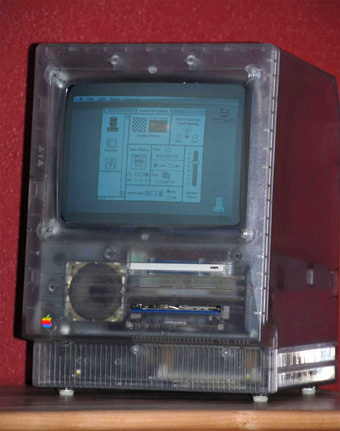
Legendary Transparent Mac SE Doesn’t Last Long On eBay

This Mac SE wasn’t meant for public release, it was a special unit designed for Apple’s employees – and most specifically, designers – so they could look at the actual components while using the machine. A transparent Mac SE coming straight from the late ’80s, sold on eBay for more than $25,000.

The item has been sold pretty quickly (heck, Jobs himself might have bought it feeling the nostalgia), and it comes from an ex-Apple employee who worked at the R&D team back in the day. Whoever bought it will have to boot it off of an 800k floppy, as the hard disk boot isn’t working anymore.

So, new transparent Mac SE owner: congratulations. You own a very rare piece of Apple’s history now. [Gizmodo via eBay]


$100,000 School Program Gets Every 4th-Grader An iPad

A $100,000 pilot program at two elementary schools in Hancock County will allow hundreds of fourth graders to get iPads and start reading books, doing math and other different assignments on them. The program, which will take place at Weirton Heights and Allen T. Allison elementary schools, was paid for with the help of federal grant money, but teachers are already looking for ways to completely customize the iPad experience for each child. Read more


This 5-Row iOS Keyboard Makes My Typing Faster | Cydia Store

5-Row Keyboard iOS 4 is a $0.99 tweak available in the Cydia Store which, you guessed it, adds a fifth row to the standard iOS keyboard. Most specifically, it adds a numeric row so that you won’t have to constantly change the keyboard layout when having to type numbers. That happens every day to me, especially when typing password, and it’s incredibly annoying.

This hack makes the keyboard bigger, but I haven’t really noticed any difference. Actually, my mobile typing has improved as I can get sentences and passwords done faster. To configure the tweak, install it from Cydia and activate it as a theme in Winterboard. Then open your keyboard settings in General -> Keyboard, select your default keyboard and apply the new 5-Row layout.

Useful.


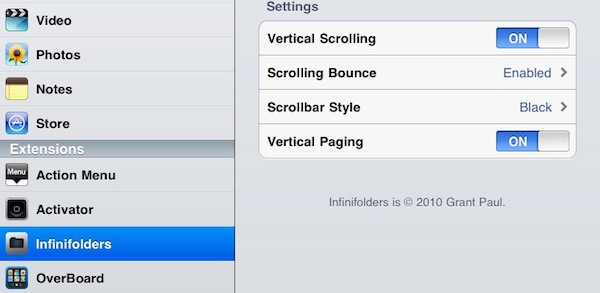
Infinifolders Updated, Now Supports iOS 4.2.1 On iPad | Cydia Store

Infinifolders by chpwn is one of our favorite Cydia tweaks here at MacStories: not only it allows you to put as many apps as you wish inside iOS folders (current limitation is 12 on the iPhone, 20 on the iPad), it also lets you customize the way folders become “scrollable” and activate a neat vertical paging functionality.

The latest update, version 1.3.3-1, adds full iOS 4.2.1 support for the iPad, which can now enjoy the power of unlimited folders as well. I’ve been testing the update on my jailbroken iPad and it works perfectly.

If you’re considering a jailbreak for your iPad running iOS 4.2 but looking “limited” in certain features, Infinifolders is one of those tweaks that leverage the real potentialities of the Cydia community. Recommended.