Federico Viticci

10804 posts on MacStories since April 2009

Federico is the founder and Editor-in-Chief of MacStories, where he writes about Apple with a focus on apps, developers, iPad, and iOS productivity. He founded MacStories in April 2009 and has been writing about Apple since. Federico is also the co-host of AppStories, a weekly podcast exploring the world of apps, Unwind, a fun exploration of media and more, and NPC: Next Portable Console, a show about portable gaming and the handheld revolution.

Microsoft’s Silverlight To Gain iOS Support in 2011

At the Silverlight Firestarter event two days ago, Microsoft announced a new version of its cross-platform runtime and development platform, Silverlight. The new version, dubbed Silverlight 5, will see a first public beta release in the second quarter of 2011, with a final release to follow before the end of next year.

Silverlight 5 will focus on better, more interactive media experiences for Microsoft’s suite of business application; Redmond’s giant wants to offer a technology that will help developers create great user experiences. While we don’t know about developers’ support for the platform, it’s interesting that the new version of Silverlight will introduce support iOS devices. At the event in Redmond, Microsoft demoed the new Silverlight on an iPad, and confirmed that during 2011 they’ll roll out support for iOS and Windows Phone 7.

Good luck with the HTML5 and Flash competition, Microsoft.
[iSpazio via CMSWire]


Dropbox For Mac Hits Version 1.0

Dropbox, one of our favorite sync services here at MacStories, just hit version 1.0 on the desktop. The new build, released for Mac, Windows and Linux, it’s available for download on Dropbox official forums here.

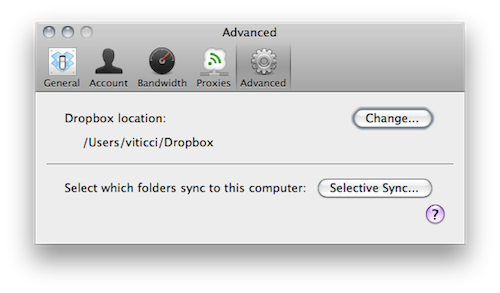
If you’ve been following the development of Dropbox for Mac closely, then you know that this 1.0 build is actually a “remixed” version of the 0.8 that’s been available on the forums for a few months now. Dropbox 1.0 comes with a redesigned preference window that makes it easy to check on your computer’s settings and your account information, but the real new feature is selective sync: located in the Advanced tab in the settings, selective sync allows you to choose which folders already on your Dropbox account you want to sync back to your computer. If you want to keep a folder online but not locally, it will not download or sync to your computer. Very useful for files you just want to keep a backup of, but not an actual local copy.

Dropbox 1.0 is available here. As for what you can do with Dropbox, here’s where to start. Check out the full 1.0 changelog below. Read more


Modded SNES Controller and Nintendo 64 Become iPhone and iPad Docks

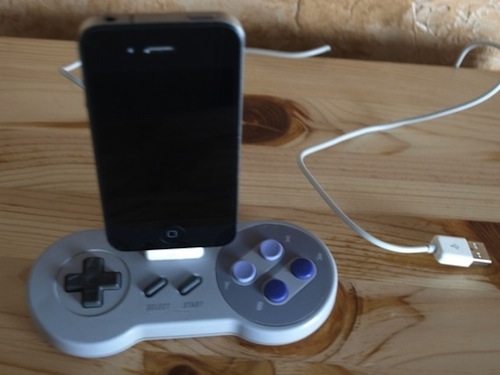
In what could be described as a pretty surprising turn of events, Nintendo now considers Apple the biggest threat to its mobile gaming dominance. Etsy user Geekunique, however, wants to bring some love back between Cupertino and Kyoto and find a way to let old Nintendo consoles and modern iOS devices play nice together. Geekunique, in fact, modded an old SNES controller and a Nintendo 64 to become iPhone and iPad docks, respectively.

It seems pretty easy to cut a hole in the controller and place an iPhone dock connector in there but hey – you can avoid the trouble and buy these things now at Etsy. If you think you really need them, be quick: I guess they’ll be sold out pretty soon.

[via TUAW]


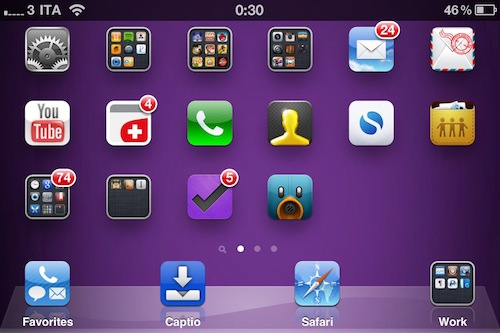
Jailbreak Hack Enables Landscape Springboard on iPhone

By default, you can’t turn the iPhone Springboard in landscape mode. The iPhone is meant to be held in portrait mode, at least when you’re navigating between pages on your Springboard. That’s what Apple wants. But some users have been asking – Why can’t we put the Springboard in landscape mode if some apps, like Mail, support the horizontal orientation?

Cydia developers, as usual, are here to come up with alternative solutions to Apple’s restrictions. My guess is that Apple doesn’t want you to turn your Springboard horizontally because that would require an icon layout adjustment, just like on the iPad. Besides, the iPhone has a much smaller screen and layout adjustment would turn out to be a huge problem to deal with. Read more


Osfoora Is Coming To The Mac [Screenshots]

Osfoora is an insanely popular Twitter client for iPhone and iPad that has gained thousands of aficionados in the past months. Released on the iPhone last year, Osfoora made its way to the tablet a few months ago with a really nice client that took advantage of the larger screen to offer a landscape “split view”.

Osfoora is now coming to the Mac, according to a screenshot of the “pre-alpha version” posted by the developer on popular design-sharing website Dribbble. We can’t see much from the teaser, but it looks like the desktop client is going to feature a minimal look with a sidebar that – again, basing on this first small screenshot – looks a lot like Tweetie’s one.

With Tweetie 2 on the horizon, Weet for Mac and now Osfoora – I  guess it ain’t really over for Twitter clients on the Mac. We look forward to seeing more about this new iteration of Osfoora.

Update: we’ve got another screenshot from Osfoora’s developer, showing the timeline with photos indicators. Looks nice to us.


MultiIconMover Now iOS 4.2.1 Compatible | Cydia

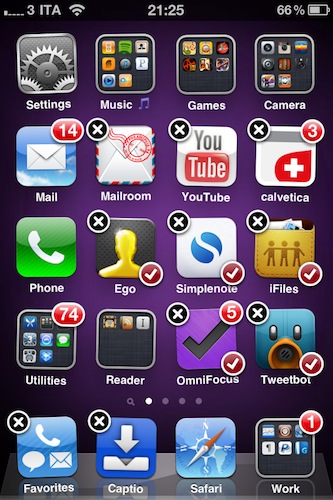
MultiIconMover is one of the reasons why many people jailbreak their iPhones: it allows users to move multiple icons at once without having to constantly move back and forth between pages. It’s really simple: you enter wiggle mode, you start selecting icons you want to move, a red badge will appear on them, choose the destination and press the Home button. All the icons will be moved to the new location.

Many say Apple should implement this by default. It surely looks “native” enough to be part of Apple’s iOS, but in the meantime you can just go ahead and install it from Cydia. The tweak is now iOS 4.2.1 compatible, and it works great on the iPhone. I haven’t tested it yet on the iPad.

MultiIconMover is available for free in Big Boss’ repository.


MacStories Preview: Screens, New VNC Client for iPhone and iPad

When the iPad came out in April, there was a category of apps I was looking forward to trying on the tablet: VNC clients. Those apps that allow you to connect to your Mac using OS X default sharing capabilities, enabling you to mirror your computer’s screen on an external device – such as the iPad, indeed. I got my iPad, and soon after that I installed iTeleport on it.

I’ve been using iTeleport on a daily basis since then to check on my computer when using the iPad in another room – usually the living room –  to change songs in iTunes, quickly move files to Dropbox and stuff like that. iTeleport is a fast and stable application, and it also comes with a feature that lets you connect over 3G routing the computer through a Google Account. Using a computer remotely over 3G isn’t the best experience you can get, but it works fairly well to start downloads and trigger actions on the go.

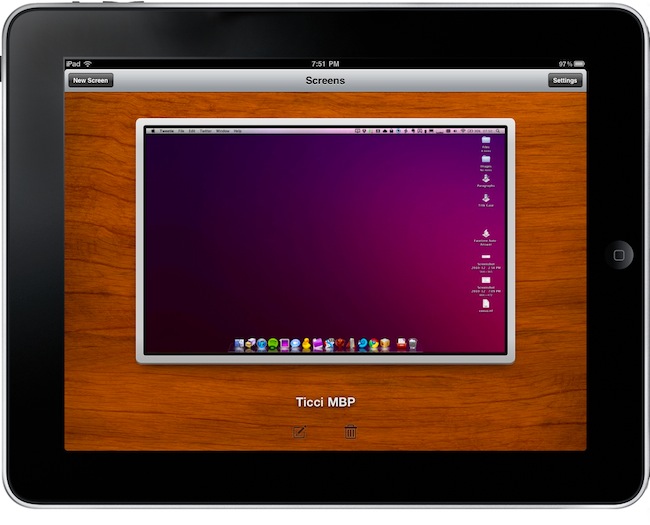
A few weeks ago Luc Vandal from Edovia contacted me and asked me if I’d be interested in trying a new VNC client they had been working on for months. I said yes, and now the app is basically ready for App Store submission. I’m running a final version of the app, the same that Edovia will submit to the App Store.

Screens by Edovia has become the best VNC app I’ve ever run on my iPhone and iPad. Read more


Will Mac App Store Users Really Miss Demos? Probably Not.

The big news this morning is that Apple clarified its position on demos and trials in the upcoming Mac App Store and confirmed what we thought would happen all along: developers can’t have demo versions of their apps in the Mac App Store. Only full-featured retail versions will be accepted. Clearly, Apple doesn’t want to offer limited-time or “half baked” apps in its new Store, and it’s forcing Mac developers to go the iOS way with either free or paid apps.

That is going to cause a few problems and headaches for many, many OS X developers. For years, they have been trained to release demo / trail versions of applications, with a paid version to purchase immediately or after the trial runs out. And indeed Apple suggests just that: keep hosting trial versions on your website, because you’ll be able to insert a link to it in the App Store description page of the app. Just as it’s possible now in the iPhone and iPad App Store. Read more


iPad At The House of Representatives

iPad At The House of Representatives

Rep. Henry Cuellar, Democratic congressman, has an iPad. He uses it with an app to check on Congress’ information, and he’s also running a teleprompter on it. He says he’s not the only one:

I’m always looking for the newest technology out there and I’ve done that for many, many years. The iPad is just one of those fabulous pieces of equipment that’s available out there. First thing I do in the morning is get my cup of coffee and start reading the papers. … And at night, before I go to bed, I check my last e-mails and check to see if there’s any new stories online.”

He says he’s not the only one toting the Apple gadget: “I’ve seen a couple of other members that have their iPads.

iPads were also spotted at the White House.

Permalink