



Great gadgets come from the distant lands of China. Knock-offs, clones, weird imitations of well-known Apple products. Sometimes you can argue they’re pretty decent, most of the times you can’t even look at them. The iPad Nano clone we have below (as if there was an actual iPad Nano to copy) surely fits well in the second category. Read more
The Safari Icon Set→
The Safari Icon Set
Something that started out as a doodle on my iPad grew into a cascade of late nights studying compass concepts and exchanging ideas with designers and good-folk alike. Sometimes you just stumble upon a fun notion and you gotta run with it, in this case it was as simple as the idea of why the Safari icon always had to depict that one type of Compass.
Impressive work by Michael Flarup.
PDF Expert Gets Even Better with Signature and Text Notes Support
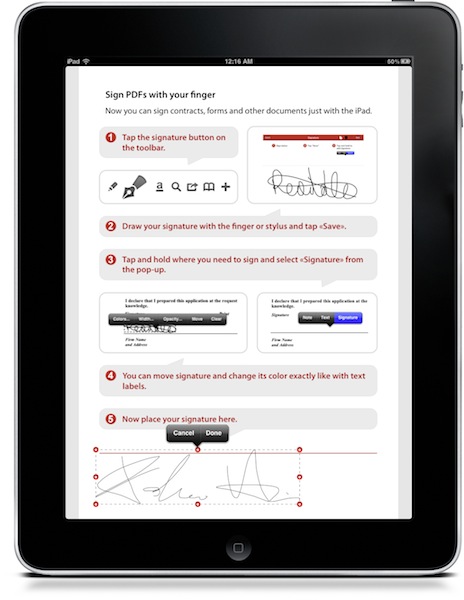
PDF Expert is, in my opinion, the best PDF reader and annotation tool you can currently have on the iPad. It’s got a nice UI, a great engine that’s damn fast at opening large PDF files, it lets you pull documents from various online sources such as Dropbox and iDisk. It allows you to annotate documents and transfer them back to the Mac to view annotations in apps such as Acrobat Reader and DEVONthink. It’s a full featured app that, unlike many alternatives, doesn’t overwhelm you. Read more
Eike Batista, Eighth Richest Person In The World, Wants To Bring Apple Manufacturing to Brazil

Eike Batista isn’t just another entrepreneur who likes Apple products and doesn’t mind having dinner with Steve Jobs every two months or so. No, he’s more like the eighth richest person in the world according to Forbes, and Brazil’s first billionaire. He runs several mining and oil-services companies, and among those one called “OSX”. He’s not exactly someone you can diss with a Steve-mail.
According to MacMagazine, the guy would like to bring Apple’s manufacturing process to Brazil, to create job positions, generate revenue and lower costs of Apple products for Brazilian customers. Apple currently gets its products made in China, through Foxconn. Read more
Flight Control HD Now Available On The Mac via Steam

Just as promised two days ago, Firemint released Flight Control HD for Mac today. The game is available at 3,99 Euros via Steam, and it’s been published under the SteamPlay label so you’ll be able to play it both on a Mac and a PC – without having to buy it twice.
You’re an air traffic controller at an increasingly busy airport; just point and drag aircraft to their landing zones with your mouse or trackpad. Sounds easy? It isn’t! You’ll need nerves of steel and smart strategy to keep the chaos under control. Flight Control HD has been especially redesigned for PC and Mac, with updated graphics and an even tougher new challenge – the Steam exclusive Stunt map where you can increase your score by flying through the gates before landing!
The Mac version of Flight Control comes with an exclusive map and also features Steam achievements and leaderboards. Flight Control HD is coming to the Mac App Store as well.
Apple Releases iOS 4.2.1 GM Build
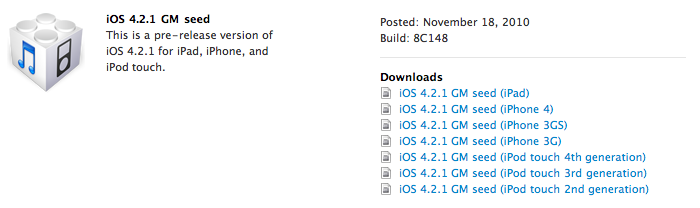
A few minutes ago Apple posted a new GM seed in the iOS Developer Center. The build shows that it’s a GM seed for iOS 4.2.1, with build number 8C148. Read more
Holiday Deals for Office for Mac 2011
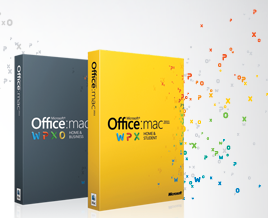
Office for Mac 2011 was released at the end of last month and it seems like it’s a pretty solid release users who purchased it are really enjoying. With the holiday season around the corner (I wish we had something like Black Friday here in Italy), the Office for Mac team decided it would be appropriate to offer from sweet discounts on its brand new suite.
So this year Apple, Best Buy, and Mac Mall shoppers can save $20 on purchases of Office for Mac 2011 Home & Student. Amazon customers will receive $40 off, which is a great deal. These offers are available Thursday, November 25 – Monday, November 29.
We’ll update this post once the links to purchase the suite on Amazon will go live.
• Apple Stores (US & Canada): $20 off Home & Student Family Pack for $129 (regularly $149 ERP).
• Best Buy and MacMall (US): $20 off Home & Student 1-pack for $99 (regularly $119 ERP) and $20 off Home & Student Family Pack for $129 (regularly $149 ERP).
• Amazon (US): $40 off the Home & Student 1-pack for $79 (regularly $119 ERP) and Home & Student Family Pack for $109 (regularly $149 ERP).
• OfficeforMac.com (US): $20 off Home & Student Family Pack for $129 (regularly $149 ERP).
Get 40% Off App Tamer for Mac→
Get 40% Off App Tamer for Mac
App Tamer tames applications that are chewing up excessive CPU time and battery life on your Mac. Its unique “AutoStop” feature will stop an application when you switch away from it, and then automatically restart it when you click back to it.
This is a neat app to free up CPU and save battery life I highly recommend. I use it on a daily basis on my iMac, and at $8.97 it’s a great deal. Promo ends in 10 hours.
The Feed, Immersive RSS App for iPad
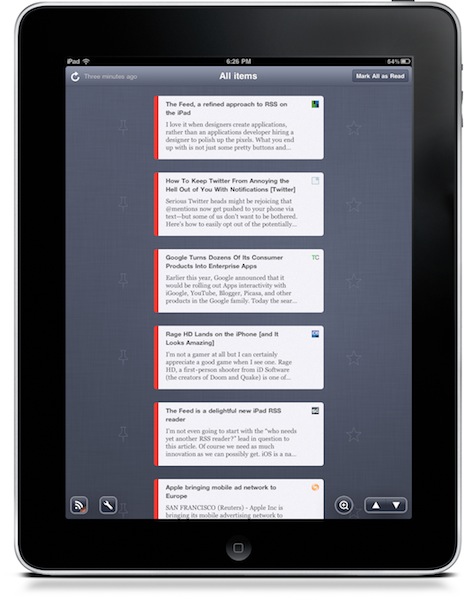
At this point, I guess you know I’m a huge Reeder fan. I use the app on my iPad on a daily basis, I fire up the iPhone version when I’m on the go and I was lucky enough to be accepted into the private Reeder for Mac alpha. Reeder has become my RSS app of choice, and I haven’t been able to switch to any other alternative since I tried the iPhone client last year. Yes, it’s that good. But that doesn’t mean I haven’t tried companion apps to Reeder.
Reeder is meant for RSS power consumption. Being based on folders and feeds navigation, Reeder isn’t meant for those people who want to sit down, pull out the iPad and start reading immediately. You have to do something to find your way through the feeds waiting for you in Google Reader. And that’s ok for me: Reeder is great Google Reader client. But what if we had the chance to have an Instapaper for Google Reader? An app that allows you to lean back, and just read? No folders, no menus, no navigation - just a flow of articles and text. Read more