Federico Viticci

10804 posts on MacStories since April 2009

Federico is the founder and Editor-in-Chief of MacStories, where he writes about Apple with a focus on apps, developers, iPad, and iOS productivity. He founded MacStories in April 2009 and has been writing about Apple since. Federico is also the co-host of AppStories, a weekly podcast exploring the world of apps, Unwind, a fun exploration of media and more, and NPC: Next Portable Console, a show about portable gaming and the handheld revolution.

Enable Keyword Filtering In Tweetie for Mac With a Preference Panel

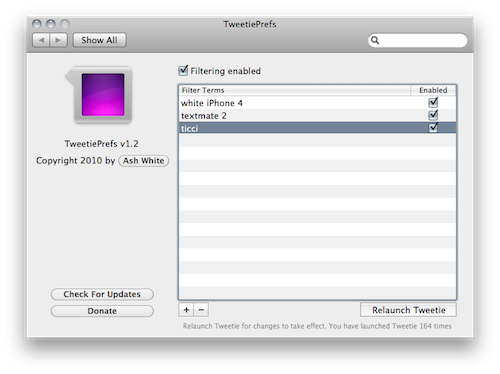
Tweetie for Mac users have been able to activate keyword filtering for more than a year using a simple Terminal hack. For all those who prefer a graphical interface to a command line hack, however, TweetiePrefs is here to help.

Developed by Ash White and available for free here, TweetiePrefs lives in System Preferences and allows you to easily create, delete and activate filters for Tweetie. Every time you’ll create or delete a filter, you’ll have to relaunch Tweetie for changes to take effect.

Works fine, and it’s easy to use. Give it a try.


RIM Posts BlackBerry Playbook and iPad Comparison Video

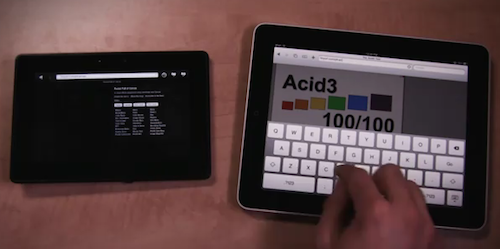
RIM believes in its upcoming Playbook tablet as a feasible alternative to Apple’s iPad. With the new video comparison they posted on their official Youtube channel, it looks like RIM is betting a lot on the web surfing capabilities of the device.

The video shows that the Playbook is faster at loading web pages than the iPad, although the selection of websites is limited and a test is focused on loading a website that feature “rich Flash content”. The iPad can’t load that, and the Playbook seems pretty fast at rendering it, but the video doesn’t show how scrolling speed is affected by Flash. The Playbook’s browser looks fast anyway, scoring a 100/100 on Acid3 test and loading a Javascript / HTML5 Canvas based webpage faster than the iPad. It looks fluid.

Check out the video below. Read more


A Day To Re-Meh-mber

Apple’s “exciting announcement from iTunes” was the availability of the Beatles’ music catalogue in the iTunes Store. No music streaming service, no subscription-based iTunes, no “iTunes in the Cloud”. It was “just” about the Beatles. Did hype take over our minds once again? Yes. But this time, Apple itself created the hype. Read more


The Beatles Come to iTunes

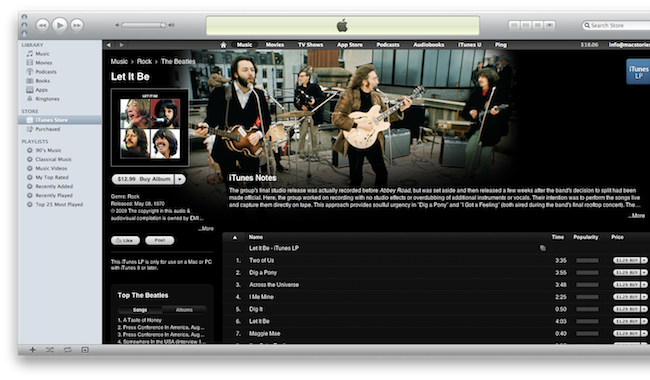
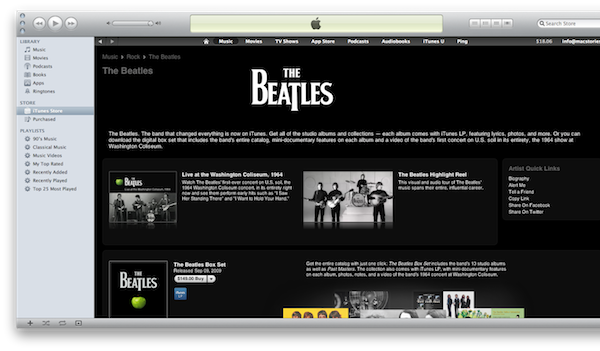
So that’s it. The Beatles music library is available in iTunes, after years of waiting. If you head over the iTunes Store now, you can see by yourself what the fuss was all about: the day “we’ll never forget” is the day Apple announced the availability of the Beatles in the iTunes Store.

Does Apple have more to announce? We sure hope so. But in the meantime, the Beatles have showed up. Songs are already available for download, there’s a Box Set available at $149.00, there are ads and videos.

An update, straight from Apple’s PR:

We’re really excited to bring the Beatles’ music to iTunes,” said Sir Paul McCartney. “It’s fantastic to see the songs we originally released on vinyl receive as much love in the digital world as they did the first time around.”

“I am particularly glad to no longer be asked when the Beatles are coming to iTunes,” said Ringo Starr. “At last, if you want it—you can get it now—The Beatles from Liverpool to now! Peace and Love, Ringo.”

“We love the Beatles and are honored and thrilled to welcome them to iTunes,” said Steve Jobs, Apple’s CEO. “It has been a long and winding road to get here. Thanks to the Beatles and EMI, we are now realizing a dream we’ve had since we launched iTunes ten years ago.”

“In the joyful spirit of Give Peace A Chance, I think it is so appropriate that we are doing this on John’s 70th birthday year,” said Yoko Ono Lennon.

“The Beatles on iTunes—Bravo!” said Olivia Harrison.

“The Beatles and iTunes have both been true innovators in their fields,” said EMI Group CEO Roger Faxon. “It’s a privilege for everybody at EMI to work with Steve Jobs and with Apple Corps’ Jeff Jones and their teams in marking a great milestone in the development of digital music.


New iPhone 4 Commercial Is All About The Battery

Last night Apple launched a new iPhone 4 commercial focused on the amazing battery life of the device. The commercial, first spotted by TiPB, still isn’t available in a high quality version on Apple’s Youtube version, but you can find an embed below anyways.

As TiPB reports:

It’s broken up into work longer (Mail), play longer (a hockey game), laugh longer (Pixar’s Monsters Inc. movie), listen longer (iPod), shoot (Camera), edit (iMovie), share (MMS), update (Facebook), download (App Store), read (iBooks), write (SMS), and even FaceTime longer.

Apple also reminds people this is the “world’s thinnest smartphone”. We think it’s a good commercial, simple and effective as always. Check it out below.


MacStories Weekly Game: Astronut

Yes, a Weekly Game on a Tuesday. It’s a day we’ll never forget, and the game we’re covering is so good I couldn’t help but play 3 hours with it last night and wake up early this morning to hit the Publish button.

Astronut by the Iconfactory is a game I was looking forward to. Since I saw the first shots on Dribbble, the promo video and I heard from people who were testing it that it was really great, I started waiting for the app to show up in iTunes with much anticipation. The app became available last night, and it’s free in the App Store. A clever move, as if you want to purchase extra “sectors” (level packs, or “zones”) you’ll have to complete a $1.99 in-app purchase. Which is totally worth it. Read more


Reeder for iPad 1.2 Adds iOS 4.2 Support, Facebook and Zootool Sharing

What I consider the best RSS app for iPad, Reeder, got updated a few hours to version 1.2. This update introduces support for iOS 4.2 (which should be really around the corner now) and task completion for Google Reader syncing: you can close the app while it’s syncing and it’ll finish in the background. Persistent state also works fine in this new release.

Other features of 1.2 include support for Facebook and Zootool sharing (if you haven’t checked out Zootool yet, it’s a great web app to collect and organize bookmarks), better handling for accounts with hundreds of subscriptions, a larger tap area for next / previous buttons and less sensitive slider controls.

Reeder for iPad remains the best app to access Google Reader. If you don’t give it a try, you’re missing out. Available at $4.99 in the App Store.


Flight Control HD for Mac Coming Later This Month via Steam

Although Firemint already announced a Mac version of award-winning game Flight Control, dubbed Flight Control HD, will be released in the Mac App Store, Mac users will be able to download the game later this month via Steam.

From the official Firemint blog:

The Steam version of Flight Control HD will feature a brand-new, exclusive map. The new “Stunt Flying” map will introduce an exciting new gameplay element, where you can score extra points for flying through a course of stunt cones before landing. This adds a new challenge to the much-loved and insanely addictive gameplay first made famous by the worldwide iPhone hit that has now been downloaded more than 3 million times.
Flight Control HD for Steam will also feature Steam achievements and leaderboards, and will be available world-wide.

Mac gaming got a lot more interesting since the release of Steam, and it’s about to get even better with the Mac App Store. In case you haven’t yet, go check out Flight Control for iPhone and iPad here and here.