Federico Viticci

10804 posts on MacStories since April 2009

Federico is the founder and Editor-in-Chief of MacStories, where he writes about Apple with a focus on apps, developers, iPad, and iOS productivity. He founded MacStories in April 2009 and has been writing about Apple since. Federico is also the co-host of AppStories, a weekly podcast exploring the world of apps, Unwind, a fun exploration of media and more, and NPC: Next Portable Console, a show about portable gaming and the handheld revolution.

Apple and Oracle Announce OpenJDK for OS X, Java Developers Rejoice

When developers noticed Apple was deprecating Java on OS X, there was quite a mess on the internet. Today, Apple announced that is joining Oracle to bring the OpenJDK project on the Mac in order to maintain Java.

Apple will contribute most of the key components, “including a 32-bit and 64-bit HotSpot-based Java virtual machine, class libraries and a networking stack”.

With OpenJDK, Apple’s Java technology will be available open source for developers to contribute to. Press release embedded below. Read more


IA Writer Now iOS 4.2-ready

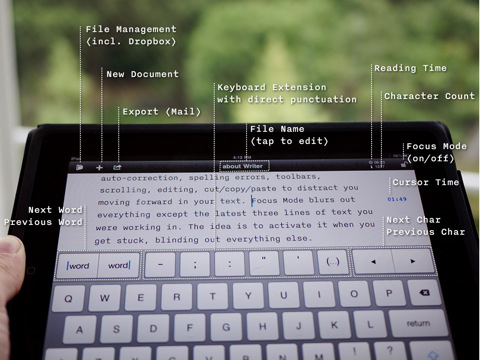
I’ve been waiting for this update: when IA Writer first came out, I couldn’t use it. I was already running iOS 4.2 beta on my iPad, and the app had a few bugs with the new operating system. The focus mode wasn’t working (and that feature is possibly the most important one in the app), custom keys didn’t match.

With the latest 1.0.2 that showed up a few minutes ago in iTunes, the app is finally ready for the elusive OS. Subfolders and auto-sync aren’t included yet, but they’re coming soon.

Finally, I can use IA Writer. Go get it, as it seems totally worth it.


iOS 4.2 “Delayed” Due to iPad WiFi Issues, New GM Build Coming [Updated]

Two days ago we reported Mac OS X 10.6.5 and iTunes 10.1 were set to come out on Wednesday, with iOS 4.2 for iPhone, iPad and iPod Touch to follow on Friday Nov. 12th – tomorrow. Mac OS X 10.6.5 indeed came out, without AirPrint functionality for shared printers as previously reported as well. iTunes 10.1 didn’t come out.

Basing on the information we got from a reliable source, it appears that iOS 4.2 won’t come out on Nov. 12th due to last-minute WiFi connection issues experienced by many users running the GM build on the iPad. The issues have been widely documented on MacRumors forums (here and here), Twitter and Apple’s own discussion boards, both by users and developers. You can check out a video of the bug in action below. Read more


Noteshelf 2.1: Dropbox Integration, Finer Ink, New Notebooks

From my Noteshelf review, about a month ago:

What totally convinced me to pick Noteshelf as my go-to app for handwritten notes, though, is wrist protection. When people write, they usually rest their wrist on paper – that’s natural and necessary to have a correct writing position. Well gentlemen, unlike all the other apps available for iPad, Noteshelf has an option to not detect your wrist as an active touch on the screen. Welcome to natural and human writing on a tablet.

As for features I’d like to see besides the upcoming Evernote and Dropbox integration and a template creator, it’d be nice to be able to pinch and zoom on pages, especially in landscape mode. I also don’t like the fact that you can’t select multiple pages when exporting them (email and iTunes are supported).

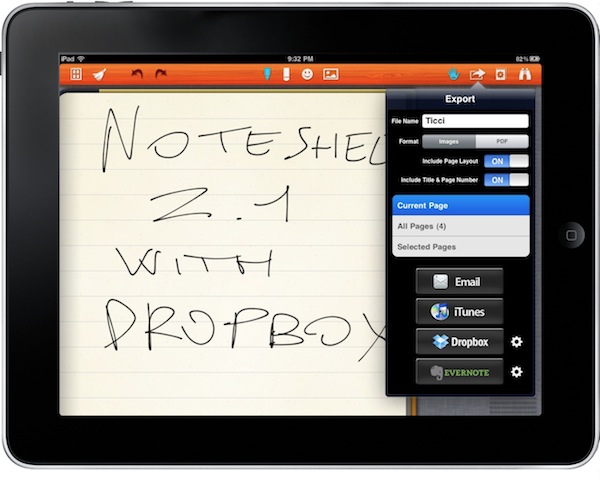
Noteshelf was already a great iPad app, now it’s even better. With the latest 2.1 update available in iTunes now, the developers added the possibility to export notes as images pr .PDF documents to Evernote and Dropbox, a feature many users have been asking since the first version of the app. Uploading to these services is simple and accessible through a popover menu in the top toolbar. You can also select and export multiple pages via email, or just email a whole notebook. Speaking of which, there are new notebook themes such as music notes and baseball scores. Read more


You Can Buy An Original Apple-1 For $200K

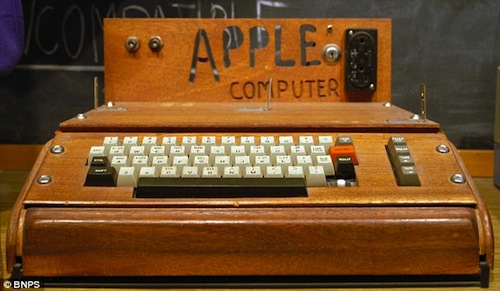
The Apple-1 is the computer that started it all. Sold by Steve Jobs and the Woz in Jobs’ garage, it was the first pre-assembled computer to come with 8k or RAM, but without a keyboard or monitor. Back then, the two folks that started Apple Computer used to sell it at $666.66, and a very few ones have survived today.

Now, you can buy one if you want. Only at $200K. Read more


Found Footage: Wiimote and Apple TV

Once I get my hands on an Apple TV you can stay assured this is exactly one of the things I’m going to test. As TUAW reports, developer and hacker Tom Cool has recompiled an old Wiimote-to-iPhone bluetooth implementation to work with the latest gen Apple TV.

The mod is based on a custom stack (from the popular BTstack) that makes sure the Apple TV activates its Bluetooth functionality. After that, a 3D render of a Wiimote is shown on screen and follows the movements of the actual Wiimote in your hands.

It’s a rough demo to show that Wiimote’s control can be passed along to the Apple TV, so if you think about Wiimote-powered gaming shouldn’t be too impossible to achieve, right?


“Ram, this is Steve”

“Ram, this is Steve”

A developer submitted an app containing private APIs to work around a bug in Apple’s own SDK. The review team didn’t accept the app, so Ram emailed Steve Jobs. A few hours later, Jobs called him:

Steve Jobs has a well-deserved reputation for creating great quality products and for his passion for excellence and user experience. I’ve also read that he is a detail-oriented executive and a hands-on guy who is intimately involved with his company’s work (in a way that few other CEOs are).
His phone-call reinforced those notions and went further to suggest that he was also a very conscientious guy who cared about people. The fact that he took the time to read my email, think about the app and then personally call me was amazing.

The app is now available in the App Store, but no private APIs are being used. Great story.

Permalink

Apple TV Launches In Italy and Switzerland, Coming Soon To Seven More Countries?

This morning we noticed the Apple TV was finally available in Italy and Switzerland. As noted by 9to5mac, though, the device will likely launch soon in seven more countries, maybe even tomorrow, as international Apple Stores are returning the same errors the Italian and Swiss ones were returning when the Apple TV wasn’t available last night:

We checked out all the Apple online stores to replicate what happened in Italy and Switzerland and sure enough Taiwan, Denmark, Sweden, Finland, Norway, Portugal, The Netherlands and Belgium are all displaying the same error message. What does this mean? It means that Apple’s second-generation Apple TV will be launching in those countries very soon, probably tomorrow, and maybe some HD movie rentals in iTunes as well.

We don’t know if the Apple Tv is ready just yet to appear in more countries, but surely the Apple online store suggests something’s moving, and fast. The Apple TV is doing great in the US thanks to its aggressive pricing and small form factor, although the promised AirPlay streaming functionality is still nowhere to be seen.


How To Sync Your Entire iTunes Library With Dropbox

Those who follow me on Twitter have probably read that I’ve been struggling in trying to make iTunes play nice with Dropbox. As I wrote many times here on MacStories in the past, I moved all the files and app databases I access on a daily basis into Dropbox, but iTunes was missing. I read in many forums and blog posts that making iTunes work fine with Dropbox sync across multiple computers was quite a mess, and I wasn’t sure I was ready to take the effort and spend hours messing with 80GB of music (and hours of uploads for my connection) and all those apps I have in my library. Fortunately, I don’t store movies in iTunes.

So as I wrote, I was having doubts about going Dropbox all the way with iTunes. The advantages of this method are obvious: you can sync your devices on multiple computers as long as Dropbox is updated to the latest version, you can check for app updates on any of your computers – you can add music to your library no matter the computer you’re using. With Dropbox, iTunes simply thinks it’s running on a single machine, while in fact you’re using it on multiple machines. I have a MacBook Pro and an iMac, but I’m sure the same method works on 2 or more computers.

There are some tricks you must know, however, and some steps you have to follow in order to make it work and avoid errors. iTunes is not exactly the most stable app for the Mac or the easiest to tweak: by default, it stores its database in a directory other than /Library (where most apps usually reside), it relies on a .xml library file that can easily be corrupted and if you go ahead and store app betas in your iTunes Library, you’ll have to deal with additional folders. In my experience, iTunes has turned out to be the hardest application to sync with Dropbox, but I think I’ve nailed it. Here’s how. Read more