
Federico Viticci

10804 posts on MacStories since April 2009

Federico is the founder and Editor-in-Chief of MacStories, where he writes about Apple with a focus on apps, developers, iPad, and iOS productivity. He founded MacStories in April 2009 and has been writing about Apple since. Federico is also the co-host of AppStories, a weekly podcast exploring the world of apps, Unwind, a fun exploration of media and more, and NPC: Next Portable Console, a show about portable gaming and the handheld revolution.

Here’s Why You Can’t Have A White iPhone 4, But This Guy Can

Once upon a time, Apple announced a white version of the iPhone 4. Hell, Steve Jobs even carried one on stage. It should have been out by July, then it got delayed. And again. And again. Then rumors about manufacturing problems started circulating. You all know the story. So what do we have here? A “gentleman” spotted at a private even in New York City by the guys over at PocketLint, carrying an iPhone 4 and giving out some details about the facts behind this white unicor - I mean, iPhone.

Say what you want, but this smells an awful lot like a controlled leak by Apple. I don’t know, some guy goes to a press event where he knows someone from the actual press is going spot the unit eventually, lets people take pictures of the device and confirms that the problem with the delays is with manufacturers? Read more

New York Band Performs Live On iPhones [Video]

We know there are hundreds of music applications for the iPhone out there; some even managed to win an Apple Design Award earlier this year. Yet, we also know there are some people on the internet who regularly quickly diss iOS devices as “consumption-only” devices.

So take a look at the video below. Brooklyn-based band Atomic Tom performed one of their hits  - “Take Me Out”  - entirely on their iPhones, in the subway. At first the crowd thought they were going to bomb the train (seriously? with those hipster moustache?), but Atomic Tom eventually managed to make quite an impression on the passengers. Great video.

[9to5 via Recombu] Read more


It’s Here: AutoCAD for Mac Now Available

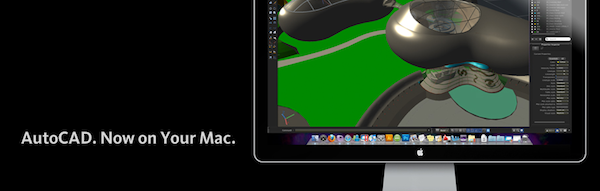
It’s been 18 years since the last appearance of AutoCAD on the Mac platform. 18 years during which professional designers and engineers all over the world were forced to use a PC, or install a copy of Windows on a partition on their Macs. Today, AutoCAD is coming back to OS X: it’s finally available for download (with a 30-day free trial) here.

Also available with educational discount for students, AutoCAD for Mac returns with a native interface and feel built on top of OS X unique capabilities, exclusive features for Mac users such as Cover Flow support and multi-touch gestures, also supported by the Magic Trackpad.

Our experience has been that AutoCAD for Mac is similar enough to the PC version that the transition is easy. We’ve found it to be a very powerful and reliable product that has all the functionality we need.”

Styles&Wood, the UK’s leading provider of property services to retailers, banks and commercial organizations, is one of the more than 5,000 participants who were part of the AutoCAD for Mac beta program. “We have been waiting a long time for AutoCAD to come back to the Mac,” said Andrew Handley, CAD development manager. “Our experience has been that AutoCAD for Mac is similar enough to the PC version that the transition is easy. We’ve found it to be a very powerful and reliable product that has all the functionality we need.

AutoCAD for Mac is available here. Check out the full press release after the break. Read more


A White iPad 2 Concept

In a few months we’ll be able to put our hands on a new iPad. Whether it’s going to be a 7-inch model, sold in double 10 / 7-inch flavor or simply have a new camera on board - it’s going to be all new. And when it’s about “all new” products from Apple, it’s never too soon to start thinking about them.

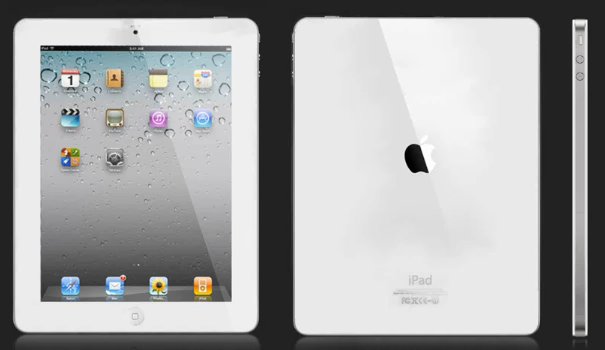
The following concept video, spotted by iSpazio, shows us a white version of the “iPad 2” with a front-facing camera and a flat back, much like the iPhone 4. I don’t know if that kind of surface would be suitable for the tablet, but sure the concept is damn sexy. Take a look at the video after the break. Read more


Clever Interactive Ads for iPad [Video]

Even though there’s no iAd program for the iPad yet (remember, it requires iOS 4), agencies are struggling to find the best way for their clients to showcase products on the tablet. And with its mainstream success, I bet clients are crying to have great ads on the iPad.

The following video, originally posted by Peter Kafka over at All Things D, showcases three cool ads for the iPad created by the MediaLets ad startup. In the video you can see a FedEx ad for the Newsweek app; a Visa ad that lets you interact with the various e-commerce possibilities offered by Visa (looks stunning); a Toyota Prius ad that allows users to draw images into the video.

Check out the video below. It gives you a taste of the things to come once iAd for iPad launches later this year. Read more


The New York Times Pulls Editor’s Choice, Releases Free Full-Content App

We knew that the NYTimes’ Editor’s Choice app for iPad was only an interesting experiment released for the iPad, we didn’t know the official, full-content NYTimes iPad would be released this week. Surprisingly enough, last night the NYTimes pulled Editor’s Choice (which has been downloaded more than 650,000 times) and released after a few hours a free version of “NYTimes for iPad”, available in the App Store here. Read more


The Power Of OmniFocus’ Perspectives

The Power Of OmniFocus’ Perspectives

Even more on OmniFocus. Tyler Hall:

It’s hard to describe how incredibly powerful Perspectives are until you actually spend a few days with them in your workflow. Other task managers have smart folders or dedicated “Today” lists, but they absolutely pale in comparison to the flexibility that Perspectives afford.

I agree. I have four custom perspectives set up, two of them helping me “focus” on iPhone and iPad reviews that need to be done. More interesting tips in the article.

Permalink

Dave Caolo on OmniFocus and the Printable CEO Forms

Dave Caolo on OmniFocus and the Printable CEO Forms

Why use a piece of paper when you’ve purchased powerful, expensive software?

I need both. Some information, like images, can’t be stored on paper. Also, OmniFocus is where I keep all aspects of a given project together, like files, research, email correspondence. There’s no denying that OmniFocus is tremendously powerful. The over-the-air sync alone is a huge selling point. Check it out if you haven’t.

Then there’s this: I just like writing on paper.

You can grab David Seah’s Printable CEO forms here. I want to give this method a try.

Permalink

Apple Adds “Halloween” and “Vocabulary Apps” Sections to the App Store

Just like every Thursday, Apple added two new custom sections to the App Store: a “Halloween” one is a go this week, together with another one dubbed “Language, Grammar & Vocabulary Apps”.

The Halloween section showcases “gruesome game and other ghostly delights” such as Plants Vs. Zombies, DOOM Resurrection, Pro Zombie Soccer and Halloween Soundlab. You can check out the section (which contains more than 40 between apps and games) here.

Language, Grammar & Vocabulary Apps, on the other hand,  features reference and dictionary apps, apps for kids, grammar games and poetry applications. Gems like the official AP Stylebook app and Words with Friends are in there. You can check out the section here. Read more