
Posts in Linked

Dropbox Launches ‘Paper’ Beta to Collaborate on Documents

Earlier today, Dropbox unveiled Paper, an evolution (and a not so creatively named one) of the Dropbox Notes beta announced in April. Dropbox Paper sounds like a Google Docs and Quip-like product where you can create rich documents and collaborate with others in real-time.

David Pierce explains at Wired:

Paper feels like a cross between Google Docs and Medium. It’s an ultra-minimal text editor—every new document offers space for a title and a body, and nothing else to look at. You go to paper.dropbox.com (which right now won’t get you anywhere unless you’re in the beta), and just start typing.

There’s some basic formatting in the document—you can write in Markdown, or use sub-heds and bold text. But that’s all obscured, in the hope you’ll turn off your internal font freak and just start typing. You can add images, too, dragging and dropping them around the page or making one full-bleed on the page with a single click. If you write lines of code, it’ll automatically format and style them as code. Or create a to-do list, and assign tasks to other people by @-mentioning them in the document. Or paste a Dropbox-stored file in, and it’ll automatically be available to everyone shared on your Paper document.

I’m curious to see what Dropbox does here. The company is diversifying their offer now that cloud storage has become a feature, and they’re working on a mobile app to access Paper natively from iOS (right now, it’s web-only). Unlike Google, Dropbox gets iOS design and conventions, and they’re usually quick in adopting new iOS technologies every year (Google Docs still doesn’t support iPad multitasking on iOS 9).

The closest service that comes to mind when looking at Paper is Quip (which was also in the news today), but Dropbox has the advantage of building on an existing foundation of collaboration, files, email, and search. On the other hand, I don’t want to see Dropbox losing focus in trying to understand what’s next for them with too many experiments and semi-abandoned initiatives. I’ll be keeping an eye on this.

Side note: if you receive a link to a Dropbox Paper document right now, it’ll open with a Universal Link in the Dropbox app inside a web view. It works okay, but there needs to be a native app for this soon.
Permalink

Apple Announces New ResearchKit Studies for Autism, Epilepsy & Melanoma

With a press release this morning, Apple announced new ResearchKit studies for autism, epilepsy, and melanoma:

Autism: Duke University and Duke Medicine are launching “Autism & Beyond” for parents with concerns about autism and other developmental issues. The Duke research team is looking at whether the front-facing camera on an iPhone can be used to detect signs of developmental issues at a much younger age. The app uses novel emotion detection algorithms to measure a child’s reaction to videos shown on iPhone. Duke is partnering with Peking University in China and other international partners to conduct the study.

Epilepsy: The EpiWatch app developed by Johns Hopkins is the first study of its kind to be conducted with Apple Watch using ResearchKit. The study will test whether the wearable sensors included in Apple Watch can be used to detect the onset and duration of seizures. During the first phase of this study, researchers will use a custom complication on the Apple Watch to provide patients with one-touch access to trigger the custom watch app to capture accelerometer and heart rate sensor data to capture the digital signature of their seizure and send an alert to a loved one. The app will keep a log of all seizures and the participant’s responsiveness during the event. The app also helps participants manage their disorder by tracking their medication adherence and by screening for side effects, while allowing participants to compare their condition with others in the research study.

Melanoma: Oregon Health & Science University is studying whether digital images taken on an iPhone can be used to learn about mole growth and melanoma risks and could help people better manage skin health by photographing and measuring mole size over time. Research participants will be able to document mole changes and share them directly with health professionals, and researchers will be able to capture images from tens of thousands of iPhone users around the globe to help create detection algorithms which can be used in future studies to potentially screen for melanoma.

ResearchKit continues to be one of Apple’s most important initiatives, and it’s great to see the sensors of Apple Watch are being used as well. According to Apple, more than 50 researchers have contributed active tasks in 6 months and more than 100,000 participants are contributing data to ResearchKit.

Permalink

Tweetbot 4.0.2 Lets You Swipe Safari View Controller Away

Well, that was fast.

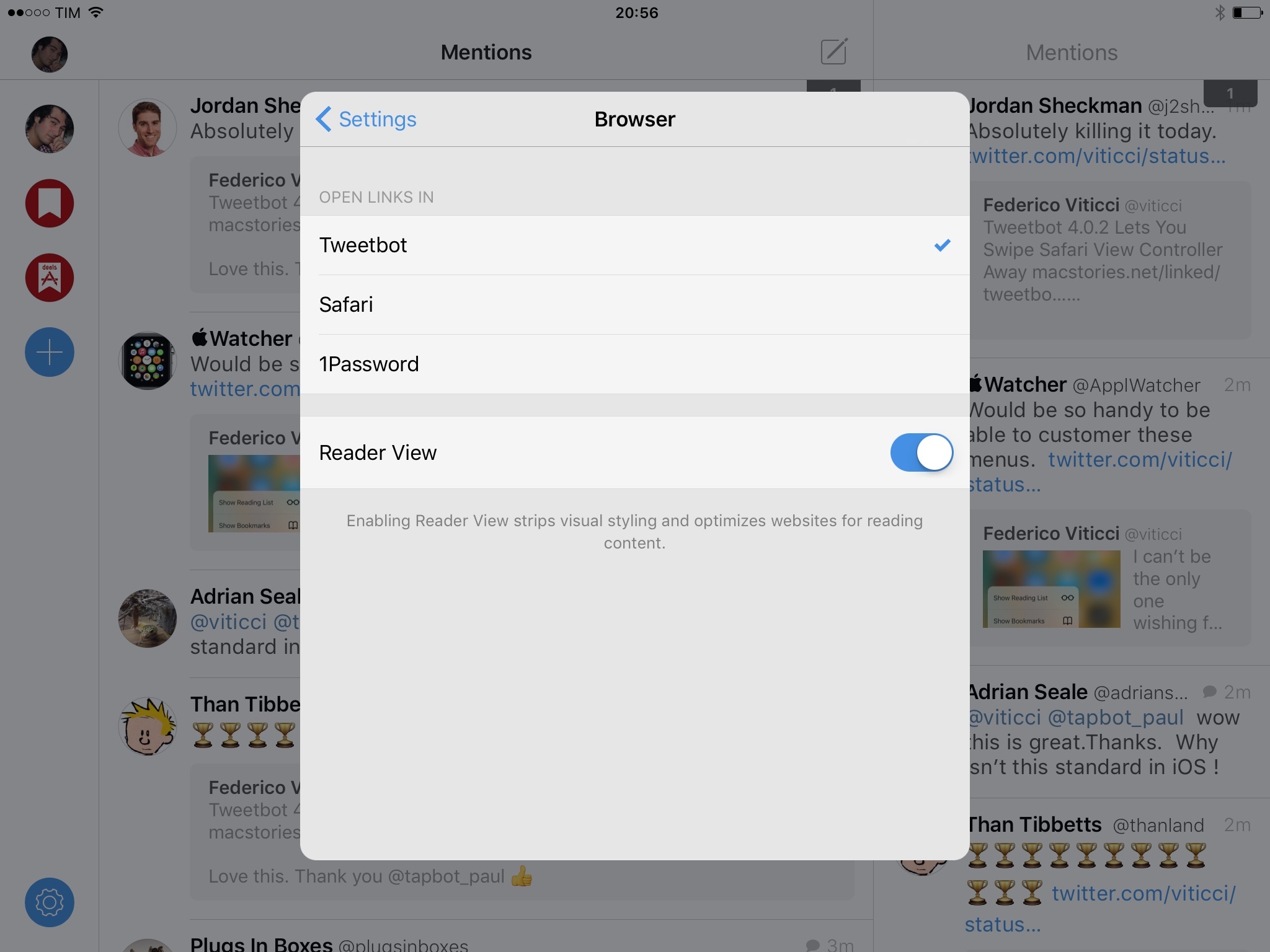
A few hours after the release of Tweetbot 4.0.1 with 3D Touch, Tapbots has released version 4.0.2 of the app, which adds a swipeable Safari View Controller.

Thanks to a workaround by Paul Haddad, you can now dismiss Safari View Controller with swipe from anywhere along the left edge of the screen – on both the iPhone and iPad. The gesture works surprisingly well despite its non-standard behavior, and it fixes one major annoyance of Safari View Controller on iOS 9.

I hope that more apps consider this, as it combines the comfort of Tweetbot’s old web view with the benefits of Safari View Controller.

Update: Also in this release, you can set Safari View Controller to open in Safari Reader mode automatically for every webpage (if Reader is available). I previously wrote about the feature here, and it works well for Tweetbot if you primarily open articles to read in-app. Very nice.

Permalink

Raising $40k for Hours Cloud with a Private Crowdfunding Campaign

Fascinating (and successful) experiment by Jeremy Olson and his team, who ran a private crowdfunding campaign to sustain the development of Hours Cloud – a web version of the excellent iOS app:

Despite the evidence against the idea, we tried it anyway and I am happy to report that the campaign has so far blown away our expectations.

We have shared the campaign privately with only 16,000 newsletter subscribers over the past few weeks and up to today it has already generated $38,428.00 from 378 backers — an average of $101.66 per backer.

It might not be Pebble but remember that this was a completely private campaign — no press and no virality potential. I’ll be watching results now that the campaign is public and will post an update once we have those numbers.

His post has a lot of interesting details on how and why they approached potential business customers with a private campaign, which is now open here.

Permalink

Apple Opens @AppleMusicHelp Twitter Account to Answer Support Questions

Benjamin Mayo, writing for 9to5Mac:

Apple is continuing to expand its presence on social media services, today launching a brand new @AppleMusicHelp Twitter account to answer queries and support questions live over Twitter related to its Apple Music service. The account is manned each day of the week from 6 AM – 8 PM Pacific Time. Apple representatives will watch the account’s mentions timeline and try to help resolve people’s problems.

Good to see Apple valuing Twitter as a fast and efficient support system. There’s something to be said about the simplicity of asking a support question via Twitter versus opening a ticket or sending an email.

Permalink

Apple Details Wi-Fi Assist Feature of iOS 9

With a support document (via Dan Moren at Six Colors), Apple has detailed the Wi-Fi Assist feature of iOS 9, which automatically switches to cellular data if a Wi-Fi connection is performing poorly. Some of the interesting tidbits:

Wi-Fi Assist will not automatically switch to cellular if you’re data roaming.

Wi-Fi Assist only works when you have apps running in the foreground and doesn’t activate with background downloading of content.

Wi-Fi Assist doesn’t activate with some third-party apps that stream audio or video, or download attachments, like an email app, as they might use large amounts of data.

Wi-Fi Assist received a bit of criticism when iOS 9 launched as some users couldn’t figure out why their cellular data usage increased. I’m glad that Apple has shared more details on the subject, though I still think it should be off by default.

Permalink

Connected: The Confidence to Go Gold

This week, Federico butchers many languages and uses a smaller phone, Myke orders a new iMac and Stephen gets upset about hard drives.

Also on this week’s Connected, my first impressions of the iPhone 6s and 3D Touch. You can listen here.

Sponsored by:

  • Braintree: Code for easy, online payments. Get your first $50,000 in transactions fee-free.
  • Igloo: An intranet you’ll actually like, free for up to 10 people.
  • Fracture: Photos printed in vivid color directly on glass. Use code ‘CONNECTED’ to get 15% off
Permalink

The Background Data and Battery Usage of Facebook’s iOS App

Nick Heer, commenting on Facebook’s battery usage on iOS in response to a piece by Matt Galligan:

Make no mistake: this is user-hostile. Facebook is actively creating channels to continue refreshing their app in the background when the user has explicitly stated that they do not want it to. Ironically, the best way to reduce the battery and data consumption of the Facebook app in the background is to switch Background App Refresh back on. Better still, remove the Facebook app from your phone, and perhaps replace it with Paper (US store only).

Every time I take a look at a friend’s iPhone, Facebook is the app with the highest amount of battery usage in the background – even with Background App Refresh turned off. This has been going on for years, and instead of fixing the issue, it does seem like Facebook is always coming up with new ways to circumvent user control and consume more energy.

The fact that a company the size of Facebook can’t optimize energy consumption of their iOS app is simply ridiculous. If they can but don’t want to (because of processes they want to run in the background, constant notifications, etc.) – well, that’s even worse.

My solution has been the same for the past couple of years: never install the Facebook app, and always access Facebook from Safari.

Update: With iOS 9’s improved energy consumption stats, it’s easier to guess one of the various tricks Facebook may be employing to stay active in the background and drain battery. On my girlfriend’s iPhone, for instance, iOS 9 reports 5 hours of on-screen usage for the last 7 days, and another 11 hours of background audio usage with Background App Refresh turned off.

My guess is that Facebook is hijacking audio sessions on iOS by keeping silent audio in the background whenever a video plays in the app. And because, by default, videos on Facebook auto-play on both Wi-Fi and Cellular and few people ever bother to turn it off, that means there’s a high chance the Facebook app will always find a way to play a video, keep audio in the background, and consume energy to perform background tasks. I’m not alone in noticing the mysterious “Facebook audio” background consumption, and video auto-play seems to me the most likely explanation at this point. I don’t know if turning off auto-play may fix the problem, but I’d recommend doing that anyway to save data.

I wonder if Apple should consider additional battery controls to take action against shady practices like invisible background audio. What Facebook is doing shows a deep lack of respect for iOS users. I continue to recommend using Safari instead.

Update 10/15: In a statement provided to TechCrunch, Facebook confirmed they’re aware of an issue causing battery draining for users, and they’re working on a “fix”. Facebook didn’t provide any additional details on the nature of the issue.

Permalink

A Level Deeper

MG Siegler, writing on 3D Touch and the iPhone 6s:

There’s been a lot of talk in the past couple of years about the great “un-bundling” of apps. That is, big, bloated apps that spin off certain features into their own apps. For some massive services, like Facebook, this makes sense. For the vast majority of apps, this makes no sense. It’s hard enough to get people to download one app, let alone two or three. Instead, what these developers should do is utilize 3D Touch to create one-touch access to certain functionality. Brilliant OS-level move by Apple.

In the few days I’ve spent with the 6s so far – I’m moving to a 6s Plus this weekend – this is exactly what I’ve noticed, too. 3D Touch quick actions on the Home screen give developers a chance to unbundle their app features and navigation points, exposing them to users in a new, convenient way.

A good example of this is Apple’s Photos app: if you 3D Touch the icon, you get a menu that, among other options, contains a ‘One Year Ago’ shortcut. The ability to view photos from the same day in the past has been explored as a standalone app concept in a variety of ways (see: Photo Flashback or Timehop). In Apple’s Photos, this isn’t even a proper screen – it’s a search filter. It could be easily missed by users, but its utility is clear (especially if combined with Live Photos a year from now). 3D Touch brings fast access to that feature without needing a separate app. In this sense, 3D Touch as an interface for the deep link has potential, and I’m curious to see how developers will further explore it.

Permalink