Posts in Linked

The Cost of Mobile Ads

Fascinating research by The New York Times on Content Blockers and performance gains in iOS 9:

Ad blockers, which Apple first allowed on the iPhone in September, promise to conserve data and make websites load faster. But how much of your mobile data comes from advertising? We measured the mix of advertising and editorial on the mobile home pages of the top 50 news websites – including ours – and found that more than half of all data came from ads and other content filtered by ad blockers. Not all of the news websites were equal.

Don’t miss the charts here. Also, from the related article:

As for me, the test results spurred me to keep Purify enabled on my iPhone. While I’m browsing, the app lets me easily denote a website whose ads I want to allow to be shown, an action known as “whitelisting.”

That means the websites I enjoy visiting that have slimmer ads — like TheGuardian.com, and, ahem, NYTimes.com — will be whitelisted. But sites saddled with ads that belong in digital fat camp will remain blocked for the sake of my data plan.

It’s fascinating to see how many are coming to the same conclusions.
Permalink

What It Means to Be Great

I didn’t read this widely shared article by Horace Dediu two days ago:

Greatness is transcendental. It’s hard to pin down. It inspires debate. It divides as much as it unites. It creates emotions as much as thoughts. It builds legends. It engages and persists. It lives in memory and penetrates culture. It implants itself in our consciousness persistently, to linger and dwell in our minds while we are bombarded with stimuli.

We use words such as “iconic” or “epic” to capture this permanent “mental tattoo” that we get from greatness. As important as this notion is, we struggle to define it. We don’t even have a proper word for it. Perhaps it is what art tries to be, or what drives us to achieve beyond surviving. As vague a notion as it may be, it is one of the most important notions I can think of. Greatness is the cause, perhaps, of our ascent.

A great piece, with a clever conclusion.

Permalink

Skype for iPad Updated for iOS 9

The Skype app for iPad has been updated today with support for iOS 9. Version 6.3 now supports Slide Over and Split View to have Skype chats next to other apps, quick text replies from notifications, and Spotlight search for usernames. Another update to Skype for iPad was released a while back bringing a redesigned UI for managing conversations, and I feel like the entire app has gotten considerably better over the past several months.

While I won’t be able to stop using my Mac to record podcasts in the near future, I want to believe that my dream of having a full podcasting setup on iOS isn’t so absurd anymore. Skype in Split View alongside Safari is a first step, but the road ahead is long (on my requirements list: Split View for Google Docs; the ability to plug a Rode microphone into my iPad; a way to record local audio during a Skype call).

Permalink


Nintendo’s LINE Stickers

Andrew Webster on Nintendo’s latest mobile product:

Most recently, the North American Line store was updated with stickers from Nintendo’s beloved life sim Animal Crossing, no doubt to help promote the new 3DS game Animal Crossing: Happy Home Designer. I spent the necessary $2 to acquire them immediately; I didn’t realize how much I needed an animated sticker of rock star dog KK Slider playing a guitar until I had it. In Japan, Nintendo recently released a second sticker pack, this one based on the wonderful new Wii U shooter Splatoon, and I absolutely cannot wait until Nintendo releases them in the English-speaking world. (Because they definitely will, right?)

I had no idea Nintendo offered LINE stickers.

I like how Nintendo is trying different mobile approaches before launching their full game initiative with DeNA. You have to wonder if amiibo (a lucrative segment for Nintendo) will ever get its own iPhone app.

Permalink

Google Maps Gets Apple Watch App

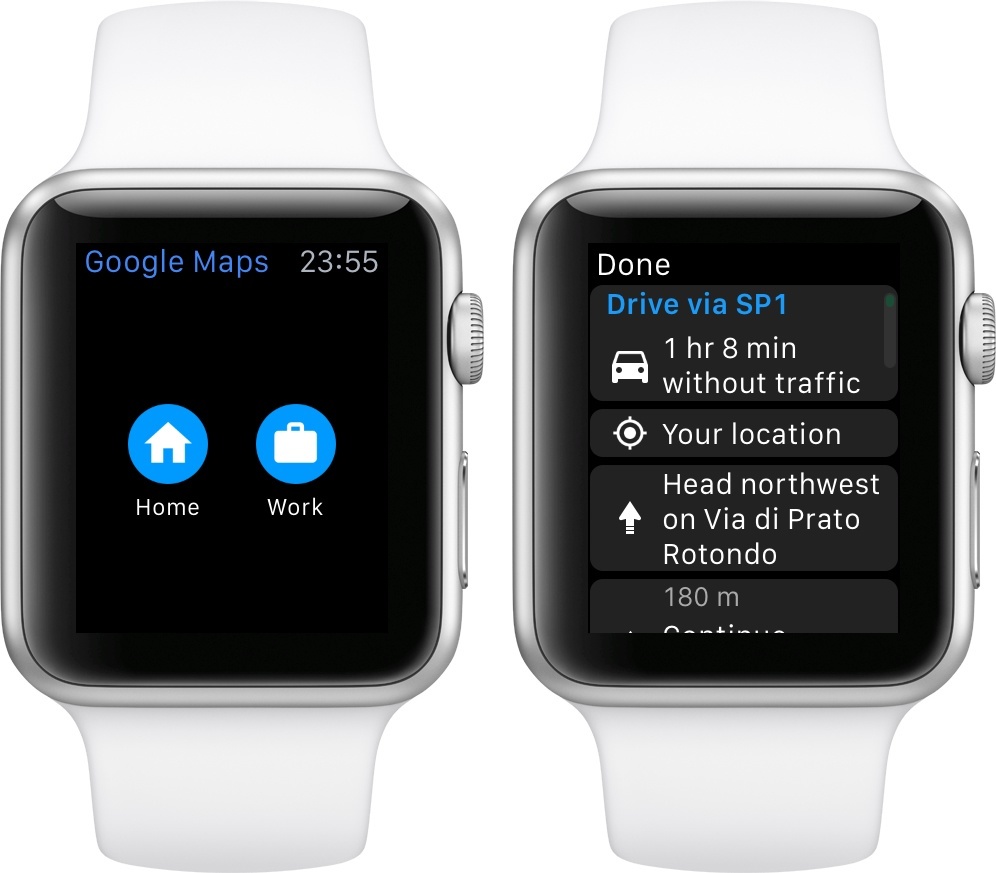
Google has released an update to its Google Maps app for iOS today, including a new version for Apple Watch. I was curious to check out Google Maps’ debut on the Watch: while I knew that they couldn’t replicate the experience of Apple’s excellent Maps app, I was hoping that watchOS 2 would give them some room for experimentation.

Instead, Google has shipped a basic Watch app that shows a list of directions for Home and Work addresses configured in the iPhone app. I guess this could be useful if you’ve been looking for a way to print out directions on your Watch’s screen, but I don’t know why you wouldn’t use your iPhone for that, with proper navigation tools and spoken feedback. Missed opportunity for Google considering they could have at least included a complication for quick access to the app.

Thankfully, you can check out ETA 2.0 for iOS, which has been updated for watchOS 2 and that includes a great complication for traffic information, public transit support, and more.

Permalink

Pixar Development Team Tests iPad Pro and Apple Pencil

Ben Lovejoy, writing at 9to5Mac:

Michael B. Johnson, who heads the Pixar team that develops the tools used to create its animated movies, tweeted that his team had been given the chance to test the iPad Pro and Apple Pencil – and described palm-rejection as perfect.

Palm rejection has been one of my primary concerns following the iPad Pro announcement. If it’s good enough for Pixar, it sounds like it should perform fairly well for the rest of us, too.

Update: Don Shank, artist at Pixar, has shared a picture of a drawing on an iPad Pro on Instagram (via Harry McCracken).

Got some play time on an iPad Pro today. So fun! Can’t wait until November.

A photo posted by Don Shank (@donshank) on

Here’s some of his most interesting comments:

pressure sensitivity is great. Each individual app determines how pressure data is used. So its effect can vary from preset to preset. But I got some very light delicate lines all the way to thick bold lines very nicely. And shading with the side of the pencil was pretty awesome.

yes! You can rest your hand anywhere and it totally ignores it and it just reads the pencil. It’s pretty amazing. I did a number of scribbles but I didn’t take pictures of any of them.

I was using Procreate in this photo. Apple Notes and 53’s Paper were also working with Apple Pencil as well. Pixelmator is another favorite but the version they had on the iPad wasn’t yet taking advantage of the pencil.

Permalink

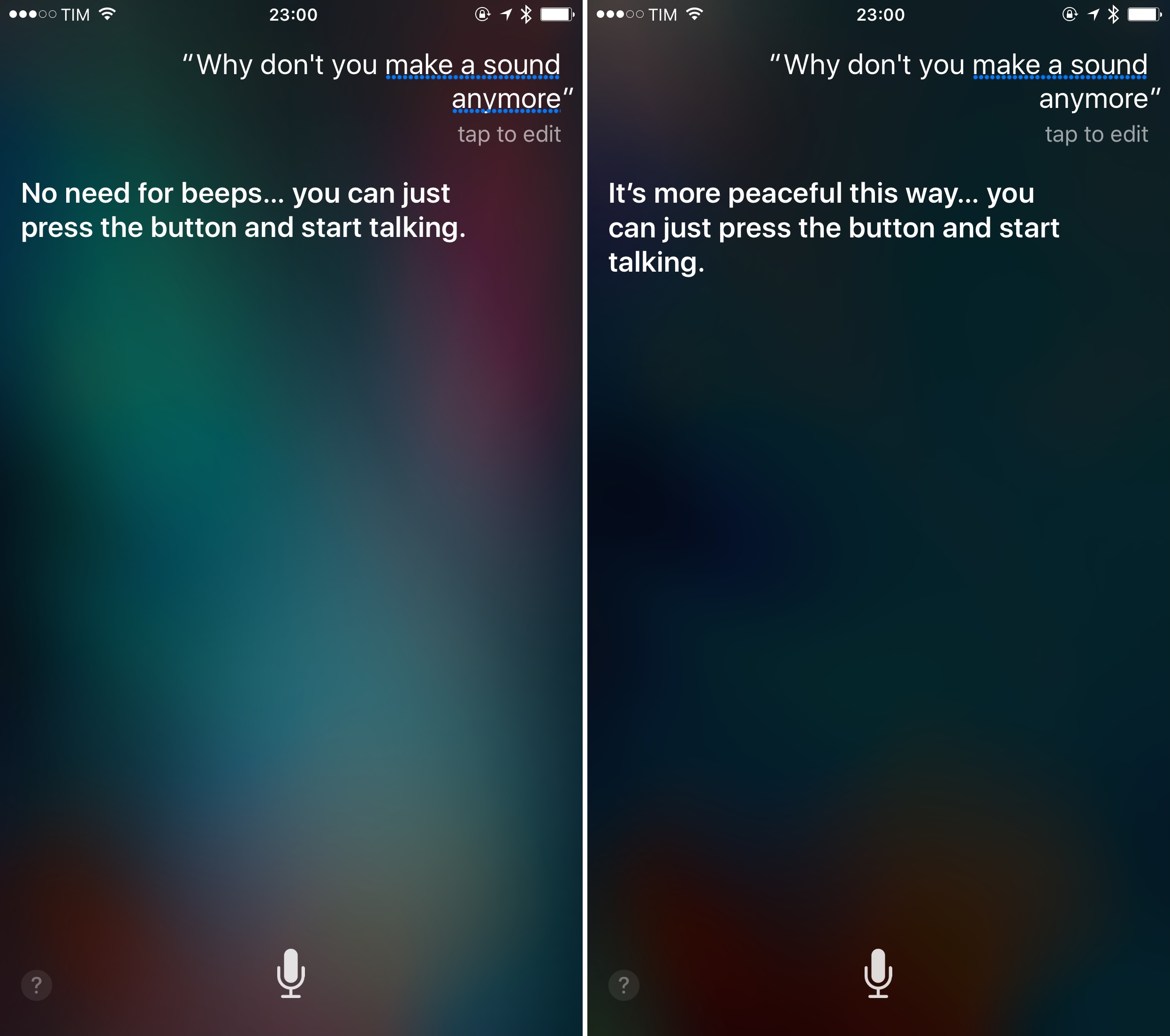
“Just Press the Button and Start Talking”

Daniel Jalkut on Siri’s new behavior:

Apple “broke” the haptic feedback associated with invoking Siri, by “fixing” the problem that there had ever been any latency before. Have an iPhone 6s or 6s Plus? Go ahead, I dare you: hold down the home button and start talking to Siri. You will not escape its attention. It’s ready to go when you are, so it would be obnoxious of it to impose any contrived delay or to give taptic feedback that is uncalled for. Siri has become a more perfect assistant, and we have to change our habits to accommodate this.

Great little detail of Siri that I didn’t notice until today. Siri seems to agree, too.

Permalink

How Does the iPhone 6s Camera Compare to Every Other iPhone Generation?

In the past eight years, each new advancement in iPhone camera technology has made dramatic improvements to image quality. The new 12-megapixel iPhone 6s iSight camera is no exception. With 50% more megapixels than the last four iPhone 8-megapixel models, the iPhone 6s boasts a number of key improvements including: improved auto-focus, local tone-mapping, noise reduction, and colour separation, with that fancy “deep trench isolation” technology Apple is raving about.

In this follow-up post to my previous iPhone comparisons, I present a 9 iPhone comparison from all iPhone versions taken with Camera+ including: the original iPhone, iPhone 3G, iPhone 3Gs, iPhone 4, iPhone 4s, iPhone 5, iPhone 5s, iPhone 6, and the new iPhone 6s, in a variety of real-life situations to test each iPhone camera’s capabilities.

Lisa Bettany’s annual iPhone camera comparison is always well worth a read. Make sure to tap on the examples for more details, and check out Lisa’s explanation of the photos.

Permalink