
Posts in Linked

iOS 8.1 and Apple Pay Launching Next Week

Earlier today, Apple confirmed that Apple Pay – the company’s new payment system based on Touch ID – will be launching on Monday alongside iOS 8.1.

From the press release:

Apple Pay will be available in the US starting Monday, October 20 with iOS 8.1. For shopping in stores, Apple Pay will work with iPhone 6, iPhone 6 Plus and with Apple Watch, upon availability. For online shopping within apps, Apple Pay is available on iPhone 6, iPhone 6 Plus, iPad Air 2 and iPad mini 3. Users should contact their bank to determine their card’s eligibility, some banks may not support all card types. Apple Pay will be available in select retailers and apps in 2014.

Apple also announced that more than 500 new banks from across the US have signed up for Apple Pay, which will also work with the following apps:

Apps with the ability to use Apple Pay at launch include: Apple Store app, Chairish, Fancy, Groupon, HotelTonight, Houzz, Instacart, Lyft, OpenTable, Panera Bread, Spring, Staples, Target and Uber. Many more will support Apple Pay by the end of this year with popular apps such as Airbnb, Disney Store, Eventbrite, JackThreads, Levi’s Stadium by VenueNext, Sephora, Starbucks, StubHub, Ticketmaster and Tickets.com, among others.

During the keynote, Apple’s Craig Federighi noted that Apple uses the release of major iOS updates such as iOS 8 to collect “feedback” (with literal air quotes from Federighi – read: criticism) and quickly improve upon them.

iOS 8 has been criticized for its various bugs and inconsistencies, but, as I noted in my article, I don’t believe its technical problems were as severe as iOS 7 last year. Still, iOS 8.1 will bring various design refinements, extension and HealthKit fixes, and it’ll see the return of the Camera Roll in the Photos app.

For more on Apple Pay, you can read our original overview.
Permalink


Facebook Launches Safety Check

Great idea by Facebook: an easy way to let people update their News Feed to tell friends and family they’re safe after a disaster.

In times of disaster or crisis, people turn to Facebook to check on loved ones and get updates. It is in these moments that communication is most critical both for people in the affected areas and for their friends and families anxious for news.

We want to provide a helpful tool that people can use when major disasters strike, so we’ve created Safety Check – a simple and easy way to say you’re safe and check on others.

On iOS, Safety Check will be a push notification that takes you to a page where you can confirm whether you’re safe or not in the area monitored by Facebook. This is a good example of how data gathered by Facebook can be useful and important on a practical standpoint. I have seen friends using Facebook to reconnect after a natural disaster, and Safety Check makes perfect sense.

As Mark Zuckerberg puts it:

Over the last few years there have been many disasters and crises where people have turned to the Internet for help. Each time, we see people use Facebook to check on their loved ones and see if they’re safe. Connecting with people is always valuable, but these are the moments when it matters most.

Safety Check is our way of helping our community during natural disasters and gives you an easy and simple way to say you’re safe and check on all your friends and family in one place.

Permalink

Connected: A War of Semantics

This week, Myke, Federico and Stephen debate what’s after the Post-PC era, the future of the iPad and Federico’s true feelings about OS X.

I expect to receive quite a bit of follow-up after this week’s episode of Connected, which is also a nice preparation for today’s Apple event. Hopefully some of my iPad wishes will come true. Get the episode here.

  • Squarespace: A better web starts with your website. Use code WORLD for 10% off
  • Dash: Create beautiful dashboards with a few clicks. Sign up now to get one free private dashboard.
  • TextExpander touch, from Smile. Type more with less effort.
Permalink

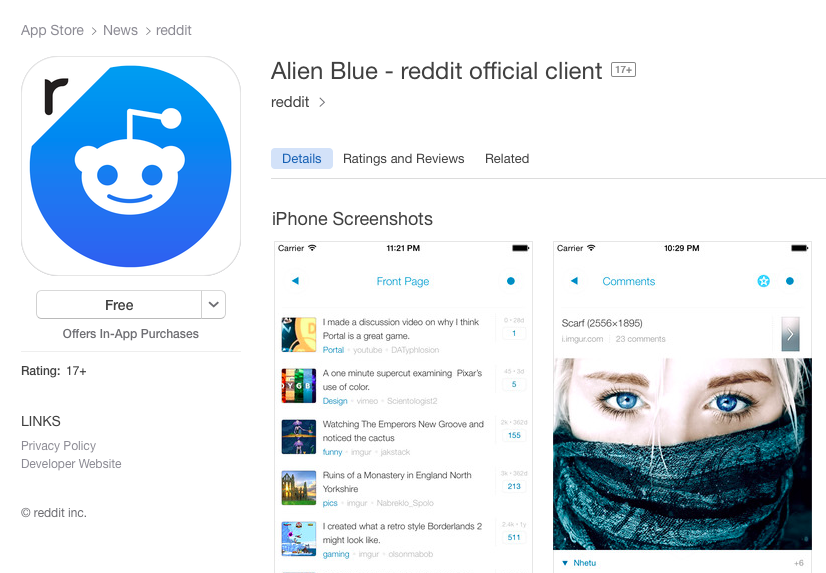
Reddit Acquires Alien Blue

Alien Blue, perhaps the most popular third-party Reddit app available on iOS, has been acquired by Reddit. Greg Kumparak writes at TechCrunch:

We heard whispers of this deal going back a few weeks. While reddit isn’t disclosing terms, they’ve just confirmed to me that they’ve acquired the Alien Blue project and that its Melbourne-based developer, Jase Morrissey, will be joining their team.

Curiously, reddit seems to hesitate in calling the app their “official iOS reader” — they’re keeping the “Alien Blue” name, for example, rather than changing it to just be called “reddit” or “reddit reader” or something.

I’ve covered Alien Blue several times here at MacStories over the past five years – it’s always been a fantastic Reddit client packed with nice design touches and powerful functionalities to customize the way you read Reddit, browse sub-reddits, and interact with comments. It’s interesting to see Reddit acquiring a power-user app such as Alien Blue rather than more simplistic and minimal clients, and it makes me wonder if the company will keep on adding features for reading and user management, or if they’ll begin to simplify the app and remove its advanced features (always been a fan of subreddit grouping and iCloud sync in the app).

Alien Blue joins the dedicated Reddit AMA app on the App Store, and it’s available in two versions for iPhone and iPad; Reddit is keeping the app’s “Pro” In-App Purchase, but to ease the transition to the separate app, they’re offering it for free for a limited time.

Permalink


Mac Necessities

I was reading this article by Fraser Speirs as a follow-up to Bradley Chambers’, and he made a great point about iOS devices and Macs towards the end:

I ask myself what it would take for me to completely eschew owning a Mac. I’m not there yet and I’m not even all that close to it in practical terms. Like your pal that doesn’t have a car but who can only do so because you give him a lift, I could possibly do without my own personal Mac only because I have access to Macs at school.

One of the reasons for this is that the Mac is how you recover an iOS device. If your device turns up its toes completely, one way to get it back is to plug it into a Mac and perform various incantations to revive it. If your iOS device ends up totally full of images and video, the fastest way to solve that problem is to plug it into a Mac and download them all through Image Capture.

I’ve been thinking about not repairing my MacBook Air and going 100% iOS-only with an iPad Air this year. Because in spite of trying to get all my work done on iOS, I still have to use a Mac for specific tasks that can’t be done on iOS.

I’ve been putting together a list of tasks that I still my Mac for. So far, I have these:

  • Local device backups with iTunes;
  • Photo and video extraction with Image Capture;
  • Screen recording (currently possible with either AirPlay Mirroring or Yosemite’s upcoming QuickTime player);
  • Generating GIFs from screencasts;
  • Browsing versions of documents;
  • Recording podcasts with Skype;
  • Cyberduck (for Rackspace Cloud Files);
  • Downloading torrents;
  • Installing betas of iOS;
  • Following Apple live streams and taking notes at the same time;
  • Xcode;
  • 4 GB of RAM (multiple Safari tabs that don’t time out).

There are many other reasons why a Mac could still be preferable to iOS, but, for me, these are the main limitations that force me to keep a Mac around. I believe some of them are unlikely to change (torrents and installing iOS firmware betas), others are simply missing apps (where are Cyberduck and GIF Brewery for iOS?), but, in general, it looks like I’ll have to finally fix my broken keyboard.

Permalink

Holding iOS Back

Bradley Chambers writes about the limitations of Safari for iOS:

When the iPhone was released in 2007 with a “desktop class” web browser, it was widely praised. You could view entire websites on a mobile device. Coming from the days of WAP optimized sites on my Motorola Q, this was incredible. If we fast forward to 2014, Mobile Safari has become the app that is holding the iPad back from becoming a fully featured laptop replacement for a lot of people. While Mobile Safari is fast and loads website reasonably well, it cannot upload and download files. It can upload pictures, but that is it. Mobile Safari needs a way to upload and download any type of file into iCloud Drive (a mirrored from the Mac downloads folder).

Safari is probably my favorite Apple app in iOS, but Bradley is right – it’s still lacking when compared to desktop browsers for simple tasks such as downloading and uploading files.

I was surprised to see features such as extensions in Mail and uploads in Safari being absent from iOS 8 when it launched – and it looks like iOS 8.1 won’t introduce them either. iOS users need these features, but I wonder if part of the reason Apple hasn’t added them yet may be security-related. In particular, I had a couple of readers suggest that lack of extension support in Mail could be an enterprise security requirement, and while that could make sense, it doesn’t sound like something that Apple can’t work around. Or maybe the problem is simpler: Apple didn’t have time to turn email messages and “Upload” buttons from webpages into attach points for document pickers and extensions, so the feature was nixed.

There’s also an argument to be made about storage. How quickly would those 5 GB of free iCloud storage fill up with a full download manager built into Safari for iOS and iCloud Drive? Macs come with plenty of local storage; iOS devices still start at 16 GB and 20 GB is a paid tier in iCloud Drive.

Hopefully Apple will keep extending iOS 8, but I wouldn’t be surprised to see these features delayed until next year.

Permalink

How “Complete My Bundle” Works

With the release of Transmit iOS and Prompt 2, we excitedly added two Panic Pack bundles to the App Store. Bundles are a great chance to reward loyal customers a little bit of a discount on our software — something that was not possible to do on the App Store previously.

Even better, customers can “Complete My Bundle” — if they’ve bought any of our apps, they can pay the difference to receive additional missing apps at a discount.

But once our bundles hit the App Store, some curious “Complete My Bundle” questions began to roll in. Pricing seemed to be weird or inconsistent. So we did a little digging and got some good tips on Twitter.

Panic just solved the mystery of obscure Complete My Bundle pricing. It makes sense after reading their conclusion, and it confirms that bundles won’t always be the most convenient option.

Permalink