Posts in Linked

Facebook Launches Slingshot

Today, Facebook has launched Slingshot, a new messaging app that mixes ephemeral photos with “pay to play” mechanics. Like Snapchat, photos you share with your friends disappear after you close them, but there’s a catch: you can only view messages shared with you if you send a photo (or video) back. If you don’t share, you won’t “unlock” messages, which will accumulate in the app showing a numeric count and a pixelated preview.

Slingshot was developed by Facebook Creative Labs, the same team behind Paper. From their announcement:

With Slingshot, we wanted to build something where everybody is a creator and nobody is just a spectator. When everyone participates, there’s less pressure, more creativity and even the little things in life can turn into awesome shared experiences. This is what Slingshot is all about.

The Slingshot team mentions Snapchat but notes that they wanted to do “something new and different” with shortcuts to share with all your contacts at once:

We’ve enjoyed using Snapchat to send each other ephemeral messages and expect there to be a variety of apps that explore this new way of sharing. With Slingshot, we saw an opportunity to create something new and different: a space where you can share everyday moments with lots of people at once.

In his overview at TechCrunch, Josh Constine highlights the fact that Slingshot could be seen as a gimmick or an advantage over established messaging apps:

The reply-to-unlock mechanic could create the right incentive to share back, feeding on our natural curiosity. It’s gamified sharing. The satisfaction of revealing hidden content could be enough to entice people to find something worth capturing. Perfect pics could end up on Facebook and Instagram, especially intimate ones could go to Snapchat, and Slingshot could pull in our day-to-day moments

Alternatively, reply-to-unlock could be seen as an annoying gimmick, introducing too much friction. Why make a friend work for your photo when you could just text them? The chore could leave Slingshot wasting away in some folder on your screen.

Over at The Verge, Ellis Hamburger reviews Slingshot, with a focus on notifications and sharing options:

But because you have to respond to a shot before you can see it, these notifications act as nags instead of notifiers. If you tap on a new notification, “Shot from Adam,” you won’t be able to view it — until you send a shot of what you’re doing back to Adam. Thus, shots feel less urgent than messages, since there’s no expectation that you’ll be able to open them immediately. The app feels far more like a News Feed with push notifications than anything else — except this News Feed requires you to share a post before you can view it, so there’s its no place for lurkers.

Slingshot is free on the App Store, and requires your phone number to sign up.
Permalink

Jony Ive on Apple’s Design Process

Brian X. Chen interviews Apple’s Jony Ive for The New York Times:

Often when I talk about what I do, making isn’t just this inevitable function tacked on at the end. The way we make our products is certainly equally as demanding and requires so much definition. I design and make. I can’t separate those two.

This is part of Steve’s legacy. Deep in the culture of Apple is this sense and understanding of design, developing and making. Form and the material and process – they are beautifully intertwined – completely connected. Unless we understand a certain material — metal or resin and plastic — understanding the processes that turn it from ore, for example – we can never develop and define form that’s appropriate.

Bits from this interview were used in a Tim Cook profile published last week.

Permalink

TouchPad Updated for iOS 7

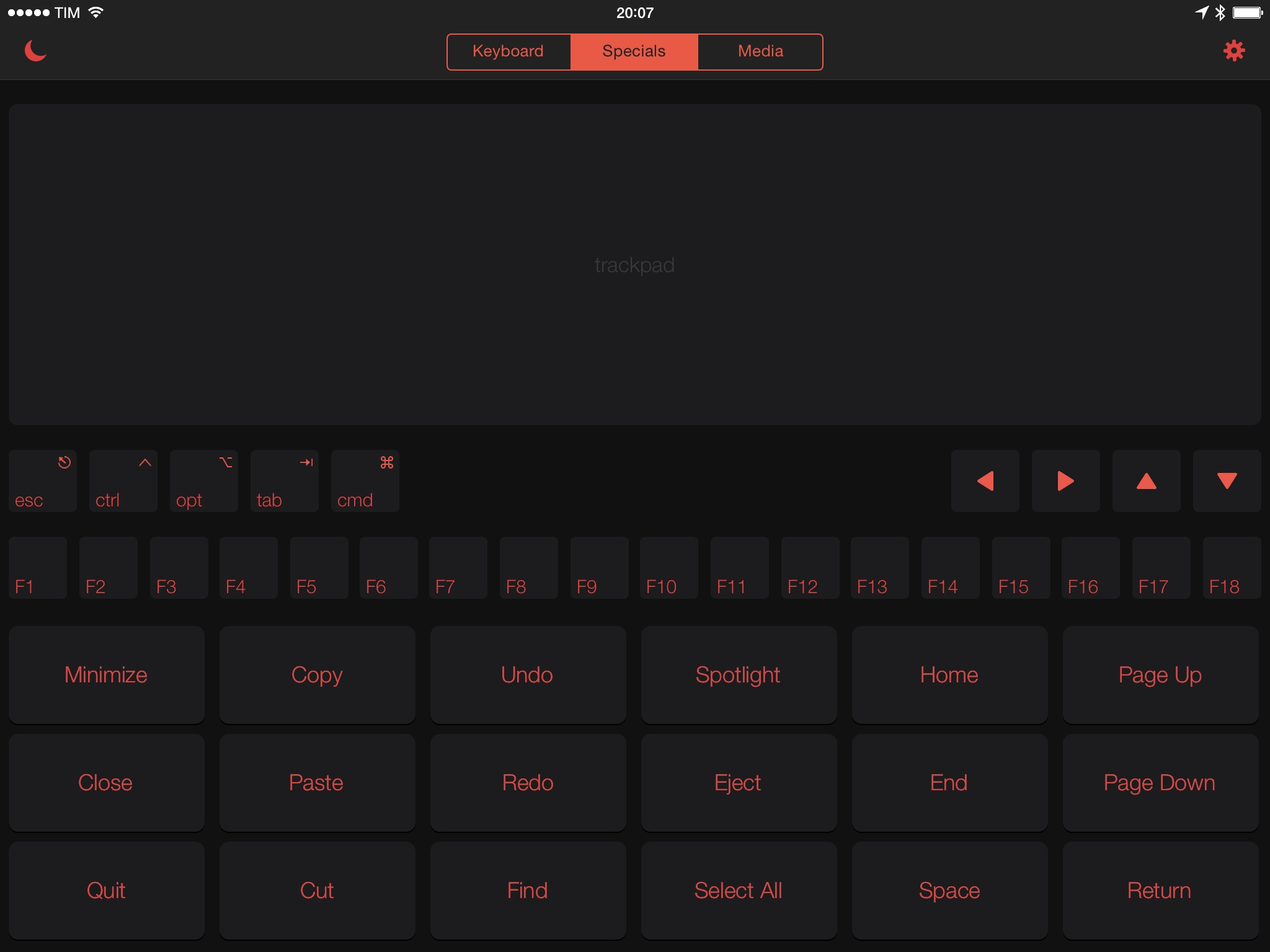
One of my all-time favorite apps for iOS, TouchPad, has been updated today with an iOS 7 redesign, a new dark theme, and performance improvements.

I’ve been using TouchPad since 2010 (here are our first reviews of the iPhone and iPad versions) as it’s a great way to turn an iOS device into a wireless keyboard/trackpad/media controller for your Mac. The setup is easy, the app is focused on basic features with no complications, and it saved me on several occasions when my keyboard’s batteries died and I couldn’t type anything on my computer (such as my login password).

Edovia, the original developers of TouchPad, stopped maintaining the app a while ago, which meant that TouchPad didn’t get an iOS 7 refresh back in September. The folks at MartianCraft, however, have acquired TouchPad and are now in charge of its development, which is good news. I’m happy that TouchPad is back.

TouchPad 5.0 is available on the App Store.

Permalink

Jason Snell’s Hands-on with OS X Yosemite

In his first hands-on with OS X Yosemite, Jason Snell points out an issue with the redesigned title bars that no longer show a title:

I have to admit I’m also a little nonplussed about the disappearance of titles from the top of many windows. In apps that never really have more than one important window (Calendar and Maps come to mind), the title is unnecessary; labeling my Calendar window with the word Calendar seems pointless. But in many other contexts, the title of the window imparts important information, and there’s a danger that some of that information could be lost if Apple takes this approach too far. It’s something worth keeping an eye on, especially given the radical changes Yosemite has in store for Safari.

I’ve been trying the first Yosemite beta on my MacBook Air, and I find it annoying that Safari doesn’t show the title of a webpage (just the domain in the address bar) when a single tab is open. It’ll be interesting to see if third-party apps will switch to this integrated toolbar approach with no separate area for a title.

Permalink

Manage Your Day-to-Day Tasks with Igloo [Sponsor]

You’ve heard that task management is coming to Igloo with their next release – but how is another task management system actually going to help get work done?

Think about all the tasks you do that aren’t part of a specific project: updating a graphic in a presentation, requesting text get corrected in a Word document, or delegating to-do’s after a meeting. Igloo makes this easy by keeping these tasks with your content.

When you view a document, blog, event, forum, or wiki inside your Igloo, you can add a task right there. You don’t need a project or list (but you can use those, too). These tasks show up on your content, informing your team if document needs edits or if it’s ready to go to the client. Content tasks are particularly great for recurring meetings; when you view tasks assigned in last week’s meeting, it’s easy to see what was completed and what wasn’t.

And when you’re the one assigned tasks? Whether it’s on a project list, on content, or a personal task, all of your tasks show up in one view. It’s the easiest way to manage your day-to-day work. Tasks are a free for all Igloo customers, coming this summer as part of Igloo’s latest update, Unicorn.

Our thanks to Igloo for sponsoring MacStories this week.

Permalink

Directional: E3 2014

This week Federico and Myke do their best to cram in as much E3 news as possible. They discuss some of their favourite game announcements from the show and their overall impressions of each company’s offerings.

In our special Directional episode for E3 2014, we try to mention all the games that caught our interest and we consider some of the general themes and trends of the show. Get the episode here, and don’t miss the show notes.

Permalink

Only Apple

Fantastic article by John Gruber on Apple’s WWDC and the state of the company. I particularly enjoyed his thoughts on Tim Cook’s Apple:

The same maestro who was able to coordinate the procurement, assembly, production, and shipment of 76 million all-new iPhones and iPads in one quarter has brought those operational instincts and unquenchable thirst for efficiency to coordinating a Cupertino that can produce major new releases of both iOS and OS X, with new features requiring cooperation and openness, in one year. They’re doing more not by changing their thousand-no’s-for-every-yes ratio, but by upping their capacity.

Permalink

The Prompt: Koala Consortium

This week Stephen leaves Federico and Myke to celebrate The Prompt’s first anniversary on their own. However, they have the help of David Smith to discuss the App Store after WWDC—as well as a whole host of follow-up and fun.

For The Prompt’s first birthday, we invited the good Underscore and discussed his wishes for a better App Store after Apple’s announcements at WWDC.

You can get the episode here, and I would like to thank everyone for listening in the past year. Here’s to many more episodes.

Permalink

Learning from iOS 8’s iMessage Changes

Scott Hurff put together a good overview of the changes in the Messages app for iOS 8, nicely illustrated with animated GIFs. He concludes that Messages for iOS 8 shows Apple has considered the ways their customers use the app and iterated accordingly:

Apple’s iMessage announcements can teach us a lot about the value of knowing our customers. It’s not enough to build products based on rumor, anecdote or speculation. We have to know exactly how and why our customers do what they do, and in what context they’ll be using our products.

Messages was especially lacking in terms of attachments and group conversations, and I’m glad to see that fixed.

I was initially surprised to see voice messages getting such a prominent spot in the app but, considering how popular audio snippets are among WhatsApp users, I think the addition makes a lot of sense.

Permalink