Posts in Linked

Continuity’s Statement

From Shawn Blanc’s article on WWDC 2014, I particularly liked this bit about Continuity:

But I think Continuity is more than just a better implementation of a cool feature. I see it as a “philosophical” feature as well — it’s a statement that we use our devices for many of the same tasks, and that “work” is device agnostic. Continuity is a way of telling the Apple user it’s okay to expect their devices to always be in sync down to the very mid-sentence of an email in progress.

This is a great way to put it. Continuity is one of those features that “just make sense” – of course my activity should follow me around seamlessly – and it highlights an important point: devices and OSes are different, but the experience should always be consistent and natural.

Permalink

Swift Links

The third big announcement that followed OS X Yosemite and iOS 8 yesterday was Swift, Apple’s new programming language meant to replace Objective-C.

From Apple’s website:

Swift is an innovative new programming language for Cocoa and Cocoa Touch. Writing code is interactive and fun, the syntax is concise yet expressive, and apps run lightning-fast. Swift is ready for your next iOS and OS X project — or for addition into your current app — because Swift code works side-by-side with Objective-C.

Swift has been in the works since 2010, as confirmed by Chris Lattner, Director of the Developer Tools (via John Siracusa):

I started work on the Swift Programming Language (wikipedia) in July of 2010. I implemented much of the basic language structure, with only a few people knowing of its existence. A few other (amazing) people started contributing in earnest late in 2011, and it became a major focus for the Apple Developer Tools group in July 2013.

The Swift language is the product of tireless effort from a team of language experts, documentation gurus, compiler optimization ninjas, and an incredibly important internal dogfooding group who provided feedback to help refine and battle-test ideas. Of course, it also greatly benefited from the experiences hard-won by many other languages in the field, drawing ideas from Objective-C, Rust, Haskell, Ruby, Python, C#, CLU, and far too many others to list.

One of the key features of Swift is interactive Playgrounds, which will allow you to type code and see the results appear immediately:

Playgrounds make writing Swift code incredibly simple and fun. Type a line of code and the result appears immediately. If your code runs over time, for instance through a loop, you can watch its progress in the timeline assistant. The timeline displays variables in a graph, draws each step when composing a view, and can play an animated SpriteKit scene. When you’ve perfected your code in the playground, simply move that code into your project.

As an introduction to Swift, Apple has created the Swift Programming Language guide, available as a free eBook on iTunes and on the web:

Swift is friendly to new programmers. It is the first industrial-quality systems programming language that is as expressive and enjoyable as a scripting language. It supports playgrounds, an innovative feature that allows programmers to experiment with Swift code and see the results immediately, without the overhead of building and running an app.

Over at The Verge, Ben Popper talked to iOS and OS X developers and collected their reactions to Swift:

The other big idea behind Swift is that programmers can write their code and see the results in real time. In the old paradigm, developers write line after line of code in a text box, then compile those results — sometimes a lengthy, painful, productivity-denting task — and wait to see the end result. The product and the process were distinct from one another. With Swift, they can tweak a parameter or algorithm and watch the changes happen right away in the same coding environment. Theoretically, this means developers can toy with concepts faster and make what they’re trying to make in less time.

Last, Tim Stevens has a good general overview at CNET, explaining the differences between various programming and scripting languages and Apple’s approach with Swift:

Scripting languages, like Python, tend to be easy to write and easy to test, but they aren’t particularly powerful and generally don’t perform well. Not ideal when you’re writing, say, a game that needs access to the full power of your device. Traditional programming languages, like Objective-C, give better access to the power of the device and enable the creation of more comprehensive apps, but are difficult to learn and tedious to compile and test.

Swift promises to have all the good with none of the bad. Apple promises that, at least in a few key benchmarks, it is considerably faster to execute than Python and faster even than Objective-C. But, despite that, the language supports what’s called “playgrounds” within the Xcode developer environment, visualizing Swift code in real-time, like a scripting language.

Permalink

iOS 8 Lock Screen and App Shortcuts Based on Location

Juli Clover, writing for MacRumors:

One new feature sees the iPhone displaying apps on the lock screen based on location. For example, MacRumors readers have seen relevant app icons pop up while at or near brick and mortar locations like Starbucks and the Apple Store. While at a Starbucks, for example, the Starbucks app icon is displayed in the lower left corner of the iPhone’s lock screen, which allows a Starbucks Passbook card to be easily accessed.

I haven’t seen this feature mentioned anywhere on Apple’s website, but I’ve read tweets from other users noting the same behavior for banks and other local points of interest and stores.

It’s interesting to think about this in combination with Near Me, an App Store section that was launched with iOS 7 to highlight relevant apps for your current location. Personally, I’ve never relied on Near Me because its recommendations were slim (I only get a single app for my town), but the idea of proactively injecting shortcuts in the Lock screen for apps based on location intrigues me.

I’d be curious to know if this feature will only work with apps that are already installed (thus simply launching them) or if it will also act as an extension for Near Me, allowing you to quickly discover relevant apps from the Lock screen.

Permalink

Peer-to-Peer AirPlay in iOS 8

From Apple’s Enterprise webpage for iOS 8:

With iOS 8, you can wirelessly connect iPad, iPhone, or iPod touch to Apple TV without first connecting to the organization’s network. Which means you can present or share your work even if you’re offline or the organization has a complex network.

AirPlay with no network connection will make it easier to beam presentations (and games) wirelessly to an Apple TV when you can’t connect to the Internet. Apple allowed Bluetooth-based setups for Apple TVs last year, and it’s good to see them extending AirPlay’s capabilities to make it more ubiquitous.

Permalink

Vying for the Hearts of Developers

[…] the mobile revolution is over, and the war is now between Apple and the Google / Samsung alliance for the hearts of developers.

That’s why Apple spent fully one-third of its presentation today on new developer features, including an entirely new programming language called Swift. That’s why iOS is opening up in entirely new ways, including previously-forbidden things like letting apps talk to each other and even share interface elements with the system. That’s why Apple is building out the foundations of both health-tracking and home-monitoring platforms that big companies like Nike and Honeywell can tap into alongside smaller players like the smart lock maker August and speaker company iHome. And that’s why Apple is adding all sorts of little features to its systems that only power users really want, like widgets in the notification shade and replacement software keyboards. Make the developers happy, and they’ll stick around to write great apps that rely on the iPhone as the center of the universe.

It’s been less than 24 hours since Apple’s WWDC 2014 keynote, but already there have been a wave of opinion pieces, criticisms, compliments and everything in between. But so far, my favorite article has come from Vox’s Nilay Patel (just ignore Vox’s weird, almost click-bait headline). Like every opinion, not everyone will agree with it, but Patel makes some strong arguments about how Apple has now laid a really solid foundation for its immediate future. Apple wants to sell consumers on their ecosystem and in order to make that appealing to consumers, Apple is making their platform as attractive as possible for developers and other third parties such as those which provide health-tracking and home-automation products.

If Apple succeeds at attracting the very best developers and third party products to the Apple ecosystem it will make it that much more appealing for new consumers to buy in (and as Tim Cook jokingly said, have “a better life”) and that much harder for existing customers to leave the ecosystem. As someone who has invested in the Apple ecosystem in recent years, yesterday’s announcements were very encouraging and restored my confidence that this ecosystem will continue to grow in convenience, utility and value. I for one can’t wait to see what the developers bring us later this fall with the public release of iOS 8 and OS X Yosemite.

Permalink

Part of Speech Highlighting in Editorial

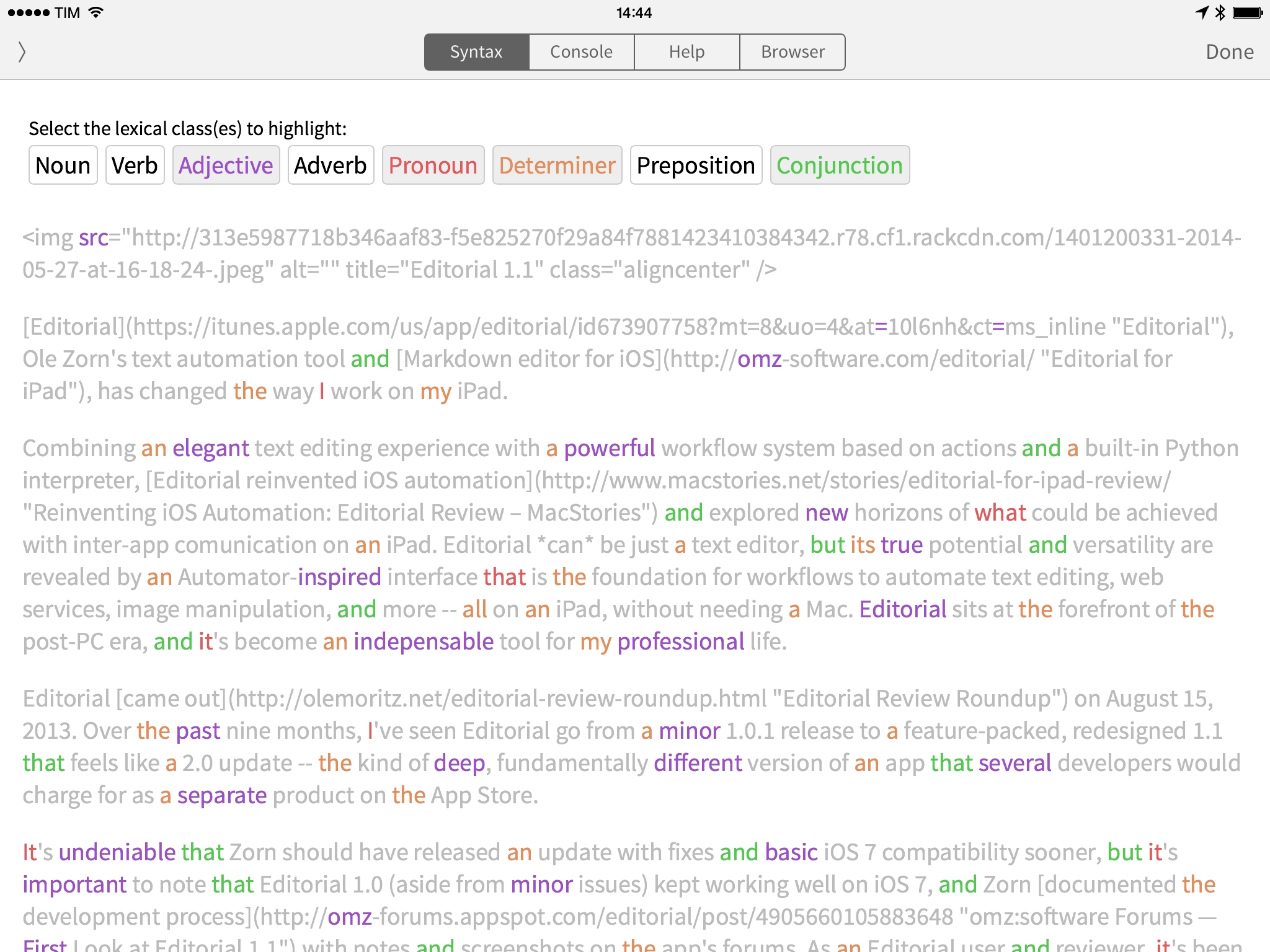
Editorial developer Ole Zorn has created a workflow showing how the new Editorial can tag parts of speech in text to highlight lexical classes like nouns, verbs, adjectives, and more.

The linguistictagger module is a new Python addition in Editorial 1.1 and it’s reminiscent of the part of speech highlighting found in apps like Phraseology and Writer Pro. In Editorial, you won’t get any editing features, but the basic syntax highlighting will still come in handy to understand how you write when reading a document in the Syntax preview.

Also from Zorn, check out two UI workflows to display a sidebar for Wikipedia and a Markdown preview while writing in the text editor.

Permalink

Directional: Extra Special Q&A

This week Federico and Myke take questions from the audience. They discuss a whole range of topics including their favourite games of all time, what they perceive as the future trends in gaming and they also come up with Pokemon characters for each other.

A fun episode, with lots of questions answered. Get it here.

Permalink

Full Video of Jimmy Iovine and Eddy Cue at Code Conference

A few hours after announcing their $3 billion deal, Apple SVP Eddy Cue and Beats co-founder Jimmy Iovine came to the Code Conference to talk about what brought them together, and what they want to do next.

Re/code has posted the full video of the interview with Jimmy Iovine and Eddy Cue, recorded shortly after news of the Beats deal broke. We had a recap of the event, but I highly recommend watching the video as much of the nuance is lost in the transition to plain text.

The video is yet another confirmation of Jimmy Iovine’s vision and, as Marco says, charisma. Iovine knows music and he values music culture, which is reflected in Beats.

See also: this profile of Iovine by Ben Sisario for The New York Times.

Permalink

The Sweet Setup’s Rundown Of Photo Stream Alternatives

Bradley Chambers, writing at The Sweet Setup:

When it comes to syncing data across our devices, we’ve largely “arrived.” If you predominately use all Apple or Google apps and services, then most of your data and documents are synced through those first-party services. And if you use 3rd-party apps and services (such as the aforementioned ComiXology, Kindle, Audible, et al.), many of them provide their own syncing with apps available on all our devices.

One of the last major hurdles for syncing across all our devices and computers is with photos and home movies.

I was surprised by Bradley’s pick, but, with that pricing, it is indeed a good deal.

I’ve personally been using the free trial of Picturelife for a few months now, and I think I’m going to upgrade to Premium for the summer. I like the Picturelife apps and especially the Map view they have on the web to visualize photos by location. The company is focused on making a great product and I hope they will stick around in the future.

The question, of course, is iOS 8. Right now, I’m using a complex workflow to organize my photos in Dropbox and mirror them to Picturelife. I would love to see new iCloud photo announcements next week.

Permalink