Posts in Linked

Readdle Documents Gets iPhone Support

Nice update to Readdle’s recently rebranded file manager for iOS. The iPhone version has the same features of the iPad app, so make sure to read my original review if you missed it.

Now that it’s universal, Documents comes with proper iCloud sync for documents. iCloud sync requires you to move files to a specific iCloud folder inside the app, and it worked well in my tests. There are two details that I like about Documents for iPhone: the dual icons for the browser/document panel, and the way the tab bar becomes an action bar after you hit Edit. I know Apple probably advises against this kind of UI, but it looks good.

Permalink

Siri Cheat Sheet

Brett Terpstra:

I also added a cheat sheet for Siri. I know it’s not the most useful thing in the world; how often are you sitting at your laptop or desktop when you want to use Siri? Still, I’d spent some time exploring and needed a way to practice the various command syntaxes so that I’d be able to use them without thinking so much after I hit the button.

While I always check out every project by Brett, I somehow missed this one. The Siri cheat sheet is part of a bigger collection called Cheaters:

Cheaters is a collection of HTML-based cheat sheets meant for display in an Automator-based popup browser which can float on your screen while you work in other apps.

I have already found some commands I didn’t know Siri supported. I am now wondering if any Italian ever made an Italian Siri cheat sheet as thorough as this one. (note: this is sad, but unsurprising)

I look forward to playing more with Cheaters. The way Brett calls the HTML file with Automator is particularly clever and extensible. Make sure to check out the other cheat sheets, which include MultiMarkdown and Sublime Text 2.

Permalink

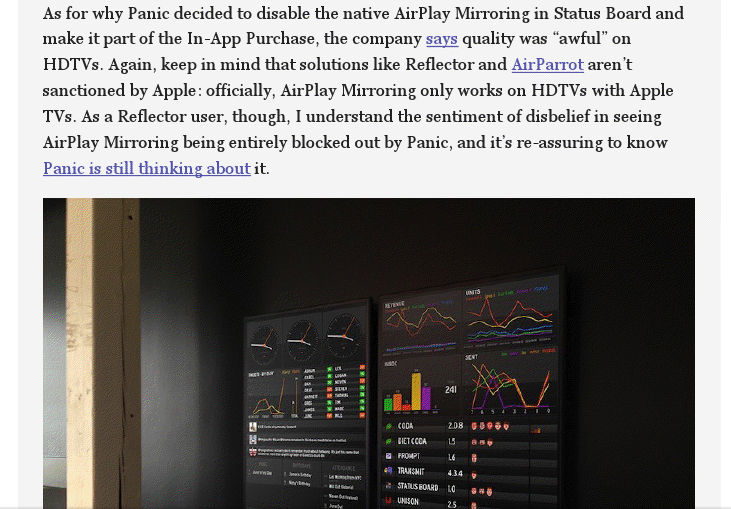
Status Board’s Samba de Setup

Cabel Sasser:

One of the things we wanted to make truly excellent in our brand-new Status Board iPad app was the setup process. Setup assistants are never fun, always annoying, and kill that “new app” buzz faster than anything. The only thing worse is that giant overlay some apps do that draw arrows all over your screen pointing to all the buttons and things like some demented football coach.

In my review, I likened the illustrations and tone of the QuickGuide Manual to Portal’s GLaDOS, but I forgot to mention the music. Now you can listen to it on Cabel’s blog. I want to make this my new iPhone ringtone.

Permalink

Chrome For iOS and “Save To PDF”

Chrome for iOS was updated yesterday with a couple of new features, and considering it’s become my daily browser on all my devices, I thought I should try them out.

The most notable addition is full-screen viewing for the iPhone version. As you scroll down a page, the Omnibox gets hidden; to view it again, simply swipe down anywhere on a webpage. I like the implementation, and I think Google is doing full-screen browsing better than Apple on iOS. More importantly, the status bar remains visible even with full-screen activated (I wish Rdio would do the same). I hope this initial iPhone-only full-screen mode will evolve into Google finally enabling a bookmarks bar on the iPad.

The other addition of version 26.0.1410.50 (I know, don’t ask) is printing. From the Print menu, you can now print webpages using AirPrint or Google Cloud Print. The changelog also mentions the possibility to save PDFs to Google Drive, and I find it curious that this functionality is hidden inside Google Cloud Print’s menu. MacStories readers know about my preference for PDFs and workflows to archive PDFs of webpages. Unfortunately, Chrome’s Drive integration leaves much to be desired: it kept timing out on my devices, and when it worked, a PDF was considerably reduced in quality (screenshot). I’ll keep using my own scripts to archive PDFs.

For a detailed overview of the update, I recommend reading Dan Moren’s piece for Macworld linked above.

Permalink

A Preview of the Apple Pop-Up Museum

Stephen Hackett has a nice overview of the Apple Pop-Up Museum, “an exclusive collection of Apple products to be shown in Atlanta”:

At the end of the first hall, there’s a room that stands out. While the hallway is bright and colorful, this room is dark, with the entrance painted black. In sparse white letters above the door, it reads “The Wilderness.”

The Apple Pop-Up Museum will be exhibiting on April 20 and April 21. Admission is only $10 per day and $15 for both days. My only experience with exhibitions of old Apple computers was an Apple I that was put on display in my town last summer. If I lived near Atlanta, I wouldn’t think twice about buying a ticket.

Permalink