This Week's Sponsor:

Turbulence Forecast

Know before you go. Get detailed turbulence forecasts for your exact route, now available 5 days in advance.


Posts in stories

iBooks Textbooks Commentary

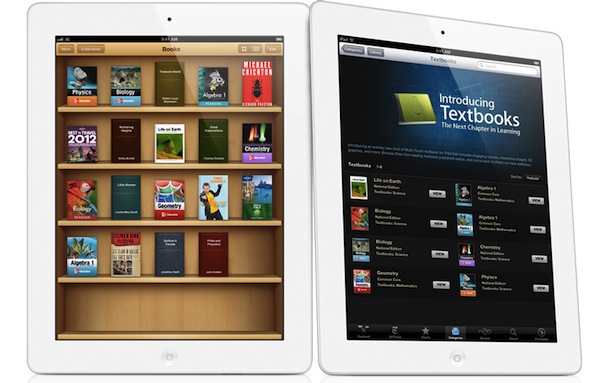
Following the announcements Apple made this morning about iBooks 2.0, textbooks and iTunes U, some interesting discussions have surfaced online in regards to Apple’s willingness to improve the education system – and reinvent textbooks – using iBooks and the iPad. Being based in Italy, I can’t comment specifically on the U.S. school system and what these new products mean for students, school districts and educational institutions, but I do have a few ideas and links to share.

iBooks has turned into a platform. No more just an e-Reader, with the addition of textbooks and books created through iBooks Author Apple seems to be betting on iBooks as a platform that stands on its own, just like iTunes and the App Store. You could argue that this was already clear from the start with the dedicated iBooks app and iBookstore within iOS, but it’s even more relevant now because of one key factor: content creation. Provided you have an iBookstore account, you can now create content-rich books on your Mac and sell them through the iBookstore. You can also export them locally, and preview them on your iPad. I have no idea how smaller, independent publishers and authors will respond to iBooks Author in the long term, but as far as creating content goes, Apple’s latest desktop app looks fantastic. The double nature of this announcement (rich textbooks, books by authors) combined with the existing features of iBooks has a real chance of creating “an iBooks ecosystem”.

Software sells the hardware. Obvious consequence: books created with iBooks Author (packages, not the actual content) can only be sold through the iBookstore. Now, assuming authors like the functionalities and workflow enabled by iBooks Author and assuming they also like money, if this initiative proves successful in the long term, what devices are authors going to recommend?

…It depends. iBooks Author looks like a great eBook creation app, but some authors are skeptical. We will have to wait and see if authors will adopt the software, if Apple will provide continued support with updates and, ultimately, if iBooks Author can be used effectively for all kinds of eBooks, not just those heavy on media and fancy effects. For instance, it doesn’t look like EPUB is supported right now as the format seems to be different. Ben Brooks is right: Apple seems to be targeting Kindle Singles directly with iBooks Author.

Rich content made simple. iBooks Author simplifies the process of creating content-rich books with drag & drop, pop-out menus, auto-align controls, and more. From iBooks Author’s Help section:

  • Gallery: Add a sequence of images your readers can swipe through, each with its own custom caption.
  • Media: Add a movie or audio file readers can play.
  • Review: Add a sequence of interactive multiple-choice or drag-to-target questions.
  • Keynote: Add a Keynote presentation (exported as HTML).
  • Interactive image: Use labels (sometimes called callouts), panning, and zooming to provide detailed information about specific parts of a graphic.
  • 3D: Add a 3D COLLADA (.dae) file readers can rotate.
  • HTML: Add a Dashboard widget (.wdgt).

By using web technologies, desktop-class content creation software and an iWork-like interface, with iBooks Author Apple is offering what Xcode is to the App Store. For free.

Accessibility. iBooks Author fully takes advantage of VoiceOver and other Accessibility technologies to let people with disabilities read and experience books. Apple takes Accessibility seriously, and it shows.

Other uses for iBooks Author? I haven’t played with it yet, but I wouldn’t be surprised to see iBooks Author being used for other purposes.

iBooks Textbooks remind me of Push Pop Press. And guess what, the folks behind PPP (acquired by Facebook earlier this year – coincidence?) sound pretty pissed off.

Prices. iPads are expensive! But so were PCs and Macs. As Stephen Hackett correctly points out, Apple doesn’t disclose educational pricing, and several schools already have leased Macs in the classrooms. Will Apple provide a 1-1 “switching program” for schools that don’t need Macs anymore? And what will base pricing of leased iPads look like? The Verge spoke to Apple’s Phil Schiller, who told them “he thinks the numbers work out favorably for school districts if you weigh the costs of textbooks and classroom computers against iBooks content and iPads”. Joshua Schnell has a slightly different take and suggests that iPads may only end up being used in “rich white kid schools”. I think we don’t have enough details to speculate on Apple’s educational pricing right now (as usual, a Volume Purchase Program for apps and books is available). The only data point we have is that iBooks Textbooks will be cheaper than physical textbooks…if publishers don’t change their minds.

Yes, physical books are more “durable” if you drop them. But what do you use today, an encyclopedia with a typewriter or a PC? Time to move on.

Other devices. I’m hearing reports of iBooks 2.0 and iTunes U not running smoothly on the original iPad and older iPhones, confirming my theory that textbooks seem to be heavily targeting the speedy A5 processor of the iPad 2 (I have no idea why would iTunes U and regular books run slower on older-gen devices though). Let’s not forget that an A6-enabled iPad 3 is rumored to land soon, and Apple may keep the iPad 2 around at a lower price.

Digital books are still heavy. Pearson’s Biology textbook is a 2.77 GB download. We complained about iPad magazines and their absurd download sizes, but it looks like there isn’t much you can do about heavy content like images and video. When I was a kid, I often needed a bigger backpack for textbooks. Now kids will need bigger flash memory.

It’s up to schools and teachers. Pricing issue aside (and that is a huge “aside” for now), schools and teachers will obviously have to learn how to deploy and manage iPads, as well as integrate textbooks and new learning experiences into their curricula. In the current scenario, it’s very likely that kids already know how to use iPads, and their teachers will have to play catch up. On the technical side, I’d suggest schools to look for inspiration in Fraser Speirs’ experiences.

Apple doesn’t want to fix textbooks. They want to improve learning. The underlying message of today’s announcements isn’t strictly about textbooks – surely they play a big role in education, but the scope of Apple’s mission is much broader. Apple wants to re-imagine learning and improve current standards with new technologies: content management systems for classes are nothing new, but iTunes U takes it to a whole new level with a beautiful, always-connected, interactive application. There are big corporations that control the education/textbook market and who knows if they’re really willing to give Apple the leading role in this game with distribution, standardization of technologies and guidance. As Dan Frommer notes, change is not going to happen overnight but you can’t believe in paper textbooks as “the future”.

Apple’s revamped education strategy will be interesting to follow.
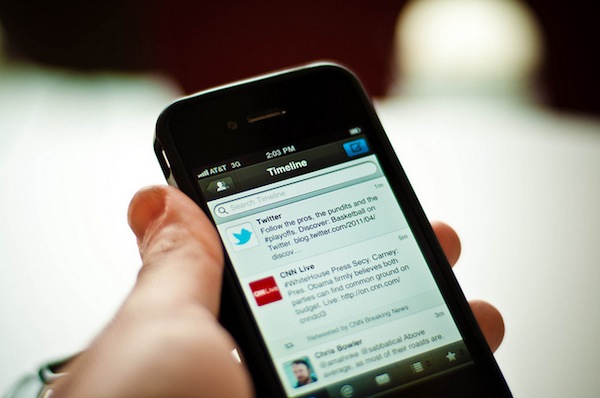

New Twitter Clients

Justin Williams writes about the current state of Twitter clients for iOS:

What iOS needs is the Twitter equivalent to Adium: a well maintained, open source Twitter client that is targeted at the most hardcore and passionate users of both Twitter and the iOS platform.

That, of course, is easier typed than done. Many open source projects fail because of lack of vision or direction. Others fail because they are just badly engineered software that aims to shove every pet feature into a unified product. Projects like Adium succeed because there is an established hierarchy of managers, developers and contributors. Each release has a focus and direction much like a commercially produced project.

My first Twitter client was Twittelator Pro by Andrew Stone, which I installed soon after I got my first iPhone in 2008. After that, I switched to Twitterrific, which I kept until Tweetie came out. For a few months I bounced back and forth between Tweetie, Twitterrific and Birdfeed but, eventually, I settled with Tweetie 2. I loved Tweetie 2. It was the perfect Twitter client for my needs, it was fast and Loren was (is) a great guy. But then Twitter bought the app, started doing all kinds of crazy things to it, and the excitement wore off. I went back to Twitterrific, but it wasn’t the same – I had become very accustomed to Tweetie (now Twitter for iPhone) and the simplicity of Twitterrific was disorienting. Like Justin, I’ve always had a problem with inline DMs in Twitterrific.

Throughout 2010 and 2011 there’s also been a period when I went back to trying every Twitter client out there, including Twittelator Pro (again), but also Echofon, Tweetings, HootSuite, Osfoora, TweetList and TweetLogix. I was addicted to trying Twitter clients until Tweetbot came out and, as I wrote in my review, proved to be a Twitter app for iPhone I could once again fall in love with. I’ve been using Tweetbot for iPhone ever since, and the app keeps getting better on each release. Personally, I don’t agree with Justin’s point that Tweetbot is “the best designed Android app available for iOS”, but this isn’t the main problem.

The real issue is that these days iOS Twitter nerds are left with Tweetbot and nothing else. Twitterrific clearly isn’t targeting power users – maybe a better expression would be “users that don’t just casually check on Twitter” – and Twitter for iPhone, well, let’s just say it’s not exactly focused on Twitter geeks anymore. How about the other clients? I see very few innovators around, and the only third-party app I’m excited about (again, except Tweetbot, which I use every day) is Twittelator Neue – Stone’s app has a good chance to reinvent a few things especially if it ever comes to the iPad. But looking at the whole Twitter software landscape today, it’s clear to me there isn’t the kind of verve and anticipation for new clients that we experienced three years ago, with developers constantly updating their clients, one-upping competitors in terms of features, and teasing new products that (sadly) never came to be.

In a scenario where the less popular Twitter clients are either a) maintained through bug fix releases or b) updated with minor features every once in a while, lacking major additions like iPad and Mac counterparts, I see a glimmer of hope in Tweetbot – Tapbots are always up to some great stuff – and services like Tweet Marker: available for free to developers to implement in their apps, Tweet Marker is the first step towards that kind of client-side unification whose lack made switching Twitter clients on a daily (or even hourly) basis so painful in 2009. Check out the apps that already support Tweet Marker, and note how they’re the same names that I’ve mentioned above.

Building an Adium-like model for the ultimate Twitter client might be a viable plan, albeit an elaborate one considering all the technical complexities and frequent changes behind the Twitter API. An ideal modern Twitter client for power users should have delightful and powerful iOS apps and an outstanding Mac client that makes it extremely easy to switch environments without user fatigue; you have to make sure the apps are always brought up to date with the latest Twitter features from Twitter itself and iOS 5 (I’m fairly sure the technologies and APIs behind AIM aren’t updated nearly as often as Apple releases new iOS betas), and when everything’s distributed for free you have to make sure you’ve got a dedicated, kick-ass team of contributors and leaders, or things start to get messy (and slow) because of updates, user support, feature request, and so forth.

So here’s another possible scenario. Let’s continue to diversify the offer of available Twitter clients, and settle with one app for power users. Justin doesn’t like Tweetbot, but perhaps one year from now Tweetbot will be available on more platforms with changes and tweaks that everyone will like and use on a daily basis, even Justin. Around that Twitter client for power users, I imagine a flourishing ecosystem of innovative Twitter apps that don’t simply focus on building an alternative to Tweetbot – a daunting task at this point – but provide a unique experience that can live alongside the main, full-featured client. I’m thinking Tweet Library, also by Tweet Marker’s Manton Reece: instead of just focusing on being the perfect regular client, Tweet Library’s built-in client is functional to the app’s real feature: curating tweets and archiving them. This is the path I believe developers should strongly consider for building Twitter-connected apps: focus on APIs, services and interactions with other software. Where’s the Twitter app that integrates with Evernote and lets you annotate tweets? Where is the app to run, manage and archive online polls exclusively via Twitter? Where’s the service that lets you use your custom vanity URL and get beautiful, real-time, reliable click analytics instead of the ugly mess that’s HootSuite?

You see where I’m getting at – I believe developers are (obviously) completely free of investing their time and resources into competing with Tweetbot, but on the other hand I don’t think focusing on other aspects of Twitter means admitting defeat. It’s easy to say “Tweetbot won” or “Twitterrific is the best” when, really, the story is much more complex than that and also goes back to a company that has shown a “peculiar” approach to guiding its own third-party developers.

Will we ever go back to the Birdfeed and Tweetie era? I don’t think so. Twitter is now integrated in iOS 5 and seeing massive growth because of it, thus justifying the prospect of creating an app “for power users” even less. Yet I can’t help but think about a time, not too distant from now, when the power users will finally settle on a single solution for their power-hungry needs, and let other developers innovate atop of the Twitter platform in disruptive new ways. The ideas, devices, APIs and users are waiting.

[Photo by Jorge Quinteros]


Why I Use Todo.txt

I’d like to briefly elaborate on my Todo.txt setup, which I only started using last month as a way to keep my “todo articles” separate from general “todos” that I now keep organized and synced through Remember The Milk. Several readers have emailed me asking why I chose Todo.txt of all text editors and task management systems, so here it goes.

Todo.txt has a simple syntax that requires no learning curve. I can fire up Todo.txt’s iOS app or TextEdit on my Mac, and add a new line for a new todo, which in my case is an article I’m working on or I know I’ll be working on in the immediate future (this week or next week, I try not to project too distant in the future as blogging priorities can rapidly change). I’ve tried other text-based todo solutions like TaskAgent and TaskPaper, and I like them a lot as apps with outstanding support from their developers, but I just feel more comfortable using Todo.txt’s syntax, which appends new lines as todos and marks those beginning with an “x” as complete. Obviously, Todo.txt comes with much more complex possibilities and interfaces such as a full-featured CLI and support for contexts and priorities, but I use none of these features. To me, Todo.txt is the easiest way to maintain a list of “todo” Vs. “not done yet” articles that I want to have on MacStories.

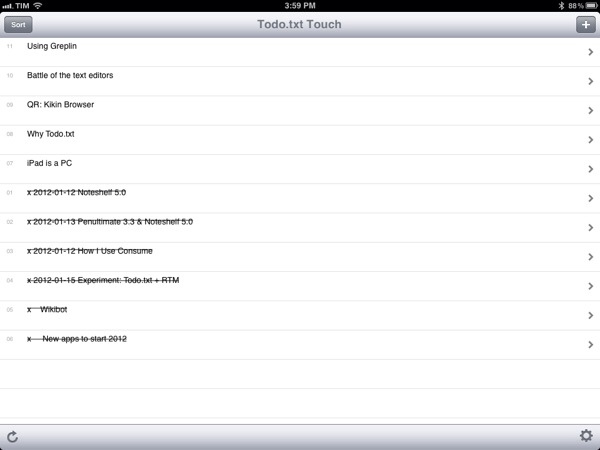
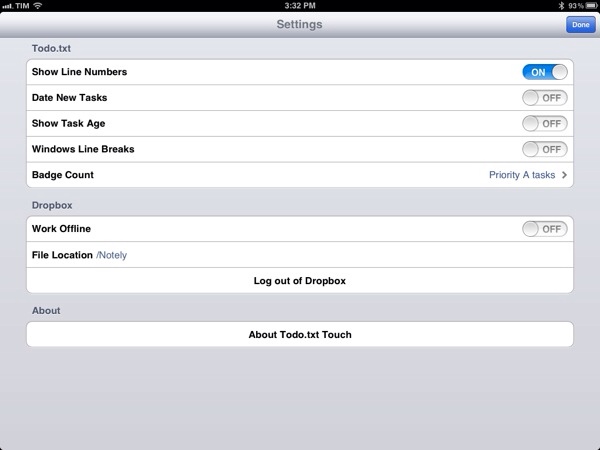
For this reason, I keep the Todo.txt iOS apps (on my iPhone and iPad) as simple and clutter-free as possible. Developer Gina Trapani made sure that you can sort by date and todo ID, enable app badges and date new tasks but, again, I haven’t found myself needing any of these (I could have enabled badges on the Mac too). In the Todo.txt iOS app, I chose to display line numbers to give me an easily scannable overview of just how many items I have, and I’ve disabled everything else as you can see in the screenshot. With this setup, it takes 30 seconds to open the app, quickly see what’s up while it’s syncing (takes a few seconds as the file to load is very lightweight) and enter a new todo. I don’t use contexts and projects either: as I mentioned last week, I don’t need a “context” for my MacStories articles, and the project is always the same, writing for the site.

If possible, things are even simpler on my Mac. Todo.txt is synced via Dropbox and alias’d on my desktop. When I need to check on the articles I have in my queue I can use TextEdit or, better, nvALT, which also displays all my other Dropbox notes synced inside a “Notely” folder (no particular app preference here, I just liked the name). Adding new todos to the file requires a few seconds, but if I’m feeling really keyboard-junkie I can append a new todo to the end of the file using an Alfred extension. I use Alfred for a lot of different tasks on my Mac (adding items to Remember The Milk, converting currencies, generating new random passwords, etc.), so it helps that I’ve found a way to integrate Todo.txt with my existing workflow.

And when an article is done and a todo is complete? I just delete it. I don’t archive, “review”, flag or categorize. Articles are just there and it’s up to me to write them.

Text-based todo management systems go back a long way. In learning about Todo.txt’s history, I stumbled upon relatively old articles that described how it was popular “back in the day” (we’re talking pre-Tiger days as well) to keep everything, from notes to passwords to long-form articles, inside a giant .txt file formatted in some way for easy scanning. These days we’re using the modern versions of those systems, which may be Evernote, Yojimbo, or other anything buckets. These services come with a fantastic set of features – I’m a huge fan of Evernote myself – but as far as my articles go, I want them to be highly portable in an environment that’s open to any other app for access and modifications. With plain text, I can have my MacStories-related todos synced in a text file that can be opened and correctly read by any text editor – and I’m sure it’ll remain that way for the next 20 years when .docx files will be corrupted and biting the dust.

Some parts of Todo.txt are modeled after David Allen’s GTD methodology and, at least for my articles, I’m not using GTD at all. But I am getting things done, for real, with a system that I can trust, is reliable and works anywhere.


New Apps for 2012

With the new year, many people make up resolutions that often involve losing weight or spend less time checking email and Facebook. Whilst those are certainly noble resolutions, they don’t quite fit the goals that I have set for this year when I began thinking about 2012 and the things I’d like accomplish in the next 12 months. Instead of working more to make more money, I’d like to work less but work smarter, as Shawn recently mentioned in an episode of Shawn Today. I want to spend more time with my family and friends and use the “time for work” with better tools to get the same things done, but better. I’m working on a series of completely new projects, too, but I also would like to optimize my existing tasks to require less time yet yield better results.

Which means I have to get new tools and understand how to properly use the ones I already have.

So instead of making up new year’s resolution and give up on losing weight after three weeks as most people do (but won’t admit), I actually went ahead and got new tools. Which, in my case, means I bought new apps and gear to get work done.

I recently wrote about how I’ve switched from OmniFocus to Remember The Milk, Calendar and Todo.txt to effortlessly manage my tasks, events, and articles. I’d like to quote for the sake of context:

I don’t have access to my Mac 24/7 anymore. I work from different places, and 80% of the time I prefer to keep my iPad with me than a MacBook. Obviously, the tweaks and adjustments I had made on my Macs didn’t carry over to iOS devices.

Articles, app releases, website management and finances are all different kinds of tasks. I used to keep them in OmniFocus, and tweak the app and its view options to fit the way I worked. It turns out, having separate tools for different sets of tasks is helping me focus more and avoid distractions. Articles need research and are more text-oriented; app releases only need a quick ping or alert; finance and website management can go into a proper GTD app with lists, due dates, etc..

These are two key points: access and writing. I don’t have access to my Mac(s) 24/7 anymore and I have to give up on pretending my articles are tasks that need to be managed with tags and due dates. Writing is a creative process (even when I’m breaking news or analyzing a rumor, I try to offer a perspective for debate and analysis), and I don’t think creativity can be managed with strict rules and app badges.

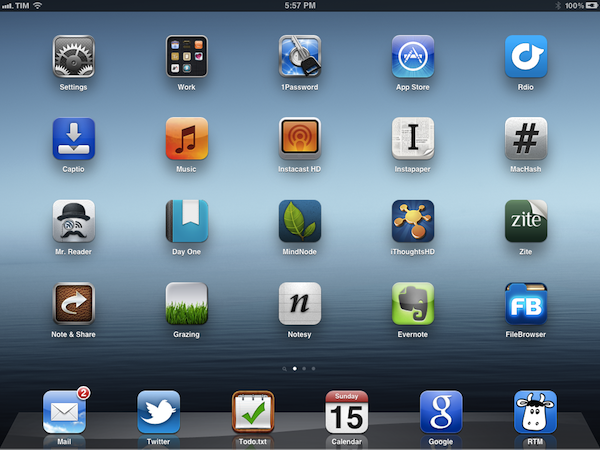
So here’s a short list of new apps that are helping me rethink my workflow. Some of them will stick around, others will probably be deleted – I don’t know. What matters is that taking a step back and reconsidering your work habits is a healthy practice (clearly better than telling your friends you’re going to lose weight or quit smoking) that, I believe, can lead to better relationships, a new knowledge of your workflows, and, ultimately, better results. Read more


A Software Experiment

For the past couple of years, I’ve been using OmniFocus to keep track of my projects and tasks. I love OmniFocus: it is a trusted system from developers I respect with an amazing set of native apps, constantly updated to take advantage of the latest features Apple has to offer. Yet for as much as I’d trust OmniFocus to handle everything for me, when personal needs change, habits are re-imagined and your workflow has to be finely tuned in a different way, software that is not meant for the purpose can only cover so much before you figure out it’s time to move on.

In the past months, some things changed in my personal life, I started a couple of new projects (including the next two iterations of MacStories), hired new people, and started helping out my girlfriend more with her job, too. To keep track of all this, I used to rely on OmniFocus, which worked extremely well until I realized I wasn’t really following any GTD methodology anymore and I had tweaked the app and made compromises with the software that turned OF into a beast it really isn’t. At the same time, I realized a part of my job – writing for this site – just can’t fit into OmniFocus’ style, at least not in the way I work. Which is to say, my colleagues use OmniFocus to manage their articles, and it works pretty well for them.

I compromised because I love OmniFocus too much. I have a deep respect for The Omni Group – a piece of history in Apple’s third-party development scene – and I have spent hours just browsing the company’s forums to read more about how people use Omni Group apps to get things done. I have dedicated Evernote notebooks just for OmniFocus and OmniOutliner, full with tips, stories, AppleScripts and lots of other cool resources. But it comes a point when, even if a specific software is flexible enough to allow for a huge amount of customization, spending hours learning and tweaking isn’t worth it anymore, especially when you have actual work to get done and people to report to. And tweaking is not getting work done, although it can give you such illusion sometimes.

I’ve been working exclusively from my iPad and iPhone for the past two months. Most recently, I got back to writing full-time again and decided to use my iPad for that, too. In this short period of time, I have used a different set of tools than OmniFocus to get things done, and this ‘experiment’ seems to be working so far.

I don’t blame it on OmniFocus. Like I said that app is fantastic, and version 2.0 is on my wish list of apps I’m looking forward to this year. I kept denying this, but the way I work (and, more generally, live) has changed in the last months of 2011; the app I used to manage my tasks wasn’t the perfect tool for the job anymore. So I stopped tweaking and moved on.

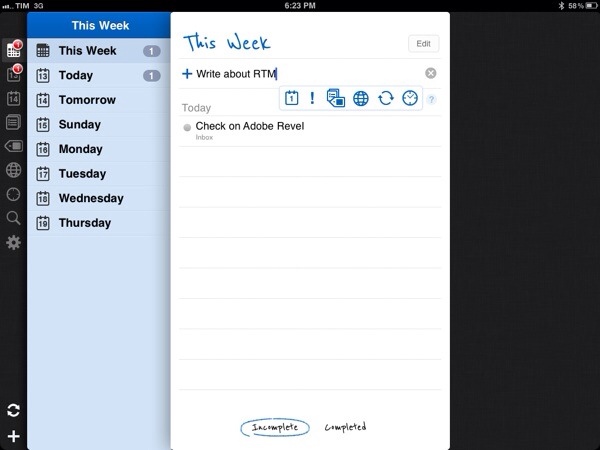
I’m now using a combination of Remember The Milk, Todo.txt and iCloud calendar. This setup is very simple, really, and I can assure you it’s more straightforward then what I had done with OmniFocus over the years. Read more


How I Rediscovered Zite

Often overlooked by iOS geeks in favor of Apple’s iPad app of 2010, Flipboard, Zite is a great “personalized news service” that I had ignored too, but started using a lot more recently. It has become an essential piece in my daily news consumption and discovery worlkflow, even more so than Flipboard which, unfortunately, is still largely based (at least on the iPad) on presenting content from your social streams in a new way, not necessarily making new content surface. That’s where Zite “clicked” for me.

Last year, one of the biggest trends of the App Store and software developers was that of launching “social magazines” and “personalized newspaper-like experiences” that leveraged social networks and your online friends to display content (articles, videos) in a new format. After Flipboard came out on the iPad and quickly captured the tech press’ hearts and eyeballs with a beautiful design and fresh approach to Twitter and Facebook, dozens of more or less similar services popped out promising to offer a better experience than Flipboard. Among them was Zite – at least I thought – and I easily dismissed the app as yet another take on the category that Flipboard created. Sometimes it’s good to be wrong, and I surely was.

Read more


The Next Apple

John Biggs writes “Why Samsung Is The Next Apple”:

Then consider Samsung’s lead in cellphone sales. While many would argue that Samsung specializes in meh and me-too, 60 million cellphones sold in 2011 can’t be a fluke. This isn’t about Android or iOS or Windows Phone – it’s about Samsung making and selling millions of phones to millions of people. Samsung is mercenary. They’re happy to use anyone’s OS as long as it puts phones into boxes and boxes into shopping bags.

So you have two superlatives: biggest phone manufacturer and biggest TV manufacturer. Add in some tablets, some washing machines, and some acceptable software and you have a real and vibrant ecosystem. The next year will bring plenty of efforts to bring streaming media into the home, but the guy who is already there will win.

John Biggs surely has been to CES more times than I have (actually, I never have) and he knows this industry, but he’s plain wrong. On several fronts. John is looking at the problem from the tech nerd’s perspective – the one that considers gadgets alone, and probably tech specs, the most important factor in the ecosystem equation.

There are many issues with this way of thinking. First: “some acceptable software” and “some washing machines” alongside mobile devices and TVs are not enough to build a “real and vibrant ecosystem”. It’s a start – though we could argue on the washing machines – but it takes a lot more. Ask Apple, who’s the company Biggs is comparing Samsung to, that is been building an ecosystem and devices for more than 10 years and yet sometimes still struggles to keep it all together. Ask Google, who still can’t get their social act together after all these years spent indexing people’s search results and web behavior.

Samsung is huge. It’s a huge company with a huge array of devices in a variegated catalogue of different hardware. But it takes an awful lot of software to build ecosystems, and TouchWiz is a laughable foundation for a “real and vibrant” ecosystem.

Second, it takes experience. Apple and Google (and Microsoft, too) have been building ecosystems of apps, services and users for years. It’s not just the software itself, as in the operating system that runs on computers and smartphones. Does Samsung sell songs? Do they host millions of user accounts? Do they facilitate digital purchases thanks to a system that has millions of credit cards on file? Do they run the most popular email web service in the world?

The answer is they don’t, but they sell a lot of Galaxy S units, Smart TVs and consumer devices. Yet in the popular line that Biggs mentions, the smartphones, they don’t completely own the experience: for as much as they customize Android with their UI “innovations”, the OS is still being made and maintained by someone else. Samsung may be selling millions of smartphones and they’re undoubtedly on track for a successful 2012 with televisions, but I just don’t see how the millions of devices Samsung is selling now can nurture a vibrant ecosystem with just some acceptable software and washing machines.

Is there any doubt that owning the experience is key to building a real ecosystem?

Apple, Google and Amazon seem to agree with me. Also worth remembering: Samsung comes from an OEM perspective that’s always generally used software by others, or at least never fully committed to building real ecosystems with its own code. The three companies above have been preferring the integrated approach as of late, with only some exceptions (Google has its own OSes but lacks hardware; Amazon is doing its own hardware but still forks Android).

Third: Apple – which I mention because Biggs compared it to Samsung – doesn’t just sell millions of devices, build and own its software ecosystem and nurture customer lock-in (as loyalty is apparently defined these days) – they also have a direct, strong relationship with customers through a retail presence worldwide. The importance of retail stores in relation to the ecosystem can never be stressed enough – it’s overlooked sometimes, so I’ll just link to the actual numbers again. Retail stores have become the link between software ecosystems (which are intangible) and the real world, which is made of people. Does Samsung have any plans about that? They’re doing something, and they also have good taste in icons.

Last, I could illustrate the theory on Samsung doing pretty well as long as Apple designs great things, but I’ll just make the facts speak for themselves (again).

It takes years to build an ecosystem. And I don’t see how we can write Samsung “will be the next Apple” just yet.


“Just Like A MacBook”

CES, the tech industry’s largest (and most crowded) trade show, is happening this week. By now, I’m sure you have already seen many of the important announcements, watched a couple of press conferences, and perhaps even read multiple tech blogs to get all the possible news from CES.

Good for you. Unlike previous years, I won’t be bothering skimming through all the headlines this time, because I’m seeing a trend that, at least for me but I believe for others too, is tiresome and deeply annoying.

As bloggers, we’re subject every day to shameless copies and imitations of Apple products. I’m not making this up. Watching CES from the outside these past few years (that is, reading from home) has been an initially ironic, then quickly annoying rush towards having to learn about the latest product from company X that is not an Apple product but looks like one. I swallowed the obvious shift in smartphone design and the hilarious copying of interface elements and tablets. Maybe those weren’t strictly related to CES, but I don’t care, because the underlying problem is the same, with the difference that during CES it’s all there in its shameless glory, rolled up in one week. We hear about these things all year. With CES 2012, I decided to stop paying attention.

Now I won’t rant and say that the tech industry doesn’t innovate. And I won’t even say that I stopped watching CES altogether, because I’ve had my fun with Ballmer and the Tweet Choir. Sony does have some amazing products (including, wait for it, two distinctive tablet designs) and they seem to be *at least* understanding what the concept of ecosystem is. Microsoft, Ballmer aside, has great taste with WP7 and, it appears, certain parts of Windows 8. Some guys made an awesome touch-based-whatever cooktop that doesn’t waste energy. Thunderbolt is looking more promising every day. The Nokia Lumia 900 is great.

There’s still some innovation going on in this industry, thank God. But the rest is bullshit.

Let’s see what CES offered, shall we? Acer unveiled a cloud-based service that looks somewhat familiar – where by “familiar” I mean look at those slides. The Ultrabooks – God bless Intel, it understands the market’s needs – were in full force at CES. They all look awfully familiar to the MacBook Air, which isn’t an “ultrabook” because Ultrabook is something the industry made up to justify the need for Windows computers that look just like MacBooks. So yeah, it looks like a MacBook but it’s not a MacBook. Get it? HP did a long time ago.

I mean, Sir Jony Ive must be proud. Even Vizio is now, well, being inspired by Jony’s creations and coming out with, again, familiar faces. Cheers to Vizio for being bold enough to announce the whole family.

We even have the computer that copies a purpoted Apple computer that doesn’t exist. They copied the patent.

Then there’s the mobile market. Smartphones and tablets. Man is it difficult to keep up with all those Android phones. Even Samsung, skilled player, must have thought this, as they have created a new category of their own so it’ll be easier to keep up with that. They call it “phablet”. Well okay Samsung, I guess I’ll take a padfone next. Oh wait. I’ll just settle for the UltraTab (No joke, I wouldn’t be surprised to see this coming out later this year). I can’t even count how many iPhone and iPad lookalikes I’ve seen on The Verge and Engadget. And don’t get me wrong, it’s their job to report on these things and I completely understand how you can get excited for the latest Android phone or 7-inch tablet. I, however, have stopped paying attention.

I personally don’t get people that purposefully buy gadgets that “look like _insert name here_, only to save a few bucks. Problem is, they might not even save those dollars anymore, because “a race to the bottom” has begun and Apple is winning. I blame those prices on the recession. Perhaps corrupted politicians, too.

It’s not all bad though. After all those clones, I look at the Nokia Lumia 900, Windows Phone 7 and OnLive and I’m reminded that there’s still hope. The innovators are out there, and there are some incredible companies working on amazing technologies that don’t make headlines at CES. There are even people who seem to get what I’m thinking here, more or less.

No one is defending the argument that folks like Samsung copy everything that Apple does. Or that Apple doesn’t copy certain trends sometimes. But the amount of shameless copying and blatant efforts of coming up with unoriginal marketing jargon going on at CES are just too much for me.

You can still find innovation. Just make sure you don’t get the Chinese rip-off.


Apple’s “Targeted Enhancements”

Marco Arment, writing about iOS’ Auto-Renewable subscriptions, which appear to be exclusive to apps that deliver “new content” during each renewal period:

Ultimately, I had to ship Instapaper 4.0 with non-renewing subscriptions, I was able to delete all of the clunky auto-renewing server code, nobody sees that terrible dialog in my app, and I need to ship an update soon that will annoy my best customers with manual-renewal notifications.

But this is a great example, like Newsstand Kit’s background downloads, of Apple adding a capability to iOS that’s potentially useful to thousands of developers, and then restricting it so that only a handful of players (usually big companies) can actually use it.

I hope that, in time, they unbundle some of these myopically targeted enhancements and make them potentially useful to all developers. But Apple’s record on this isn’t great so far.

Marco is right – auto-renewable subscriptions are easy to use (and understand) and more developers should get access to it. Imagine being able to subscribe to Instapaper through iTunes, or getting your Evernote Premium account billed automatically every year or month, instead of having to purchase it manually (as it happens now). But I could argue that, at the same time, new technologies like Newsstand Kit’s background downloads (described here) and auto-renewable subscriptions are more of a conceptual and technical issue for Apple rather than a “limitation” imposed to developers. Imagine if every app in the Store went free, and started billing users periodically for “usage”. That would create an unrealistic ecosystem of free apps with in-app subscriptions for all kinds of content. I’m not saying apps like Instapaper shouldn’t get access to auto-renewable subscriptions – it actually seems like a perfect fit to me – but I believe that instead of going on a case-by-case basis, Apple decided to roll out the feature for “publishers of new content” first. That’s easier to scale.

It gets murkier with the background downloads of Newsstand. Periodicals and newspapers get this neat implementation of automatic downloads of new issues. Would a third-party app like Instapaper benefit from it? Sure. Imagine being able to have your Instapaper queue delivered to you wirelessly, each morning, instead of having to download it manually (which takes seconds but it’s still a manual action). That’d be great. Or the aforementioned Evernote, which could, in theory, figure out a way to push changes from its remote database once per day without a user’s direct action (case in point: I add a lot of items to Evernote on my Mac overnight, I see all the changes automatically pushed to my iPad the next morning). Again, I believe some apps should get this functionality for increased usability and overall enjoyment of the user, but there are exceptions I’m fairly certain Apple considered. What if every developer of every app starts implementing background downloads for remote content? Even once per day, for every app, it can be  a lot of data. And when you add data caps to the mix and start imagining games that can download new levels remotely on 3G…not good.

Obviously, if we follow this argument – that every developer should get access to the latest technologies used by Apple, or that at least some developers should be able to – we could say that Apple did figure out solutions in the past to avoid problems with, say, data caps and 3G downloads. Granular controls, like “Use Cellular Data” in the Store’s Settings, or the common limit of 20 MB for App Store downloads on 3G. But again, imagine a scenario where every developer gets to implement subscriptions or background downloads. Is the user supposed to go through a list of 100+ apps and switch every single one of them to “off” for background downloads? And if the list is a bad idea, and we argue again that only some apps should get these features – why, say, just Instapaper or Evernote? Why not Infinity Blade II?

Last, it is true Apple doesn’t have a great record for bringing iOS’ enhancements to third-party developers in a short period of time – but keep in mind that the iPhone launched without multitasking and background applications and eventually got one of the best implementations of multitasking out there and background tasks (for some apps) up to 10 minutes. The other side of the coin, obviously, is that third-party apps can’t run in the background all the time like Apple’s Music app - but the same question rises again: can you imagine every single developer doing that? (Speaking of enhancements in Apple’s apps: I expect Mail’s rich text controls to be opened up next to developers for integration. And did anyone mention Siri?)

In the past four (almost five now) years, Apple has taught us (and the industry) that iOS isn’t about big press releases and revolutions as much as it’s about incremental progress, iterative improvements and refinements. Apple rolls in its very own way, and looking back at the differences between iPhone OS 1 and iOS 5, it’s clear that a lot of work went into all the updates and fixes and changes that got us this.

Developers rightfully want access to cool new features as soon as they’re available (especially when they seem such a good fit) and users are always eager to see the latest software functionalities implemented in delightful new ways, but the App Store’s ecosystem is so variegate and unique that sometimes waiting is the best option.