
Here are today’s @MacStoriesDeals on hardware, iOS, and Mac apps that are on sale for a limited time, so get them before they end!
Read more
#MacStoriesDeals - Tuesday
Automating iOS: How Pythonista Changed My Workflow
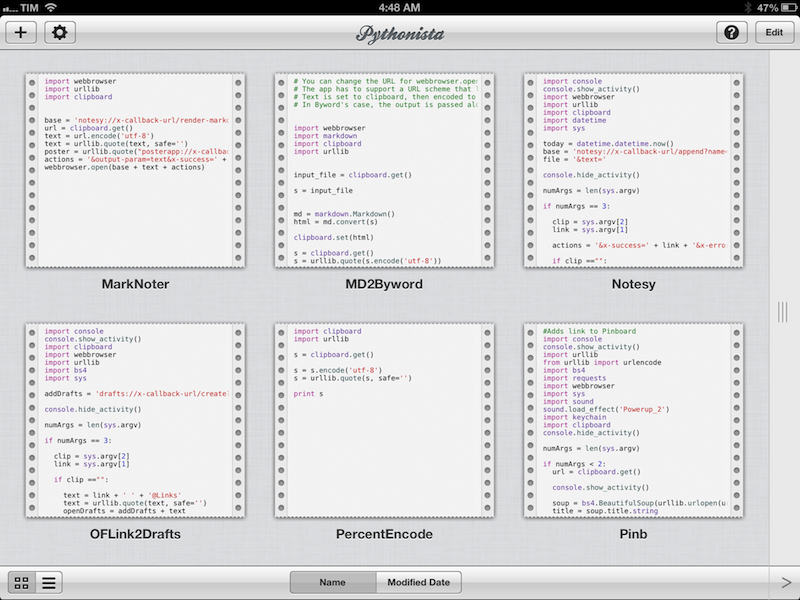
A couple of months ago, I decided to start learning Python.
I say “start” because, as a hobby to fit in between my personal schedule and work for the site, learning the language is still very much a work in progress. I hope I’ll get to an acceptable level of knowledge someday. Coming from AppleScript, another language I started researching and playing with earlier this year, the great thing about Python is that it’s surprisingly easy to pick up and understand. As someone whose job primarily consists of writing, I set out to find how Python could improve my workflow based on text and Markdown; I found out – and I’m still finding out – that Python allows for more flexible and intelligent string manipulation[1] and that some very smart folks have created excellent formatting tools for Markdown writers.
But this article isn’t strictly about Python. Soon after I took my decision to (slowly) learn my way around it, I asked my friend Gabe Weatherhead about possible options to write and execute Python scripts on iOS. Thanks to Gabe’s recommendation I installed Pythonista, and this app has completely changed my iOS workflow. Read more
Kickstarter: Shaun Inman’s Retro Game Crunch - Six Games in Six Months

I haven’t covered many Kickstarter projects as of late: it seems many are getting funded but not delivering on time or backers are still waiting for the product to ship. Today, Shaun Inman has launched his own Kickstarter project along with his friends Rusty Moyher, of Bloop fame, and Matt Grimm, a great composer and sound designer of such games as Flip’s Escape. Together they are launching Retro Game Crunch, a Kickstarter series that will try to produce six original games in six months. Sound too good to be true? Normally yes, but with the awesome team I believe it will happen. Read more
#MacStoriesDeals - Monday

Here are today’s @MacStoriesDeals on hardware, iOS, and Mac apps that are on sale for a limited time, so get them before they end!
Read more
Apple Airs New iPad mini Commercials→
Apple Airs New iPad mini Commercials

Following the “Piano” ad launched after the announcement of the iPad mini, today Apple aired two new commercials for the device. Named “Books” and “Photos”, both commercials focus on showing the size difference between the regular iPad and the iPad mini. More importantly, both ads want to communicate the simple message that the iPad mini is smaller in size, but also just as capable in terms of functionality: the iPad mini runs the same apps of the bigger iPad, therefore making it a “real” iPad, only smaller (and thus more portable). This follows the tagline on the product page: There’s less of it, but no less to it.
As noted by Jordan Golson at MacRumors, the commercials rely on clever pairings of books and photos to compare the two iPad models. For books, Apple uses The Sun Also Rises and The Valley of the Moon; East of Eden and How the West Was Won; Moby Dick and Gone Fishing.
The new commercials aren’t available on Apple’s YouTube channel yet, but they have been uploaded to Apple’s website. You can watch them here.
#MacStoriesDeals - Friday

Here are today’s @MacStoriesDeals on hardware, iOS, and Mac apps that are on sale for a limited time, so get them before they end!
Read more
StatNut for iPhone
I’ll admit it: I am crazy about the details. I enjoy numbers, statistics, and as much info about my interests as humanly possible. Sometimes I wonder if my brain will collapse with all the data I try to absorb. I’m one of those people who reads the manual every time I get a new gadget because I want to know the ins and outs of how everything works.
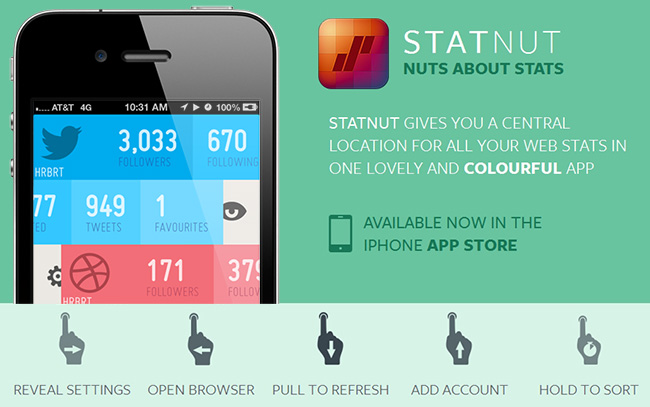
Most of us enjoy seeing stats for our social networks; we like to know how many followers, clicks, etc. we have across the Internet. There are a few iOS apps out there that do so, like Ego or Birdbrain, but I’m always curious to try something new. StatNut is a new iPhone app from Shiny Frog and FFFABS that lets you add accounts from many social services and displays them in one easy to read mobile interface. Services include Instagram, Twitter, Dribbble, Facebook, Tumblr, Vimeo and YouTube.
Setup is easy: just enter your usernames and you’re ready to go. Once you enter your accounts you can access the settings for each by swiping to the right to reveal an animated gear icon; from there you can change your username or delete the account. Swiping to the left reveals more details like follows, lists, tweet counts, likes, shots, and favorites. A full swipe to the left reveals an animated opening eye, and this will take you to the mobile site of each service except Instagram; StatNut will open the Instagram app if you have it installed.
If you want to reorder the services, simply tap and hold to move them up and down. Some services will let you enter more than one username if you have multiple accounts, like Twitter or Dribbble. We have included a promo video below so you can see it in action. Read more
Apple Tweaks Design Of App Store Category Pages
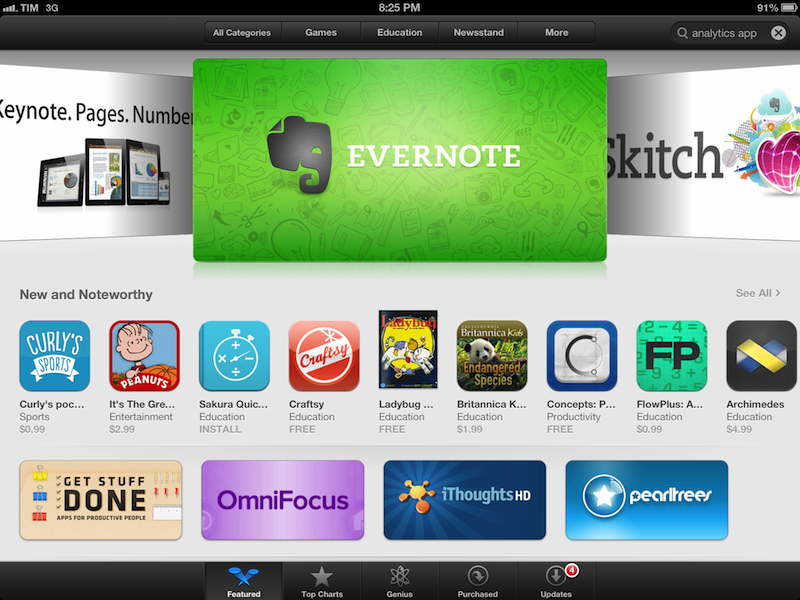
In its weekly App Store refresh, it appears Apple has today tweaked the design of App Store categories to include the same design of the App Store’s home page. By heading to a category like Productivity or Utilities, both from an iOS device or Mac, you can see how Apple is featuring more apps with large banners across the top of a category page, smaller banners in the middle, and the usual “New and Noteworthy” and “Essential” collections that are updated on a weekly basis. Read more
Apple Confirms iTunes Connect Holiday Shutdown December 21-28

In an email sent to developers earlier today, Apple has confirmed that iTunes Connect — the developer portal to manage applications to sell in the App Store — will be closed from December 21 to December 28. During the shutdown, access to iTunes Connect and delivery of any apps or updates will not be available.
iTunes Connect will be temporarily shut down from Friday, December 21, 2012 to Friday, December 28, 2012, for the winter holidays.
[…]
Additionally, the following will be delayed:
Releases scheduled to appear on the App Store for the first time
Pricing changes scheduled through the interval pricing system in iTunes Connect
For the shutdown period, Apple suggest developers to not schedule price changes that would take effect between Friday, December 21 and Friday, December 28. According to Apple, price changes scheduled for the shutdown week will not take effect, and “In-App Purchase will become unavailable for purchase until after the shutdown”.
Last year, Apple shut down iTunes Connect for developer from December 22 to December 29.