This Week's Sponsor:

LookAway

It helps you take regular breaks from your Mac to rest your eyes, without breaking your flow.


Should the App Store Let You Demo Apps?

“My question is: why won’t Apple allow me to try an app before I buy it? The availability countdown works great for content rented from the store like movies. I can play all I want for 24 hours, and then it’s deactivated. That would be ideal for apps too. I download it, see how it works, and after some time the app prompts me to purchase when launched. The prompt has a link to the app’s page in the store and I can make my decision. This is often how it’s done on the desktop. Why not the iPhone?”

Link

It’s not up to Apple to provide a demo version of each application. Every developer should release lite versions of their apps to let the users test them before purchasing the full version.

But with the recent in-app purchasing system, things could become a lot more interesting: what if every app is free for - say - 3 days then the user must buy it in order to continue using it? This method would have the huge pro of deleting all those Lite / Free apps that clutter the App Store and most important, would allow us to test and then decide to purchase. Much like David Klein writes in his post, a “limited-time demo”.
Shorten URLs with Shrinker

I recently wrote an article about how you can create a Lessn, Bit.ly, Is.gd, Tinyurl desktop shortener with Applescript, but if you don’t use lessn from Shaun Inman (which is the most important reason to use that script) or you just don’t want to mess with Applescript language, Shrinker is for you.

Read more


Hey, Developers! How Can We Improve the Installation of Mac Apps?

There an interesting debate which is going on since many years about how Mac apps should be distributed an installed. Back in September John Gruber wrote this interesting piece, outlining the pros and cons of three popular formats of delivering Mac apps: .zip, .dmg and installer. He was inspired by this post where Alexander Limi (founder of Plone, working at Mozilla now) discussed the problems of the installation process of Firefox on the Mac platform.

In this post I’ll discuss all the possible scenarios, referring to other articles found on the web to give you my idea of how Mac applications should be distributed.

Read more


That’s Why Cydia Store Is Great: Multifl0w and Overboard

Though the App Store was a revolution for Apple, and besides the fact that everybody uses the App Store, there are many apps which Apple will never approve. You know, SDK. Backgrounder, BiteSMS, Twidget,Winterboard: the best hacks for your iPhone can only be installed with Cydia, the amazing “alternative App Store” from Saurik. Obviously, you’ll have to jailbreak to install and use Cydia.

But anyway, if you already have a jailbroken phone, you should know that Saurik launched a few months ago the Cydia Store, a real store within Cydia where you can purchase paid apps. Today, I’d like to talk about two new apps from the Cydia Store, Overboard and Multifl0w.

Read more


MultiFirefox: Run Multiple Versions of Firefox Side-by-Side

Link

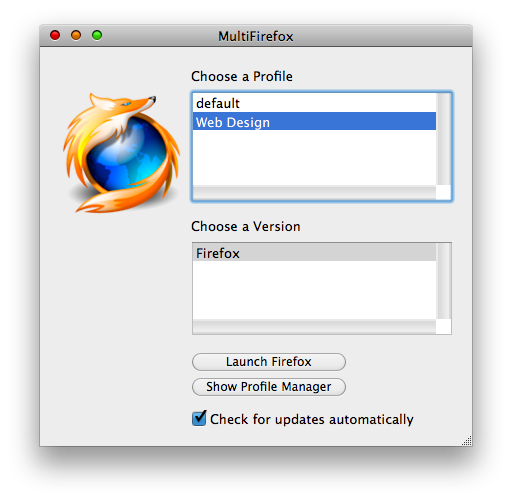
This is awesome guys. If you ever wanted to run multiple instances of Firefox on your Mac, this is for you. Thanks to this lightweight utility you can easily create and run as many profiles / versions of Firefox you’d like. This means, each profile or version can have different addons, different settings.

Great!