This Week's Sponsor:

Turbulence Forecast

Know before you go. Get detailed turbulence forecasts for your exact route, now available 5 days in advance.


Posts tagged with "app store"

Hatch Brings Virtual Pets to the iPhone

Suzanne LaBarre for Co.Design on Hatch, the latest app from Impending dream team Phill Ryu, David Lanham, and friends.

The average app is a money making proposition first, and artistic statement or utility second. That’s why the App Store is loaded with clunky Angry Birds clones and pandering zombie shooters. But Hatch, a tamagotchi app by the two-man, part-time team at Impending, is a rarely polished labor of love.

It’s worth $2 alone to see David’s creatures come to life. Download it from the App Store.

Permalink

The Apple Store App, Now on iPad

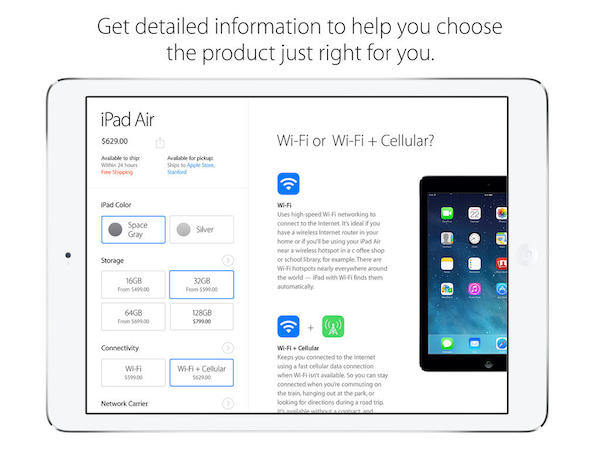
Apple has launched a brand new version of their Apple Store app for the iPad, bringing their online digital storefront to iOS 7. Just like the iPhone app, you can browse through all of the Apple Store’s available listings for backpacks, accessories, and Apple products; customize products like iPod touches and iPads with engraving and add gift wrapping at checkout; and explore products using gestures to zoom and browse. Unlike the iPhone app, however, Mashable writes that the app brings some new functionality to the big screen.

Many features baked into the iPad app don’t appear on the existing iPhone app version, like highlighting products trending on the site based not only purchases, but also reviews. It also draws attention to a slew of products, not just iPads and iPhones, like the Anki Drive racing game, headphones and a connected basketball. The app is also rich with filtering capabilities, including colors and price.

The Apple Store for iPad app is separate from the iPhone version, likely due to new features and to accommodate iPads that don’t have cellular capabilities. Download the app for free from the App Store.

[via Mashable]


Find My Friends Updated for iOS 7

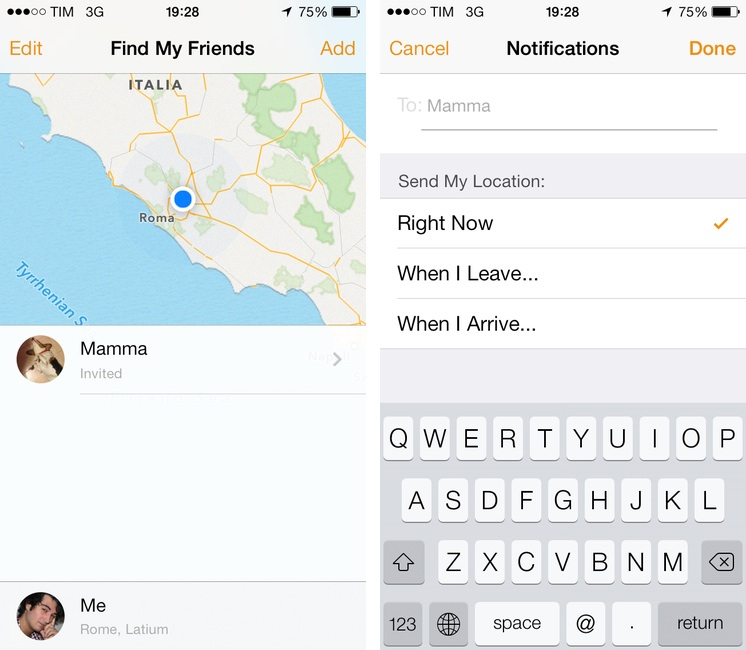
There’s not much to say about Find My Friends for iOS 7. I don’t know why the previous version of the app used leather detailing in such excess (see our original article), but it’s done away with now, leaving behind just the bare essentials. It’s a convenient app to use with friends and family when meeting up or bouncing around town before reconvening, and it’s free on the App Store.


Google Play Music Now Available on the App Store

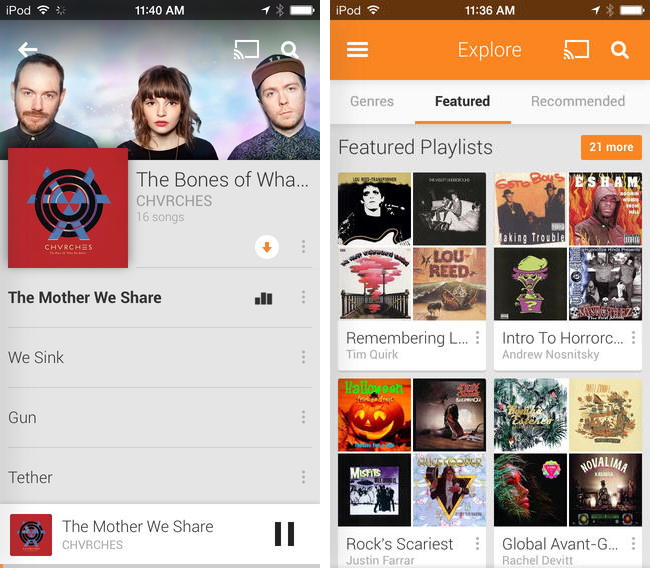
Joining the wealth of music streaming services such as Rdio and Spotify, Google Play Music is now available to download on the App Store. Formally announced in March, Google Play Music All Access originally let subscribers stream a collection of two million songs from the web and to Android devices for $9.99 a month. Similar to iTunes Match, Google also lets users match up to 20,000 songs from local music libraries for free, but like Spotify lets users listen to local music alongside streaming content.

Google Play Music for iOS brings all of All Access’ features to the iPhone, including unlimited streaming, ad-free custom radio stations with unlimited skips based on songs or artists, recommendations, and curated playlists. For streaming to speakers, the iOS app will stream over AirPlay and Chromecast.

Download Google Play Music from the App Store for free. A $9.99 monthly subscription is required to enjoy the service, but you can stream the first month for free.

[via 9to5Mac, The Verge]


Thoughts on Nike+ Move for the iPhone

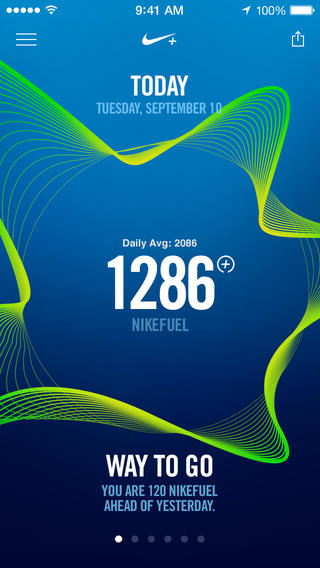
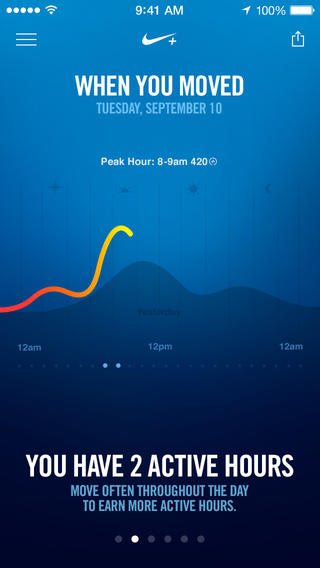
The waveform as shown in motion. It’s mesmerizing.

While not their own, it seems strange that an app Apple showcased on stage in September wouldn’t be available until early November, especially since it’s a major bullet point for one of the iPhone 5s’ key features. Designed exclusively[1] for use with the M7 coprocessor, Nike+ Move is one of the iPhone 5s’ most anticipated apps, expected to set the bar for fitness apps and demonstrate how useful Apple’s new motion technology actually is.

While Nike has stated the app provides an introductory experience into the Nike+ ecosystem, I’m not sure if I’m left wanting more. The app is pretty good, despite being an obvious gateway to other Nike products such as the FuelBand[2].

There’s two things I’ve learned about NikeFuel, the universal system used to measure your activity throughout the day: it’s a much better way to measure activity than step count, and it’s much more adaptable to a wider variety of exercises. NikeFuel doesn’t discriminate against how you move, so long as you get off your butt and get active.

Ultimately, the Nike+ Move app on the iPhone 5s, provided you have one, makes me question wether you need a separate wearable device. My opinion boils down to the M7 coprocessor and how it’s able to determine what you’re doing at any given time.

The problem with wearable fitness devices is that they’re geared towards urbanites, with companies suggesting potential buyers to get fit by stepping out of the office and taking a stroll around the block. They record steps counted, calories burned, and distance climbed, but that’s a rather narrow view into the world of activity and personal fitness[3]. And they’re step counters tied to your wrist, which don’t yet have robust algorithms to differentiate between walking and other activity to be considered reliable pedometers.

Apple’s M7 coprocessor is baked into a device you already have with you. It knows when you’re driving, and it knows when you’re walking vs. running[4]. Being in a phone, it’s also not locked to your body, and it doesn’t (hopefully) end up in the wash. Combined with NikeFuel, you end up with a surprisingly honest fitness device.

Adding to that potency is Game Center support. I don’t have to sign into a separate social network, join a new community, or find my friends. They automatically show up in the Nike+ Move app, and suddenly the idea of gaming my fitness vs. my friends actually works. Not only do I want to get active, I’m motivated to stay active.

Nike+ Move adds a ton of value to the iPhone 5s. It’s free, and for most people, it obviates the need to purchase a separate fitness device[5].

There’s six sections in the Nike+ Move app that break down your activity into various charts and info graphs. At its worst, Nike+ Move is a marketing tool disguised as a fitness app. At its most, it’s the iPhone’s best fitness app solely because the concept is simple: beat your score.

Apple keeps a log of your movement data on the iPhone so that other apps can tap into it at a moment’s notice. This means that you’ll effectively have a good baseline of fitness data to start with when you open a fitness app on the iPhone, and Nike+ Move is certainly no different, which averages the prior week’s total from the get-go.

The app encourages you to get moving, not only to match the prior day’s score, but to go above and beyond. It’ll tell you when you’re behind your average, remind you to “win the hour” by staying continually active for a 5 minute workout, and pit your score against people nearby in addition to Game Center friends to up the ante.

Nike+ Move provides a very similar experience to the Nike+ FuelBand App, lacking only a few features such as move reminders, session recordings (useful for tracking specific workout activity), and sharing successes with the Nike+ community. I’m impressed that the Nike+ Move app offers so much.

The downside is that the app is borderline an advertisement for other Nike+ products. Nike really wants to get people who download in the app to further invest themselves in their community and products, but I really need a solid reason to own a FuelBand considering this app has all the key features in place. I feel a bigger opportunity would be having a shop link in the app menu for directing people to Nike’s store for shoes and apparel[6] so people can gear up in ways that are more beneficial. With the phone having access to location data, there’s a lot you can do there with local and seasonal apparel suggestions.

Fortunately the ads are tucked into menus or hidden in stat info that you don’t have to tap on. In fact, the app is pretty good about just relaying your activity info. There’s no pressure to buy, and I’m sort of interested to see if Nike begins to add advanced features via in-app purchases for people like me who don’t see a need for the hardware component.

The app does require you to sign in via a Nike+ or Facebook login, and I chose the former rather than the latter. The login process feels like an unnecessary step for an otherwise good app, but on the bright side all of your activity data can then be taken to another device if you upgrade to a FuelBand or switch phones down the road.

Once you log in, Nike+ Move requires you to get moving before you can poke around and view your baseline data. A set of jumping jacks with the phone in hand will do the trick.

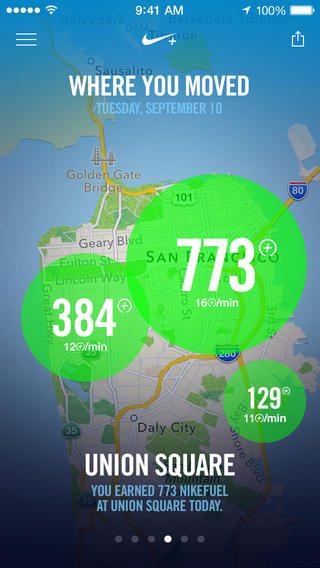
I don’t know if I need to go through all of the charts and graphs the app offers since they’re all self explanatory. There’s a few different ways Nike+ Move relays your activity, including a central NikeFuel counter, a daily line graph, and a weekly bar graph, but the one that people might raise questions is the location graph.

Nike+ Move asks to keep tabs on your location throughout the day, effectively keeping the location indicator in your status bar on all the time. While the app keeps tabs of your location in the background, I haven’t noticed any real noticeable battery drain (and I’m already running apps like Automatic in the background in addition to other apps that take advantage of geofencing).

These circles get bigger depending on how much you got active, not necessarily outlining the entirety of where you got active.

You can opt out of Nike+ Move’s location features, but they’re perhaps Nike+ Move’s coolest. Basically, the location graph puts big activity bubbles over (very general) areas that you’ve got active in. If you choose to compete with people nearby, you’ll likely end up competing regionally rather than hyper locally. It’s less like a FourSquare check-in and more like a neighborhood scoreboard. Just keep in mind your Game Center name and photo will be public.

I’ve talked a lot about an app that’s free, so at this point you should just download it if you haven’t already. I’m surprised that the app isn’t featured in this week’s Featured top banners on the App Store, but at least it’s found a spot in the enhanced collection.

Nike’s polish on Nike+ Move is remarkable, especially for the price of free. Lots of graphs and activity info is in motion, and Nike’s color palette is bright and captivating. Complaints about the app boil down to login issues, and I have to admit I’ve been logged out of the app at least once (but with no loss in recorded data).

The bigger story here is that the iPhone 5s is now officially a serious fitness device to be contended with. I’ve said before that the M7 in the iPhone 5s is Apple’s testbed for a potential wearable, but now I’m asking if they even need one.

Nike+ Move doesn’t break down nuanced data, calories burned, or supplement data with lifestyle information with nutritional plans. What it does do is encourage people to be just a little bit more active each day, and I think that’s absolutely enough for most people. Athletes who want more can have more, and that’s where the FuelBand, GPS running watches, and other fitness devices like heart rate monitors become compelling. For the rest of us? I’d say we’re set.

Download Nike+ Move from the App Store.


  1. While the App Store’s compatibility information states the app is ready for iPod touches and iPads running iOS 7 as well, Nike’s app description states: “iPhone 5S is required to get motivated with Nike+ Move.” ↩︎
  2. Can we talk about something Nike? On the product page it’s spelled Fuelband. On the press release and store page it’s spelled FuelBand. Standardize the CamelCase yo. ↩︎
  3. Personally, I find fitness programs like Wii Fit and Nike+ Kinect Training much more interesting than wearable technologies. Wearable devices don’t account for where people are, how people are moving, or reliably count steps. For suburbanites, wearables (aka pedometers) are a hard sell because the time to conveniently get active is going to be at a shopping center or around the neighborhood before or after work (large chunks of time are spent commuting). I don’t know about you, but it’s also not so easy to get outside in the cold of Winter. ↩︎
  4. I had to stop using the Jawbone UP because I got frustrated with the fact that it counted steps when I was driving. Plus the band ultimately gets in the way when you want to type at a keyboard, and while its sleeping data was useful, the textured band snags too much on bedding to be comfortable. If you sleep on your side on a box spring mattress, the UP’s morning alarm will loudly vibrate the bed, potentially waking your significant other. ↩︎
  5. I talked about this a little bit when I was invited onto The Menu Bar, but to me, the M7 coprocessor is the iPhone 5s’ most interesting feature. Yes: more so than Touch ID. ↩︎
  6. One of the views reveals how you moved, breaking down running, walking, and other movement statistics. Depending on what stat you tap on, you’ll get a pop-up telling you which product would better track that stat. ↩︎

Banca: A Simple Currency Converter Reimagined for iOS 7


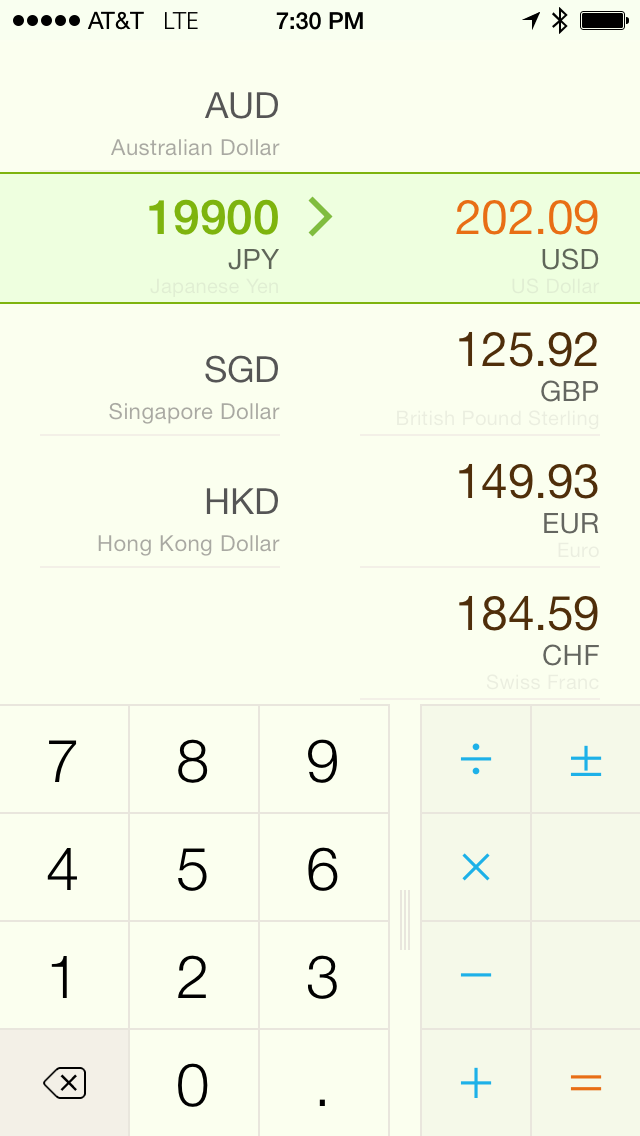
You need no introduction to Banca, a beautiful converter that lets you quickly get the exchange rate between any currency currently in use. Redesigned from the ground up, Banca repurposes the best parts from apps like Convert and marries them with the functionality of a basic calculator for quick conversions. Fluid animations, a stowaway units pad, and thoughtful touches such as the option to flip conversions with a tap of the arrow reveals an app made with care. The app refreshes the world’s exchange rates automatically, providing up to date information in a simple, customizable interface. A free update on the App Store for previous customers, Banca can currently be downloaded for $1.99.


Apple Advertising System Apps and Features in App Store Search Results

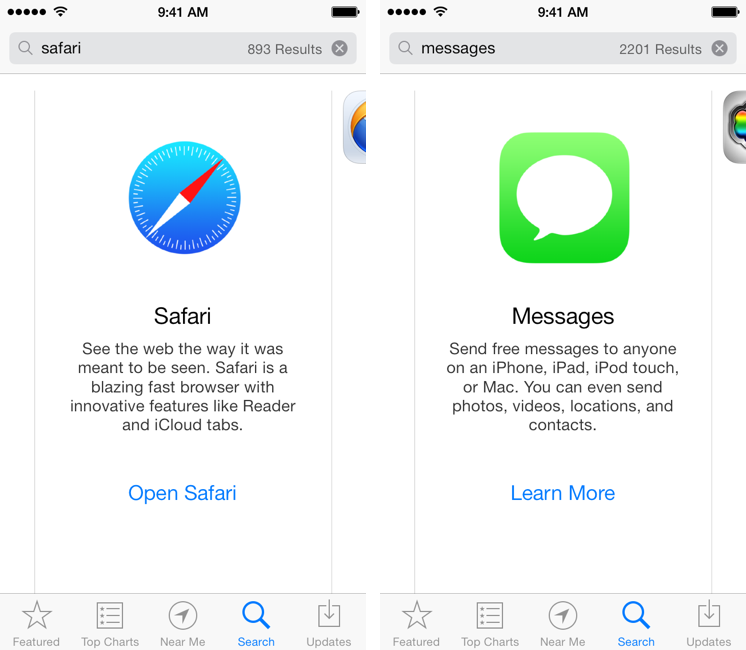
This morning, I noticed a tweet by Lukas Burgstaller with a screenshot of Apple’s Safari browser showing up in App Store search results for the “browser” search query. I did some tests, and I’ve discovered other search results advertising built-in iOS system apps and features with banners and links to open an app or read more information about it. I’m not sure when Apple started displaying their own built-in apps in the App Store search results, but it’s an interesting (and, I believe, good) idea worth discussing.

If you search for common terms like “web”, “SMS”, or “movies” in the iOS 7 App Store you’ll see special search results for Apple apps like Safari, Messages, and iTunes with a large icon, a description, and a link to learn more or open an app (such as Safari). These results appear on the App Store for iOS 7 devices (I wasn’t able to display them on a Mac using iTunes) and, in my tests, they also worked for queries like “browser”, “messages”, “cloud”, “internet”, “Siri”, and “text”. I’ve tried several other queries, but I couldn’t see results for other apps like Reminders, Calendars, Mail, Photos, Music, or Notes. Read more


Fantastical 2 Review

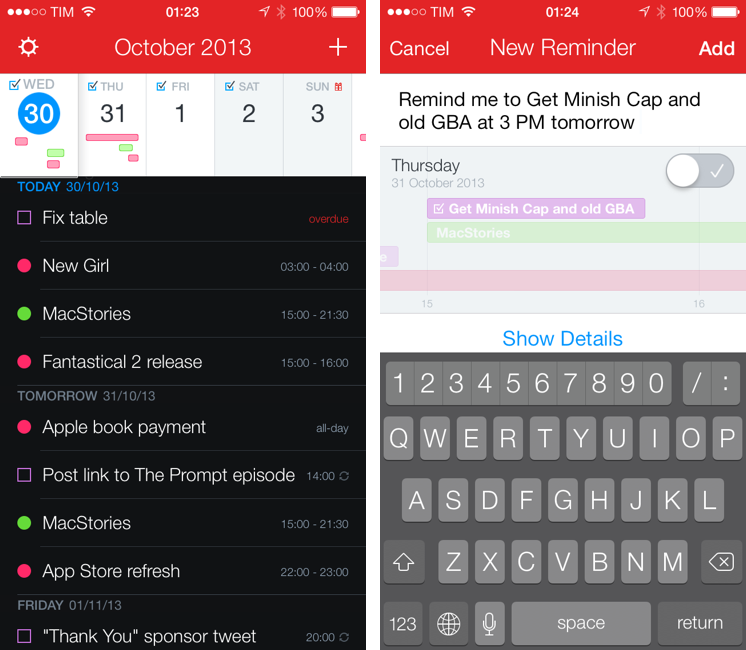
Fantastical 2 for iPhone

Fantastical 2 for iPhone

Last month, I was discussing my schedule for this Fall’s check-ups with my oncologist. During our conversation, she asked me if I had a list of all the appointments and todos that I had saved for the next weeks because she couldn’t find the department’s calendar and she doesn’t save patients’ information in her personal one.

I know that my doctor has an iPhone, and I know that she uses Apple’s Calendar and Reminders apps to manage her own schedule, so I showed her the beta of Fantastical 2 that I had on my iPhone.[1] “You can search for events and reminders that match a keyword or location and get a single list showing all results”. She was intrigued. “For my appointments here, I save them with the hospital’s name, so I can just look for that if I want to see them all at once”. At that point, I’m pretty sure she was sold on the app. “But you can’t buy it yet”, I added with a subtle smirk.

Fantastical 2 for iPhone, released today on the App Store and on sale at $2.99 for a limited time, is one of the best iOS 7 apps I’ve tried so far and the best calendar and reminder client for iPhone, period. It improves upon several aspects of the original app and it introduces powerful new features while sporting a complete redesign that makes the app feel at home on iOS 7 without compromising its identity.

Fantastical 2 is, for my workflow, better than Apple’s built-in apps, and it builds upon the solid foundation of the original Fantastical to offer new functionalities and more flexibility. Read more


Tweetbot 3 Review: Human After All

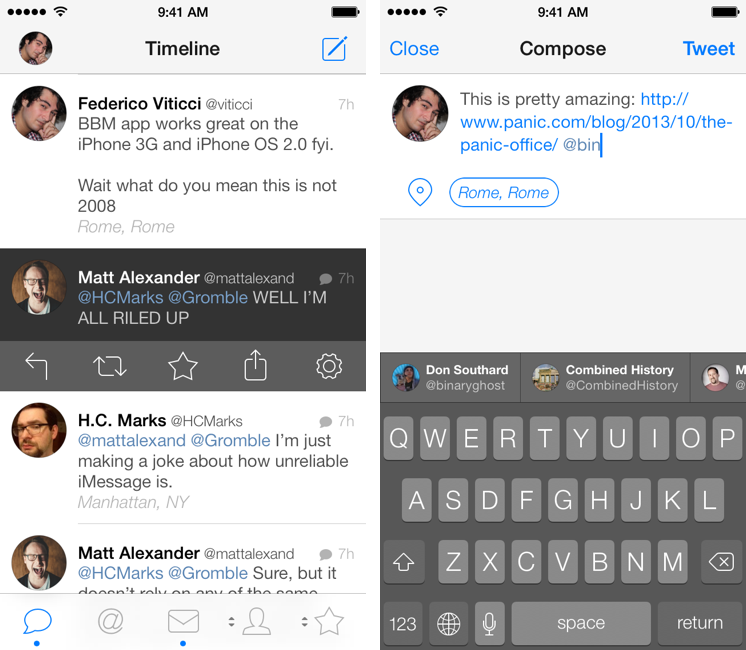
Tweetbot 3 for iPhone

Tweetbot 3 for iPhone

Tweetbot is, by far, the iPhone app that I use the most on a daily basis. It’s not just that I keep Twitter open essentially all day to check for news, talk to friends, or post GIFs: since I got the first beta of the original Tweetbot three years ago, the app has become so ingrained in my workflow that I wouldn’t be able to switch back to any other client that doesn’t have the same capabilities. What started as a moderately advanced take on Twitter clients by Tapbots has evolved with time into a powerful app that spans three platforms and that comes with dozens of unique features and a solid engine that, for me, has no equal. I don’t say it lightly: because of Tweetbot’s feature set, I have been able to reliably communicate with other people (via DM or Mentions), reference tweets for articles, or build complex workflows that have allowed me to be more efficient, faster, and generally happier with Twitter.

That’s why I take major changes to Tweetbot’s overall structure and design, such as Tweetbot 3 for iOS 7, very seriously. Tweetbot 3, released today as a new app sold at $2.99 on the App Store (launch sale), is many things at once: it’s Tapbots’ first foray into the iOS 7 design aesthetic, which marks a radical departure from the small studio’s former visual style; it’s a profound reimagination of Tweetbot’s looks, animations, and sounds, which had gone largely unchanged since 2011; and it’s a confirmation of Tweetbot’s existing feature set with changes aimed at further enhancing the app’s functionality and making room for future additions. It’s iPhone-only, with a new version for iPad coming next.

I have been using Tweetbot 3 every day on my iPhone 5 for the past couple of months. I think that I have a good understanding of the decisions behind the app’s redesign, feature changes, and complete embrace of iOS 7’s visual and hierarchical approach to building interfaces. With version 3.0, Tweetbot, the robotic toy for your Twitter stream, eschews its mechanical roots and graduates to a modern, fluid, and fun assistant that, in the process, is still Tweetbot. I wouldn’t be able to go back to the old Tweetbot now, but I also think that getting used to the new app will take some time. Read more