This Week's Sponsor:

Turbulence Forecast

Know before you go. Get detailed turbulence forecasts for your exact route, now available 5 days in advance.


Posts tagged with "app store"

Blur 2.0

The new version of Blur, an app to create blurred wallpapers for iOS 7 that I mentioned a while ago, includes a new feature to generate a random wallpaper by tapping a button. What’s nice is that Blur loads random photos from Flickr, displaying a link to the original photo at the bottom of the screen. It’s a cool idea and it can generate interesting wallpapers that you wouldn’t be able to create off your own photos.

Blur is $0.99 on the App Store.

Permalink


The Converted: A Different Take On Unit Conversions

Unit converters are perfect as iOS apps: their feature set is limited, they can work with and without an Internet connection, and, because of their constraints and purpose-oriented nature, they allow developers to experiment with touch and UI interactions. They’re less celebrated than Twitter clients and weather apps, but they’re UI playgrounds too.

As such, I’m having a hard time settling with a specific unit converter because every week new interesting ones come out and I’m lucky enough to get to try them because trying apps is part of my job. I suppose that if converting units was a recurring task of my daily life I would be forced to pick one and stick with it, but, instead, I’m free to experiment and let my readers judge.

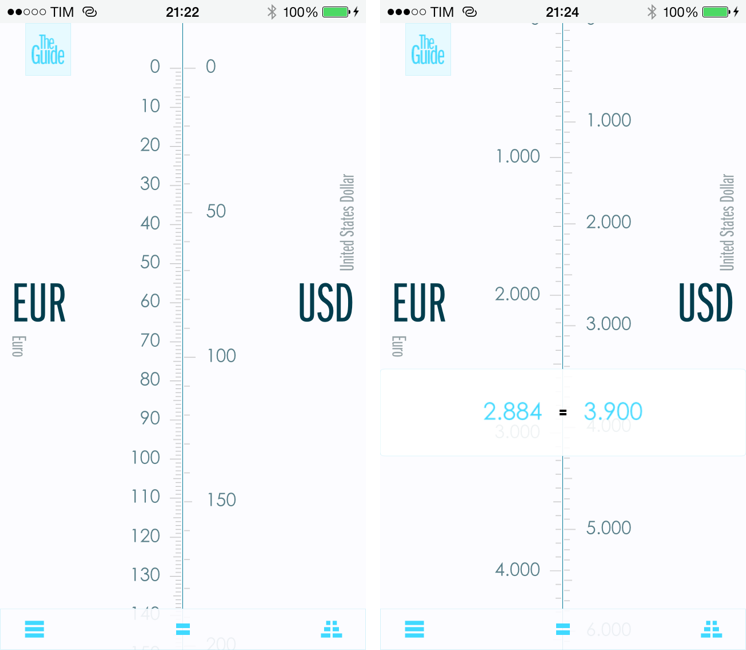
In the past year, I’ve taken a look at various unit and currency converters like Denominations, Convertible, Measures, and, recently, Amount. Each one of them solves a problem in a different way, either with a particular interface design or through advanced features. The Converted, developed by Ideon, is a $2.99 app that eschews manual input through a keypad to show you the relation betwen units in a unique presentation that I haven’t found in other iOS apps. Read more


Alien Blue Updates for iOS 7

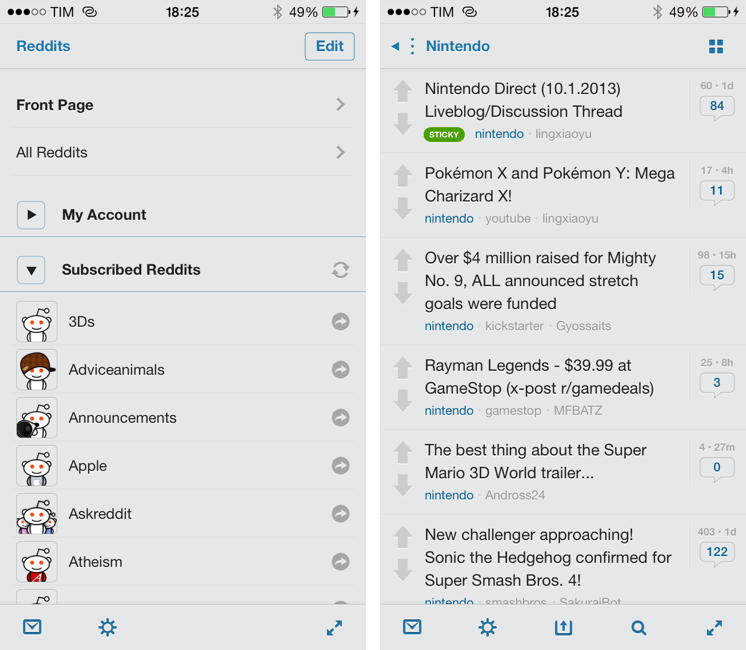
Alien Blue, developed by Jason Morrissey, is the only Reddit client that I keep on my iPhone and iPad. The app has been constantly and thoughtfully updated throughout the years, with Jason adding support for new iOS and Reddit features while also maintaining a clear identity for his app.

For iOS 7, Alien Blue has been updated with some subtle design changes and improvements, but, overall, the app’s interface was already minimal enough to fit with iOS 7’s general aesthetic (unless set to the Forstallian wooden theme). Alien Blue doesn’t integrate with iOS 7’s Dynamic Type setting, so you’ll still have to adjust font size in the app’s Settings under Appearance.

In terms of features, the iPad app received some minor additions like a new gesture to toggle the iOS status bar, whereas the iPhone version, which is free with a $1.99 In-App Purchase, has been improved in several areas. Notably, there are now inbox notifications on iOS 7, GIFs and videos are supported in the Canvas view, and the Optimal browser view has been enhanced to work with more sites, large GIFs, and to completely declutter YouTube videos. Some previously Pro-only features like comment link previews and Retina thumbnails have been ported to the free version, and, overall, the Canvas view has become a fantastic replacement for the standard list view.

Alien Blue has been on my Home screen for years and it keeps getting better. There are some aspects that I’d still like to see improved (the sharing menu, for instance, it a bit archaic) and I don’t like the alternative themes, but Alien Blue remains my favorite Reddit client. The iPhone app is free with an In-App Purchase, and the iPad version is $3.99 on the App Store.


Joe Cieplinski On App Pricing and App Store Customers

A different and refreshing take on the recent discussions on app pricing and In-App Purchases by Joe Cieplinski:

If we were to convert Teleprompt+ to the free with in-app purchase model, for instance, the three of us at Bombing Brain would be out of business in a couple of weeks.

Our customers are primarily prosumers and pros—people who wouldn’t trust their business to a “free” app. Our high price is a large part of what has made us successful in this market. (Along with years of cultivating a reputation for being better than our competition.) Converting this particular app to free with in-app purchase now would likely be an unmitigated disaster. We know, because there have been free alternatives that have crashed and burned. Hard.

While In-App Purchases may work for some apps, I agree that developers shouldn’t follow other developers’ advice blindly without carefully considering their userbase and customers. The Omni Group, for instance, charges a “premium” for apps that they know their customers will be happily paying for because they trust the company.

Joe continues:

Users looking to pay a premium price may be few and far between, but each one is ten times more valuable than the “average” iOS user to a developer like me.

Again, it depends on whether you’re after market share or a subset of App Store customers who can sustain your business by paying for higher-priced apps. It’s a great perspective, so read Joe’s post here.

Permalink

Outliner Update for iOS 7

CarbonFin Outliner isn’t the most frequently updated app on the App Store, but I still think it offers a superior outlining experience than any other outliner for the iPhone. On the iPad, I’m torn between Outliner and The Omni Group’s update to OmniOutliner (custom keyboard shortcuts? That’s business), but Outliner is capable of syncing with Dropbox and directly to an iPhone version, which makes it preferable to OmniOutliner and OmniPresence in some aspects.

Outliner was recently updated with iOS 7 support, which means interface changes that make the app’s chrome more subdued in favor of content. This is an overly used expression these days (by me as well), but it’s true, and, in Outliner’s case, I think it benefits the app. Outlines stand out and buttons are easily recognizable; the app retains the menus it always had to allow you to indent or outdent lines with ease.

The app didn’t get iOS 7 features, but, according to the developer, background sync is on the roadmap. Outliner is a good outlining tool, albeit rarely updated with major additions. On the iPhone, I don’t think other similar apps come close to Outliner’s simplicity and elegance yet. I’d recommend getting the Universal version for $4.99 while hoping for updates in the near future.

Permalink

David Smith’s Pedometer++ Demos the iPhone 5s’ M7

It hasn’t been said (or if it has been it’s been buried underneath a litany of other geeky details), but the M7 coprocessor in the iPhone 5s records your movement data whether you’re using apps or not. Without apps, the M7 keeps a basic log of data, determining whether your phone is in motion and how to decide if it’s an appropriate time to ping for network data. With apps such as Pedometer++, free on the App Store, it’ll pull off current data and a small history of what the M7 has already recorded. The best part about this is when you go to switch apps or use a different one, there will already be a solid baseline of data for apps to draw upon.

Permalink

TaskAgent 3 for iOS 7

Before OmniFocus and Reminders, TaskAgent was my todo management system of choice for a long time. TaskAgent lets you manage todos in lists that are synced to Dropbox as plain text files that you can edit on the desktop using any app you want. They look like todos in TaskAgent, but they’re actually lines of plain text that, if you want, you can interact with in various ways (perhaps with IFTTT or other automated workflows).

Developer Francisco Cantu released version 3 of TaskAgent alongside the launch of iOS 7 as a new free app with a $1.99 In-App Purchase. The app is limited to three lists, and you can unlock unlimited lists, URL scheme actions, Archive, and folder management if you want more. The app has been rewritten and redesigned for iOS 7, and Cantu is working on compatibility fixes for the Mac counterpart.

I use Reminders these days, so TaskAgent isn’t really for me anymore. However, if the idea of managing todos as plain text lists intrigues you, I’d recommend trying the free version of TaskAgent 3.

Permalink

Simple Photo Collages with Diptic PDQ

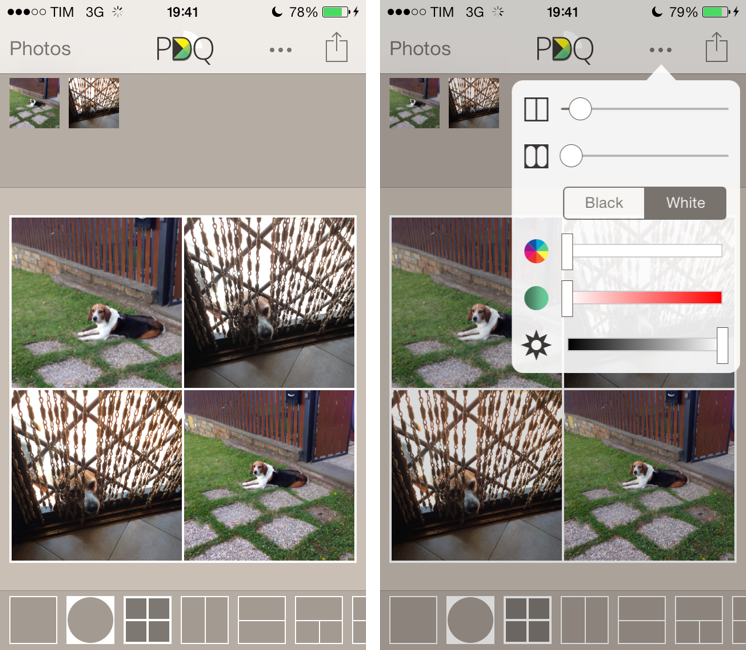
I’ve never been into the idea of sharing my photos as “collages”, especially because all the iPhone and iPad apps that promised to make it easy to assemble collages looked overly social, filter-oriented, or just badly designed. However, I recently wanted to send a photo collage of my dog to my parents, and I conveniently came across Diptic PDQ on the App Store thanks to Apple’s feature for iOS 7-ready apps. Apparently, PDQ (a Universal app) is the “lighter” version of Peak Systems’ more advanced Diptic app, which comes with all sorts of settings, textures, and In-App Purchases. I just needed to create simple collages with thin borders, so I bought PDQ and have been using it for the past week with nice results. Read more