This Week's Sponsor:

Turbulence Forecast

Know before you go. Get detailed turbulence forecasts for your exact route, now available 5 days in advance.


Posts tagged with "app store"

Discovr Apps Is Like Pandora For The App Store

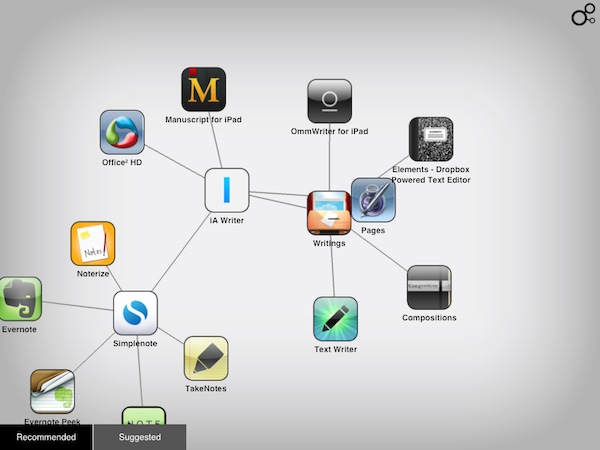
Back in January I reviewed Discovr, an interactive music map that was aimed at letting you easily and joyfully discover new artists and songs based on your tastes. By providing an original interface that turned classic hyperlinking into an interactive experience with animated maps and multitouch, Discovr still holds up as one of the most original iPad apps to explore the iTunes Store in an alternate view that, eventually, also made its way to the iPhone. But after music, the Filter Squad developers might have asked themselves what is that iOS users want to discover on a daily basis. And that is apps, obviously. Discovr Apps, a new version of Discovr available in the App Store at $0.99, runs on the iPhone and iPad and, just like its music counterpart, wants to turn the App Store categories and links into a map that changes every time according to the suggestions you’re given and the apps you’re interested in.

In the main page, you’re presented with a search box to manually start looking for an app, or two tabs at the bottom: recommended for you, and suggested apps. For those who don’t know how Discovr works: after the first element – in our case, an app – pops up on screen, a tap will generate related items connected to it, thus creating a map. As you keep tapping to view related items, the map grows and the connections expand. To view an item in detail, you just have to double-tap and you’re brought to an App Store-like page with description and screenshots. If you want a broader view of the map you’ve generated, pinch to go back.

You can share discoveries on Twitter and Facebook or via email, but the main point of the app is to sit down, check out the recommendations or start with an app you like, and see where Discovr brings you with its interactive system. And as far as recommendations go, I’m very satisfied with this app-focused version of Discovr: even more than Discovr for music, I found app suggestions to be really tailored to my tastes and needs, with gems like Twitterrific, Evernote, Simplenote and Writings often showing up in my maps.
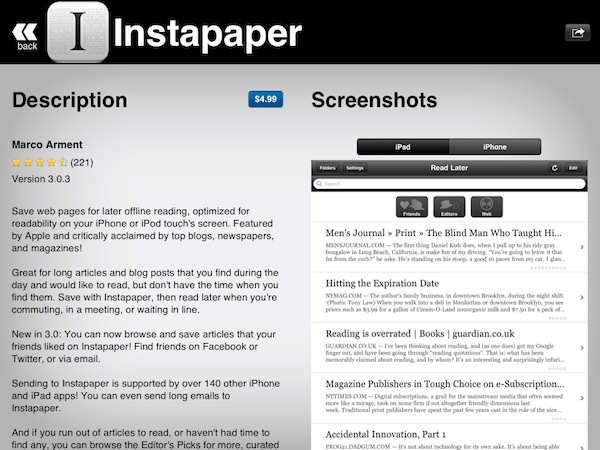
Discovr is, once again, an interesting experiment that offers an intuitive way to discover media you’d probably miss in the sea of App Store apps and updates. At $0.99 in the App Store, that’s an investment you should consider to discover more great apps in the future.

Apple Removes App That Revealed The Most Common PINs

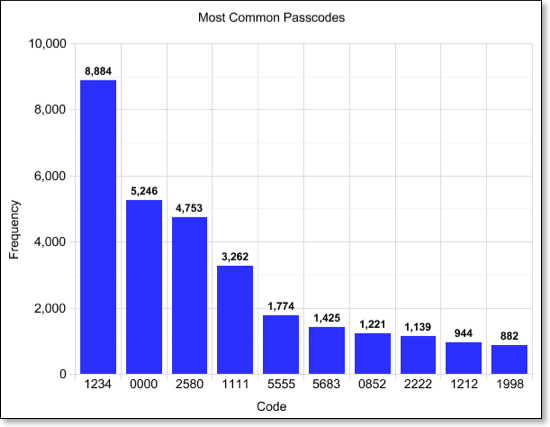
On Monday we reported on what the most common PINs were for users of the Big Brother Camera Security app after its developer had added the ability for the app to anonymously send back those PINs. Many were not happy about hearing this and Apple was clearly among those as the Big Brother Camera Security app was pulled from the App Store yesterday.

In a blog post, the developer of the app, Danial Amitay explains that the app was not obtaining the actual lockscreen PINs but rather those used for his app. He also quells fears by explaining that when the app sent the data to his server it was “literally sending only that number (e.g. “1234”) and nothing else”. Amitay had presumed (when he added the function) that it would be within the iTunes EULA for him to do so, as it states the following (emphasis added):

b. Consent to Use of Data: You agree that Application Provider may collect and use technical data and related information, including but not limited to technical information about Your device, system and application software, and peripherals, that is gathered periodically to facilitate the provision of software updates, product support and other services to You (if any) related to the Licensed Application. Application Provider may use this information, as long as it is in a form that does not personally identify You, to improve its products or to provide services or technologies to You.

Amitay says he is actively trying to work out the issue Apple had with the app and get it back into the App Store soon. If it means he has to get rid of the code that sent the PIN data, he says would “gladly” do that, understanding the concern it raised. He does say however that he had planned to warn users not choose the obvious PINs that the data had revealed in a future update.

[Via Macgasm]


Funnel is an Expressive News App Based on Google News

Looking for all the hot topics of today? Patrick Rhone of Minimal Mac points to a very cool looking iPhone app called Funnel, which reminds me of Marcos Weskamp’s Newsmap, which provides a distinct way to view upcoming topics on Google News. While I haven’t visited the “Marumushi Newsmap” (as I called it when I was but a young teen) in a long time, provided you have Flash installed or you use Google Chrome, you can check out how news aggregates in real time. If we return to Funnel, it’s practically the same thing (which is great considering you can have Newsmap on the go). The bigger the news, the more popular that particular news item is. You can download it here (currently I’m having trouble pulling it up in the App Store). Let us know what you think if it’s available in your part of town.

[via Minimal Mac]


Boxee Getting an Update on Mac, PC, and Linux This Fall

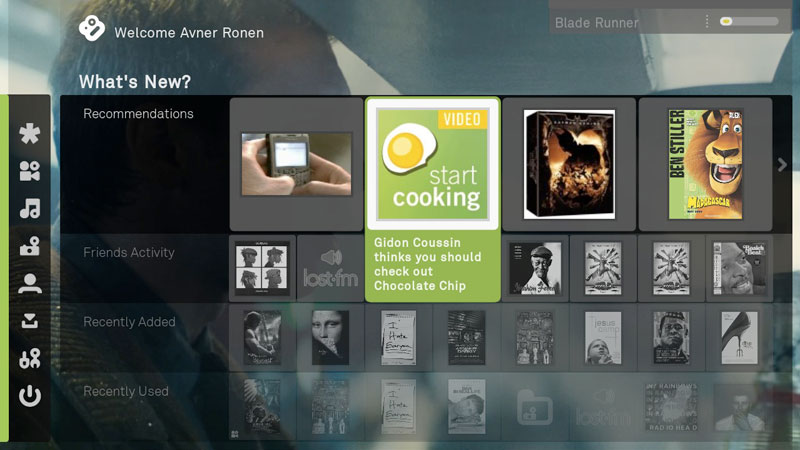
Just because Boxee’s released the Boxee Box doesn’t mean they’ve forgotten about our beloved desktop clients. Straight from the Boxee blog, Avner Ronen writes:

We are going to release an update for the downloadable version this fall, and hope to keep it more up to speed with the CE version going forward. We also hope to make the open source version of the downloadable version easier to use for people who want to build out their own versions of Boxee. That said, updates for the downloadable version will most likely lag behind the versions of Boxee for devices.

Before Boxee released the Boxee Box with D-Link, their efforts were focused on supporting their device for consumers. Now that the device is on the market (and from the sounds of things doing okay), the Boxee team wants to bring an updated version back to the desktop to remove usability issues. Lastly, the company wants to open-source their app so developers can bring Boxee to new platforms and devices. That’s pretty cool if you ask me.

Read more


Nuance Releases Dragon Remote Microphone for iOS

With Nuance technology possibly sprinkled in iOS, why not show off with a brand new app that’s free in the App Store? Dragon Remote Microphone was announced by Nuance today as a sort of “wireless microphone” for Dragon NaturallySpeaking, Windows-only speech recognition software for the desktop. The best part is that all you need is a WiFi connection to the PC - you don’t need to crawl under your desk or visit staples to buy an accessory.

In conjunction with the launch of Dragon NaturallySpeaking 11.5, Nuance introduced the Dragon Remote Mic App, a free application on the Apple iOS app store which makes it possible to use an iPhone, iPod touch, or iPad as a wireless microphone for Dragon via a Wi-Fi network connection. Many customers have requested to use their smartphones and other mobile devices with Dragon to have more flexibility with how and where they dictate with Dragon. The new Dragon Remote Mic App takes advantage of the nearly 200 million iOS devices in use today, and transforms the device into a wireless microphone that easily captures dictation and controls applications on your PC.

Leading up to WWDC 2011, the Internet was lit with rumors about Apple possibly integrating Nuance technology into iOS 5. Later leaked screenshots reveal Nuance dictation to be embedded, which may offer speech-to-text input thanks to a microphone button on your keyboard (not dissimilar from Android). Remember when Apple acquired Siri? Much of Siri’s technology was based on Nuance - TechCrunch speculated that Apple may already be running Nuance’s translation software in the Apple data center. That deal was rumored to be dismissed, however, as a partnership would reduce costs, yet it’s unknown whether a partnership could reveal itself by the time iOS 5 is released in the fall. As Nuance continues to release apps on iOS, including the previously released Dragon Dictation for iPhone and iPad (free in the App Store), they convey that iOS seems to be a prime candidate future integration.

[Nuance via MacRumors]


Want to Host Your Own iTunes Store? That’ll Cost You $1.3 Billion a Year.

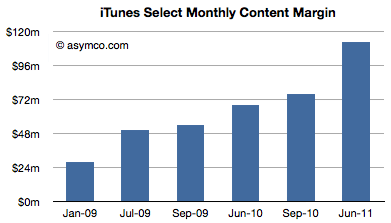
If you were to run your iTunes Store out of your basement, just think about how much it would cost to serve Apple’s 225 million accounts on file. With 15 Billion iTunes song downloads, 14 Billion app downloads, and with those downloads soon to be happening simultaneously between your Mac, iPad, and iPhone thanks to iCloud, Horace Diedu writes that we can deduce a lot about how much it costs Apple to keep the operation running smoothly. “Since we know something about the average price of songs and apps, and we know the split between developers and Apple (and roughly between music labels and Apple) we can get a rough estimate of the amount Apple retains to run its store.”

Diedu took the margin of apps and song downloads per month (assuming if the app store runs ‘break even’) and added them together; the margin consists of what Apple pays out to content owners before processing, delivery, and maintenance costs. He concludes that it costs Apple $133 million a month, or $1.3 billion which is paid towards keeping everything operating smoothly. Remember, we’re not calculating the gross margin, but rather the amount Apple is left with after paying developers, record labels, and publishers, before pouring that cash into their operating fees. The leftovers, Deidu concludes, would go towards capacity increases, perhaps in Apple’s new datacenter.

[via Asymco]


iOS5: There’s a reason it’s called ‘beta’ software.

iOS5: There’s a reason it’s called ‘beta’ software.

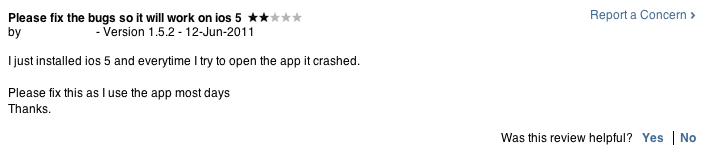
Malcom Barclay comments on how iOS 5 is hurting App Store reviews,

I can understand users are very eager to get their hands on the latest & greatest iOS shown off at WWDC. So they sign up for developer accounts for £59, with a few clicks and an alternative restore through iTunes. Voilà new iOS on shinny iPhone. Problem is, this is beta software and there’s a very good reason it’s called beta software. It’s not finished.

Barclay writes, “The review system is not for leaving bug or support related questions, for example, ‘How do I add a favourite?’.” While the review system in the Mac App Store is generally unfiltered and used to spew much vitriol if an app doesn’t work, the iOS 5 beta adds to this problem since so many casual users are downloading the software early from Apple or somewhere online, and then complain when these apps are broken or crash.

Barclay reminds us that while Apple doesn’t provide a proper support system so developers can better engage with customers, that you should be mindful (in general) and contact the developer directly with any questions, concerns, or bugs. With iOS 5 just being released this week, developers have had little time to update their apps, submit it to the app store, wait for the review process, and fix any current bugs. Considering that iOS 5 is beta software, you shouldn’t expect anything to run smoothly - iOS 5 is scheduled to be released in the fall, and iterative updates will be made in the meantime. “There is no point in dev’s releasing fixes for these issues yet because this is just beta 1, there could be as many as 6 more to go.” Barclay concludes.

Many of us often forget that the beta labels software that is untested; instead it’s associated with ‘early’ or ‘preview’. If you currently have iOS 5 running on your devices, be aware that developers aren’t supermen. Many are just getting back from WWDC (full of knowledge), and will be working to update their apps for the scheduled Fall release. If stuff doesn’t work in the meantime, that’s the risk you take. That doesn’t mean you shouldn’t enjoy your first look, but to simply to be mindful that you’re using an unfinished product.

Permalink

Apple to Reject Apps that Identify DUI Checkpoints

After four US Senators sent a letter to Apple’s Scott Forstall concerning apps that reveal DUI Checkpoints, Apple has updated their App Store Review Guidelines to reject apps that aid drunk drivers (and sober drives who just don’t want to be bothered by the delay) from evading the law. Senators Harry Reid, Charles Schumer, Frank Lautenberg and Tom Udall expressed grave concerns about apps that enabled those who drink and drive to escape law enforcement, and cited the apps as harmful to public safety. Apple’s new rules can be found in section 22.8:

Apps which contain DUI checkpoints that are not published by law enforcement agencies, or encourage and enable drunk driving, will be rejected.

If flashing your lights to alert oncoming drivers to a speed trap is against the law in the United States, why shouldn’t these iPhone apps be banned as well? This certainly opens up the opportunity for drunk drivers to break the law, but what about other iPhone apps that can check into police radio and point out speed traps? Just like with sexually explicit apps, this is going to be another hot topic of debate as Apple curates content on the App Store.

[via Autoblog]


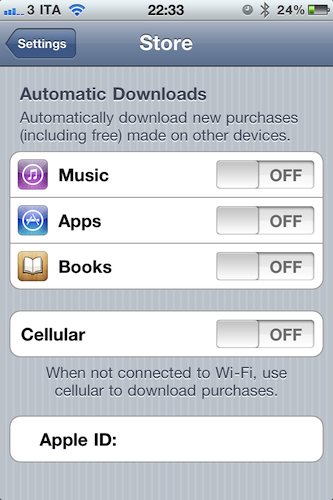
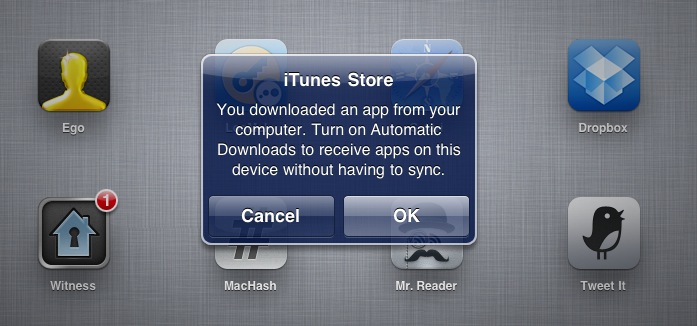
“Automatic Downloads” Lets You Push Purchases Over The Air

Revealed last week with a leaked screenshot from iTunes and officially announced earlier today at the WWDC keynote, the “Automatic Downloads” feature for iOS device is now live and accessible from the Store menu inside the Settings app on an iPhone, iPod touch or iPad running iOS 4.3. Here’s how it works: once enabled in the Store menu, the new functionality will allow you to beam apps, books and songs across devices – Macs, iPhones and iPads. For a first test, I enabled the menu on my iPhone, and started downloading a free app on my Mac. Within the seconds, the download started on my iPhone, which wasn’t connected via USB – it was an OTA download based on the fact that I hit “download” on my MacBook Pro.

The iPad, which was not enabled to have Automatic Downloads, alerted me to say I had to activate the feature if I wanted to see purchases becoming available on it.

Once activated on the iPad too, I downloaded an app on my iPhone and it started downloading both on the iPhone and iPad, automatically. But what about updates, not new purchases or free downloads? The system seems to be a bit unstable now: I had three app updates on my Mac, and I downloaded them. Those updates were showing up on the iPad App Store app with a red badge, but the download didn’t start automatically as with a new purchase / download. However, as soon as I opened the App Store on my iPad, those updates were gone – as if the device downloaded them in the background without me seeing a loading indicator. Maybe Apple simply needs a better UI for app updates (again, not new purchases) or better integration with iTunes 10.2.2 on the desktop (the announced iTunes 10.3 is not available yet).

To test the new Automatic Downloads for iOS and Macs, go to the Store menu on your iPhone and iPad and turn the switches to “on”. You can also decide to use cellular data when not on WiFi.