This Week's Sponsor:

Turbulence Forecast

Know before you go. Get detailed turbulence forecasts for your exact route, now available 5 days in advance.


Posts tagged with "app store"

Enable Hidden Mac App Store Debug Menu

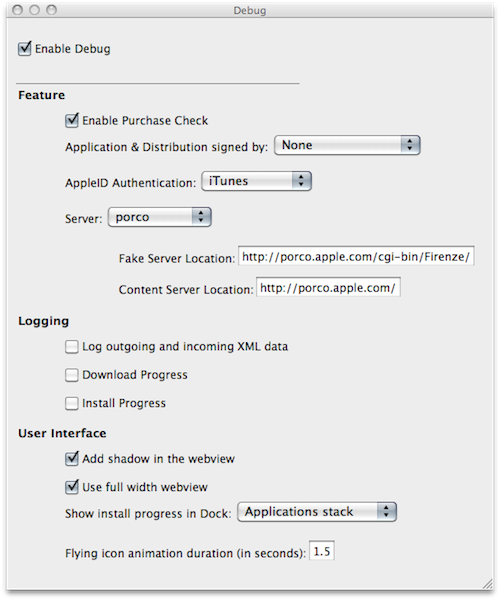
We’re not sure why the average Mac App Store user would want to do this, but we couldn’t resist to post about the Debug menu Apple left behind in the Mac App Store. Discovered by Daniel Jalkut of Red Sweater earlier today, enabling the menu is fairly easy: you just need to quit the Mac App Store, open Terminal and write:

defaults write com.apple.appstore ShowDebugMenu -bool true

Then relaunch the Mac App Store. To revert back to a Mac App Store without Debug menu, simply replace “true” in the string above with “false”. The menu, anyway, is quite interesting as it allows you to play around with a bunch of hidden settings such as shadows and width in the App Store’s webview, the animations and duration of “flying icons” (when you download an app and it goes straight to the Dock). You can also enable and disable the Purchase Check, although we wouldn’t really recommend to tweak these default settings – you don’t want to break the Mac App Store app.

We think this Debug menu will be removed in a future update, as Apple doesn’t want users to modify, or even see, this stuff. Still, you can check it out for now.


Apple Featuring “College Survival Guide” in App Store Homepage

Once again, Apple is featuring apps for college students in the iOS App Store homepage. The new section, called “College Survival Guide”, is available here and showcases more than 40 free and paid apps for iPhone and iPad.

Among the apps included in the guide, iBooks from Apple, iStudiez Pro, AP Stylebook, Momento and Instapaper. We’re not totally sure about Twitter and Facebook during classes but hey, at least they’re useful tools to stay in touch with friends. What about Netflix and Pandora Radio, though? I’m personally not sure about them either. Still, it’s good to see gems like Evernote and Put Things Off in the list.

Apple’s College Survival Guide can be accessed from the App Store’s homepage here.


VLC for iOS Pulled From The App Store, Now on Cydia

Just like we expected in October, VLC for iOS has been removed from the App Store. But this time, the removal of one of the most popular free apps for iPhone and iPad has nothing to do with Apple and the app review team’s rules. Instead, we have to thank developer Rémi Denis-Courmont, who since October has been busy trying to get the app out of the App Store because it violated VLC’s GNU public license. Rather than keep calm, carry on and let other developers (Applidium, the guys behind the VLC port to iOS) distribute VLC for iOS for free, he forced to get the app removed. Read more


How Apple Could Fix The Issue with “Installed” Mac App Store Apps

How Apple Could Fix The “Installed” Mac App Store Issue

Since the Mac App Store launched yesterday, hundreds (if not thousands) of users noticed that apps previously installed on a Mac through a developer’s website show up as, well, “installed” on the Mac App Store. That may lead you to think the new Store can handle updates for apps purchased and downloaded out of it just fine, but it can’t. Either a bug or a “feature” in Apple’s system, those apps seems to be “installed” simply because the Mac App Store sees the bundle identifier of an app already present on your Mac’s hard drive. So say you have iPhoto, Pages, Panic’s Coda or Coversutra already installed on your Mac and you fire up the Mac App Store, those apps may be listed as “Installed”. But they won’t go through the handy automatic update process apps you really purchase in the Mac App Store have. It happened to me. And if you ask me, that’s bad user experience.

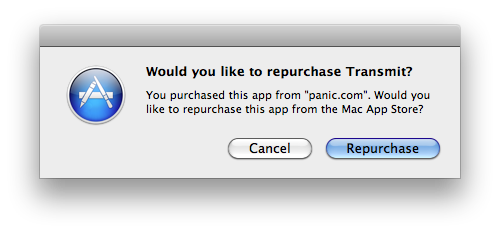
Daylen Yang has an interesting mockup on his personal blog of a simple feature that could fix this issue of apps showing up as “Installed”. Apple could simply offer a way to re-purchase applications found on your Mac although, yes, you’d have to pay again. But considering that several developers are moving to App Store-exclusive applications offering discounted prices now looking forward to future free version upgrades (example: you can buy Pixelmator again now at $29, but the future 2.0 version will be a free update), it doesn’t sound like a bad idea. Or, Apple could evolve the concept seen in this mockup developing a way for the Mac App Store to recognize installed apps and provide more detailed information and options about what you can do.

Permalink

Weather HD by Vimov Victim of Name Squatting in Mac App Store

iOS and Mac development studio Vimov saw an unpleasant surprise yesterday in the Mac App Store: another developer, Presselite, is selling an application called “Weather HD” in the Mac App Store. The problem is, Weather HD is the popular application the Vimov guys released for the iPhone and iPad, featured multiple times by Apple in the App Store homepage and covered by all the major tech blogs.

The “Weather HD” that’s being sold in the Mac App Store is not affiliated with Vimov in any way – actually, Presselite “stole” the name from Vimov when registering the app’s name in iTunes Connect. This practice is known as name squatting. Read more


Mac App Store Impressions: Elegant, Some Apps Are Expensive, Others Suck

Today’s a pretty hectic day. Apple officially launched the Mac App Store as part of OS X 10.6.6 a few hours ago and mostly everyone in the Mac community is now playing around with the new Store, busy installing paid and free apps, trying to find what’s already good and what could have been done a lot better.

After a few purchases, free downloads and some minutes spent to get used to the new UI brought by the Mac App Store, we have some first impressions to share. Read more


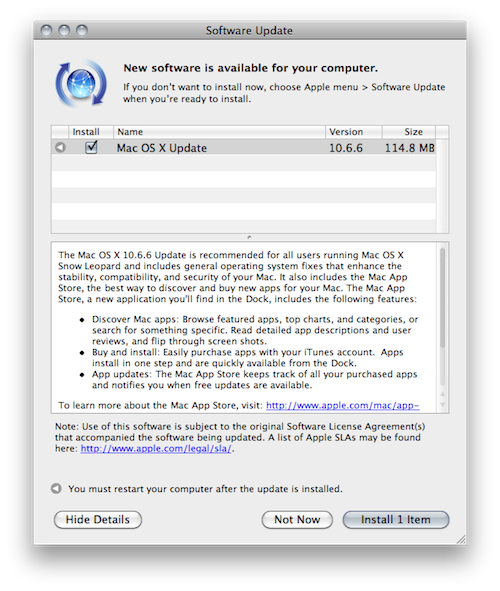
Apple Releases OS X 10.6.6 and Mac App Store

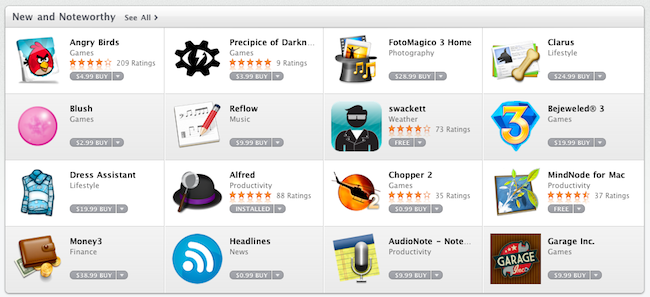
A few minutes ago Apple released OS X 10.6.6 with access to the Mac App Store in Software Update. It is available now as a free 114 MB download for Snow Leopard users. As noted by Macworld, the Mac App Store already includes some apps from Apple such as the iLife ‘11 suite with standalone apps sold at $15 each. Sadly, there’s no iWork ‘11 in the Mac App Store – the iWork ‘09 apps are sold at $20 each.

Aperture and Apple Remote Desktop are also on sale in the Mac App Store, both available at $79.99.

Full changelog and first screenshots of the Mac App Store below.

Update: here are the direct links to the OS X 10.6.6. update.

- Mac OS X v10.6.6 Update

- Mac OS X v10.6.6 Update Combo

- Mac OS X Server v10.6.6 Update

- Mac OS X Server v10.6.6 Update Combo

Update #2: And here’s everything you need to know about the Mac App Store.

Read more


Apple Releases OS X 10.6.6 and Mac App Store

A few minutes ago Apple released OS X 10.6.6 with access to the Mac App Store in Software Update. It is available now as a free 114 MB download for Snow Leopard users. As noted by Macworld, the Mac App Store already includes some apps from Apple such as the iLife ‘11 suite with standalone apps sold at $15 each. Sadly, there’s no iWork ‘11 in the Mac App Store – the iWork ‘09 apps are sold at $20 each.

Aperture and Apple Remote Desktop are also on sale in the Mac App Store, both available at $79.99.

Full changelog and first screenshots of the Mac App Store below.

Update: here are the direct links to the OS X 10.6.6. update.

Update #2: And here’s everything you need to know about the Mac App Store.

Read more


Mac App Store Preview: Tembo, A New Take On Spotlight

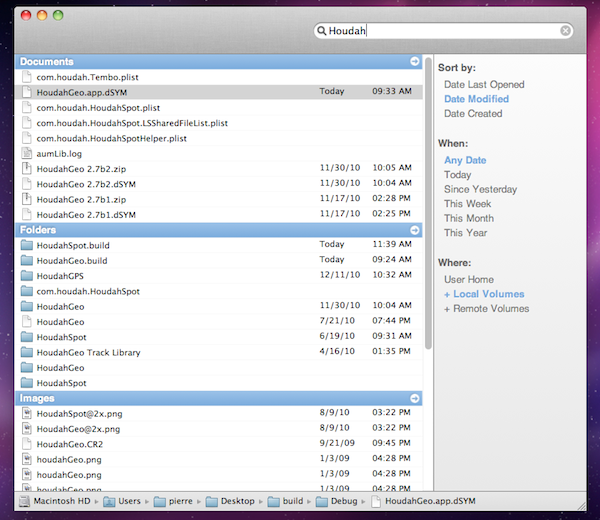
Coming to the Mac App Store this Thursday, Tembo is a new app from the guys behind popular OS X software like HoudahGeo and HoudahSpot that aims at providing a fast, fun and easy interface for Spotlight. Tembo will allow you to easily find music, mail messages, documents and bookmarks through a window that resembles the Spotlight UI you were used to on OS X Tiger.

Search results are grouped by categories, and you can enable, disable or reorder these categories in the app’s Preferences. A top bar for each category in the search results window will let you filter through these results already neatly organized in categories. It’s really powerful, but user-friendly at the same time. Tembo can list up to 2500 items in a single group, and can work as an extension to Mail and iChat to find messages and conversations, or Safari to search through bookmarks and history.

Tembo will be available on January 6 at $20 with a free trial available on the developers’ website.